
If you need one set of peripherals to work across multiple PCs, the right KVM switch can clean up your desk fast. For today’s mixed work, gaming, and creator setups, USB 3 ports make a real difference.
This roundup covers 10 of the best options for sharing keyboards, mice, storage, and displays with less cable clutter and better everyday convenience.
Best 10 Kvm Switches with USB 3 Ports for PC Picks for 2026
Triple-Monitor KVM
HDMI KVM Switch for 2 PCs and 3 Screens

- 3 HDMI monitor sharing for 2 computers
- 4 USB 3.0 ports for shared peripherals
- Supports extend and duplicate modes
Best For: Dual-PC triple-monitor desks with shared USB devices
USB Sharing Switch
BENFEI 4-Port USB 3.0 Switch for 2 PCs

- Shares 4 USB devices between 2 computers
- USB 3.0 transfer up to 5Gbps
- Works with major operating systems
Best For: USB-only switching for shared keyboards, printers, and more
4-PC Triple-Display KVM
4-PC Triple-Monitor KVM with USB 3.0
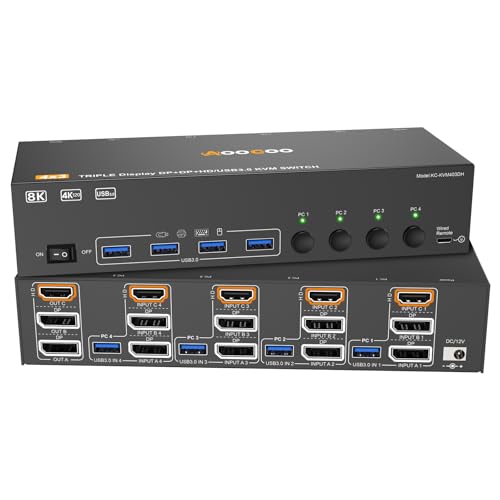
- Shares 3 monitors across 4 desktops
- 4 USB 3.0 ports for shared devices
- Supports up to 8K@60Hz and 4K@144Hz
Best For: High-end multi-PC workstations with triple monitors
Dual-Monitor KVM
2-PC HDMI KVM with 4 USB 3.0 Ports

- Shares 2 monitors between 2 computers
- 4 USB 3.0 ports for keyboards and other devices
- Includes button and wired extension switching
Best For: Two-computer dual-monitor desks with shared USB peripherals
Triple-Display Powerhouse

- Shares 3 monitors between 3 computers
- 4 USB 3.0 ports with 5Gbps transfer
- DP 1.4 and HDMI 2.1 high-resolution support
Best For: Triple-monitor users who need to switch three PCs and USB 3.0 devices
Simple Quad-PC Hub

- 4 computers share 1 HDMI monitor
- 3 USB 3.0 ports plus 1 USB-C port
- Button and wired remote switching
Best For: Users who need an easy one-monitor switch for four computers
Premium Triple-Display Switch

- Shares 3 monitors between 2 computers
- 4 USB 3.0 ports for common peripherals
- Up to 8K@60Hz support on each output
Best For: Two-PC users who want a premium triple-monitor KVM with USB 3.0
High-Resolution DisplayPort Pick
8K DisplayPort KVM for 2 Computers

- 8K@60Hz DisplayPort support
- 4 USB 3.0 ports at up to 5Gbps
- Push-button and wired controller switching
Best For: Users who want dual-PC DisplayPort switching with plenty of USB 3.0 ports
Plug-and-Play HDMI Option

- 4K@60Hz HDMI with HDCP 2.2
- 4 USB 3.0 ports including USB-C
- Button or wired remote switching
Best For: People who want a simple HDMI KVM with USB-C peripheral sharing
Triple-Monitor KVM – HDMI KVM Switch for 2 PCs and 3 Screens
If you need kvm switches with usb 3 ports for pc setups that also handle multiple displays, this model is built for a very specific workflow: two computers sharing three HDMI monitors and four USB 3.0 devices. It supports both duplicate and extend modes, and it includes a wired controller plus panel button switching for everyday use.
Best For: Users with dual-PC, triple-monitor workstations who also need shared USB 3.0 peripherals.
Pros:
- Shares 3 HDMI monitors between 2 computers.
- Includes 4 USB 3.0 ports for devices like keyboards, mice, printers, scanners, and webcams.
- Supports extend or duplicate display mode.
- Comes with a 12V power adapter for more stable use with higher-power USB devices.
Cons:
- Each computer must connect 3 HDMI cables to use all three displays.
- Keyboard hotkey switching is not supported.
- Maximum 4K@60Hz performance depends on compatible source devices and HDMI cables.
Overall, this is a practical pick for users who want one switch to manage both triple-monitor video and multiple USB peripherals, especially when external power and manual switching are preferred.
USB Sharing Switch – BENFEI 4-Port USB 3.0 Switch for 2 PCs
For buyers comparing kvm switches with usb 3 ports for pc use, this BENFEI unit is the simpler route: it shares four USB devices between two computers without involving video switching. It’s a straightforward desktop switch for keyboards, mice, printers, scanners, webcams, and other USB peripherals.
Best For: People who only need to share USB accessories between two computers.
Pros:
- Shares up to 4 USB devices between 2 computers.
- USB 3.0 speeds up to 5Gbps, with backward compatibility for USB 2.0.
- Driver-free and compatible with Windows, Mac, Linux, and Chrome OS.
- Includes LED indicators and a one-click switch button.
Cons:
- Does not switch video displays.
- High-power devices may need the extra USB-C power input for stable performance.
- Requires the BENFEI USB A-to-A cable to work as intended.
This is a focused USB-sharing solution rather than a full monitor KVM, making it a good fit if your priority is fast peripheral switching between two PCs.
4-PC Triple-Display KVM – 4-PC Triple-Monitor KVM with USB 3.0
If your shortlist of kvm switches with usb 3 ports for pc includes demanding multi-monitor setups, this model stands out for combining 4-computer support with triple-display capability. It’s designed for users who want to share three monitors and four USB 3.0 devices, while also pushing higher refresh-rate resolutions than many basic KVMs.
Best For: Power users who need one KVM for 4 PCs, 3 monitors, and fast USB sharing.
Pros:
- Lets 4 desktops share 3 monitors and 4 USB 3.0 ports.
- Supports up to 8K@60Hz and 4K@144Hz, depending on the port and cable type.
- Includes a wired remote, power adapter, and four USB 3.0 cables.
- Supports panel-button and wired-remote switching.
Cons:
- Requires compatible multi-display support on each computer.
- Triple-display setup needs 2 DP + HDMI connections per computer.
- For best results, HDMI 2.1 and DP 1.4 cables are recommended.
For users who want more computer inputs and stronger display specs, this is a more advanced KVM option that still keeps USB 3.0 peripheral sharing front and center.
Dual-Monitor KVM – 2-PC HDMI KVM with 4 USB 3.0 Ports
This is a practical choice if you’re comparing kvm switches with usb 3 ports for pc setups and only need to share two monitors instead of a full triple-display rig. It supports 2 computers, 2 HDMI monitors, and 4 USB 3.0 peripherals, with a focus on clean desktop management and easy switching.
Best For: Two-PC users who want dual-monitor sharing with USB 3.0 device control.
Pros:
- Shares 2 monitors and 4 USB devices between 2 computers.
- Supports 4K@60Hz with backward compatibility to lower resolutions.
- Includes extended and duplicate display modes.
- Offers both onboard button switching and a wired extension button.
Cons:
- Each computer must have two HDMI ports.
- Keyboard hotkey switching is not supported.
- USB 3.0 ports are shared, not dedicated to each PC.
Overall, this model is well suited to a streamlined two-computer workspace where you want dual-monitor output, fast USB sharing, and a simple hardware switch.
Triple-Display Powerhouse – 3 Monitors, 3 Computers KVM
If you need kvm switches with usb 3 ports for pc setups that run multiple screens, this model is built for serious triple-monitor workflows. It shares 3 displays and 4 USB 3.0 devices between 3 computers, with one-click switching and wired remote control for a cleaner desk.
Best For: Users who want a 3-computer, 3-monitor KVM with high-resolution DP/HDMI support and USB 3.0 sharing.
Pros:
- Shares 3 monitors across 3 computers with 2 DisplayPort and 1 HDMI connections.
- USB 3.0 support with 4 ports and up to 5Gbps transfer for peripherals and file handling.
- DP 1.4 and HDMI 2.1 support with up to 8K/4K high-refresh output, depending on the port.
- Includes both physical button switching and a 1.5m wired remote.
Cons:
- Each PC must have 2 DP plus 1 HDMI and 1 USB cable connected for triple-screen use.
- To use all 3 displays, the computer must support multi-screen output.
- Maximum resolution depends on compatible source devices, monitors, and cables.
This is the most expansive option in the group, but it is also the most demanding in terms of setup. If your PC hardware already supports triple displays, it offers a strong mix of flexibility, USB 3.0 connectivity, and high-end video support.
Simple Quad-PC Hub – 4-Port HDMI KVM
For buyers comparing kvm switches with usb 3 ports for pc, this 4-port HDMI model is a straightforward way to share one monitor, keyboard, and mouse across multiple desktops. It focuses on simple 4K@60Hz switching and keeps the setup easy with button controls and a wired remote.
Best For: People who want a plug-and-play 4-computer KVM for one HDMI display and USB 3.0 peripheral sharing.
Pros:
- Supports 4 computers sharing 1 monitor with one keyboard and mouse.
- Includes 3 USB 3.0 ports plus 1 USB-C port for common peripherals.
- Handles up to 4K@60Hz and is backward compatible with lower resolutions.
- Offers two switching methods: front buttons and a wired remote keypad.
Cons:
- Only supports one monitor, so it is not for multi-display setups.
- Hotkey switching is not supported.
- HDMI-only design may limit users with DisplayPort-based workstations.
This is the easiest pick if you just need to consolidate four PCs around a single display and a few USB devices. It is less specialized than a triple-monitor KVM, but that simplicity can be exactly what many offices need.
Premium Triple-Display Switch – UGREEN 2-PC HDMI/DP KVM
If you want kvm switches with usb 3 ports for pc setups that prioritize display quality, this UGREEN unit is aimed at high-end dual-computer sharing. It lets two computers share 3 monitors and 4 USB 3.0 ports, with button and desktop controller switching for a tidy workspace.
Best For: Users who need a premium 2-computer KVM for three monitors, USB 3.0 devices, and high-refresh video support.
Pros:
- Shares 3 monitors between 2 computers with 2 DisplayPort and 1 HDMI output.
- 4 USB 3.0 ports support peripherals like keyboard, mouse, printer, and webcam.
- Supports up to 8K@60Hz on each video output, with broad 4K backward compatibility.
- Includes button switching and a desktop controller, plus support for mirror and extend modes.
Cons:
- Both computers must support triple-monitor output to use all 3 displays.
- Hotkeys are not supported.
- To reach top resolutions, cable length and device compatibility matter.
This is the most polished option for two-PC setups that need strong video performance and clean desk control. If your machines already support three external displays, it offers a capable mix of resolution, peripheral sharing, and convenience.
High-Resolution DisplayPort Pick – 8K DisplayPort KVM for 2 Computers
If you need kvm switches with usb 3 ports for pc and want DisplayPort plus high-end video support, this 2-computer switch is built for a clean desktop setup. It lets two computers share one monitor and USB peripherals while adding four USB 3.0 ports for devices like a mouse, keyboard, printer, webcam, or flash drive.
Best For: Dual-PC users who want DisplayPort video, 4 USB 3.0 ports, and simple button-based switching.
Pros:
- Supports up to 8K@60Hz on DisplayPort for sharp image quality.
- Includes 4 USB 3.0 ports with up to 5Gbps transfer speed.
- Offers push-button and wired controller switching for flexible desk placement.
- Comes with external 12V power for more stable USB device operation.
Cons:
- Hotkey switching is not supported.
- 8K use requires a separate Super Speed DP 1.4 cable.
- Needs the included 12V power adapter for best stability.
Overall, this is a strong fit if your priority is high-resolution DisplayPort output with practical USB sharing. The combination of 4 USB 3.0 ports and powered operation makes it a capable choice for workstations that need dependable peripheral switching.
Plug-and-Play HDMI Option – 2-PC 4K HDMI KVM with USB-C
For shoppers comparing kvm switches with usb 3 ports for pc, this HDMI model keeps things simple for a two-computer, one-monitor setup. It combines video and USB sharing in one unit, while adding four USB 3.0 ports, including one USB-C port, for peripherals like keyboards, mice, printers, scanners, webcams, and headsets.
Best For: Two-PC users who want 4K HDMI sharing, USB-C compatibility, and easy switching without extra software.
Pros:
- Supports 4K@60Hz with HDCP 2.2 compliance.
- Includes 4 USB 3.0 ports: 3 USB-A plus 1 USB-C.
- Two switching methods: front button and wired remote.
- Plug-and-play design with Adaptive EDID and no driver required.
Cons:
- Limited to 2 computers and 1 monitor.
- No separate power supply is included or required.
- Does not support dual-monitor setups.
This is a practical choice if you want a straightforward HDMI KVM with modern USB connectivity. The USB-C port adds flexibility, and the clean plug-and-play setup makes it easy to integrate into a home office or shared workstation.
Dual-Monitor Multi-PC Pick – 3-PC Dual-Monitor 4K HDMI KVM
If you need kvm switches with usb 3 ports for pc and run a dual-monitor workspace, this model is aimed at more complex desktop setups. It lets three computers share two HDMI monitors and four USB 3.0 peripherals, with support for extended or duplicate display modes depending on how you want to work.
Best For: Multi-PC users who need dual-monitor sharing, 4K HDMI output, and powered USB 3.0 peripheral switching.
Pros:
- Supports 3 computers and 2 monitors in one switch.
- Handles up to 4K@60Hz with backward support for lower resolutions.
- Includes 4 USB 3.0 ports with up to 5Gbps transfer speed.
- Supports extended and copy display modes, plus EDID simulation.
Cons:
- Requires each computer to have 2 HDMI ports and a USB-A port.
- Dual-monitor use depends on the computer having two graphics outputs.
- Hotkeys are not supported.
This is the most capable pick in the group for users who need to manage several PCs and dual displays from one desk. The tradeoff is stricter compatibility requirements, but the added flexibility makes sense for a dedicated multi-system setup.
How We Picked the Best Kvm Switches with USB 3 Ports for PC
We focused on practical, buyer-friendly features that matter most in Kvm Switches with USB 3 Ports for PC setups: display support, USB 3.0 port count, number of connected computers, monitor layout, and switching convenience. We also looked for models that fit common use cases such as dual-monitor productivity, triple-monitor workstations, and simpler single-display sharing.
Quick Comparison
Use the product count as a starting point: some options are built for 2 computers and 1 to 3 monitors, while others support 3 or 4 PCs for more demanding desk sharing. If your priority is high refresh-rate gaming or professional video work, pay close attention to resolution and bandwidth ratings. If your focus is office work, compatibility and reliable USB peripheral sharing may matter more than extreme display specs.
Key Buying Factors for Kvm Switches with USB 3 Ports for PC
Display Configuration
Match the switch to your monitor setup first. Single-monitor KVMs are simpler and often cheaper, while dual- and triple-monitor models are better for productivity users who need more screen space.
USB 3.0 Port Needs
Think about what you want to share beyond keyboard and mouse. Extra USB 3.0 ports are useful for webcams, external drives, printers, capture devices, and audio accessories. More ports usually means fewer compromises.
Resolution and Refresh Rate
For general office work, 4K at 60Hz is often enough. Gamers, designers, and power users may want 4K at 120Hz, 144Hz, or 8K-rated hardware, but only if their PCs, cables, and monitors support it too.
Input and Switching Method
Button control, wired remotes, and hotkey switching all have different advantages. If the switch will sit under a desk, a remote or dedicated button can be much more convenient.
Who Should Buy Which Kvm Switches with USB 3 Ports for PC?
Choose a dual-monitor KVM if you want a balanced mix of price, productivity, and simplicity. Go with a triple-monitor unit if you run a workstation and need maximum screen real estate. Pick a multi-PC switch if your desk handles several systems at once, such as a work PC, personal PC, and test machine. For lighter setups, a USB-only switch may be enough if you just need to share peripherals without switching video.
In short, the best choice depends on how many PCs and monitors you need to connect, how much USB expansion you want, and whether your setup prioritizes convenience, resolution, or refresh rate.