
If your laptop or desktop needs clearer positional audio, an external sound card for surround sound can be a simple, low-cost upgrade.
This roundup focuses on models that make setup easy while improving gaming, movie, and voice-chat performance.
Best 10 External Sound Card for Surround Sound Picks for 2026
Budget 7.1 USB Adapter
StarTech 7.1 USB Audio Adapter

- Up to 7.1-channel output from one USB port
- Analog 3.5mm jacks plus SPDIF digital audio
- Plug-and-play on Windows 7/8.1/10
Best For: Windows users needing simple surround upgrades
Classic Optical Surround
VANTEC USB External 7.1 Channel Audio Adapter

- 7.1-channel surround over USB 2.0
- SPDIF optical input and output
- Separate left and right microphone inputs
Best For: Buyers wanting basic surround and optical I/O
Driverless Virtual Surround
SMSL Nano ONE Pro External Sound Card

- Driverless USB-C support across major platforms
- Virtual 7.1 plus game, movie, music, and voice modes
- Noise reduction and separate headphone/mic interfaces
Best For: Multi-platform streaming, gaming, and casual listening
FPS Gaming DAC Amp

- Native 7.1 surround with HRTF processing
- StepSense boosts footsteps for FPS play
- 32-bit/384kHz PCM and DSD256 support
Best For: Competitive gamers who want positional audio
Home Theater Upgrade
USB External Sound Card with SPDIF Digital Sound

- True 5.1 and 7.1 playback support
- SPDIF optical in/out for digital audio
- Aluminum alloy external housing
Best For: Home cinema users and gamers wanting true surround sound with SPDIF
Plug-and-Play Gaming Pick
1Mii Virtual 7.1 USB Sound Card

- Virtual 7.1 surround sound
- No-driver plug-and-play setup
- Built-in volume and mic mute controls
Best For: Gamers and meeting users who want a simple USB audio adapter
Compact SPDIF Adapter
StarTech USB Sound Card with Digital Audio

- SPDIF output with AC3/DTS pass-through
- Compact replacement for internal sound cards
- External volume and EQ controls
Best For: Users needing a small SPDIF USB adapter for home theater
Budget 5.1 Optical Adapter
USB 2.0 External 5.1 Surround Sound Card
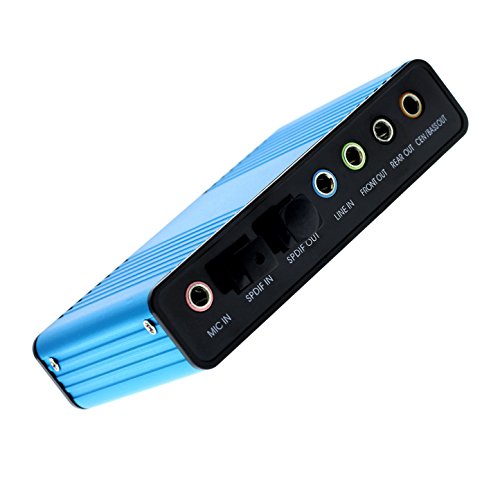
- USB 6-channel 5.1 surround audio
- Digital and analog playback/recording
- Optical S/PDIF with older Windows support
Best For: Budget-minded users needing basic 5.1 USB surround audio and optical output
Gaming Headset Sound Hub
1Mii S03 7.1 Virtual Surround Adapter

- 7.1 virtual surround for headset users
- USB headphone and mic jacks with controls
- Mic mute, volume control, and LED indicators
Best For: Gamers and headset users wanting easy USB audio with virtual surround and mic control
Legacy 5.1 Audio Adapter
Optimal Shop USB Optical Surround Card
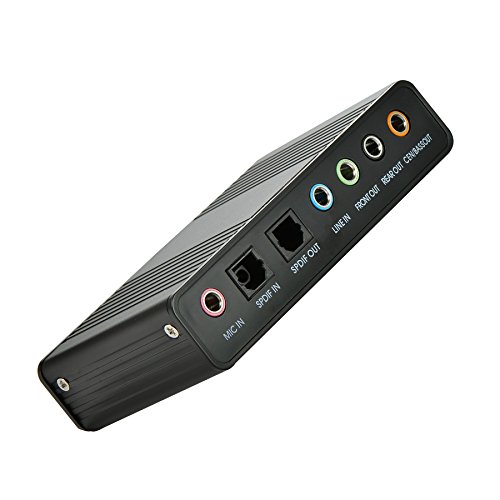
- USB 6-channel 5.1 surround output
- Optical S/PDIF with digital/analog support
- Works with Windows 10, 8, 7, and XP
Best For: Legacy PC users who need a basic USB 5.1 adapter with optical output
Budget 7.1 USB Adapter – StarTech 7.1 USB Audio Adapter
If you want an external sound card for surround sound that adds real 7.1-channel output through a single USB port, this StarTech adapter is a practical, plug-and-play pick for Windows PCs and laptops. It supports 7.1, 5.1, and 2-channel output, includes analog 3.5mm jacks plus SPDIF digital audio, and is aimed at users upgrading integrated audio without a complicated setup.
Best For: Windows users who want a simple USB upgrade with 7.1 surround, analog outputs, and SPDIF support.
Pros:
- Supports up to 7.1, 5.1, and 2-channel output
- Includes analog 3.5mm ports, headphone, line-in, mic inputs, and SPDIF
- Plug-and-play support in Windows 7/8.1/10
- Volume controls and mute buttons built in
Cons:
- SPDIF digital output is limited to 48kHz playback
- Optical input passthrough is only up to two-channel audio at 48kHz
- Software is needed to select audio outputs
This is a straightforward external sound card for surround sound if you mainly need dependable channel expansion and a familiar Windows setup. It’s less about premium audiophile features and more about adding flexible surround output to a desktop or laptop.
Classic Optical Surround – VANTEC USB External 7.1 Channel Audio Adapter
The VANTEC USB external sound card for surround sound is built for users who want a simple 7.1-channel USB 2.0 adapter with optical digital I/O. It supports 48/44.1 kHz playback and recording, and it adds separate left and right microphone inputs for true stereo recording on a desktop or laptop.
Best For: Users who want a basic 7.1 USB audio adapter with SPDIF optical input and output.
Pros:
- 7.1-channel surround sound support
- SPDIF optical digital input and output
- Separate left and right mic inputs for stereo recordings
- Simple USB 2.0 connection with backward USB 1.1 compatibility
Cons:
- No advanced software or gaming features listed
- Only 48/44.1 kHz sampling rates are specified
- Requires setting Vantec as the default sound system
This adapter focuses on core connectivity rather than extras, which makes it a solid choice if you mainly need surround output and optical audio in a compact USB device. It fits best as a no-frills external sound card for surround sound on general PC use.
Driverless Virtual Surround – SMSL Nano ONE Pro External Sound Card
If you need an external sound card for surround sound that works across more than just Windows, the SMSL Nano ONE Pro stands out with driverless USB-C plug and play for Windows, Mac, iOS, and Android. It offers virtual 7.1 surround sound plus four listening modes for music, games, movies, and voice enhancement, making it a flexible option for streaming, casual gaming, and mobile use.
Best For: Multi-platform users who want driverless virtual 7.1 audio for gaming, streaming, and everyday listening.
Pros:
- Driverless plug and play on Windows, Mac, iOS, and Android
- Virtual 7.1 surround sound with dedicated game and movie modes
- Built-in voice enhancement and intelligent microphone noise reduction
- Compact USB-C design with separate headphone and mic interfaces
Cons:
- Uses virtual surround rather than native 7.1 channel configuration
- Maximum sample rate is 48 kHz
- Output power is listed at 20mW @ 600Ω, which may not suit every demanding setup
This model is best viewed as a versatile, portable audio controller rather than a pure desktop sound upgrade. Its strength is easy multi-device compatibility and mode-based tuning for different everyday use cases.
FPS Gaming DAC Amp – Fosi Audio C3 Gaming DAC Amp
The Fosi Audio C3 is an external sound card for surround sound aimed at gamers who want clearer positional cues and a cleaner desktop setup. It combines native 7.1 surround sound with HRTF processing, a StepSense footstep enhancement feature, and a powerful DAC amp section that can drive headphones from 16 to 300 ohms.
Best For: FPS players and console/PC gamers who want footstep enhancement and 7.1 positional audio.
Pros:
- Native 7.1 surround sound with HRTF processing
- StepSense feature enhances footsteps and movement cues
- CS43131 DAC supports up to 32-bit/384kHz PCM and DSD256
- Works with PC, PS5, Switch, and Mac using UAC mode switching
Cons:
- Platform notes are centered on Windows for full feature use
- Console compatibility depends on UAC 1.0 mode
- Designed for headphones and headset use rather than speaker output
For competitive play, this is the most gaming-focused option in the group, with tuning aimed at positional awareness and comms clarity. It’s a strong pick if your external sound card for surround sound needs to do more than basic channel output.
Home Theater Upgrade – USB External Sound Card with SPDIF Digital Sound
If you want an external sound card for surround sound that can feed a home theater setup, this USB model is built around 5.1 and 7.1 channel playback with SPDIF optical in/out. Its aluminum body and 48KHz sample rate make it a practical pick for users who want a simple external upgrade for PC-based entertainment, gaming, or audio work.
Best For: Home cinema users, gamers, and audiophiles who need true 5.1/7.1 support with digital audio connections.
Pros:
- Supports true 5.1 and 7.1 surround sound playback
- Includes SPDIF optical in/out for digital audio connections
- Aluminum alloy body for a sturdier external build
- Works with PCs and other connected audio gear through USB
Cons:
- Windows-focused platform support in the supplied details
- Maximum sample rate is 48KHz, which may limit higher-res use cases
Overall, this is the most straightforward option here for buyers who specifically want external surround sound capability plus SPDIF connectivity. It fits best where the goal is to add cinematic multichannel audio without opening a desktop or relying on an internal card.
Plug-and-Play Gaming Pick – 1Mii Virtual 7.1 USB Sound Card
This external sound card for surround sound is designed for quick setup on a PC or laptop, with virtual 7.1 audio and no driver installation needed. It uses a braided USB cable, built-in controls, and LED status indicators, making it a convenient upgrade for gaming, voice chat, and everyday headphone use.
Best For: Gamers and remote workers who want a simple USB-to-3.5mm audio adapter with easy controls.
Pros:
- Virtual 7.1 surround sound for more immersive listening
- Plug-and-play design with no drivers needed
- Volume and mic mute controls built into the adapter
- Braided 6 ft cable for flexible desk placement
Cons:
- Virtual surround, not true multichannel output
- Listed output mode is stereo in the supplied details
- Windows compatibility is specifically noted
If you want an easy USB audio upgrade rather than a full home-theater interface, this model keeps things simple. It makes the most sense for users who value convenience, inline control, and virtual surround cues for gaming or calls.
Compact SPDIF Adapter – StarTech USB Sound Card with Digital Audio
For buyers looking for an external sound card for surround sound with a compact footprint, this StarTech model adds SPDIF digital output and AC3/DTS pass-through support. It is aimed at replacing an internal sound card on a laptop or PC while keeping setup simple and offering external volume and EQ controls.
Best For: Users who want compact USB sound-card replacement with SPDIF output for home-theater use.
Pros:
- SPDIF digital output with AC3 and DTS pass-through support
- External volume and EQ controls for easy adjustment
- Compact USB design for replacing an internal sound card
- Built for home-theater surround sound support
Cons:
- Listed output mode is 2.1 in the supplied details
- Smaller size may mean fewer onboard features than larger adapters
This is a good fit if your priority is digital audio output in a small, no-fuss package. It stands out most for users who want SPDIF-based surround sound support and easy physical controls rather than a feature-heavy interface.
Budget 5.1 Optical Adapter – USB 2.0 External 5.1 Surround Sound Card
Optimal Shop USB 2.0 External Sound Card 6 Channel 5.1 Surround Adapter Audio S/PDIF for PC -Blue
Check Price On AmazonIf you need an external sound card for surround sound on an older or basic PC, this USB 2.0 adapter is built around 5.1-channel output with optical S/PDIF support. It can handle digital and analog playback, and the notes indicate it supports Windows systems from Win98 through Win8, making it a practical pick for legacy setups.
Best For: Desktop or laptop users who want an affordable 5.1 USB audio adapter with optical output and broad older-Windows support.
Pros:
- USB 6-channel 5.1 surround audio with S/PDIF support
- Supports digital and analog playback/recording
- Compact external design for PCs and laptops
- Listed support for older Windows versions
Cons:
- 5.1 optical output depends on DTS 5.1 source and proper passthrough setup
- General MP3 or 2-channel video will only produce 2-channel effect over fiber output
- Some sampling rates need driver or application support
Overall, this model suits buyers who mainly want straightforward 5.1 USB audio and optical output rather than a feature-rich gaming controller. Its strengths are compatibility and simple surround-capable playback, especially for users working with the right source and decoder chain.
Gaming Headset Sound Hub – 1Mii S03 7.1 Virtual Surround Adapter
This external sound card for surround sound is aimed at headset users who want an easy USB audio upgrade with mic controls. The 1Mii S03 adds 3.5mm headphone and microphone jacks through USB and includes 7.1 virtual surround mode for a more immersive gaming and entertainment setup.
Best For: PC, laptop, and gaming users who want a plug-and-play USB headset adapter with virtual surround and easy mic control.
Pros:
- 7.1 virtual surround sound mode for gaming and media
- Plug-and-play USB setup with headphone and microphone jacks
- Mic mute button and mic volume adjustment built in
- LED indicators for connection and mute status
Cons:
- Virtual surround is for 2-channel headset use, not true multi-speaker 5.1 output
- Designed around headset audio rather than speaker systems
- Signal-to-noise ratio is listed at 91 dB, below the 120 dB figure on the 5.1 adapters
The S03 makes sense if you want quick external audio control without opening system menus, especially for voice chat and casual gaming. It is less about physical surround speaker decoding and more about giving wired headset users a simple USB path to 7.1 virtual surround and mic management.
Legacy 5.1 Audio Adapter – Optimal Shop USB Optical Surround Card
For shoppers looking for an external sound card for surround sound on an older PC, this Optimal Shop adapter provides USB 6-channel 5.1 audio with optical S/PDIF output. It supports digital and analog playback and is listed for Windows 10, 8, 7, and XP, making it useful when you need basic surround output on a mixed legacy system.
Best For: Users who want a simple USB 5.1 sound card with optical output for PCs, laptops, or speaker setups.
Pros:
- USB 6-channel 5.1 surround audio output
- Optical S/PDIF support for digital playback
- Digital and analog recording/playback support
- Listed compatibility with Windows 10/8/7/XP
Cons:
- Fiber output requires DTS 5.1 source plus passthrough and external decoding
- General 2-channel content will not become full 5.1 over optical output
- Some sample rates need driver or application support
This is a straightforward option if you need basic external 5.1 audio rather than premium software features. Its value comes from the familiar USB-to-surround formula, with optical output and broad Windows support for older hardware environments.
How We Picked the Best External Sound Card for Surround Sound
We prioritized compatibility, surround-sound support, connection options, ease of setup, and real-world usefulness for gaming, streaming, and everyday listening. We also looked for products that balance audio quality with practical features like volume control, microphone support, and digital outputs.
Quick Comparison
Among this group, USB plug-and-play models are the easiest choice for most users, while SPDIF-equipped units are better if you already use a receiver or external speaker system. Virtual 7.1 models are typically best for headphones, while true multichannel support matters more for home theater-style setups.
Key Buying Factors for External Sound Card for Surround Sound
Surround Format
Check whether the device supports virtual 7.1, 5.1, or true multichannel output. For headset gaming, virtual surround is often enough. For speaker systems, SPDIF or native multichannel support may be more important.
Connection Type
USB is the most flexible option for laptops and desktops. If you need to connect to an AV receiver or optical input, choose a model with SPDIF/Toslink support. Also confirm whether the card uses USB-A, USB-C, or an adapter.
Mic and Headphone Support
If you use voice chat, streaming, or calls, make sure the adapter includes separate mic and headphone paths or a combined headset jack. Controls for mute and volume are a plus.
Platform Compatibility
Not every External Sound Card for Surround Sound works equally well across Windows, Mac, consoles, tablets, and phones. Driver-free models are easiest, but Windows-specific features may offer more advanced surround tuning.
Use Case Features
Gamers may want footstep enhancement, live EQ, or independent volume control. Movie listeners may prefer cleaner digital output, while streamers should look for low-noise input and stable device recognition.
Who Should Buy Which External Sound Card for Surround Sound?
Choose a simple USB virtual 7.1 adapter if you mainly use headphones and want quick setup. Pick an SPDIF model if you already own a 5.1 or 7.1 speaker system. If you want the most versatile option for gaming and desktop use, look for a unit with both surround processing and easy-access controls. For Mac, phone, or live-stream use, prioritize broad compatibility and driver-free operation.
In short, the best External Sound Card for Surround Sound depends on whether you need headset-friendly virtual audio or true system-level digital output. Match the card to your playback gear first, then compare controls, compatibility, and surround features.