
If your PC keeps dropping Bluetooth devices or struggles through walls and distance, a long-range adapter can make a big difference. Models with external antennas are often the best choice for stronger reception and more stable connections.
This roundup focuses on bluetooth adapters with external antennas that are built for desktop use, better range, and practical plug-and-play convenience across common Windows setups.
Best 10 Bluetooth Adapters with External Antennas Picks for 2026
Long-Range Specialist
Sena UD100-G03 Exchangeable Antenna

- Exchangeable antenna design
- Up to 300m listed working distance
- Supports up to 7 simultaneous connections
Best For: Range-focused Windows users who want an exchangeable antenna and broad profile support
Power User Choice
GAROGYI Dual-Antenna Bluetooth 5.4 Adapter

- Two antennas for better signal stability
- Bluetooth 5.4 with broad backward compatibility
- Plug and play on Windows 11/10/8.1
Best For: Windows users who want dual antennas, stable performance, and wide device support
Range Leader
BT548 Long-Range Bluetooth 5.4 Adapter

- Detachable 5dBi antenna with Class 1 design
- Bluetooth 5.4 dual-mode support
- Plug and play on Windows 11/10/8.1
Best For: Windows PC users who want the strongest stated range and a detachable antenna
High-Gain Budget Pick
USB Bluetooth 5.4 Dongle with Dual Antennas
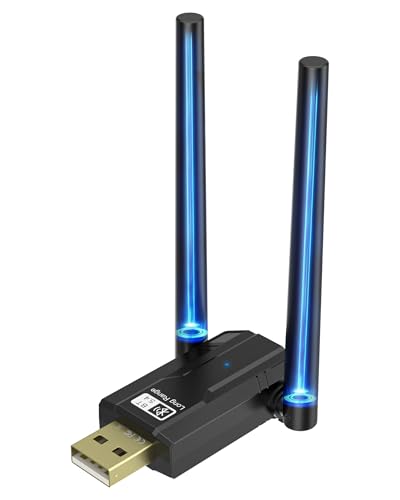
- Bluetooth 5.4 with up to 3 Mbit/s transfer speed
- Two rotating high-gain antennas for better reception
- Supports up to 7 Bluetooth devices on Windows
Best For: Windows users wanting a simple long-range Bluetooth adapter
Premium Range Pick
StarTech Bluetooth 5.3 USB Adapter

- Bluetooth 5.3 Class 1 with up to 328 ft range
- Omni-directional antenna helps reduce interference
- Native support for Windows and Linux
Best For: Users who want a range-focused adapter with broad OS support
Long-Range Upgrade Pick
ZEXMTE Bluetooth 6.0 Dual-Antenna Adapter

- Bluetooth 6.0 with Realtek RTL616 chip
- Dual adjustable 2dBi antennas for wider coverage
- Supports up to 7 devices and claims 200m range
Best For: Windows users who want maximum range from a dual-antenna adapter
High-Gain Range Pick
Upgraded USB Bluetooth 5.4 Adapter for PC

- 5dBi external antenna for extended coverage
- Connects up to 7 Bluetooth devices at once
- Windows 11/10/8.1 and Linux plug-and-play support
Best For: Users who need long range and multi-device pairing on Windows or Linux
Long-Range Office Pick
ZEXMTE 6.0 USB Bluetooth Adapter for PC

- External antenna and Class 1 radio for long range
- Connects up to 7 devices simultaneously
- Bluetooth 6.0 with low-latency dual-mode support
Best For: Large workspaces and desktops that need dependable long-range Bluetooth
Balanced Value Pick
USB Bluetooth 5.1 Adapter for Desktop PC

- 5dBi antenna with up to 300ft range in open areas
- Plug-and-play on Windows 11/10/8.1
- Supports up to 7 Bluetooth devices
Best For: Windows desktop users who want simple setup and stronger range
Editor’s Pick – TP-Link UB500 Plus Long-Range Bluetooth 5.3
If you want bluetooth adapters with external antennas for a Windows PC, the TP-Link UB500 Plus is a practical upgrade for adding wireless support to desktops and laptops. It uses Bluetooth 5.3 with EDR and BLE, and its adjustable antenna is designed to help improve reception in different setups.
Best For: Windows users who want an easy plug-and-play adapter with a movable antenna for better coverage.
Pros:
- Bluetooth 5.3 with EDR and BLE for faster data transfer and lower power use
- Adjustable multi-direction antenna for better reception positioning
- Plug and play on Windows 11, 10, and 8.1 when connected to the internet
- Backward compatible with older Bluetooth versions, including 4.2 down to 1.1
Cons:
- Windows 7 requires a driver download
- Works only with Windows-based systems in the supplied details
Overall, this is a straightforward long-range option if you want simple setup and the flexibility of an adjustable antenna. It fits well for everyday PC peripherals and wireless audio use on supported Windows systems.
Long-Range Specialist – Sena UD100-G03 Exchangeable Antenna
Among bluetooth adapters with external antennas, the Sena UD100-G03 stands out for its open-field range claims and exchangeable antenna design. It uses Bluetooth 4.0 over USB 2.0 and is built for users who need a wider working distance and support for multiple simultaneous connections.
Best For: Users who want a range-focused Windows adapter with an exchangeable antenna and broad profile support.
Pros:
- Exchangeable antenna design for flexible setup
- Working distance listed at up to 300 meters normally, up to 600 meters with 5 dipole antenna in open field
- Supports up to 7 simultaneous connections
- Wide profile support, including HID, A2DP, HFP, PAN, and more
Cons:
- Bluetooth driver is needed
- Uses Bluetooth 4.0 rather than newer 5.x versions
This is a specialized pick for range and connection flexibility rather than the latest Bluetooth standard. If you are comfortable with driver setup and want an antenna-driven long-distance solution, it is one of the more focused options here.
Power User Choice – GAROGYI Dual-Antenna Bluetooth 5.4 Adapter
If you are comparing bluetooth adapters with external antennas for a desktop or laptop, the GAROGYI BT606 is built around signal stability and long range. It pairs Bluetooth 5.4 with two antennas and supports plug-and-play use on Windows 11, 10, and 8.1, while Windows 7 may require a driver.
Best For: Windows users who want dual antennas, broad compatibility, and stable wireless performance.
Pros:
- Two antennas for stronger signal stability and extended range
- Bluetooth 5.4 with backward compatibility to older versions
- Plug and play on Windows 11/10/8.1
- Supports many devices, including headphones, speakers, mice, keyboards, and printers
Cons:
- Windows 7 may need driver installation
- Range depends on conditions, despite Class-1 design
The BT606 is a strong fit if you want a dual-antenna adapter that emphasizes stability and modern Bluetooth support. It is especially appealing for mixed-use setups that need both peripheral support and dependable wireless audio.
Range Leader – BT548 Long-Range Bluetooth 5.4 Adapter
For buyers specifically searching for bluetooth adapters with external antennas, the BT548 leans hard into distance and signal stability. It uses a detachable 5dBi antenna, Bluetooth 5.4 with dual-mode support, and is designed for Windows users who want a long-range plug-and-play adapter.
Best For: Windows PC users who want maximum stated range with a detachable antenna for peripherals and audio.
Pros:
- Detachable 5dBi antenna and Class 1 radio design for extended range
- Bluetooth 5.4 with BR/EDR and BLE dual-mode support
- Plug and play for Windows 11, 10, and 8.1
- Supports up to 7 connected devices at once
Cons:
- Not compatible with Mac, TV, car stereos, or Windows 8 XP Vista
- Windows 7 needs a driver
- Built-in Bluetooth should be disabled if your PC already has it
This is the most range-forward option in the group, especially if you want a detachable antenna and modern Bluetooth 5.4 support. It is best suited to Windows desktops and laptops where long-distance connectivity matters more than broad cross-platform compatibility.
High-Gain Budget Pick – USB Bluetooth 5.4 Dongle with Dual Antennas
If you want bluetooth adapters with external antennas for a desktop PC, this USB Bluetooth 5.4 dongle is built around range and simple setup. It supports up to 150 meters in open spaces, uses two rotating high-gain antennas, and is designed for easy plug-and-play use on supported Windows versions.
Best For: Windows users who want a long-range Bluetooth adapter for headphones, keyboards, mice, and other everyday devices.
Pros:
- Bluetooth 5.4 with up to 3 Mbit/s transfer speed
- Two high-gain antennas rotate 180 degrees for signal optimization
- Supports up to 7 connected Bluetooth devices at once
- Plug and play on Windows 10/11/8.1; driver download for Windows 7
Cons:
- Open-space range claims may be harder to achieve indoors
- Windows 7 requires manual driver installation
- Not positioned as a universal cross-platform option
Overall, this is a practical choice if you specifically want external antennas and an easy Windows setup. The two-antenna design and multi-device support make it appealing for mixed-use desktop setups where stability matters more than compact size.
Premium Range Pick – StarTech Bluetooth 5.3 USB Adapter
Among bluetooth adapters with external antennas, this StarTech model focuses on reliable long-range coverage and broad compatibility. It uses a class 1 design with an omni-directional antenna, supports multiple Bluetooth profiles, and offers native support for Windows and Linux.
Best For: Desktop or laptop users who want a range-focused adapter with strong compatibility across Windows and Linux.
Pros:
- Bluetooth 5.3 Class 1 with up to 328 ft / 100 m range in open environments
- Omni-directional antenna helps improve signal strength and reduce interference
- Supports A2DP, Bluetooth PAN, BDR/EDR, and BLE
- Plug and play with Windows 7/8/10/11 and Linux Kernel 5.19.0+
Cons:
- Range depends heavily on open-environment conditions
- Linux support is limited to Kernel 5.19.0 and newer
- Higher-end feature set may be more than basic users need
This is a strong pick if you want an external-antenna adapter with broader platform support and a more premium feature list. The antenna and Class 1 radio make it a sensible choice for users prioritizing stable wireless connections over compact form factor.
Long-Range Upgrade Pick – ZEXMTE Bluetooth 6.0 Dual-Antenna Adapter
If you need bluetooth adapters with external antennas for a larger home or office, this ZEXMTE model is aimed at long-range, stable connections. It combines Bluetooth 6.0 with two adjustable 2dBi antennas, supports up to 7 devices, and is plug and play on supported Windows systems.
Best For: Windows 11/10/8 users who want the strongest range and dual-antenna design for a busy desktop setup.
Pros:
- Bluetooth 6.0 with Realtek RTL616 chip and dual mode support
- Dual 2dBi high-gain antennas adjust for 90° vertical and 180° horizontal positioning
- Claims up to 200 m / 656 ft range in open spaces
- Connects up to 7 Bluetooth devices with low-latency performance
Cons:
- Not compatible with Mac OS, Linux, TV, or gaming consoles
- Built-in Bluetooth should be disabled before use
- Range is based on open-space conditions
For Windows users who want the most aggressive range claim and a clearly antenna-driven design, this is the standout option here. It is best treated as a desktop expansion tool for stable wireless peripherals and audio, not a universal cross-platform dongle.
High-Gain Range Pick – Upgraded USB Bluetooth 5.4 Adapter for PC
If you want bluetooth adapters with external antennas for a desktop or laptop, this Bluetooth 5.4 model is built around range, stability, and broad Windows/Linux support. Its 5dBi antenna is designed to strengthen the signal for longer-distance use, while dual-mode Bluetooth helps improve responsiveness and reduce interference on crowded 2.4GHz networks.
Best For: Windows or Linux users who want the longest possible wireless reach and multi-device pairing.
Pros:
- 5dBi high-gain external antenna for stronger, more stable coverage.
- Supports up to 7 Bluetooth devices connected at once.
- Bluetooth 5.4 with dual-mode BR/EDR + BLE for better speed and efficiency.
- Plug-and-play on Windows 11/10/8.1 and Linux, with Win7 driver support.
Cons:
- Not compatible with Mac, TV, car stereo, Windows 8, XP, or Vista.
- Existing internal Bluetooth must be disabled to use it.
- Range can drop with walls, metal, routers, and other interference.
This is a strong fit if your priority is extended reach from an external antenna rather than a tiny low-profile dongle. It trades universal compatibility for better coverage and flexible device support.
Long-Range Office Pick – ZEXMTE 6.0 USB Bluetooth Adapter for PC
Among bluetooth adapters with external antennas, this ZEXMTE model focuses on maximum reach and everyday stability for desktops and workstations. It uses a high-gain antenna and Class 1 radio design to push range up to 492ft/150m in open space, while supporting multiple simultaneous devices and low-latency connections.
Best For: Large rooms, office desks, or home setups that need strong range and steady connections.
Pros:
- High-gain external antenna with Class 1 radio for long-range use.
- Supports up to 7 devices connected at the same time.
- Bluetooth 6.0 dual-mode design for stable audio and peripheral use.
- Plug and play on Windows 10/11; Windows 7 only needs driver installation.
Cons:
- Windows 7 requires a driver setup.
- Actual range still depends on walls and interference.
- Only listed for Windows compatibility in the supplied notes.
This is a practical choice if you want a range-first adapter for a busy desktop setup. The external antenna and multi-device support make it especially useful when several peripherals need to stay connected reliably.
Balanced Value Pick – USB Bluetooth 5.1 Adapter for Desktop PC
If you’re comparing bluetooth adapters with external antennas for a Windows desktop, this Techkey dongle offers a straightforward mix of range, speed, and easy setup. Its 5dBi antenna and Class 1 design are aimed at longer open-air coverage, while Bluetooth 5.1 with EDR and BLE is meant to keep connections fast and responsive.
Best For: Windows users who want an easy plug-and-play adapter with a longer antenna-based range.
Pros:
- 5dBi external antenna with up to 300ft/100m open-area range.
- Bluetooth 5.1 with EDR and BLE for faster transmission.
- Plug-and-play setup with no driver installation required.
- Supports up to 7 Bluetooth devices at once.
Cons:
- Compatible only with Windows 11/10/8.1.
- Not supported on Mac, Linux, TVs, or game consoles.
- Real-world range may be reduced by walls and wireless interference.
This model is a good fit if you want the antenna-based range advantage without a complicated setup process. It is most compelling for Windows-only users who need simple, stable Bluetooth for common peripherals.
How We Picked the Best Bluetooth Adapters with External Antennas
We focused on Bluetooth Adapters with External Antennas that prioritize usable range, stable pairing, and broad Windows compatibility. That means favoring adapters with clear wireless-class claims, recent Bluetooth versions, and antenna designs intended to improve signal strength on a desktop PC.
We also looked for useful real-world features such as plug-and-play support, low-profile USB placement, and compatibility with both older peripherals and newer headphones, controllers, keyboards, and mice.
Quick Comparison: What Matters Most
For most buyers, the biggest differences are antenna design, claimed range, and operating system support. Dual-antenna and high-gain designs are usually the best fit for users who need the most flexibility across rooms. Smaller single-antenna units may be enough if your devices stay nearby.
Bluetooth version alone does not guarantee better range, but newer versions can improve efficiency and device compatibility. Always balance version claims with antenna quality and driver support.
Key Buying Factors for Bluetooth Adapters with External Antennas
Range Claims Vs. Real-World Use
Manufacturer range numbers are usually measured under ideal conditions. Walls, metal desks, interference, and USB port placement all reduce performance. Treat range as a guide, not a guarantee, and expect the best results with a clear line of sight.
Antenna Design
External antennas can improve reception, especially on desktop towers placed under desks or near interference-heavy setups. Higher-gain or dual-antenna models may help if you connect across a room or multiple rooms.
Compatibility and Drivers
Check whether the adapter supports your version of Windows and whether it uses native drivers or bundled software. Plug-and-play is convenient, but some long-range models still rely on driver installation for full functionality.
Device Type and Placement
These adapters are usually best for desktop PCs, not crowded laptop ports or travel use. If your PC is tucked away, consider a short USB extension cable to move the adapter away from the case and improve signal quality.
Who Should Buy Which Bluetooth Adapters with External Antennas?
If you want the simplest upgrade for a home office or gaming setup, choose a compact Bluetooth adapter with an external antenna and straightforward Windows support. If you need the widest possible coverage for speakers, controllers, or peripherals across larger rooms, pick a higher-range model with a stronger antenna setup.
Users with older systems should pay extra attention to driver compatibility, while buyers who want the least hassle should favor adapters that advertise easy setup and broad OS support. In short, choose the adapter that matches your distance, device mix, and Windows version rather than chasing the biggest range claim alone.