
Choosing a Lenovo ThinkStation for AI work means balancing CPU performance, memory headroom, storage speed, and workstation features that support real production work. The right setup should feel fast today and still handle heavier models, datasets, and multitasking later.
This roundup focuses on 10 Lenovo ThinkStation configurations built for AI-assisted workflows, CAD, content creation, and business use. Use it to match your workload to the right tower or small-form-factor workstation without overbuying or undersizing.
Best 10 Lenovo Thinkstation for AI Picks for 2026
Best AI-Ready Business Workstation
Lenovo ThinkStation P2 Tower AI PC

- Core Ultra 5 platform for responsive multitasking
- 3-display 4K support with HDMI and DisplayPort
- Wi-Fi 7, Windows 11 Pro, and useful port selection
Best For: Professionals who want a dependable Lenovo workstation for office productivity and light AI use.
Best for Entry-Level CAD AI Work

- NPU-accelerated Intel Core Ultra 7 performance
- 32GB DDR5 RAM with 1TB SSD storage
- Upgradeable workstation for CAD and design
Best For: Designers and engineers needing an AI-ready entry workstation for CAD, modeling, and automation.
Best for Ready-to-Run Workstations
Lenovo ThinkStation P2 Tower AI PC
- 64GB DDR5 and 2TB SSD for smooth multitasking
- Triple-monitor 4K support for productive setups
- Wi-Fi 7, Bluetooth, and many USB ports
Best For: Professionals who need a dependable Lenovo workstation for AI-adjacent workflows and business multitasking.
Best for AI-Ready Multitasking
Lenovo ThinkStation P2 Tower for AI Workflows
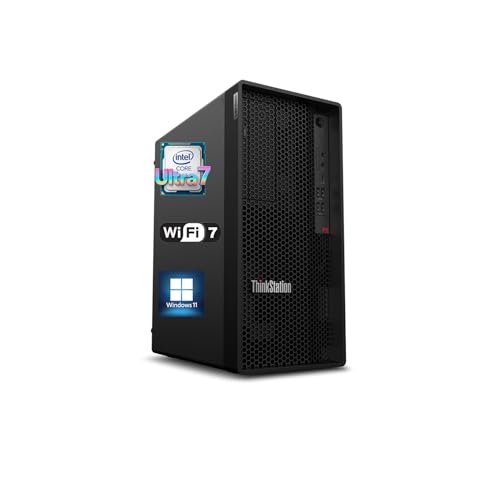
- 20-core Intel Core Ultra 7 265K for demanding multitasking
- 32GB DDR5, 1TB SSD, and upgrade room up to 128GB/12TB
- Wi-Fi 7, HDMI, and dual DisplayPort for modern connectivity
Best For: Professionals who want a capable tower for AI-assisted productivity and future upgrades.
Best for Compact AI Workstations
Lenovo ThinkStation P3 Ultra SFF Gen 2

- Core Ultra 9 285 with vPro and built-in NPU
- Compact under-4L chassis with MIL-STD-810H build
- 32GB DDR5 and 1TB Gen 5 SSD for fast multitasking
Best For: Professionals and teams needing a compact AI-ready workstation for office and productivity workloads.
Best for AI-Ready Business Workstations
Lenovo ThinkStation P3 Tower AI PC

- Core Ultra 5 platform suits productivity and AI-assisted tasks
- 16GB DDR5 and 512GB SSD keep multitasking snappy
- Three 4K display support and Wi‑Fi 7 add modern flexibility
Best For: Office teams and small businesses needing a capable AI-ready workstation.
Best for Business AI Workflows
Lenovo ThinkStation P2 Tower 32GB/1TB

- Core Ultra 5 and 32GB DDR5 handle multitasking smoothly.
- 1TB SSD supports quick boot times and fast file access.
- 3-display 4K support suits productivity-focused setups.
Best For: Business users who want a reliable AI-ready desktop for office multitasking and multi-monitor work.
Best for Business AI Productivity
Lenovo ThinkStation P2 Tower AI Workstation
- Core Ultra 5 chip handles everyday AI-assisted productivity well
- 3-display 4K support makes it easy to expand your workspace
- Windows 11 Pro and ThinkShield suit business environments
Best For: Office buyers and small teams wanting a dependable AI-ready tower for daily productivity.
Best Heavy-Duty Pick
Lenovo ThinkStation P3 Tower AI PC
- Core Ultra 5 + 32GB DDR5 for smooth multitasking
- 1TB SSD and Wi-Fi 7 for fast, modern workflow
- Supports three 4K displays for office productivity
Best For: Small businesses and professionals needing a dependable workstation for productivity and light AI-assisted work.
Best for a Ready-to-Work AI Tower
Lenovo ThinkStation P3 Tower AI PC
- 64GB DDR5 RAM and 2TB SSD for fast multitasking
- Wi-Fi 7 plus HDMI and dual DisplayPort support
- Windows 11 Pro and bundle included for quick setup
Best For: Professionals who want a preconfigured workstation for productivity and light AI tasks.
Best AI-Ready Business Workstation – Lenovo ThinkStation P2 Tower AI PC
If you want a practical lenovo thinkstation for ai that can also handle everyday office work, this P2 Tower is a solid business-first option. It pairs an Intel Core Ultra 5 processor with DDR5 memory, a fast SSD, Wi-Fi 7, and Windows 11 Pro, making it a sensible pick for multitasking, light AI workflows, and general productivity.
Best For: Professionals and small teams that need a dependable workstation for office apps, multi-display setups, and light AI-ready workloads.
Pros:
- Intel Core Ultra 5 and DDR5 memory give it a responsive base for multitasking.
- Multiple video outputs plus 3-display 4K support make it easy to build a productive desk setup.
- Wi-Fi 7, Windows 11 Pro, and plenty of USB ports improve day-to-day usability.
- Includes a 64GB USB flash drive bundle for extra convenience.
Cons:
- 16GB RAM and 512GB SSD are modest if your AI projects or datasets grow quickly.
- More of a business workstation than a heavy-duty AI training machine.
- Bundle and upgraded parts may not matter if you only need the base tower.
This is a good lenovo thinkstation for ai if your priority is a reliable, well-connected desktop for productivity first and AI experimentation second. It offers enough modern hardware to stay useful without pushing into the price or power needs of a full workstation-class build.
Best for Entry-Level CAD AI Work – Lenovo ThinkStation P2 Tower
If you want a practical lenovo thinkstation for ai that can handle design work, simulations, and everyday productivity without jumping straight to a full high-end workstation, the ThinkStation P2 Tower is a strong fit. Its Intel Core Ultra 7 chip adds an NPU for AI-accelerated tasks, while 32GB of DDR5 memory and a 1TB SSD keep the system responsive for busy creative workflows.
Best For: Designers, engineers, and small teams that need an AI-capable workstation for entry-level CAD, 3D modeling, and creative automation.
Pros:
- Built-in NPU helps speed up AI-assisted workflows and automation.
- 32GB DDR5 RAM and 1TB SSD support smooth multitasking and fast load times.
- Expandable workstation design is ready for professional graphics upgrades.
- WiFi 7, Bluetooth 5.4, and broad port selection simplify modern setups.
Cons:
- Integrated graphics limit heavy 3D or rendering work until upgraded.
- More demanding AI and CAD users may still want a dedicated GPU.
As a lenovo thinkstation for ai, this model makes sense for buyers who want a dependable tower with room to grow rather than a maxed-out graphics workstation on day one. It balances speed, expandability, and AI-ready features in a way that suits practical design and engineering use.
Best for Ready-to-Run Workstations – Lenovo ThinkStation P2 Tower AI PC
If you want a lenovo thinkstation for ai that feels workstation-ready out of the box, this P2 Tower is built for serious multitasking, local data work, and everyday business productivity. The Intel Core Ultra 5, 64GB of DDR5 memory, and 2TB SSD give it the responsiveness needed for large projects, while Wi-Fi 7 and multiple display outputs make it easy to drop into a modern desk setup.
Best For: Professionals who need a dependable Lenovo workstation for AI-adjacent workflows, heavy office multitasking, and triple-monitor productivity.
Pros:
- 64GB RAM and a 2TB SSD handle demanding apps and large files smoothly.
- Multiple display outputs support up to three 4K monitors for a productive workspace.
- Wi-Fi 7, Bluetooth, and plenty of USB ports make connectivity flexible.
- Windows 11 Pro adds business-friendly tools for organization and collaboration.
Cons:
- Intel Graphics and the Core Ultra 5 are more practical than truly AI-workstation heavy.
- The tower format takes up more desk space than a compact desktop.
- The bundled flash drive is useful, but it is not a major performance upgrade.
Overall, this lenovo thinkstation for ai is a strong choice if you value memory, storage, and workstation connectivity over flashy specs. It is especially appealing for buyers who want a stable business desktop that can handle demanding day-to-day work without much setup.
Best for AI-Ready Multitasking – Lenovo ThinkStation P2 Tower for AI Workflows
If you want a practical lenovo thinkstation for ai that can also handle everyday business work, this P2 Tower is built around a 20-core Intel Core Ultra 7 265K, 32GB of DDR5 memory, and a 1TB SSD for fast response times. It is a sensible choice for creators, analysts, and office users who need a capable desktop with room to grow.
Best For: Professionals who want a workstation-style desktop for AI-assisted productivity, multitasking, and future upgrades without jumping to a full high-end tower.
Pros:
- 20-core Intel Core Ultra 7 265K is strong for multitasking and demanding workloads
- 32GB DDR5 and 1TB SSD provide a fast, responsive base configuration
- Wi-Fi 7, Bluetooth 5.4, HDMI, and dual DisplayPort support flexible connectivity
- Up to 128GB RAM and 12TB SSD expansion leaves plenty of upgrade headroom
Cons:
- Integrated Intel graphics limit heavier 3D and GPU-accelerated AI work
- Not the best fit if you need a fully configured workstation with a discrete GPU
- Includes basic wired keyboard and mouse rather than premium peripherals
This lenovo thinkstation for ai makes the most sense if you want a strong CPU, modern connectivity, and upgrade potential in a straightforward tower. It is less about extreme graphics power and more about dependable performance for productivity-heavy AI use cases.
Best for Compact AI Workstations – Lenovo ThinkStation P3 Ultra SFF Gen 2
If you want a lenovo thinkstation for ai that fits on a crowded desk without giving up business-grade hardware, this P3 Ultra is a strong fit. It pairs Intel Core Ultra 9 performance, built-in NPU acceleration, and fast Gen 5 storage in a compact chassis aimed at professional multitasking, light AI workloads, and office deployments.
Best For: Professionals and teams that need a compact workstation for AI-assisted productivity, data work, and everyday business use.
Pros:
- Core Ultra 9 285 with vPro and built-in NPU for up to 36 combined TOPS
- Compact under-4L design with enterprise security and MIL-STD-810H durability
- 32GB DDR5-6400 RAM and 1TB PCIe Gen 5 SSD for fast loading and multitasking
- Wi-Fi 7, Bluetooth 5.4, and multiple front/rear USB options for modern offices
Cons:
- Integrated graphics limit it for heavy 3D rendering or advanced GPU AI training
- Front USB-C ports are data transfer only, not full-featured video outputs
- Premium workstation parts make it more expensive than basic mini PCs
As a lenovo thinkstation for ai, this model makes the most sense when desk space is tight but reliability and speed still matter. It is better suited to AI-assisted business workflows than to GPU-heavy creative or model-training tasks.
Best for AI-Ready Business Workstations – Lenovo ThinkStation P3 Tower AI PC
If you want a practical lenovo thinkstation for ai that can also handle everyday business work, the ThinkStation P3 Tower is built around a modern Intel Core Ultra 5 processor, fast DDR5 memory, and flexible display support. It’s a straightforward choice for users who need a dependable desktop for productivity, light content creation, and AI-assisted workflows without jumping to a larger premium workstation.
Best For: Office teams, power users, and small businesses that want a capable workstation for multitasking, multi-monitor setups, and entry-level AI workloads.
Pros:
- Intel Core Ultra 5 chip brings solid everyday performance with AI-focused platform benefits
- 16GB DDR5 and 512GB PCIe SSD provide quick boot times and responsive multitasking
- Supports up to three 4K displays plus Wi‑Fi 7, HDMI, and DisplayPort for flexible connectivity
- Windows 11 Pro adds business-friendly tools for organization and collaboration
Cons:
- 16GB RAM may feel limiting for heavier AI or workstation-class workloads
- 512GB storage can fill up quickly with large project files or datasets
- The bundled upgrade/opened-seal configuration may not suit buyers wanting a factory-sealed unit
Overall, this lenovo thinkstation for ai is best viewed as a balanced business tower rather than a high-end creator rig. It makes sense if you need reliable speed, modern connectivity, and room for multiple displays in a desktop that’s ready for daily professional use.
Best for Business AI Workflows – Lenovo ThinkStation P2 Tower 32GB/1TB
If you want a lenovo thinkstation for ai that leans more toward dependable business productivity than heavy workstation graphics, this ThinkStation P2 Tower is a practical fit. It pairs Intel Core Ultra performance with 32GB DDR5 memory and a 1TB SSD, making it a solid choice for multitasking, fast file access, and everyday AI-assisted office work.
Best For: Business users, office teams, and solo professionals who need a reliable desktop for productivity, light AI tasks, and multi-monitor work.
Pros:
- Intel Core Ultra 5 and 32GB DDR5 deliver smooth everyday performance.
- 1TB PCIe SSD helps speed up boot times, app launches, and file handling.
- Supports 3-display 4K setups for an expanded workspace.
- Windows 11 Pro and ThinkShield add business-ready security features.
Cons:
- Not ideal for demanding GPU-heavy AI training or advanced 3D workloads.
- Integrated bundle is useful, but the included flash drive is a minor add-on.
Overall, this lenovo thinkstation for ai is best viewed as a secure, well-equipped productivity tower rather than a specialized creator rig. For buyers who need a stable business desktop with modern connectivity and enough headroom for AI-assisted workflows, it offers a balanced and sensible setup.
Best for Business AI Productivity – Lenovo ThinkStation P2 Tower AI Workstation
If you want a lenovo thinkstation for ai that feels more like a dependable office workstation than a flashy creative rig, the ThinkStation P2 Tower is a practical fit. It pairs an Intel Core Ultra 5 225, 16GB DDR5 memory, and a 512GB SSD with Windows 11 Pro, making it a solid choice for day-to-day AI-assisted productivity, multitasking, and business workflows.
Best For: Small business users, office teams, and professionals who want a stable, secure tower for everyday AI-enabled work, spreadsheets, and multi-monitor productivity.
Pros:
- Core Ultra processor with integrated AI-focused performance for responsive everyday work
- Supports up to 3x 4K displays for a flexible productivity setup
- Windows 11 Pro and ThinkShield security add business-friendly protection
- Generous port selection plus Wi-Fi 7 and bundled USB flash drive
Cons:
- 16GB RAM and 512GB SSD are fine for office use but not ideal for heavier AI projects
- Integrated graphics limit it for GPU-accelerated creative or training workloads
- Bulkier tower design than a compact desktop
Overall, this lenovo thinkstation for ai is best viewed as a reliable business workstation rather than a high-end AI development machine. For users who want steady performance, strong connectivity, and multi-monitor support, it covers the essentials well.
Best Heavy-Duty Pick – Lenovo ThinkStation P3 Tower AI PC
If you want a lenovo thinkstation for ai that feels more like a dependable office workstation than a flashy gaming tower, this P3 Tower is a practical fit. It pairs an Intel Core Ultra 5 225 with 32GB of DDR5 memory and a 1TB SSD, so it can handle everyday multitasking, data-heavy workflows, and fast startup times without much fuss.
Best For: Small businesses, power users, and teams that want a stable Windows 11 Pro workstation for productivity, light AI-assisted tasks, and multi-display work.
Pros:
- Core Ultra 5 processor and 32GB DDR5 provide solid everyday workstation performance
- 1TB PCIe SSD keeps boot times and file access quick
- Supports up to three 4K displays for productive multitasking
- Wi-Fi 7, HDMI, and DisplayPort add modern connectivity
Cons:
- Not a dedicated GPU workstation for heavy AI training or rendering
- Bundle and upgraded components may complicate warranty expectations
- More business-focused than enthusiast-focused in design and features
Overall, this lenovo thinkstation for ai makes the most sense if you need a reliable business tower with strong memory, fast storage, and flexible display support rather than raw workstation horsepower. It is a sensible pick for productivity-first buyers who want a modern desktop that can grow with their workload.
Best for a Ready-to-Work AI Tower – Lenovo ThinkStation P3 Tower AI PC
If you want a practical lenovo thinkstation for ai that can get to work right out of the box, this ThinkStation P3 Tower is a strong fit. It pairs an Intel Core Ultra 5 processor with 64GB of DDR5 memory, a 2TB SSD, and Windows 11 Pro, making it well suited for multitasking, business apps, and light AI-assisted workflows.
Best For: Professionals who want a configured tower workstation for productivity, multitasking, and AI-ready everyday work.
Pros:
- 64GB DDR5 and a 2TB SSD give it plenty of speed and headroom for demanding workloads.
- Wi-Fi 7, Bluetooth, HDMI, and dual DisplayPort outputs make it flexible for modern desk setups.
- Windows 11 Pro and a full bundle add value for business users who want less setup hassle.
- Front and rear USB ports provide easy access for accessories and external storage.
Cons:
- Intel graphics are fine for business use, but not ideal for heavy GPU-based AI training.
- The tower form factor takes up more desk or floor space than a compact mini PC.
As a lenovo thinkstation for ai buyers should note, this model is better for productivity support and light AI workloads than for graphics-intensive creation or machine-learning projects. It is a solid choice if you want a dependable workstation-style desktop with generous memory and storage already installed.
How We Picked the Best Lenovo Thinkstation for AI
We looked for Lenovo ThinkStation systems that make sense for AI-adjacent productivity, not just raw specs on paper. Priority went to newer Intel Core Ultra platforms, useful memory and SSD options, modern connectivity, and workstation-friendly designs that fit real office or studio setups.
We also favored configurations that offer clear upgrade paths and practical features such as Wi-Fi 7, multiple display support, and higher-capacity RAM choices. For Lenovo Thinkstation for AI, those details matter because AI tools often run alongside heavy multitasking, large files, and display-intensive workflows.
Quick Comparison
Think of the lineup in three tiers: entry-level Core Ultra 5 systems for lighter AI-assisted work, midrange Core Ultra 7 options for stronger multitasking and CAD, and premium P3 models for users who want more workstation headroom. Storage and memory differences are often the biggest real-world separators, especially between 16GB, 32GB, and 64GB configurations.
If your workload is mostly office AI features, browsing, and light creative tools, a smaller P2 or P3 tower may be enough. If you regularly use larger datasets, design software, virtual machines, or multiple apps at once, the 32GB and 64GB builds are the safer buy.
Key Buying Factors for Lenovo Thinkstation for AI
Processor and AI Features
Intel Core Ultra chips with an NPU can help accelerate certain AI-enabled tasks while keeping the system responsive. For most buyers, the CPU still matters most, so look for a processor level that matches your workload before focusing on AI branding.
Memory and Storage
For a Lenovo Thinkstation for AI, 16GB is fine for lighter use, 32GB is the practical sweet spot, and 64GB is best for heavier multitasking or larger projects. SSD capacity also matters more than many buyers expect, since AI tools, project files, and caches fill drives quickly.
Form Factor and Expandability
Tower models usually offer more room for future upgrades, better airflow, and easier service. The P3 Ultra Small Form Factor is the better fit when desk space is limited, but a tower is generally the more flexible long-term choice.
Connectivity and Display Support
Check for Wi-Fi 7, HDMI, DisplayPort, and multi-display support if your workflow depends on several monitors. For office, design, and AI-assisted productivity, that can be just as important as the processor.
Who Should Buy Which Lenovo Thinkstation for AI?
Choose a Core Ultra 5 ThinkStation if you want a capable business AI desktop for everyday productivity, light creative work, and moderate multitasking. Step up to a Core Ultra 7 model if you want better responsiveness for CAD, heavier application switching, or more demanding AI workflows.
Pick the P3 Ultra Small Form Factor if you need workstation power in a compact chassis, and choose 64GB RAM or larger SSD configurations if you want the least compromise for future growth. In short, buy for your actual workload, not the highest spec badge.