
Digitizing bound books is much easier when a scanner can correct curved pages, remove fingers from the frame, and turn captured images into searchable text. The best book scanners with automatic page flattening combine overhead cameras, OCR, generous capture areas, and software that reduces post-scan cleanup.
This roundup compares 10 options ranging from portable single-sheet scanners to A2/A3 overhead models. Use the buying guide below to match resolution, format support, workflow features, and portability with the way you plan to scan.
Best 10 Book Scanners with Automatic Page Flattening Picks for 2026
Best All-Around AI Flattening

- 18MP 4K capture with up to 600 dpi
- AI flattening and finger erasing
- OCR, searchable PDFs, and cloud export
Best For: Book digitization, teaching, and mixed document workflows
Best for Large-Format Speed
VIISAN 23MP A2 Document Camera

- Supports documents up to A2
- Scans in under 1.5 seconds per page
- Foldable 90-degree adjustable design
Best For: Maps, newspapers, oversized documents, and thick books
Best for Archival Detail
VIISAN S48 Duo Overhead Scanner
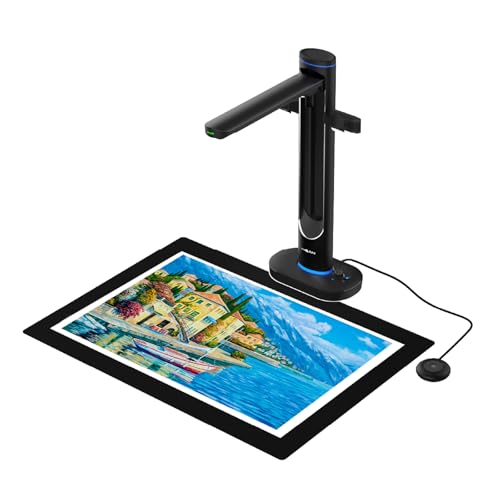
- Dual 48MP cameras and up to 600 dpi
- AI flattening and finger-mark removal
- A2 scanning without pressing fragile bindings
Best For: Archives, libraries, education, and delicate bound materials
Best Portable Single-Sheet Option

- Lightweight mobile single-sheet design
- Scans pages in as fast as 5.5 seconds
- OCR creates editable text and searchable PDFs
Best For: Receipts, cards, loose documents, and mobile scanning
Best A3 Anti-Glare Pick

- A3 overhead scanning for books and large documents
- 16MP camera with up to 300 DPI resolution
- Anti-glare LED lighting for clearer pages
Best For: A3 books, artwork, and large documents
Best Established Book-Scanning Workflow
ScanSnap SV600 Overhead Scanner

- Auto Book Correction flattens curved pages
- Page Turning Detection supports faster workflows
- Scans books without cutting or damaging them
Best For: Frequent book scanning and automated page capture
Best Large-Format Resolution

- A2/A3 capture with up to 26MP resolution
- Automatic flattening, finger removal, and page splitting
- OCR exports to PDF, Word, Excel, EPUB, and text
Best For: Oversized books, maps, manuscripts, and detailed OCR
Best Overall

- AI flattening and finger hiding
- A3 scans in under one second per page
- OCR supports 138+ languages
Best For: Libraries, educators, and home offices needing book and document scanning
Best Large-Format Option

- Interchangeable A2 and A3 scanning
- 26MP capture with software-enhanced 600 DPI
- Automatic flattening, finger removal, and page repair
Best For: Large books, maps, newspapers, and technical documents
Best Portable Pick
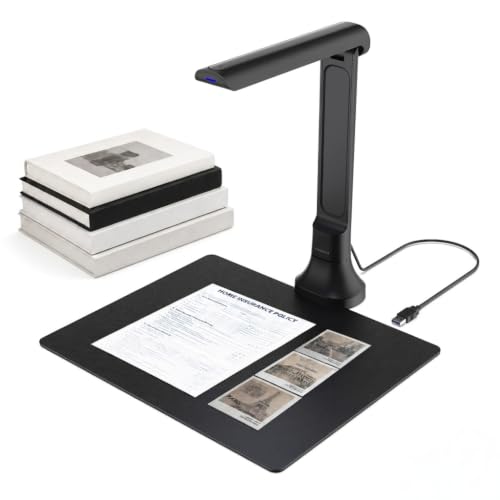
- Lightweight 16MP autofocus camera
- Foldable design with driver-free setup
- OCR and text-to-speech features
Best For: Teachers, students, and mobile home-office users
Best All-Around AI Flattening – IRIScan Desk 7 Pro
The IRIScan Desk 7 Pro is a strong choice among book scanners with automatic page flattening, combining AI book-curve correction with finger erasing, OCR, and high-resolution capture. Its 18MP camera supports up to A3 landscape materials and multiple searchable and office-friendly output formats.
Best For: Home offices, educators, and users digitizing books and mixed documents who want automatic flattening plus OCR and cloud-export options.
Pros:
- AI flattening helps correct curved book pages.
- 18MP, 4K, and up to 600 dpi capture support detailed scans.
- OCR supports more than 130 languages and searchable PDFs.
- Includes finger removal, blank-page removal, and multiple export destinations.
Cons:
- Its feature-rich software may be more than casual users need.
- USB Type-C connectivity may require an adapter for some setups.
Choose this model if you want an all-purpose overhead scanner with particularly broad software capabilities. The built-in flattening and cleanup tools can reduce editing work when processing bound books.
Best for Large-Format Speed – VIISAN 23MP A2 Document Camera
The VIISAN 23MP document camera is a practical option for large materials when evaluating book scanners with automatic page flattening. Its adjustable, foldable design covers documents up to A2 and scans pages in under 1.5 seconds, making it suited to newspapers, maps, and larger books.
Best For: Users who need fast A2/A3 coverage for oversized documents, newspapers, maps, or thick books.
Pros:
- Captures materials up to A2 size.
- Under-1.5-second scanning speed is useful for batch work.
- Adjustable height and a 90-degree foldable hinge add flexibility.
Cons:
- The supplied notes do not specify OCR or automatic flattening features.
- 300 dpi resolution is lower than some high-resolution book-scanning models.
- It is USB-connected, so it requires a compatible computer setup.
This model stands out primarily for its large capture area and speed. It may be a better fit for oversized materials than for buyers specifically seeking the most advanced page-flattening software.
Best for Archival Detail – VIISAN S48 Duo Overhead Scanner
The VIISAN S48 Duo is designed for archival and educational workflows where book scanners with automatic page flattening must handle large, bound, or delicate materials. Its dual 48MP cameras capture up to A2 at 600 dpi, while built-in AI helps flatten curved pages, remove fingers, correct edge distortion, and clean backgrounds.
Best For: Libraries, schools, archives, and professionals scanning oversized or fragile books without pressing on their bindings.
Pros:
- Overhead design scans bound materials without flattening or damaging them.
- Dual 48MP cameras provide detailed capture up to 600 dpi.
- AI assists with page flattening, finger removal, and background cleanup.
- OCR and text-to-speech support searchable and accessible content.
Cons:
- At 2.8 kg, it is less portable than compact scanners.
- Its recommended computer setup includes 4GB RAM minimum and substantial storage.
- It may be more capability than needed for occasional home scanning.
The S48 Duo is the strongest match here for careful digitization of large or delicate books. Its dual-camera design and AI cleanup tools target demanding archival work, while UVC functionality adds value for teaching and live presentations.
Best Portable Single-Sheet Option – Epson DS-70
The Epson DS-70 is a compact single-sheet scanner rather than a dedicated overhead book scanner, so it is best considered a portability-focused alternative to book scanners with automatic page flattening. It handles documents up to 8.5 by 72 inches, receipts, cards, and IDs, with OCR software for editable text and searchable PDFs.
Best For: Mobile users who primarily scan loose documents, receipts, cards, and long sheets on the go.
Pros:
- Smallest and lightest mobile single-sheet scanner according to the supplied notes.
- Scans a page in as fast as 5.5 seconds.
- Supports documents up to 8.5 by 72 inches plus cards and receipts.
- Includes OCR and document-management software.
Cons:
- It is not designed for bound books or automatic page flattening.
- Single-sheet capacity limits batch scanning.
- The listed minimum system requirement is Windows 7.
Choose the DS-70 when portability and loose-paper scanning matter more than book capture. For bound volumes or curved pages, an overhead model with dedicated flattening software will be a better fit.
Best A3 Anti-Glare Pick – VIISAN DL16 Book Scanner
The VIISAN DL16 is a practical option among book scanners with automatic page flattening, especially for users digitizing bound books, oversized pages, artwork, and sheet music. Its A3 capture area, 16MP camera, 300 DPI scanning, and anti-glare lighting suit organized home, office, library, and archival workflows.
Best For: A3 books, artwork, large documents, and users who want anti-glare overhead capture on Windows or Mac.
Pros:
- A3 overhead design accommodates books and large-format materials.
- 16MP camera and up to 300 DPI resolution capture printed details clearly.
- Anti-glare LED lighting helps reduce glare and uneven shadows.
- Compatible with both Windows and Mac systems.
Cons:
- Its 300 DPI resolution may be less detailed than some higher-resolution alternatives.
- USB connectivity requires a computer-based setup.
The DL16 is a balanced choice for everyday digitization when A3 coverage and page visibility matter more than portability. It is particularly well suited to collections that include glossy pages or oversized documents.
Best Established Book-Scanning Workflow – ScanSnap SV600 Overhead Scanner
The ScanSnap SV600 is a strong fit for shoppers comparing book scanners with automatic page flattening and hands-off capture features. It scans books, newspapers, magazines, photos, and documents without cutting them, while automatic book correction addresses curved pages and page-turn detection can start scans as you work.
Best For: Frequent book and document scanning with automatic correction, multi-document detection, and page-turn automation.
Pros:
- Scans bound books and other materials without cutting or damaging them.
- Auto Book Correction flattens pages and corrects curve distortion.
- Page Turning Detection can automatically begin the next scan.
- Multi Document Detection crops and rotates multiple items in one scan.
Cons:
- At 6.6 pounds, it is less lightweight than the DL16.
- The listed system requirements specify Windows 10/11 or macOS Monterey 12 and later.
- It uses USB connectivity rather than a standalone workflow.
The SV600 emphasizes scanning convenience and software-assisted productivity. Its page-turn and correction tools make it appealing for larger book projects, while the included background pad and accessories support a dedicated desktop setup.
Best Large-Format Resolution – VIISAN S21 A2 Book Scanner
The VIISAN S21 stands out among book scanners with automatic page flattening for its A2/A3 flexibility and high-resolution capture. Its software can digitally flatten curved pages, remove fingers, split double-page spreads, and convert scans through OCR, making it suited to oversized books, maps, manuscripts, and other demanding projects.
Best For: Large-format materials and users who need A2 capture, high-resolution images, OCR, and multiple page-cleanup tools.
Pros:
- A2 capture supports journals, manuscripts, newspapers, maps, and other oversized materials.
- 26MP capture and software-enhanced resolution up to 600 DPI preserve substantial detail.
- Software digitally flattens pages, removes fingers, repairs edges, and splits double pages.
- OCR can export files to PDF, Word, Excel, EPUB, and text formats.
Cons:
- Bundled OfficeCam software is not compatible with ARM-based devices such as the Surface Pro X.
- Very glossy paper is not recommended, and the built-in LEDs are not recommended in bright light.
- Its extensive large-format feature set may be more than needed for ordinary letter-size scanning.
The S21 is the most capable choice here for oversized source material and detailed digital conversion. Buyers should confirm computer architecture and lighting conditions before choosing it, particularly for glossy originals or ARM-based systems.
Best Overall – IRIScan Desk 6 Pro
The IRIScan Desk 6 Pro is a versatile choice among book scanners with automatic page flattening. Its AI-powered flattening and finger hiding help produce cleaner scans of curved books, while its A3 capture area and OCR software make it useful for larger documents and everyday paperwork.
Best For: Home offices, libraries, educators, and users who need book scanning plus document-camera and OCR features.
Pros:
- AI automatically flattens curved book pages and hides fingers.
- Scans A3-size documents at under one second per page.
- OCR supports 138+ languages and exports to searchable PDF, Word, Excel, and e-book formats.
- Works with Windows and macOS and doubles as a USB document camera.
Cons:
- Requires a USB connection and compatible computer.
- Its extensive software and camera features may be more than casual users need.
Choose this model if you want a well-rounded scanner for books, large documents, and video presentations. Its 13MP AI-assisted capture and included Readiris software make it particularly practical for digitizing and editing documents.
Best Large-Format Option – VIISAN S21 Pro A2/A3 Scanner
The VIISAN S21 Pro stands out among book scanners with automatic page flattening for its interchangeable A2 and A3 formats. Its software can flatten curved pages, remove fingers, repair page edges, and split double-page spreads, making it a strong option for oversized books, maps, newspapers, and archival projects.
Best For: Users scanning large-format materials, technical drawings, newspapers, maps, and standard books.
Pros:
- Switches between A2 and A3 capture sizes with a foldable, height-adjustable design.
- 26MP sensor captures detailed images, with software-enhanced 600 DPI output.
- Automatically flattens pages, removes fingers, repairs edges, and separates spreads.
- OCR supports 180+ languages and exports to PDF, Word, Excel, ePub, and TXT.
Cons:
- Software-enhanced resolution is not the same as 600 DPI optical resolution.
- The supplied notes caution against highly glossy or glare-prone paper.
- Not compatible with ARM-based devices such as Surface Pro X.
This is the most flexible pick when capture size matters. The A2 capability and page-repair tools add value for specialized scanning, while USB plug-and-play operation and compatibility with Windows and macOS keep setup straightforward.
Best Portable Pick – VIISAN DB8401 Document Camera
The VIISAN DB8401 is a compact choice among book scanners with automatic page flattening for users who also need a portable document camera. Its 16MP autofocus camera, automatic edge correction, OCR, and foldable design support quick scanning of books and papers while remaining useful for remote teaching and video calls.
Best For: Teachers, students, remote workers, and anyone who wants a lightweight book scanner for occasional digitizing and live presentations.
Pros:
- 16MP autofocus camera captures books, documents, photos, and 3D objects.
- Supports multi-page scanning with automatic edge correction.
- OCR converts scans to editable Word, Excel, PDF, and searchable text.
- Foldable, 350-gram design works with Windows and macOS without drivers.
Cons:
- The supplied notes mention edge correction but do not specify automatic curved-page flattening.
- It offers less resolution than the 26MP large-format model in this roundup.
- Some AI translation and read-aloud features require the VisualCam Lite web interface and Gemini.
The DB8401 makes the most sense when portability and live camera use are as important as scanning. It is less specialized for demanding book-flattening work, but its autofocus, OCR, foldability, and text-to-speech features create a useful everyday setup.
How We Picked the Best Book Scanners with Automatic Page Flattening
We focused on scanners and document cameras that can capture bound material from above and use software or imaging technology to correct page curvature. The selection includes models with automatic flattening, finger hiding or removal, OCR, adjustable capture areas, and resolutions suited to everything from everyday documents to archival projects.
We also considered practical differences that affect ownership: maximum page size, lighting, scanning speed, computer compatibility, portability, and whether the device is designed primarily for books or for mixed document work. Product specifications can vary by software version and operating system, so confirm current compatibility before buying.
Quick Comparison
- Best for advanced book digitization: Look for overhead models with automatic flattening, finger removal, OCR, and a large A3 or A2 capture area.
- Best for oversized materials: A2-capable document cameras provide more room for large books, maps, magazines, and artwork.
- Best for portable scanning: A compact single-sheet scanner is easier to carry, but it is less suitable for bound books.
- Best for text conversion: Prioritize reliable OCR, language support, and export options rather than camera resolution alone.
- Best for frequent production: Choose a sturdy overhead unit with fast capture, consistent lighting, and software that supports batch processing.
Key Buying Factors for Book Scanners with Automatic Page Flattening
Capture Size and Camera Resolution
Check whether the scanner supports A3 or A2 pages if you work with oversized books or open volumes. Higher megapixel counts can preserve finer detail, but effective sharpness, lens quality, lighting, and software processing matter just as much.
Flattening and Finger-Removal Software
Automatic page flattening should correct the gutter and curved outer edges without making text look distorted. Finger hiding or removal is useful when you hold pages open during capture. These features may work best when the book is positioned within the recommended area and lighting is even.
OCR, Formats, and Operating System Support
OCR turns images into searchable or editable files, but accuracy depends on typeface, language, page condition, and layout. Check supported languages and whether the software exports PDF, searchable PDF, Word, or image files. Confirm Windows or macOS compatibility before purchase.
Lighting, Speed, and Setup
Built-in anti-glare lighting helps with glossy pages, while a stable stand and autofocus can simplify repeated scans. Consider whether the scanner captures both pages at once, uses a foot pedal or shortcut, and requires a permanent desk setup.
Who Should Buy Which Book Scanners with Automatic Page Flattening?
Choose a professional overhead model if you are digitizing books regularly, need OCR, or want automated correction with minimal editing. Choose an A2/A3 large-format camera for oversized books, archival materials, maps, and classroom or library use. Choose a compact document scanner if portability and single-page paperwork matter more than bound-book scanning. Choose a simpler document camera if you want an affordable way to capture occasional books and documents and are comfortable doing more cleanup yourself.