
Choosing among the best streaming encoders for multi-camera setups means balancing camera inputs, output protocols, production control, and network reliability. The right encoder can simplify a live workflow while preserving video quality across streaming platforms, local networks, and recording systems.
This roundup covers all-in-one switchers, compact IP encoders, and professional HDMI or SDI hardware. Use the buying guide below to match features such as 4K support, NDI, SRT, loop-through, recording, and PoE to your production needs.
Best 10 Streaming Encoders for Multi Camera Setups Picks for 2026
Portable Production Hub

- Four HDMI/SDI inputs with built-in 14-inch monitor
- USB connectivity for OBS, vMix, and Zoom
- AC, DC, and USB power-bank support
Best For: Mobile multi-camera productions and event streaming
All-in-One Streaming Studio

- 4K encoder, switcher, recorder, and touchscreen
- Four HDMI inputs plus USB source support
- NDI, SRT, ISO recording, and cellular bonding
Best For: Laptop-free live production across varied platforms
High-Density IP Encoder
ORIVISION 4-Channel 4K Encoder

- Four HDMI channels and up to 16 simultaneous feeds
- Supports 4Kp30, 1080p60, and multiple codecs
- RTMP, RTMPS, SRT, HLS, UDP, and more
Best For: Multi-platform broadcast and IPTV distribution
Professional SDI Streamer
Magewell Ultra Encode SDI Plus

- 4K SDI encoding with H.264 or H.265
- Multi-protocol, multi-destination streaming
- Simultaneous streaming and 128GB recording
Best For: Professional SDI production and IP contribution workflows
Versatile Production Hub

- Four HDMI inputs with dual monitor outputs
- Three-platform streaming plus recording and playback
- Built-in switching, audio, overlays, and PC-free control
Best For: HDMI-based events, podcasts, worship, and conferences
Broadcast-Ready 4K Link
Blackmagic Streaming Encoder 4K
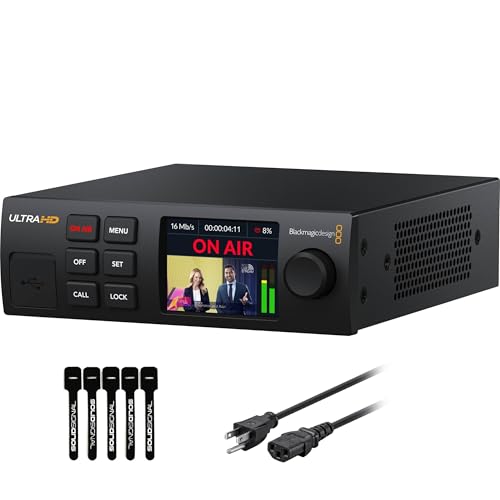
- 12G-SDI encoding up to 2160p60
- H.264/H.265 streaming through SRT or RTMP
- Ethernet and mobile auto-failover connectivity
Best For: SDI-based 4K broadcast and remote production workflows
Protocol-Flexible HDMI Encoder
URayCoder UHE265-8 Video Encoder

- Supports numerous IP streaming protocols
- Dual streams can use different protocols
- Detailed stream customization and lifetime support
Best For: HDMI-to-IP, IPTV, NVR, and multi-destination streaming
Best All-in-One Pick

- HDMI and SDI inputs with built-in mixing
- Up to six simultaneous streaming destinations
- 4K encoding with recording and overlays
Best For: Mixed HDMI/SDI multi-camera productions
Best Budget 1080p Option

- 1080p60 H.265/H.264 encoding
- Supports four protocol-based output streams
- Adds captions, logos, and timestamps
Best For: Single-HDMI workflows paired with an external switcher
Best HDMI Pass-Through Pick

- 4K HDMI encoding with loop-through output
- Records to 128 GB internal storage and more
- Supports NDI|HX and multiple streaming protocols
Best For: HDMI productions needing monitoring and recording
Portable Production Hub – GoStream Duet Kit
For streaming encoders for multi camera setups, the Osee GoStream Duet Kit is a portable all-in-one option that combines switching, monitoring, recording, and streaming connections in a compact package. Its four HDMI/SDI inputs, built-in 14-inch monitor, USB connectivity, and flexible power options suit mobile productions that need hands-on control without a large rack setup.
Best For: Mobile creators, event teams, and small productions that need an integrated multiview and switcher kit.
Pros:
- Four HDMI/SDI inputs support flexible multi-camera connections.
- Built-in 14-inch 1080p monitor helps with multiview monitoring.
- Can connect with OBS, vMix, and Zoom through USB.
- Supports AC, DC, or USB power-bank operation.
Cons:
- At about 5 kg, it is portable but not especially lightweight.
- The all-in-one design may be more equipment than a simple single-camera workflow needs.
The GoStream Duet Kit stands out when portability and physical production control matter more than a minimal encoder footprint. Its expandable cheese plates and multiple power choices also make it practical for changing field setups.
All-in-One Streaming Studio – YoloBox Ultra
The YoloBox Ultra is a self-contained choice among streaming encoders for multi camera setups, with a 4K encoder, switcher, recorder, and touchscreen monitor in one device. It accepts four HDMI sources plus USB inputs, while NDI, SRT, and cellular bonding add options for remote or connectivity-sensitive productions.
Best For: Churches, schools, sports teams, and creators who want laptop-free switching and streaming.
Pros:
- Combines a 4K encoder, switcher, recorder, and 8-inch touchscreen.
- Supports four HDMI cameras and 10 or more total sources.
- Includes PiP, overlays, scoreboards, instant replay, and auto-switching.
- Can record inputs separately for more flexible post-production.
Cons:
- Cellular bonding may involve additional charges.
- The listed battery-recovery procedure requires specific dual-charger steps if the battery becomes stuck on the logo.
Choose the YoloBox Ultra when speed and broad production features are priorities. Its horizontal and vertical streaming support is particularly useful for teams publishing to a mix of traditional and mobile-first platforms.
High-Density IP Encoder – ORIVISION 4-Channel 4K Encoder
For streaming encoders for multi camera setups that emphasize simultaneous distribution, this ORIVISION unit provides four HDMI inputs and can output up to 16 feeds. It supports H.265, H.264, and MJPEG, along with RTMP, RTMPS, SRT, RTSP, HLS, UDP, and other protocols for online broadcasting and IPTV-style workflows.
Best For: Broadcast, IPTV, and multi-platform operators needing several simultaneous outputs from multiple HDMI sources.
Pros:
- Four HDMI channels can feed up to 16 platforms simultaneously.
- Supports up to two 4Kp30 inputs plus two 1080p60 inputs.
- Offers extensive protocol compatibility, including RTMPS, SRT, HLS, and UDP.
- LCD screen and OSD tools assist with monitoring and branded output.
Cons:
- It is an encoder-focused device rather than an all-in-one camera switcher with a production monitor.
- Its broad configuration options may require more technical setup than a creator-oriented appliance.
This ORIVISION encoder is a strong fit when distribution flexibility and channel density matter most. The 16-feed claim is especially relevant for operators managing several destinations, while the included screen provides basic status visibility at the device.
Professional SDI Streamer – Magewell Ultra Encode SDI Plus
The Magewell Ultra Encode SDI Plus is a compact professional option among streaming encoders for multi camera setups built around SDI sources. It encodes up to 4Kp30 using H.264 or H.265, supports multiple streaming protocols and destinations, and can stream and record at the same time for production, contribution, or archive workflows.
Best For: Professional AV, broadcast, corporate, education, worship, and remote-production teams using SDI equipment.
Pros:
- Supports SDI encoding up to 4096×2160p30.
- Works with RTMP, RTMPS, SRT, NDI|HX, HLS, and TS over UDP/RTP.
- Records to internal 128GB storage, USB media, or network locations while streaming.
- Includes PoE, Wi-Fi, optional USB modem support, and web/API control.
Cons:
- Its SDI input makes it less suitable for HDMI-only camera systems without additional conversion.
- 4K encoding is limited to 30 frames per second.
For SDI-centered installations, the Ultra Encode SDI Plus offers a strong balance of professional connectivity, recording, and IP workflow support in a small chassis. NDI|HX, PoE, and scheduled or loop recording add useful flexibility for fixed and mobile deployments.
Versatile Production Hub – Osee GoStream Deck HDMI Pro
For creators comparing streaming encoders for multi camera setups, the Osee GoStream Deck combines four HDMI inputs with live switching, audio control, recording, and direct streaming. Its built-in control surface is designed for productions that need hands-on operation without relying entirely on a computer.
Best For: Conferences, worship services, podcasts, weddings, education, and other HDMI-based multi-camera productions.
Pros:
- Four HDMI inputs and two HDMI outputs support multi-source production and monitoring.
- Streams to up to three platforms through Ethernet and supports landscape or portrait formats.
- Includes audio effects, SD card or USB SSD recording, playback, overlays, chroma key, and picture-in-picture.
- Physical PVW/PGM buses, T-Bar, macros, and a built-in menu enable PC-free control.
Cons:
- Designed around HDMI sources rather than professional SDI camera inputs.
- The broad feature set may require setup time for users new to live production switchers.
The GoStream Deck is a strong all-in-one choice when you want camera switching, graphics, audio, recording, and streaming in one compact unit. It is especially practical for event teams that value tactile controls and flexible HDMI connectivity.
Broadcast-Ready 4K Link – Blackmagic Streaming Encoder 4K
Among streaming encoders for multi camera setups, the Blackmagic Streaming Encoder 4K is aimed at SDI-based workflows that demand 4K support and resilient connectivity. It encodes H.264 or H.265 streams up to 2160p60 while providing standards conversion, monitoring outputs, and mobile failover.
Best For: Broadcast-style productions using 12G-SDI cameras, remote control workflows, and high-resolution live streaming.
Pros:
- Supports 12G-SDI input up to DCI 4K60 and encodes in H.264 or H.265.
- Streams via SRT or RTMP over Gigabit Ethernet, with USB-C smartphone tethering and auto-failover.
- SDI and HDMI monitor outputs include configurable standards conversion.
- Offers closed captions, timecode, REST API control, tally, talkback, and compatible camera control.
Cons:
- Its single SDI input makes it an encoder rather than a multi-input camera switcher.
- Advanced features are most useful in compatible professional broadcast ecosystems.
This encoder is best suited to a production chain that already uses SDI infrastructure and needs reliable, high-quality delivery. The Ethernet-plus-mobile design adds useful protection against an interrupted primary connection.
Protocol-Flexible HDMI Encoder – URayCoder UHE265-8 Video Encoder
The URayCoder UHE265-8 is a compact option for streaming encoders for multi camera setups when HDMI sources need to be distributed across varied platforms or video servers. It supports dual streams per HDMI input and a wide range of protocols, making it adaptable for broadcast, IPTV, and monitoring applications.
Best For: HDMI-based streaming, IPTV, NVR, and workflows that require multiple protocols or simultaneous destinations.
Pros:
- Supports RTMPS, RTSP, SRT, HLS, UDP, RTP, WebRTC, MP4, FLV, and additional protocols.
- Can output two video streams per HDMI input, with different protocols for each stream.
- Provides controls for resolution, frame rate, bitrate, audio, cropping, rotation, mirroring, and overlays.
- Includes free lifetime technical support and warranty, plus SDK, API, and CGI documentation.
Cons:
- It encodes HDMI signals but does not provide the camera switching and production controls of a video mixer.
- It is limited to 1080p HD rather than 4K output.
- Configuration may feel technical for users unfamiliar with streaming protocols.
The UHE265-8 stands out for deployment flexibility rather than a built-in production control panel. Choose it when protocol coverage, simultaneous stream outputs, and detailed stream customization matter more than integrated switching.
Best All-in-One Pick – Ultra Encode AIO
For streaming encoders for multi camera setups, the Magewell Ultra Encode AIO stands out when you need HDMI and SDI flexibility in one rack-mountable unit. It supports 4K encoding, multi-destination streaming, onboard overlays, and simultaneous recording for more involved live-production workflows.
Best For: Multi-camera productions combining HDMI and SDI sources, especially when you need picture-in-picture or side-by-side layouts.
Pros:
- Combines HDMI and SDI inputs with picture-in-picture and side-by-side mixing.
- Streams to up to six destinations using protocols including RTMP, RTMPS, SRT, and NDI|HX2/HX3.
- Supports 4K encoding, recording, overlays, scaling, cropping, and scheduled captures.
- Offers Ethernet, Wi-Fi, PoE, 4G USB modem support, web control, API control, and an LCD.
Cons:
- Its broad feature set may be more than a simple single-source streaming setup requires.
- SDI input supports up to 4096×2160p30, while HDMI supports up to 4096×2160p60.
The Ultra Encode AIO is the most adaptable option here for productions with mixed camera connections and advanced routing needs. Its six-destination streaming and recording capabilities make it a strong fit for growing live-production systems.
Best Budget 1080p Option – URayCoder H.265 HDMI Encoder
The URayCoder HDMI encoder is a practical choice for streaming encoders for multi camera setups built around 1080p HDMI sources. Its H.265/H.264 support, broad protocol compatibility, and ability to output up to four streams can help distribute video to several platforms or network destinations.
Best For: HDMI-based 1080p streaming setups using YouTube, Facebook, Twitch, Vimeo, OBS, IPTV, or NVR workflows.
Pros:
- Supports 1920×1080 input and output at up to 60 fps with H.265/H.264 encoding.
- Can output four video streams using protocols such as RTMP(S), SRT, HLS, RTSP, and UDP/RTP.
- Includes text, scrolling captions, logos, timestamps, cropping, rotation, flipping, and mirroring.
- Accepts HDMI-embedded audio or 3.5 mm line-in audio.
Cons:
- It has one HDMI video input, so multiple cameras require an external switcher or other source-selection hardware.
- It is limited to 1080p rather than 4K encoding.
This compact encoder offers useful streaming flexibility at 1080p, particularly for users who already have a switcher handling multiple cameras. It is less suitable when direct multi-input mixing or 4K production is a priority.
Best HDMI Pass-Through Pick – Ultra Encode HDMI Plus
For HDMI-focused streaming encoders for multi camera setups, the Magewell Ultra Encode HDMI Plus adds 4K encoding, loop-through monitoring, and multi-protocol delivery in a compact standalone design. It is well suited to a camera, switcher, or other HDMI source that needs local pass-through while streaming and recording.
Best For: HDMI-based live production where local monitoring, NDI|HX integration, and onboard recording are important.
Pros:
- Encodes HDMI video up to 4096×2160p30 and provides HDMI loop-through for displays or switchers.
- Supports RTMP, RTMPS, SRT, NDI|HX, HLS, and TS over UDP/RTP.
- Records to its 128 GB internal storage, USB storage, or network locations while streaming.
- Includes PoE, Gigabit Ethernet, Wi-Fi, 4G/5G USB modem support, overlays, and web/API control.
Cons:
- It has an HDMI video input rather than the combined HDMI and SDI connectivity of the Ultra Encode AIO.
- 4K HDMI encoding is specified up to 4096×2160p30.
The Ultra Encode HDMI Plus is a strong match for HDMI production chains that benefit from loop-through monitoring and integrated storage. Its NDI|HX support and network options also make it useful for modern IP-based contribution workflows.
How We Picked the Best Streaming Encoders for Multi Camera Setups
We focused on the features that most affect real-world multi-camera production: input type and count, supported resolutions, encoding formats, streaming protocols, monitoring, recording, and network connectivity. The selection includes HDMI and SDI models, standalone encoders, multi-channel systems, and integrated switchers so different production sizes and budgets are represented.
We also considered workflow flexibility. Some units are designed to send one or more sources directly to an online platform, while others add switching, mixing, vertical video, local recording, NDI|HX, or simultaneous outputs. Always verify the exact input, output, and protocol combination before buying.
Quick Comparison
| Best For | Look For | Typical Strength |
|---|---|---|
| Portable events | All-in-one switching and battery-friendly operation | Fast setup with fewer external devices |
| Professional SDI systems | SDI inputs, genlock-friendly infrastructure, PoE, SRT | Long cable runs and dependable production workflows |
| IP video distribution | Multiple channels, NDI, RTSP, UDP, or RTP | Routing video across a local network |
| Creator and hybrid productions | HDMI, vertical output, recording, and platform support | Flexible online content production |
Key Buying Factors for Streaming Encoders for Multi-Camera Setups
Inputs, Resolution, and Switching
Start with your cameras. HDMI is common for mirrorless cameras, camcorders, and consumer production gear, while SDI is better suited to longer cable runs and professional cameras. A multi-channel encoder may accept several feeds, but confirm whether it can encode them simultaneously or only switch between them. For 4K workflows, check the maximum frame rate and whether 4K applies to every input or only the program output.
Protocols and Platform Compatibility
RTMP and RTMPS are widely used for internet streaming. SRT is valuable when a connection is less predictable because it is designed for reliable contribution over public networks. RTSP, UDP, RTP, HLS, and NDI are more relevant to local distribution, production software, monitoring, and IPTV workflows. Match the encoder to the destination before prioritizing headline resolution.
Recording, Monitoring, and Networking
Built-in recording can provide a backup copy or simplify post-production. A local display, preview interface, or loop-through output helps operators monitor the feed without adding another converter. Ethernet is generally preferable for stable streaming; PoE can reduce cabling in compatible installations. Check bitrate controls, audio inputs, embedded audio support, and storage requirements.
Who Should Buy Which Streaming Encoders for Multi Camera Setups?
Choose an all-in-one mixer or switcher if you need to combine several cameras, add transitions, and stream without a separate computer. Choose a standalone HDMI encoder for a simple camera-to-platform setup or a compact studio system. SDI models make more sense for venues, houses of worship, sports, and other installations using professional cameras and long cable runs.
For network-centric studios, prioritize NDI and multi-protocol support. For remote events or unstable connections, look for SRT and dependable Ethernet operation. If you produce both landscape and portrait content, a system with vertical output or flexible layout tools can avoid extra processing. Finally, leave capacity for future cameras, higher bitrates, and backup streaming rather than buying only for today’s minimum configuration.