
Choosing a 4K streaming encoder is about more than matching a resolution spec. Input type, streaming protocols, network options, recording features, and workflow compatibility can determine whether a live setup is simple and reliable—or frustrating to operate.
This roundup compares 10 4K-capable encoders spanning HDMI, SDI, NDI, IPTV, PoE, and professional production use. Use the guide below to narrow the list by source equipment, output needs, and the features that matter most for your workflow.
Best 10 4K Streaming Encoders Picks for 2026
Most Versatile HDMI Pick
URayCoder 4K HDMI Streaming Encoder

- H.264/H.265 encoding with 4K input up to 30fps
- Four simultaneous streams and broad protocol support
- Custom overlays, audio input, and lifetime support
Best For: HDMI streaming, IPTV, and multi-platform broadcasts
Best Pro Workflow Option
Blackmagic Design Streaming Encoder 4K

- DCI 4K streaming up to 60fps
- H.264/H.265 support for SRT and RTMP
- SDI, HDMI, USB-C, and front-panel controls
Best For: Professional live production and high-frame-rate 4K workflows
Best PoE HDMI Encoder
J-Tech Digital 4K HDMI IPTV Encoder

- 4K 60Hz input with 1080p 60Hz output
- H.264/H.265/MJPEG and broad IPTV protocols
- PoE, analog audio input, and custom OSD
Best For: Churches, events, and fixed AV installations
Best Professional SDI Model
Magewell Ultra Encode SDI Plus

- 4K SDI encoding up to 4096×2160p30
- Multi-destination streaming with NDI|HX support
- Simultaneous recording, PoE, Wi-Fi, and API control
Best For: Professional SDI production and remote AV workflows
Best Versatile HDMI Encoder
Zowietek ZowieBox HDMI Encoder/Decoder

- HDMI encoding to SRT, RTMP(S), and RTSP
- Bidirectional network-to-HDMI decoding
- UVC, NDI HX4, PoE, and standalone operation
Best For: Flexible HDMI-based streaming and AV workflows
Best Professional 4K Encoder
Blackmagic Streaming Encoder 4K
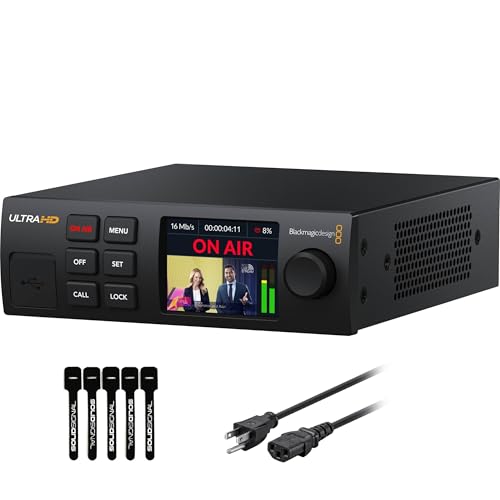
- 12G-SDI input with 4K60 support
- H.264/H.265 SRT and RTMP streaming
- Ethernet plus mobile auto-failover
Best For: Broadcast and SDI-based live production
Best for NDI Gaming Workflows

- 4K HDMI passthrough for low-lag gameplay
- NDI HX3/HX2/HX and SRT/RTMP/RTSP support
- Standalone control with PoE and tripod mounting
Best For: PC-free gaming and compact NDI production
Most Versatile

- HDMI and SDI inputs with layout mixing
- 4K H.264/HEVC encoding
- Up to six destinations plus recording
Best For: Flexible professional live-production workflows
Best Compact NDI Tool
Zowietek ZowieBox 4K Encoder/Decoder

- SDI-to-NDI|HX and NDI-to-SDI modes
- Standalone SRT, RTMP(S), and RTSP streaming
- PoE, USB-C power, and tripod mounting
Best For: Portable SDI and NDI|HX integration
Best HDMI Workflow
Magewell Ultra Encode HDMI Plus

- 4K HDMI encoding with loop-through
- 128 GB internal recording storage
- Multi-protocol streaming with PoE and Wi-Fi
Best For: HDMI cameras, switchers, and AV productions
Most Versatile HDMI Pick – URayCoder 4K HDMI Streaming Encoder
For buyers comparing 4k streaming encoders, the URayCoder UHE265-1L-4K stands out for broad protocol support, flexible HDMI handling, and multi-platform output. It accepts 4K input at up to 30fps and can encode up to four streams using different protocols.
Best For: HDMI-based live streaming, IPTV distribution, and users who need customizable overlays and multiple output protocols.
Pros:
- Supports H.264 and H.265 encoding with 4K input up to 30fps.
- Works with RTMP(S), SRT, RTSP, HLS, HTTP, UDP, WebRTC, and other protocols.
- Can output four streams simultaneously and supports logos, captions, timestamps, and video adjustments.
- Includes HDMI and line-in audio options plus lifetime technical support.
Cons:
- 4K frame rate is limited to 30fps.
- Its extensive settings may be more than casual users need.
This is a flexible choice when protocol compatibility and stream customization matter more than a compact, minimalist design. It is particularly suitable for installations serving several platforms or network destinations.
Best Pro Workflow Option – Blackmagic Design Streaming Encoder 4K
The Blackmagic Design Streaming Encoder 4K is a professional-oriented option among 4k streaming encoders. It supports H.264 and H.265 streaming over SRT or RTMP, with DCI 4K streaming up to 60fps and dedicated SDI and HDMI monitoring outputs.
Best For: Professional live production setups that need DCI 4K streaming, SDI connectivity, and straightforward hardware controls.
Pros:
- Supports DCI 4K streaming up to 60fps.
- Offers H.264 and H.265 encoding for SRT or RTMP workflows.
- Includes SDI and HDMI monitor outputs.
- Provides USB-C phone tethering and webcam output.
Cons:
- Protocol support is narrower than models listing HLS, RTSP, or multiple IPTV formats.
- The supplied notes do not specify built-in recording or multi-destination streaming.
Choose this encoder when high-frame-rate 4K and integration with professional video equipment are priorities. Its front-panel buttons and control knob also make it appealing for operators who prefer physical controls.
Best PoE HDMI Encoder – J-Tech Digital 4K HDMI IPTV Encoder
The J-Tech Digital JTECH-ENCH4AP is a practical choice among 4k streaming encoders for installations that capture 4K but deliver Full HD. It accepts 4K at 60Hz, outputs 1080p at 60Hz, and supports common IPTV and streaming protocols.
Best For: Churches, live events, and AV systems that need analog audio embedding, branded overlays, and one-cable PoE installation.
Pros:
- Accepts 4K 60Hz input while providing 1080p 60Hz output.
- Supports H.264, H.265, and MJPEG compression.
- Offers RTSP, RTP, RTMP(S), HTTP, UDP, HLS, FLV, TS, and ONVIF compatibility.
- PoE carries power and data over one Ethernet cable when used with a PoE switch.
Cons:
- Output resolution is limited to 1080p rather than 4K.
- PoE installation requires a compatible PoE network switch.
- Multi-platform streaming is described as up to four platforms, so setup requirements may vary by service.
This model makes sense when your source is 4K but your distribution workflow is Full HD. PoE, analog audio input, and custom no-signal screens add useful installation flexibility for managed AV environments.
Best Professional SDI Model – Magewell Ultra Encode SDI Plus
The Magewell Ultra Encode SDI Plus 53160 is a strong professional option among 4k streaming encoders, combining 4K SDI encoding with multi-destination streaming, recording, NDI|HX, and PoE. It encodes up to 4096×2160p30 using H.264 or H.265.
Best For: Broadcast, corporate AV, education, houses of worship, and remote production workflows built around SDI sources.
Pros:
- Encodes 4K SDI video up to 4096×2160p30 in H.264 or H.265.
- Supports RTMP(S), SRT, NDI|HX, HLS, and TS over UDP/RTP.
- Can stream and record simultaneously to internal 128GB storage, USB, or network locations.
- Provides Gigabit Ethernet with PoE, Wi-Fi, optional USB modem support, and web/API control.
Cons:
- Designed for SDI workflows rather than HDMI sources.
- 4K encoding is limited to 30fps.
- 4G/5G modem support requires a modem that is not supplied.
This is the most workflow-focused choice in the group for SDI-based production. Its recording, overlay, networking, and NDI|HX capabilities make it better suited to integrated AV systems than simple one-platform streaming.
Best Versatile HDMI Encoder – Zowietek ZowieBox HDMI Encoder/Decoder
If you need a flexible addition to your 4k streaming encoders setup, the Zowietek ZowieBox handles HDMI-to-IP encoding and network-to-HDMI decoding in a compact standalone unit. It supports SRT, RTMP(S), and RTSP, along with H.264/H.265 compression, making it suitable for live broadcasts, remote production, and monitoring workflows.
Best For: HDMI cameras, consoles, classrooms, events, and AV teams needing bidirectional streaming and decoding.
Pros:
- Encodes HDMI sources to SRT, RTMP(S), and RTSP without requiring a PC.
- Decodes network streams to HDMI for monitors, switchers, and displays.
- Supports UVC conversion, NDI HX4, PoE, tripod mounting, and multiple power options.
- Uses hardware H.264/H.265 encoding for efficient network transmission.
Cons:
- HDMI-only source connectivity may not suit SDI-based production systems.
- The wide feature set may be more than needed for simple single-platform streaming.
The ZowieBox is a strong choice when one compact device needs to cover encoding, decoding, UVC conversion, and professional network workflows. Its PoE and tripod support also make it practical for mobile or installed setups.
Best Professional 4K Encoder – Blackmagic Streaming Encoder 4K
For broadcast-oriented 4k streaming encoders, the Blackmagic Design Streaming Encoder 4K combines 12G-SDI input, Ultra HD support up to 2160p60, and H.264/H.265 encoding in a self-contained unit. It can stream over SRT or RTMP without an encoding computer and adds mobile failover for more resilient live production.
Best For: Professional SDI production, live events, broadcast teams, and workflows requiring monitoring, captions, or network redundancy.
Pros:
- Supports HD and Ultra HD encoding up to 2160p60 in H.264 and H.265.
- 12G-SDI input, loop output, and Teranex standards conversion support varied sources.
- Ethernet and USB-C smartphone tethering provide automatic connection failover.
- Includes HDMI and SDI monitoring, webcam outputs, captions, timecode, and REST API control.
Cons:
- Its SDI-focused design is less suitable for HDMI-only source environments.
- The professional feature set may be excessive for basic home streaming.
This encoder stands out for production teams that need 4K60 capability, SDI integration, standards conversion, and dependable connectivity. Camera control, tally, talkback, and mobile failover further strengthen its role in more demanding live workflows.
Best for NDI Gaming Workflows – Zowietek ZowieBox HDMI NDI
The Zowietek ZowieBox HDMI NDI is a compact option among 4k streaming encoders for gamers and IP video users. It captures HDMI sources with zero-lag passthrough, supports up to 4K workflows, and converts HDMI to NDI HX3/HX2/HX as well as SRT, RTMP(S), and RTSP streams.
Best For: PC-free game streaming, NDI-enabled production, PTZ camera workflows, and compact HDMI-to-IP installations.
Pros:
- Provides 4K HDMI passthrough for gameplay without affecting the source display.
- Supports NDI HX3/HX2/HX, SRT, RTMP(S), and RTSP workflows.
- Runs as a standalone streaming device with web-based control from a PC, phone, or tablet.
- Offers PoE, USB-C and DC power, tripod mounting, and H.264/H.265 encoding.
Cons:
- Encoder and decoder modes cannot operate simultaneously.
- Full NDI signals and USB capture-card functionality are not supported.
- UVC decoding supports up to 4K at 30 fps or 1080p at 60 fps.
This model is especially appealing for gamers and small production teams building NDI or IP-based systems. Its low-lag HDMI passthrough and compact enclosure simplify PC-free streaming, while the stated NDI and UVC limitations are important to check before purchase.
Most Versatile – Magewell Ultra Encode AIO 4K
For demanding 4k streaming encoders setups, the Magewell Ultra Encode AIO stands out by combining HDMI and SDI inputs with extensive streaming, recording, and processing options. It supports 4K encoding, multiple protocols, and simultaneous delivery to several destinations.
Best For: Live productions that need HDMI/SDI flexibility, multi-destination streaming, and onboard mixing or recording.
Pros:
- Accepts HDMI and SDI, with picture-in-picture and side-by-side layouts.
- Supports up to 4096×2160p60 over HDMI and H.264 or HEVC encoding.
- Streams to up to six destinations while recording to SD, USB, or network storage.
- Includes overlays, scaling, cropping, PoE, Wi-Fi, and optional 4G modem support.
Cons:
- Its extensive feature set may be more than a basic HDMI streaming setup requires.
- SDI input supports up to 4096×2160p30, below the HDMI maximum.
The Ultra Encode AIO is a strong choice when one encoder needs to handle varied professional sources and workflows. Its dual-input design and broad protocol support make it particularly adaptable for broadcast, events, and remote production.
Best Compact NDI Tool – Zowietek ZowieBox 4K Encoder/Decoder
The compact Zowietek ZowieBox is a practical option among 4k streaming encoders for SDI-to-NDI workflows and standalone streaming. Its aluminum enclosure, PoE support, and multiple operating modes make it suitable for portable or installed production systems.
Best For: Compact SDI, NDI|HX, and network-video deployments that need flexible power and PC-free streaming.
Pros:
- Encodes SDI to NDI|HX2/HX3 or decodes NDI and network streams to SDI.
- Supports SRT, RTMP(S), and RTSP for standalone streaming.
- Can convert UVC cameras to SDI at up to 1080p60 decoding resolution.
- Offers PoE, USB-C power compatibility, tripod mounting, and a tally light.
Cons:
- Cannot encode and decode simultaneously; users must switch operating modes.
- It supports NDI|HX formats rather than full NDI|HB.
- Its stated UVC functionality does not support USB capture-card operation.
ZowieBox is best viewed as a compact connectivity and conversion tool rather than a conventional all-in-one 4K production encoder. It is especially useful where SDI, NDI|HX, and network transport need to coexist in a small, easily powered device.
Best HDMI Workflow – Magewell Ultra Encode HDMI Plus
The Magewell Ultra Encode HDMI Plus is a focused choice for 4k streaming encoders built around HDMI cameras, switchers, gaming systems, and AV sources. It adds loop-through monitoring, multi-protocol streaming, recording, and NDI|HX support in a compact standalone unit.
Best For: HDMI-based productions that need local pass-through, scheduled recording, and flexible IP delivery.
Pros:
- Encodes HDMI up to 4096×2160p30 and provides HDMI loop-through output.
- Supports RTMP, RTMPS, SRT, NDI|HX, HLS, and TS over UDP/RTP.
- Records while streaming to 128 GB internal storage, USB, or network locations.
- Includes PoE, Wi-Fi, 4G/5G modem support, overlays, and web/API control.
Cons:
- It is designed for HDMI input rather than combined HDMI and SDI workflows.
- 4K encoding is specified up to 4096×2160p30.
- 4G/5G USB modems are supported but not supplied.
For HDMI-first setups, the Ultra Encode HDMI Plus balances straightforward source connectivity with advanced recording and network options. The loop-through output is especially useful when operators need to monitor or pass the source to another display or production device.
How We Picked These 4K Streaming Encoders
We selected products based on their ability to support modern live-video workflows, not just their advertised maximum resolution. The lineup includes HDMI and SDI models, standalone hardware for dedicated streaming, IPTV-focused units, and professional encoders with recording, NDI, PoE, or input-mixing capabilities.
We also considered protocol support, including RTMP, SRT, UDP, HTTP, HLS, and NDI, because compatibility with your platform and network is often more important than headline 4K specifications. Products were chosen to represent different budgets, production environments, and levels of operational complexity.
Quick Comparison
| Best For | Look For | Typical Input | Useful Extras |
|---|---|---|---|
| Basic platform streaming | RTMP support and simple setup | HDMI | Compact standalone operation |
| Broadcast production | SDI, SRT, recording, and redundancy | SDI | Professional monitoring and network control |
| IP video workflows | NDI or NDI|HX compatibility | HDMI or SDI | PoE and network discovery |
| IPTV distribution | UDP, HTTP, HLS, and multicast options | HDMI | Audio embedding and flexible output |
| Mobile or mixed production | Multiple inputs and recording | HDMI and/or SDI | Loop-through or input mixing |
Key Buying Factors for 4K Streaming Encoders
Input and Output Compatibility
Start with the camera, switcher, or playback device you already own. HDMI is common in consumer and prosumer equipment, while SDI is preferred for longer cable runs and professional installations. Confirm whether the encoder accepts the exact resolution and frame rate your source produces. Some devices accept 4K input but stream at 1080p, which may be ideal for platform compatibility but should be understood before purchase.
Codec and Protocol Support
H.264 remains the safest choice for broad platform compatibility, while H.265 can improve efficiency when your destination and playback devices support it. RTMP is widely used for social and streaming platforms; SRT is valuable when unreliable networks or long-distance contribution links are involved. NDI and NDI|HX are more relevant to networked production than public-platform streaming.
Network, Audio, and Recording Features
Check Ethernet speed and connection options, then look for PoE if the encoder will be installed remotely. Audio inputs, embedded-audio support, loop-through, local recording, and USB or mobile connectivity can eliminate extra equipment. For critical events, prioritize stable configuration, status monitoring, and recovery options over a long list of rarely used formats.
Who Should Buy Which 4K Streaming Encoders?
Choose a Simple HDMI Encoder for Straightforward Streaming
Creators, educators, houses of worship, and small venues usually benefit from an HDMI-focused unit with RTMP and H.264 support. It is the easiest path when one camera or switcher needs to feed YouTube, Facebook, or another compatible service.
Choose an SDI Model for Professional Installations
Broadcast teams and event crews should favor SDI encoders when they need robust cabling, dependable signal handling, SRT, or integration with existing production infrastructure.
Choose NDI or PoE for Networked Production
Studios and corporate AV teams should look for NDI support and PoE when video must move across a managed local network. Confirm whether the product supports full NDI or NDI|HX, since bandwidth and latency characteristics differ.
Choose an All-In-One Model for Flexible Live Production
If you need multiple inputs, recording, loop-through, or input mixing, an all-in-one encoder can reduce the number of devices in the signal chain. These models cost more, but their flexibility can be worthwhile for recurring productions and mobile setups.