
A reliable WiFi adapter can add wireless connectivity to a desktop, replace an outdated radio, or improve access to faster 5GHz and WiFi 6 networks without opening the PC case.
We compared 10 WiFi adapters under $50 across advertised speeds, wireless standards, antenna designs, USB interfaces, compatibility, and practical setup considerations so you can choose the right fit for your network.
Best 10 Wifi Adapters Under 50 Picks for 2026
Long-Range Value
TP-Link AC600 USB WiFi Adapter

- Dual-band speeds up to 600 Mbps combined
- Adjustable 5 dBi high-gain antenna
- Supports Windows 11 through XP
Best For: Windows users prioritizing range and simple dual-band connectivity
Compact AC1300 Pick
Cudy WU1300S Wi-Fi 5 USB Adapter

- AC1300 dual-band speeds up to 867+400 Mbps
- USB 3.0 with USB 2.0 compatibility
- Works with Windows, macOS, and Linux
Best For: Cross-platform users wanting compact AC1300 performance
High-Gain AC1300
Nineplus 1300Mbps USB WiFi Adapter

- AC1300 dual-band speeds up to 1300 Mbps
- Two external 5 dBi high-gain antennas
- USB 3.0 and Windows 11/10/7 support
Best For: Windows users needing stronger reception at longer distances
Wi-Fi 6 Budget Option

- Wi-Fi 6 speeds up to 900 Mbps rated
- Built-in drivers for simple Windows setup
- Compact USB adapter with dual-band support
Best For: Windows users with a Wi-Fi 6 router seeking an easy upgrade
Best Balanced Upgrade
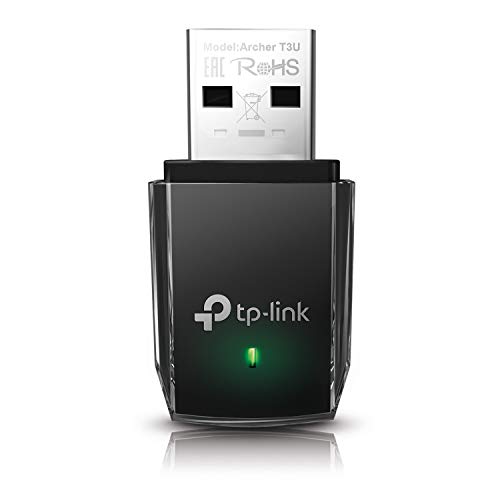
- Dual-band AC1300 wireless performance
- USB 3.0 with MU-MIMO and beamforming
- Supports Windows 11 through XP and macOS X 10.9-10.14
Best For: Balanced everyday Wi-Fi upgrades for compatible PCs
Best Wi-Fi 6 Value

- Wi-Fi 6 AX1800 dual-band rating
- High-gain antenna and USB 3.0 interface
- Windows 10/11 only; includes WPA3 support
Best For: Windows 10/11 users with Wi-Fi 6 routers
Best Nano Design

- Tiny plug-and-leave design
- Dual-band 2.4GHz and 5GHz support
- Two-year warranty and broad older-system support
Best For: Compact travel setups and basic dual-band connectivity
Best Value Wi-Fi 5
1300Mbps Dual-Band USB Adapter

- Up to 1300Mbps dual-band performance
- Two 5dBi external antennas
- Windows 10/11 plug-and-play setup
Best For: Upgrading older Windows desktops and laptops
Best Compact Wi-Fi 6 Pick

- Wi-Fi 6 dual-band connectivity
- Built-in Windows 10/11 drivers
- Compact USB 3.0 design
Best For: Windows 10/11 systems paired with Wi-Fi 6 routers
Best Performance Option
TP-Link Archer TX20U Plus AX1800

- AX1800 Wi-Fi 6 dual-band speeds
- Adjustable antennas with 1-meter cable
- MU-MIMO, OFDMA, and WPA3 support
Best For: Windows users who prioritize range and placement flexibility
Long-Range Value – TP-Link AC600 USB WiFi Adapter
For shoppers comparing wifi adapters under 50, the TP-Link Archer T2U Plus is a practical dual-band option for desktops and laptops. It supports up to 200 Mbps on 2.4 GHz and 433 Mbps on 5 GHz, and its adjustable 5 dBi high-gain antenna can help improve reception when positioned toward the router.
Best For: Windows users who want an affordable dual-band adapter with an adjustable high-gain antenna.
Pros:
- Dual-band 2.4 GHz and 5 GHz connectivity
- Adjustable 5 dBi antenna for improved signal reception
- Supports Windows 11, 10, 8.1, 8, 7, and XP
- Two-year manufacturer warranty
Cons:
- Windows-only support is listed in the product notes, despite MacOS appearing in the specifications
- Lower rated speeds than the AC1300 models in this roundup
The Archer T2U Plus emphasizes range and straightforward setup over maximum throughput. It is a sensible pick for basic browsing, streaming, and everyday connectivity, especially when antenna positioning matters.
Compact AC1300 Pick – Cudy WU1300S Wi-Fi 5 USB Adapter
The Cudy WU1300S is a strong contender among wifi adapters under 50 if you want AC1300 performance in a compact USB 3.0 design. It combines dual-band connectivity, MU-MIMO, and WPA3 support, while offering compatibility with Windows, macOS, and Linux.
Best For: Users seeking a small, cross-platform adapter for gaming, streaming, downloads, and everyday productivity.
Pros:
- AC1300-class dual-band performance with up to 867+400 Mbps combined speeds
- USB 3.0 interface with USB 2.0 backward compatibility
- Supports Windows 7/10/11, macOS, and Linux
- Includes WPA3 and MU-MIMO features
Cons:
- Windows 8 and 8.1 support is not specifically listed
- The compact design does not include a high-gain external antenna
With broad operating-system support and a small footprint, the WU1300S is one of the more flexible choices here. Its USB 3.0 connection and AC1300 rating make it appealing when you want more bandwidth without bulky hardware.
High-Gain AC1300 – Nineplus 1300Mbps USB WiFi Adapter
For wifi adapters under 50 aimed at longer-distance connections, the Nineplus N12 combines AC1300 dual-band speeds with two 5 dBi antennas. Its USB 3.0 interface is designed for higher data throughput, and Windows 10 and 11 systems are described as supporting automatic driver detection.
Best For: Windows desktop or laptop users who need external antennas for stronger signal capture over distance.
Pros:
- AC1300 speeds of up to 867 Mbps on 5 GHz and 400 Mbps on 2.4 GHz
- Two 5 dBi high-gain antennas for reception and transmission
- USB 3.0 supports higher-speed data transfer and USB 2.0 compatibility
- Two-year support and online setup assistance are included
Cons:
- Does not support macOS, Chromebook, or Linux
- Windows 7 requires manual driver installation
- External antennas make it less compact than a basic USB dongle
The N12 is built around signal strength and coverage rather than portability. It is a reasonable match for Windows users dealing with a weak connection, provided the operating-system limitations fit your setup.
Wi-Fi 6 Budget Option – Tenda AX900 USB WiFi Adapter
The Tenda U11 brings Wi-Fi 6 connectivity to the wifi adapters under 50 category, with rated speeds up to 600 Mbps on 5 GHz and 286 Mbps on 2.4 GHz. Its built-in drivers are intended to simplify installation on supported Windows systems, though a Wi-Fi 6 router is required to reach the combined AX900 rating.
Best For: Windows 7, 10, or 11 users upgrading to a compact Wi-Fi 6 adapter with built-in setup files.
Pros:
- Wi-Fi 6 dual-band connectivity with AX900 rated speeds
- Supports up to 600 Mbps on 5 GHz and 286 Mbps on 2.4 GHz
- Built-in drivers enable one-click installation on supported Windows systems
- Can receive Wi-Fi and share an internet connection with other devices
Cons:
- Not compatible with macOS, Linux, Windows 8/8.1, or Windows XP
- Requires a Wi-Fi 6 router to reach the combined AX900 speed rating
- Recommended placement is within 30 feet of the router
The U11 is a straightforward upgrade for compatible Windows computers, particularly if you already use a Wi-Fi 6 router. Its compact design and pre-loaded drivers are convenient, but the narrow operating-system support should be checked before purchase.
Best Balanced Upgrade – TP-Link Archer T3U AC1300
For shoppers comparing wifi adapters under 50, the TP-Link Archer T3U is a practical middle-ground option. It combines dual-band AC1300 performance, USB 3.0, MU-MIMO, and a compact design for compatible Windows and older macOS computers.
Best For: Desktop or laptop users who want a balanced dual-band adapter for everyday browsing, streaming, and general wireless performance.
Pros:
- Supports up to 1300 Mbps across 2.4GHz and 5GHz bands.
- USB 3.0 interface is designed for faster data transfer than USB 2.0.
- MU-MIMO and beamforming support can help provide a more consistent connection.
- Supports Windows 11 through XP and macOS X 10.9-10.14.
Cons:
- Listed macOS support ends at macOS X 10.14.
- Performance depends on the router, network, and surrounding wireless conditions.
The Archer T3U stands out when you want more speed than a basic nano adapter without moving to a larger external antenna design. Its broad listed operating-system support and two-year warranty add useful flexibility.
Best Wi-Fi 6 Value – Nineplus AX1800 USB Adapter
If you are shopping for wifi adapters under 50 and specifically want Wi-Fi 6, the Nineplus AX1800 offers the highest stated wireless rating in this group. It uses USB 3.0, dual-band connectivity, a high-gain antenna, and WPA3 support, but compatibility is limited to Windows 10 and 11.
Best For: Windows 10 or 11 desktop and laptop users with a Wi-Fi 6 network who prioritize newer wireless standards and higher stated speeds.
Pros:
- Wi-Fi 6 AX1800 rating with up to 1201 Mbps on 5GHz and 574 Mbps on 2.4GHz.
- High-gain antenna is intended to improve reception and transmission strength.
- USB 3.0 supports the adapter’s faster wireless connection.
- Supports WPA3 as well as WPA2, WPA, and WEP security.
Cons:
- Supports only Windows 11 and Windows 10 according to the supplied notes.
- Not compatible with Windows 7 or Mac systems.
- The claimed speeds require suitable network equipment and conditions.
This is the strongest fit for a newer Windows system and Wi-Fi 6 router. Before buying, confirm that your computer runs Windows 10 or 11, since this adapter does not offer the broader platform support of the TP-Link alternatives.
Best Nano Design – TP-Link Archer T2U Nano AC600
Among wifi adapters under 50, the TP-Link Archer T2U Nano is a simple choice for users who want a tiny adapter that can stay plugged in. Its dual-band AC600 design is less performance-focused than the other options here, but its miniature footprint is convenient for travel and compact setups.
Best For: Users who want a discreet, low-profile adapter for basic dual-band wireless access on compatible Windows or older macOS systems.
Pros:
- Compact nano design can remain plugged into a desktop or laptop.
- Supports both 2.4GHz and 5GHz wireless bands.
- Broad listed support for Windows 11 through XP and macOS X 10.9-10.14.
- Includes a two-year manufacturer warranty and free 24/7 technical support.
Cons:
- Uses USB 2.0 rather than USB 3.0.
- AC600 offers lower stated throughput than the other adapters in this roundup.
- Driver installation may be required.
The Archer T2U Nano makes the most sense when size and convenience matter more than maximum throughput. It is an especially tidy option for travel or systems where a larger adapter would obstruct nearby ports.
Best Value Wi-Fi 5 – 1300Mbps Dual-Band USB Adapter
If you need one of the more versatile wifi adapters under 50 for an older desktop or laptop, this USB 3.0 model offers dual-band connectivity, external antennas, and broad Windows support. Its advertised speeds reach up to 867Mbps on 5GHz and 400Mbps on 2.4GHz, depending on your network setup.
Best For: Windows users upgrading an older computer or improving reception in rooms with weaker Wi-Fi signals.
Pros:
- Dual-band 2.4GHz and 5GHz support with advertised speeds up to 1300Mbps combined.
- Two high-gain 5dBi antennas can help improve signal reception and coverage.
- USB 3.0 interface, WPA3 security, and support for Windows 11, 10, 7, and Linux.
- Plug-and-play installation on Windows 10 and 11, plus a two-year replacement service.
Cons:
- Driver-free setup is specifically stated for Windows 10 and 11; other systems may require drivers.
- The advertised 1300Mbps rate depends on compatible networking equipment and conditions.
This is a practical pick when antenna placement and compatibility matter more than choosing the newest Wi-Fi generation. It is especially appealing for Windows 10 or 11 desktops that need a straightforward wireless upgrade.
Best Compact Wi-Fi 6 Pick – UGREEN AX900 USB Adapter
Among wifi adapters under 50, the UGREEN AX900 is a compact option for Windows 10 and 11 computers that use a Wi-Fi 6 router. It supports dual-band connections with advertised rates up to 600Mbps on 5GHz and 287Mbps on 2.4GHz, while built-in drivers simplify installation.
Best For: Windows 10 or 11 desktop and laptop users who want a small Wi-Fi 6 adapter with no CD-based driver installation.
Pros:
- Wi-Fi 6 dual-band support with up to 600Mbps on 5GHz and 287Mbps on 2.4GHz.
- Built-in drivers enable CD-free installation on compatible Windows 10 and 11 systems.
- USB 3.0 interface and support for both receiving and transmitting Wi-Fi.
- Supports WPA-PSK, WPA2-PSK, and mixed WPA/WPA2 encryption modes.
Cons:
- Compatible only with Windows 10 and 11 using X86/X64 CPU architectures.
- It does not support macOS, Linux, Windows 7, or Windows 8/8.1.
- UGREEN recommends keeping the adapter within 30 feet of the router.
The UGREEN adapter makes the most sense for a relatively recent Windows computer and a Wi-Fi 6 router. Check your operating system before buying, since its narrower compatibility is the main trade-off for its simple setup and compact design.
Best Performance Option – TP-Link Archer TX20U Plus AX1800
If you are comparing wifi adapters under 50 for gaming, streaming, or downloads, the TP-Link Archer TX20U Plus stands out with AX1800-class Wi-Fi 6 performance. It includes adjustable high-gain antennas, a one-meter USB 3.0 cable, and support for both MU-MIMO and OFDMA.
Best For: Windows 10 and 11 desktop or laptop users seeking stronger placement flexibility and higher potential Wi-Fi 6 throughput.
Pros:
- AX1800 dual-band speeds rated up to 1201Mbps on 5GHz and 574Mbps on 2.4GHz.
- Adjustable high-gain antennas and a one-meter USB 3.0 cable allow flexible positioning.
- MU-MIMO and OFDMA can help reduce congestion and improve throughput on compatible networks.
- Supports WPA3 security and includes a two-year manufacturer warranty.
Cons:
- Compatible only with Windows 10 and 11; it does not support Linux or Mac.
- Actual speeds cannot exceed the connected router’s capabilities.
- Best performance requires a Wi-Fi 6 or newer router.
The Archer TX20U Plus is a strong choice when reception, placement, and Wi-Fi 6 features are priorities. Its cable and adjustable antennas make it easier to position than a basic dongle, but confirm your operating system and router support first.
How We Picked the Best Wifi Adapters Under 50
We focused on USB adapters that offer a practical upgrade for desktops and laptops at an affordable price. The selection includes WiFi 5 and WiFi 6 models, compact nano adapters, high-gain external antennas, and dual-band designs supporting both 2.4GHz and 5GHz networks.
We also considered advertised wireless throughput, USB 2.0 versus USB 3.0 connectivity, WPA3 support where listed, MU-MIMO features, operating-system compatibility, and whether an adapter’s physical design suits a stationary desktop or a portable laptop.
Remember that advertised speeds are theoretical link rates, not guaranteed internet speeds. Real-world performance depends on your router, signal strength, network congestion, USB port, drivers, and internet plan.
Quick Comparison
| Feature | What to look for | Best suited to |
|---|---|---|
| WiFi 5 AC600 | Basic dual-band connectivity | Older desktops and everyday browsing |
| WiFi 5 AC1300 | Higher advertised throughput and dual-band support | Streaming, gaming, and general home use |
| WiFi 6 AX900 | Modern efficiency at a lower cost | WiFi 6 routers and busy networks |
| WiFi 6 AX1800 | Higher capacity and USB 3.0 designs | Fast broadband, downloads, and demanding use |
| External antennas | Improved positioning and potentially stronger reception | Desktops far from the router |
| Nano design | Small, low-profile installation | Laptops and unobtrusive setups |
Key Buying Factors for Wifi Adapters Under 50
Wireless Standard and Speed
Choose WiFi 6 if your router supports it and you want better efficiency on crowded networks. WiFi 5 remains sufficient for many internet plans and is often the better value for basic browsing, streaming, and office work.
Dual-Band Support
Dual-band adapters can use 2.4GHz for longer range or 5GHz for faster, less congested connections nearby. Single-band options are generally less flexible and harder to recommend unless cost is the only priority.
Antennas and Placement
External antennas can help a desktop receive a more consistent signal, particularly when the computer is under a desk or several rooms away. Nano adapters are tidier but may sacrifice positioning flexibility.
USB Connection and Compatibility
USB 3.0 is preferable for higher-speed WiFi 5 and WiFi 6 adapters because it offers more bandwidth than USB 2.0. Before buying, confirm support for your operating system and check whether driver installation requires temporary internet access or an included disc.
Who Should Buy Which Wifi Adapters Under 50?
Choose an AC600 adapter for basic connectivity, older PCs, and modest broadband plans. AC1300 models are a balanced choice for streaming, video calls, gaming, and everyday household use. Select an AX900 adapter when you want affordable WiFi 6 efficiency without needing the highest rated speeds.
For fast broadband, frequent large downloads, or a WiFi 6 router, an AX1800 USB 3.0 model offers more headroom. If signal strength is the main concern, prioritize a model with adjustable external antennas. If portability and appearance matter most, a nano adapter is easier to leave installed in a laptop or compact desktop.