
The best memory card readers make it easy to move photos, videos, and other files between cameras, cards, phones, tablets, and computers. The right model depends on your card formats, device ports, transfer-speed needs, and whether you want a compact adapter or a multi-card hub.
We’ve selected 10 memory card readers covering SD, microSD, CompactFlash, Memory Stick, USB-A, and USB-C connections. Use the guide below to narrow the choices by compatibility, convenience, and intended workflow.
Best 10 Memory Card Readers Picks for 2026
Versatile Four-Slot Pick
SmartQ C368 USB 3.0 Card Reader

- Four slots support SD, microSD, MS, and CF cards
- USB 3.0 speeds up to 5Gbps
- Plug-and-play across Windows, Mac, and Linux
Best For: Travelers and users with multiple card formats
Most Flexible Connectivity
- USB-C and detachable USB-A connections
- SD, microSD, and MS card support
- Dual USB-A ports add accessory connectivity
Best For: Cross-device photo and file transfers
Compact Dual-Card Choice

- Reads SD and microSD cards simultaneously
- USB-C and USB-A interfaces
- USB 3.0 speeds up to 5Gbps
Best For: Photographers using SD and microSD cards
Durable Everyday Option

- Simultaneous SD and microSD access
- USB 3.0 speeds up to 5Gbps
- Protective covers and attached cable
Best For: Portable Android, laptop, and tablet workflows
Versatile Workstation Pick
UGREEN 4-Slot USB 3.0 Card Reader
- Supports SD, microSD, CF, and MS formats
- Reads and writes four cards simultaneously
- USB 3.0 speeds up to 5Gbps
Best For: Photographers and users managing multiple card formats
Best Compact USB-C Option
Anker PowerExpand Dual-Slot Reader

- Includes SD and microSD slots
- Compact USB-C design for mobile use
- Transfers data at up to 5Gbps
Best For: USB-C laptops, phones, and tablets using SD or microSD cards
Maximum Format Coverage
Rocketek 7-in-1 USB Card Reader

- Supports seven card interfaces
- Includes USB-C and USB-A connections
- Reads and writes five cards simultaneously
Best For: Mixed-media workflows using modern and legacy cards
Best USB-C/A Dual-Slot Pick
Acer USB-C Dual-Slot Card Reader

- 5Gbps USB 3.0 transfers
- USB-C and USB-A connectors
- Simultaneous SD and microSD support
Best For: Creators using multiple devices and card formats
Best Budget USB-A Option
Wansurs 2-in-1 USB 3.0 Card Reader

- 5Gbps USB 3.0 transfer rate
- SD and microSD slots
- 2-year warranty
Best For: Affordable transfers on USB-equipped computers
Best Travel-Friendly Performance
UANTIN USB-A/C Dual-Slot Reader

- USB-A and USB-C connectivity
- Simultaneous card-to-card transfers
- Compact keychain design
Best For: On-the-go creators backing up SD and microSD media
Versatile Four-Slot Pick – SmartQ C368 USB 3.0 Card Reader
The SmartQ C368 is a practical memory card reader for users who need broad card-format support in a compact, plug-and-play design. Its four slots cover SD, microSD, Memory Stick, and CompactFlash cards, while USB 3.0 connectivity supports transfer speeds up to 5Gbps.
Best For: Travelers, photographers, and households using several card formats with Windows, Mac, or Linux computers.
Pros:
- Four-in-one support for SD, microSD, MS, and CF cards
- USB 3.0 transfer speeds up to 5Gbps
- Reads cards independently and requires no driver installation
- Blue LED clearly shows operating status
Cons:
- Uses a USB Type-A connection rather than native USB-C
- Memory cards are not included
The C368 is a strong choice when format flexibility matters more than the smallest possible footprint. Its included cable organizer and plug-and-play setup also make it convenient for mobile use.
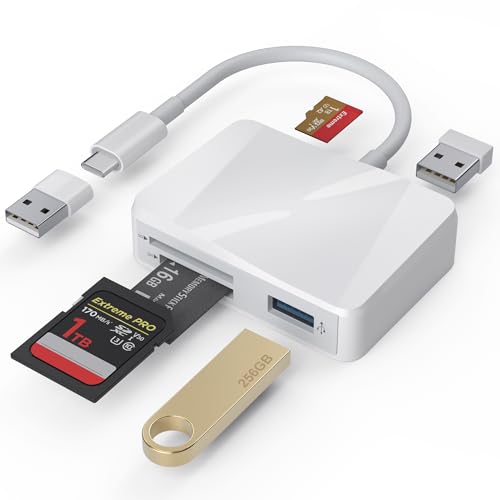
Most Flexible Connectivity – 5-in-1 USB-C Card Adapter
This 5-in-1 memory card reader is designed for mixed-device setups, combining USB-C and USB-A connectivity with SD, microSD, MS, and dual USB-A ports. It is a useful option for moving photos, videos, and files between newer phones, tablets, Macs, and older computers.
Best For: Photographers and users who transfer files among USB-C and USB-A devices.
Pros:
- USB-C connection includes a detachable USB-A adapter
- Supports SD, microSD, and MS cards
- Dual USB-A ports can be used alongside a card
- No drivers or external power are required
Cons:
- Listed transfer rate is up to 480MBps
- The multi-port design may be more than casual users need
- Memory cards are not included
Its standout advantage is versatility: one adapter can serve USB-C phones and laptops as well as USB-A computers and accessories. Consider it when broad compatibility and expansion are priorities.
Compact Dual-Card Choice – UGREEN USB-C SD Card Reader
The UGREEN USB-C memory card reader is a streamlined option for photographers and content creators who regularly use both full-size SD and microSD cards. USB 3.0 supports speeds up to 5Gbps, and the reader includes both USB-C and USB-A interfaces for flexible device compatibility.
Best For: Photographers, videographers, and mobile users who need simultaneous SD and microSD access.
Pros:
- Reads SD and microSD cards simultaneously
- USB-C and USB-A interfaces are built into one compact reader
- USB 3.0 supports speeds up to 5Gbps
- Plug-and-play operation requires no driver or extra power
Cons:
- Limited to SD and microSD formats
- Does not provide additional USB accessory ports
The dual-card design helps reduce repeated plugging and unplugging, making it especially convenient for camera workflows. Its slim build and 24-month warranty service add to its travel-friendly appeal.
Durable Everyday Option – uni USB-C SD Card Reader
The uni USB-C memory card reader offers dual-slot access for SD and microSD cards, with USB 3.0 transfer speeds up to 5Gbps. Its protective covers, attached cable, and no-driver setup make it a convenient choice for managing camera, GoPro, dash-cam, and surveillance footage.
Best For: Android, laptop, and tablet users who want a portable reader with protected slots and simultaneous card access.
Pros:
- Reads and writes SD and microSD cards at the same time
- USB 3.0 and USB-C support speeds up to 5Gbps
- Protective covers help keep out dust and liquid
- Attached cable and compact profile suit travel use
Cons:
- Not compatible with Lightning devices
- Does not support CF Express, SIM, XQD, MS, or Memory Stick cards
- Does not connect directly to a camera
This reader is a sensible everyday tool for standard SD and microSD workflows, particularly when durability and simultaneous access matter. Check your device port and card format before buying.
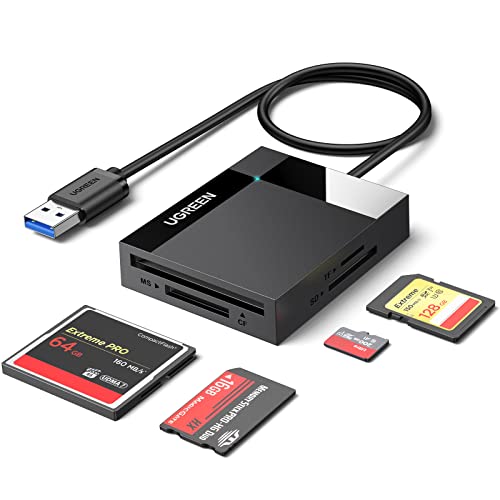
Versatile Workstation Pick – UGREEN 4-Slot USB 3.0 Card Reader
For photographers and anyone handling several card formats, this memory card reader combines four card slots with USB 3.0 connectivity. It supports SD, microSD, CompactFlash, and Memory Stick cards, while allowing four different cards to be read or written at the same time.
Best For: Photographers, mobile workers, and users who regularly transfer files from multiple card types.
Pros:
- Supports SD, microSD, CF, and MS card formats.
- Can read and write four cards simultaneously.
- USB 3.0 offers transfer speeds up to 5Gbps.
- Works with Windows, macOS, Linux, and ChromeOS.
Cons:
- Uses a USB connection with a 1.7-foot cable rather than a compact built-in plug.
- Its four-slot design is larger than a basic single-card reader.
The UGREEN is a strong choice when broad format support and simultaneous card access matter more than having the smallest possible reader. Its compact housing and included cable also make it practical for travel or desk use.
Best Compact USB-C Option – Anker PowerExpand Dual-Slot Reader
If you need a portable memory card reader for a USB-C laptop, tablet, or phone, the Anker PowerExpand keeps things simple with standard SD and microSD slots. Its small design is easy to carry, and the USB-C connection supports transfers up to 5Gbps.
Best For: USB-C device owners who mainly use SD and microSD cards on the go.
Pros:
- Provides both standard SD and microSD slots.
- Ultra-compact 1.65-by-0.67-by-0.37-inch design.
- Compatible with a wide range of USB-C devices.
- Includes an 18-month warranty.
Cons:
- Does not include CF, MS, or other larger card formats.
- Some devices may require removing the case before connection.
The Anker is a convenient pick for everyday SD and microSD transfers, especially when portability is a priority. Its two-slot layout is focused rather than expansive, making it less suitable for users who need professional or legacy card support.
Maximum Format Coverage – Rocketek 7-in-1 USB Card Reader
For broad compatibility across newer and older media, this Rocketek memory card reader offers seven card interfaces and both USB-C and USB-A connectors. It supports formats including CF, SD, microSD, XD, and MS, with simultaneous reading and writing for up to five cards.
Best For: Users working across cameras, legacy media, USB-C devices, and computers with USB-A ports.
Pros:
- Seven-in-one design covers CF, SD, microSD, XD, and MS cards.
- Dual USB-C and USB 3.0 connectors improve device flexibility.
- Can read and write five cards simultaneously.
- Supports Windows, macOS, Linux, ChromeOS, and Android.
Cons:
- Its many slots may be unnecessary for users with only SD or microSD cards.
- Reported 5Gbps performance depends on the connected port and card.
The Rocketek stands out for users who want one reader for a wide range of media and connection types. Its plug-and-play design and simultaneous multi-card support make it particularly useful for mixed-device workflows.
Best USB-C/A Dual-Slot Pick – Acer USB-C Dual-Slot Card Reader
For shoppers comparing memory card readers, this Acer model stands out as a flexible option for devices with either USB-C or USB-A ports. Its dual slots, 5Gbps USB 3.0 transfer rate, and compact covered design suit everyday photo and video transfers.
Best For: Photographers, video editors, and travelers who use both SD and microSD cards across newer and older devices.
Pros:
- USB-C and USB-A connectors support a broad range of computers, tablets, and phones.
- Supports simultaneous reading and writing of SD and microSD cards.
- Compact aluminum construction with protective port covers and an attached cord.
- Plug-and-play operation works with Windows, macOS, Android, Chrome OS, and Linux.
Cons:
- Thick device cases may interfere with full connector insertion.
- Does not support CFexpress, SIM, XQD, MS, or Memory Stick cards.
- Cards are not included, and Lightning devices are unsupported.
The Acer is a well-rounded memory card reader for mixed-device households and mobile creators. Its dual connector design reduces the need for separate adapters, while the two-slot workflow is useful when managing SD and microSD media.
Best Budget USB-A Option – Wansurs 2-in-1 USB 3.0 Card Reader
This Wansurs model is a straightforward choice among memory card readers for computers and other devices with a standard USB port. It combines SD and microSD slots with USB 3.0 transfer speeds in a lightweight, compact body.
Best For: Budget-conscious users transferring photos, videos, and files to USB-equipped laptops, desktops, TVs, or projectors.
Pros:
- USB 3.0 supports transfer speeds up to 5Gbps.
- Dual SD and microSD slots accommodate several listed card formats.
- Plug-and-play design requires no driver installation.
- Includes a 2-year warranty and 24/7 customer support according to the supplied notes.
Cons:
- SD and microSD cards cannot be used simultaneously.
- Uses a USB connection rather than offering USB-C and USB-A connectors.
- Compatibility and actual speeds depend on the host device and card.
The Wansurs reader keeps the feature set simple and affordable. It is a practical desktop or laptop accessory when you need quick access to common SD and microSD cards but do not need simultaneous card operation.
Best Travel-Friendly Performance – UANTIN USB-A/C Dual-Slot Reader
For mobile creators comparing memory card readers, this UANTIN adapter emphasizes stable high-speed transfers and portability. It offers USB-A and USB-C connectivity, dual-card read/write support, and a keychain design for keeping the reader close at hand.
Best For: Photographers and videographers who back up SD and microSD media while traveling or working across USB-C and USB-A devices.
Pros:
- Advertised 5Gbps transfer performance with a heat-dissipation layout for extended transfers.
- Supports simultaneous SD and microSD reading and writing, including card-to-card transfers.
- USB-A and USB-C connectors work with newer phones, tablets, laptops, and older PCs.
- Integrated keychain, safety chip, and reinforced connectors support portable use.
Cons:
- Actual speed depends on the device port, card rating, and connection.
- The reader may become slightly warm during prolonged high-speed transfers.
- Memory cards are not included.
The UANTIN is the most travel-oriented option in this group. Its keychain form and simultaneous card-to-card workflow make it especially useful for field backups, while the dual connector design keeps it compatible with a wider range of equipment.
How We Picked These Memory Card Readers
We focused on readers that cover common photography, video, mobile, and everyday storage needs. The selection includes compact single-purpose adapters, dual-interface models, and multi-slot hubs with support for formats such as SD, microSD, CF, MS, MMC, and xD. We also considered USB 3.0 or faster connections, simultaneous card access, plug-and-play operation, and compatibility with modern USB-C devices as well as older USB-A computers.
Because advertised performance depends on the card, host device, file size, and connection, the listed speed ratings should be treated as maximum interface capabilities rather than guaranteed transfer rates.
Quick Comparison
| Best For | Look For |
|---|---|
| Everyday SD and microSD transfers | Compact USB 3.0 or USB-C reader |
| Phones and tablets | USB-C connector and broad device compatibility |
| Older cameras and legacy cards | CF, MS, MMC, or xD support |
| Multiple cards at once | Multi-slot hub with simultaneous-read support |
| Mixed computers and accessories | USB-A and USB-C connections or included adapters |
Key Buying Factors for Memory Card Readers
Card-Format Compatibility
Confirm that the reader supports the exact cards you use. SD and microSD are common, but older cameras may require CompactFlash, Memory Stick, MMC, or xD support. A slot labeled SD may not accept every related format or card capacity.
Connector and Device Support
USB-C is standard on many newer phones, tablets, and laptops, while USB-A remains common on desktops and older computers. A dual-connector model offers more flexibility, but check whether your phone or tablet supports external storage and whether the operating system can browse the card.
Speed and Workflow
USB 3.0 and 5Gbps-rated readers can reduce waiting when transferring large photo or video files, but the card’s own speed rating is often the limiting factor. For occasional documents, a basic reader is sufficient; frequent RAW or 4K-video transfers justify a faster model.
Slot Layout and Construction
Choose a compact adapter for travel or a hub when you regularly handle several card types. Check whether multiple cards can be read simultaneously, and consider cable length, port access, protective caps, and strain relief if the reader will be used on location.
Who Should Buy Which Memory Card Readers?
Choose a small SD or microSD reader if you mainly transfer files from one camera, drone, or action camera. Pick a USB-C model for newer phones, tablets, and laptops, especially when portability matters. A dual USB-A/USB-C reader is the safest general-purpose choice for mixed devices.
Photographers and editors working with legacy equipment should choose a multi-format hub with the required CF, MS, MMC, or xD slot. If you frequently copy from several cards, prioritize a multi-slot reader that explicitly supports simultaneous access. For occasional transfers, prioritize low cost and simple plug-and-play operation over extra slots or maximum interface speed.