
The best capture cards for PC make it easier to stream console gameplay, record high-quality footage, and add a second video source to your setup. The right model depends on your target resolution, refresh rate, connection type, and whether you need passthrough for lag-free play.
We selected 10 capture cards covering premium HDMI 2.1 hardware, internal PCIe cards, portable USB models, and affordable 1080p options. Use the guide below to match performance and features to your streaming or recording workflow.
Best 10 Capture Cards for PC Picks for 2026
Premium External Capture

- 4K144 capture with HDMI 2.1
- VRR passthrough and ultra-low latency
- Works with PC, Mac and major consoles
Best For: High-refresh-rate gaming and advanced streaming setups
Internal 8K Passthrough

- 8K60 passthrough with 4K60 capture
- HDMI 2.1, HDR10 and VRR support
- Compatible with dual-PC setups
Best For: Windows desktop streaming workstations
Versatile Budget Capture
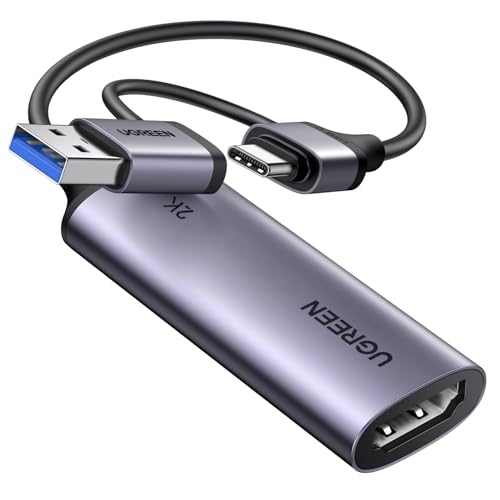
- 4K input with 2K30 and 1080p60 support
- USB-A and USB-C connectivity
- Compatible with PC, Mac, Linux and iPadOS
Best For: Everyday multi-device streaming and recording
Console-Focused 4K Capture

- 4K60 capture with HDR10 support
- 1440p120 and 1080p240 passthrough
- 3.5mm input for chat or commentary
Best For: Console creators recording PS5, Xbox or Switch 2
Best Budget USB Capture Card

- 1080p60 or 2K30 capture
- USB-A and USB-C connectivity
- Plug-and-play design for streaming
Best For: Casual streamers and portable recording setups
Best Internal 4K Capture Card

- 4K60 HDR10 capture
- Zero-lag pass-through
- Up to 240fps high-frame-rate capture
Best For: Desktop streamers and 4K HDR console recording
Best USB Capture Card With Mic Input
1080p60 HDMI Capture With 4K Pass-Through

- 4K60 HDMI loop-out
- 1080p60 or 2K30 capture
- 3.5mm mic input for commentary
Best For: Streamers adding voice commentary to console gameplay
Premium PCIe Performance
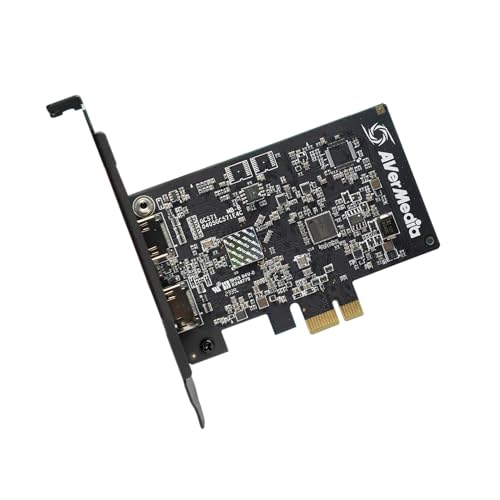
- 4K30 capture with 4K60 pass-through
- VRR and 1080p120FPS support
- Drive-free PCIe installation
Best For: Dedicated Windows gaming and streaming PCs
Flexible USB Value

- 1080p60 capture over USB 3.0
- 4K60 HDMI loop-out
- Mic input and broad compatibility
Best For: Multi-device streaming on a budget
Creator-Friendly USB Setup

- 1080p60 capture via USB 3.0
- 4K30 low-latency loop-out
- Headset, line-in, and RGB controls
Best For: Console streamers using Windows or Mac
Premium External Capture – Elgato 4K X
For gamers who want high-end capture cards for PC without sacrificing passthrough quality, the Elgato 4K X combines HDMI 2.1, 4K144 capture and ultra-low latency in a compact external design. It supports popular streaming apps and works with PC, Mac, PS5, Xbox Series X and Nintendo Switch.
Best For: High-refresh-rate console and PC gaming setups that need VRR passthrough and flexible streaming.
Pros:
- Captures up to 4K at 144 frames per second.
- HDMI 2.1 supports up to 1080p240 capture and VRR passthrough.
- Works with OBS, Streamlabs, Twitch Studio, Zoom and other applications.
- USB 3.2 Gen 2 provides ultra-low latency.
Cons:
- Requires a compatible USB 3.2 Gen 2 port for its highest capture performance.
- Its full feature set requires relatively capable Windows or macOS hardware.
The 4K X is a strong choice when smooth passthrough and high frame-rate capture matter more than minimizing cost or configuration requirements.
Internal 8K Passthrough – Elgato 4K Pro
The Elgato 4K Pro is an internal option for desktop users comparing capture cards for PC. Installed in a PCIe slot, it delivers 8K60 passthrough while capturing in 4K60, with HDMI 2.1, HDR10, VRR support and dual-PC compatibility.
Best For: Windows desktop streamers and dual-PC users who want an internal capture solution with high-resolution passthrough.
Pros:
- Supports 8K60 passthrough and 4K60 HDR10 capture.
- HDMI 2.1 connectivity supports up to 1080p240 recording.
- VRR support and ultra-low latency help preserve smooth gameplay.
- Designed for dual-PC setups.
Cons:
- Requires a Windows 10 PC with an available PCIe slot.
- Less suitable for laptops, Macs or users seeking a portable capture card.
Choose the 4K Pro if your desktop can accommodate an internal card and you want maximum passthrough resolution for a dedicated streaming workstation.
Versatile Budget Capture – UGREEN 2K HDMI Capture Card
The UGREEN 2K HDMI capture card is a practical choice for everyday capture cards for PC use, offering 4K input, 2K output at 30Hz and 1080p capture at 60FPS. Its USB-A and USB-C connectivity makes it suitable for laptops, desktops, tablets, phones and supported gaming devices.
Best For: Streamers who need broad device compatibility, plug-and-play setup and dependable 1080p60 capture.
Pros:
- Supports 4K input, 2K output at 30Hz and 1080p at 60FPS.
- Includes both USB-A and USB-C interfaces.
- Works with Windows, macOS, Linux and compatible iPadOS devices.
- Supports OBS Studio, XSplit, QuickTime Player, PotPlayer and VLC.
Cons:
- HDMI signal flow is input-only to USB output.
- 2K output is limited to 30Hz.
- Consoles may require HDCP to be disabled for use.
UGREEN makes the most sense for flexible, cross-platform streaming where 1080p60 is sufficient and USB-A or USB-C compatibility is especially useful.
Console-Focused 4K Capture – Elgato 4K S
The Elgato 4K S is a streamlined external choice among capture cards for PC, built for current consoles including PS5, Xbox Series X/S and Switch 2. It captures 4K60 video, supports 1440p120 or 1080p240 passthrough, and adds HDR10 and analog audio input for commentary or in-game chat.
Best For: Console players who want 4K60 recording, high-frame-rate passthrough and a dedicated analog audio connection.
Pros:
- Captures video at 4K60.
- Supports 1440p120 and 1080p240 passthrough.
- HDR10 support includes tone mapping on Windows.
- 3.5mm analog audio input can capture chat or commentary.
Cons:
- Requires Windows 11, macOS 13 or later, or a compatible iPadOS setup.
- Its listed USB connection is USB 3.0 Type-C, which may require the appropriate port or adapter.
With its console support, near-zero latency and analog audio input, the 4K S is a sensible fit for creators who want straightforward 4K recording without moving to an internal card.
Best Budget USB Capture Card – 1080p60 HDMI Capture Card
If you need capture cards for PC that are compact and easy to set up, this USB 3.0 model offers 1080p recording at 60fps and accepts HDMI input up to 4K30. It connects through USB-A or USB-C and is designed for recording, streaming, meetings, and online teaching rather than direct HDMI display output.
Best For: Casual streamers, gaming capture, video calls, and portable recording setups.
Pros:
- Captures up to 1080p at 60fps or 2K at 30fps.
- Supports USB-A and USB-C connections with no external power required.
- Works with Windows, macOS, Linux, Android, OBS Studio, Zoom, and common streaming platforms.
- Compact aluminum design helps with portability and heat dissipation.
Cons:
- Requires capture software and cannot directly cast to a monitor or TV.
- USB 3.0 is recommended for the best bandwidth and resolution.
- Audio setup in OBS may require restarting the software.
This is a practical low-cost option for PC users who want straightforward 1080p60 capture. Its broad compatibility and dual USB connectivity are useful, but users should pay attention to the one-way HDMI-to-USB design and software requirements.
Best Internal 4K Capture Card – AVerMedia Live Gamer 4K
For demanding capture cards for PC, the AVerMedia GC573 is an internal PCIe solution built for 4K60 HDR10 capture and zero-lag pass-through. It is aimed at Windows users recording or streaming high-quality console gameplay through software such as OBS, Streamlabs, or XSplit.
Best For: Serious PC-based streamers and gamers capturing 4K HDR console footage.
Pros:
- Captures 4K60 HDR10 video with zero-lag pass-through.
- Supports high-frame-rate capture up to 240fps.
- Compatible with PS5, Xbox Series X/S, and other listed consoles.
- Includes customizable RGB lighting and resolution/frame-rate settings through AVerMedia software.
Cons:
- Requires an available PCI Express x4 slot and a Windows 10 or 11 PC.
- 4K60 HDR capture requires relatively capable hardware, including a suitable CPU, GPU, and dual-channel RAM.
- Less suitable for laptops or users seeking a portable capture device.
The GC573 is the strongest choice here for high-end 4K HDR workflows, provided your desktop meets the requirements. Its internal installation and Windows-only compatibility make it less flexible than USB models, but the performance target is substantially higher.
Best USB Capture Card With Mic Input – 1080p60 HDMI Capture With 4K Pass-Through
This USB model is one of the more versatile capture cards for PC, combining 4K60 HDMI pass-through with 1080p60 or 2K30 capture. Its built-in 3.5mm mic input is useful for adding commentary while streaming games, interviews, or other HDMI sources through OBS and similar software.
Best For: Streamers who want 4K pass-through, 1080p60 capture, and direct microphone commentary.
Pros:
- Supports 4K60 HDMI input and loop-out while capturing up to 1080p60 or 2K30.
- Includes USB-A and USB-C connectivity through the supplied cable.
- Dedicated 3.5mm mic input supports voice commentary during streams.
- Compatible with major consoles, cameras, Windows, macOS, Linux, Android, and OBS Studio.
Cons:
- The mic input does not record party chat.
- OBS audio changes may require a software restart before sound appears.
- Although it accepts 4K input, its listed capture output is limited to 1080p60 or 2K30.
This is a well-rounded choice for creators who want smooth 4K pass-through without recording in 4K. The microphone input adds practical value for commentary, while the USB design keeps installation simpler than an internal PCIe card.
Premium PCIe Performance – AVerMedia GC571 Ultra HD
For PC builders who want high-end capture cards for PC, the AVerMedia GC571 combines 4K30 capture with 4K60 pass-through, VRR support, and 1080p120 gameplay support. Its internal PCIe design suits a dedicated Windows streaming setup.
Best For: PC gamers and streamers prioritizing high-resolution pass-through and high-frame-rate gameplay.
Pros:
- Captures up to 4K30 and supports 4K60 HDMI pass-through.
- VRR support helps provide tear-free, responsive gameplay.
- Supports 1080p120FPS capture for smoother footage.
- Fits PCIe x1, x4, x8, and x16 slots with drive-free setup.
Cons:
- Requires a compatible Windows 10 or Windows 11 PC with an available PCIe slot.
- Its internal-card format is less portable than USB capture devices.
The GC571 is the strongest choice here for a permanent PC streaming station. It offers the most advanced pass-through and frame-rate features, though it is best suited to users comfortable installing a PCIe card.
Flexible USB Value – VIXLW 4K HDMI Capture Card
This VIXLW model is a practical option among capture cards for PC, offering USB 3.0 connectivity, 1080p60 capture, 4K60 loop-out, and broad operating-system compatibility. It also adds a microphone input for commentary and interviews.
Best For: Budget-conscious streamers who need a versatile external capture card with audio input.
Pros:
- Captures up to 1080p60 and supports 4K60 HDMI loop-out.
- Plug-and-play design requires no drivers or external power supply.
- Includes a 3.5mm microphone input for external commentary.
- Works with Windows, macOS, Linux, Android, consoles, cameras, and common streaming software.
Cons:
- USB output is limited to up to 2K30 with YUY2, while capture is up to 1080p60.
- The listed warranty is only 60 days.
- The microphone input does not record party chat.
With its wide compatibility and useful loop-out and mic features, this is a flexible external choice. Verify your USB 3.0 connection and desired output resolution before buying.
Creator-Friendly USB Setup – Fifine AmpliGame V3
The Fifine AmpliGame V3 keeps capture cards for PC simple with 1080p60 capture, 4K30 HDMI loop-out, plug-and-play USB 3.0 operation, and support for Windows and Mac. Headset, line-in, and RGB controls make it especially appealing for desk-based creators.
Best For: Console streamers and creators wanting straightforward capture with integrated audio ports and RGB lighting.
Pros:
- Captures smooth 1080p60 video through USB 3.0.
- Provides 4K30 HDMI loop-out for low-latency gameplay.
- Includes HDMI output, line-in, and headset ports.
- Offers nine RGB lighting modes and works with OBS, YouTube, Discord, and Twitch.
Cons:
- Capture resolution is limited to 1080p rather than 4K.
- Requires USB 3.0 and HDMI input/output connections.
- The product notes recommend using the original USB cable and consulting troubleshooting guidance if no display appears.
The V3 is a well-rounded external option for creators who value easy setup and audio convenience over 4K recording. Its 4K loop-out preserves a sharper gaming display while the stream remains at 1080p60.
How We Picked the Best Capture Cards for PC
We compared these Capture Cards for PC based on capture resolution and frame rate, passthrough support, interface speed, latency, compatibility, and setup requirements. We also considered whether each model is better suited to console streaming, PC-to-PC recording, live production, or basic video capture. Features such as HDR support, HDMI 2.1 bandwidth, USB 3.0 connectivity, and onboard or software-based audio handling can make a significant difference in everyday use.
Quick Comparison
| Type | Best For | Typical Strength | Main Limitation |
|---|---|---|---|
| HDMI 2.1 external | PS5, Xbox Series X, high-refresh gaming | 4K capture or passthrough at high refresh rates | Higher price and demanding hardware requirements |
| Internal PCIe | Dedicated desktop streaming setups | Low latency and stable bandwidth | Requires an available compatible slot |
| USB 3.0 | Portable or simple single-PC setups | Easy installation and broad compatibility | Often limited to 1080p or 4K passthrough |
Key Buying Factors for Capture Cards for PC
Capture Resolution and Frame Rate
Capture resolution is the quality your computer records or streams, while passthrough is the signal sent to your display. A card may accept a 4K input but capture only 1080p. For smooth competitive gaming, look for 1080p at 60 frames per second or higher. Choose a 4K-capable model when you want detailed recordings or HDR workflows.
Passthrough, Refresh Rate, and Latency
Passthrough lets you play on a monitor or television without relying on the preview window. Check the supported refresh rate at your preferred resolution. HDMI 2.1 models are the better fit for 4K at 120Hz or higher, while older HDMI standards may restrict high-refresh signals. Ultra-low latency is particularly important for fast games.
USB or Internal PCIe Installation
USB capture cards are convenient for laptops, compact desktops, and flexible setups, but connect them directly to a fast USB 3.x port rather than a hub. Internal PCIe cards can provide consistent performance and a cleaner permanent installation, though they require a desktop with an open slot and adequate airflow.
Compatibility and Audio
Confirm support for your console, graphics card, operating system, and streaming software. HDMI-protected content typically cannot be captured, so these devices are intended for compatible game and camera sources. Check audio input options as well if you plan to combine game sound, commentary, or microphone feeds.
Who Should Buy Which Capture Cards for PC?
Choose an HDMI 2.1 external card if you play on a modern PS5, Xbox Series X, or other high-refresh source and want to preserve premium passthrough performance. An internal Elgato or AVerMedia card is a stronger choice for a dedicated desktop studio where reliability and low latency matter more than portability.
USB 3.0 models are the practical choice for beginners, laptop users, and creators who mainly stream or record at 1080p60. Budget cards can work well for straightforward gameplay capture, but verify their real capture limits rather than assuming that a “4K” label means 4K recording. For occasional use, prioritize simple setup and software compatibility; for frequent streaming, spend more on bandwidth, passthrough, and dependable drivers.