
A standing desk with built-in power outlets can simplify your workspace by keeping chargers, laptops, monitors, and accessories connected where you need them. The right model also makes it easier to alternate between sitting and standing without sacrificing desktop space.
We compared 10 options across desktop size, outlet and USB connectivity, frame design, storage, and workspace flexibility to help you choose a practical fit for your home office, gaming setup, or executive workstation.
Best 10 Standing Desks with Built in Power Outlets Picks for 2026
Best Value Power Desk
FLEXISPOT EN2 48-Inch Standing Desk
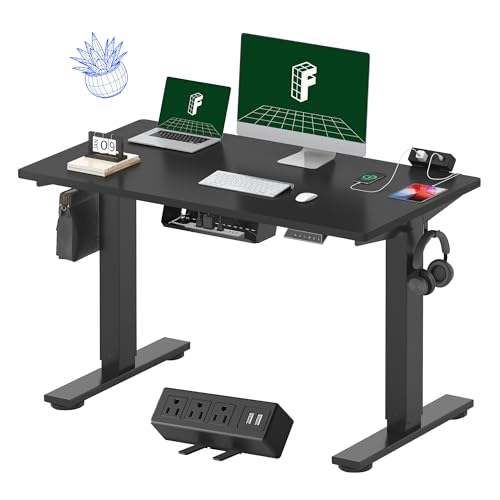
- Removable strip with 3 outlets and 2 USB ports
- Four programmable height presets
- Compact 48-by-24-inch FSC-certified desktop
Best For: Compact home offices and flexible outlet placement
Best Executive Setup
67-Inch L-Shaped Executive Standing Desk

- Dual brushless motors support up to 275 pounds
- Seven built-in charging ports
- L-shaped workspace with lockable storage
Best For: Large executive offices and multi-monitor workstations
Best for Gamers
Huuger 55-Inch Electric Standing Desk

- 4 AC outlets plus USB and Type-C charging
- Deep 55-by-27.6-inch work surface
- Quiet motor with anti-collision protection
Best For: Gaming setups and deep home-office workspaces
Best Stylish L-Shape
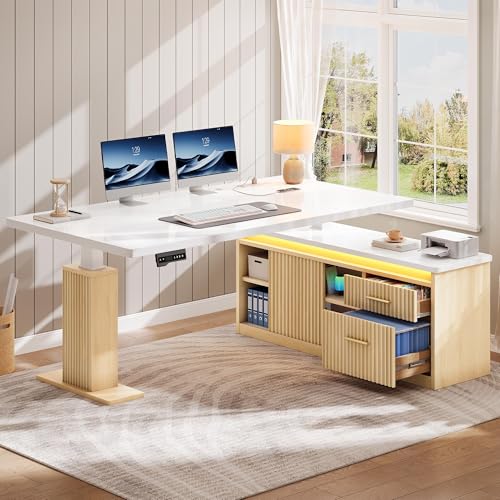
- 4 outlets, USB, and Type-C charging
- App-controlled RGB LED lighting
- Drawers, cabinet, and 330-pound capacity
Best For: Modern work or gaming spaces needing storage
Quiet Charging Hub
Huuger 47-Inch Electric Standing Desk

- Six-device charging station with AC, USB, and USB-C ports
- Three height presets with a 28.7- to 46.5-inch range
- Quiet motor, cable management, and 220-pound support
Best For: Compact home offices needing quiet, organized charging
Spacious Rustic Workstation
Huuger 55-Inch Electric Standing Desk

- 55.1-inch-wide surface provides room for larger setups
- Four AC, one USB, and one USB-C charging connections
- Quiet height adjustment with three presets and anti-collision protection
Best For: Larger home-office or gaming setups needing extra surface space
Compact White Workstation

- Four AC outlets plus USB and USB-C charging
- Three presets and a 28.7- to 46.5-inch height range
- 220-pound steel-frame capacity with quiet lifting
Best For: White home-office and dual-monitor setups
Rustic Brown Extended Desk

- Generous 62.9-inch-wide desktop
- Four AC outlets plus USB and USB-C ports
- Quiet height adjustment with three presets
Best For: Large gaming and multi-monitor workstations
Small-Space Black Desk

- Compact 39.3-inch-wide desktop
- Four AC outlets plus USB and USB-C ports
- Three presets with quiet, electric height adjustment
Best For: Small rooms and single-monitor workstations
Best Value Power Desk – FLEXISPOT EN2 48-Inch Standing Desk
If you want standing desks with built in power outlets without taking over your workspace, the FLEXISPOT EN2 offers a practical 48-by-24-inch setup. Its removable power strip clips to the back or side, while the programmable electric frame supports smooth sit-stand transitions.
Best For: Home offices, dorm rooms, and users who want a compact desk with flexible outlet placement.
Pros:
- Removable strip provides 3 AC outlets and 2 USB charging ports.
- Four programmable height presets and a 28.9- to 46.5-inch adjustment range.
- One-piece FSC-certified desktop, cable management, and a 154-pound frame capacity.
Cons:
- The 48-by-24-inch surface may feel limited for multiple large monitors.
- Assembly may require an electric drill, which is not included.
This is a well-rounded choice when accessible charging and a straightforward rectangular footprint matter more than expansive executive features. The removable strip also gives you some flexibility in arranging your cables and devices.
Best Executive Setup – 67-Inch L-Shaped Executive Standing Desk
For a large office workstation, this L-shaped model combines standing-desk adjustability with built-in charging and lockable storage. Its brushless dual-motor system, spacious work surface, and pre-assembled frame make it a substantial option among standing desks with built in power outlets.
Best For: Executive offices, multitasking setups, and users who need extensive workspace and enclosed storage.
Pros:
- Built-in power strip includes 3 AC outlets, 2 USB-A ports, and 2 USB-C ports.
- Brushless dual motors lift up to 275 pounds from 29.5 to 48.4 inches.
- L-shaped surface includes a CPU cabinet and lockable three-drawer file cabinet.
- Pre-assembled frame and snap-lock components can simplify setup.
Cons:
- Its 415-pound weight and large footprint require significant space.
- The executive configuration is less suitable for small rooms or minimalist setups.
This desk is built for users who need a command-center layout rather than a simple workstation. The charging array and lockable storage are especially useful for equipment-heavy office environments, while the four memory keys support quick position changes.
Best for Gamers – Huuger 55-Inch Electric Standing Desk
The Huuger pairs a deep 55-by-27.6-inch desktop with an integrated charging station, making it a practical pick for gaming and home-office setups. Its four AC outlets, USB ports, Type-C connection, hooks, and cable managers help keep frequently used gear within reach.
Best For: Gamers and home-office users who need a deep surface and multiple built-in charging connections.
Pros:
- Includes 4 AC outlets, 2 USB ports, and 1 Type-C port.
- Three programmable presets cover a 28.3- to 46.5-inch height range.
- 55-by-27.6-inch surface, dual hooks, and cable managers support organized setups.
- Quiet motor operates below 45 dB and includes anti-collision protection.
Cons:
- It offers three presets rather than four or more on some competing models.
- The engineered-wood desktop may not suit buyers seeking a solid-wood surface.
Choose this model when built-in charging and gaming-friendly organization are priorities. The deeper top gives monitors and peripherals more breathing room, while the T-shaped steel frame is rated to support up to 220 pounds.
Best Stylish L-Shape – YITAHOME LED Standing Desk
The YITAHOME L-shaped desk adds built-in charging, app-controlled RGB lighting, drawers, and a cabinet to a modern high-gloss design. It is a strong choice for shoppers seeking standing desks with built in power outlets that also function as a statement piece for work or gaming.
Best For: Style-conscious users who want an L-shaped workstation with storage, lighting, and integrated charging.
Pros:
- Includes 4 outlets, 1 USB port, and 1 Type-C port.
- Three saved height settings cover a 29.5- to 45.2-inch range.
- RGB LED strip supports app control, music sync, and timer modes.
- Two drawers, a storage cabinet, and a 330-pound support capacity add practicality.
Cons:
- The desk arrives in two packages that may not arrive together.
- Its 45.2-inch maximum height is lower than some models in this roundup.
- The high-gloss, L-shaped design may be more furniture than a compact office needs.
This model emphasizes visual design as much as ergonomics. Its integrated outlets and storage reduce the need for add-ons, while the LED system gives users more customization than a conventional office desk.
Quiet Charging Hub – Huuger 47-Inch Electric Standing Desk
If you want standing desks with built in power outlets for a compact home-office setup, the Huuger 47-inch model combines a six-device charging station with electric height adjustment. Its 28.7- to 46.5-inch range, three memory presets, cable manager, and quiet motor make it practical for everyday work or gaming.
Best For: Users who need a compact desk with multiple charging connections and quiet height adjustments.
Pros:
- Built-in charging station includes four AC outlets, one USB port, and one USB-C port.
- Three memory presets and a digital display simplify sit-to-stand transitions.
- Quiet motor operates under 35 dB, while the reinforced steel frame supports up to 220 pounds.
- Anti-collision protection and included cable management add everyday convenience.
Cons:
- The 47.2-inch-wide surface may feel limited for larger multi-monitor arrangements.
- The engineered-wood top may be less substantial than a solid-wood desktop.
This is a strong choice when quiet operation, integrated charging, and a manageable footprint matter more than maximum desktop space.
Gaming and Storage Pick – GTPLAYER 48-Inch Standing Desk
For shoppers comparing standing desks with built in power outlets, the GTPLAYER adds gaming-focused features to a height-adjustable workstation. It offers a built-in power strip, monitor shelf, drawer, shelves, headphone hook, and RGB lighting alongside electric adjustment from 28.3 to 48 inches.
Best For: Gamers and home-office users who want storage, monitor elevation, lighting, and integrated charging in one desk.
Pros:
- Built-in power strip provides two AC outlets and two USB charging ports.
- Monitor stand, utility drawer, shelf, and hooks provide useful storage and organization.
- Three memory presets support quick height changes, with a stated 220-pound capacity.
- RGB lighting offers 12 scene modes and five brightness levels.
Cons:
- The motor is rated under 55 dB, so it may be more noticeable than quieter alternatives.
- The added shelf, drawer, and lighting create a more gaming-oriented design that may not suit minimalist offices.
The GTPLAYER is the most feature-rich option here for gaming setups, particularly if built-in storage and RGB lighting are as important as sit-stand adjustment.
Spacious Rustic Workstation – Huuger 55-Inch Electric Standing Desk
The Huuger 55-inch model is a spacious option among standing desks with built in power outlets, pairing a rustic-brown engineered-wood top with a six-device charging station. Electric adjustment, three memory presets, cable management, and a quiet under-35-dB motor support flexible home-office or gaming use.
Best For: Users who want a wider work surface for monitors, accessories, and everyday office equipment.
Pros:
- Six-device charging station includes four AC outlets, one USB port, and one USB-C port.
- The 55.1-inch-wide surface offers more room than the smaller Huuger model.
- Height adjusts from 28.7 to 46.5 inches with three memory presets and a digital display.
- Reinforced steel support, adjustable feet, anti-collision protection, and a 220-pound capacity add stability and safety.
Cons:
- The larger footprint requires more available floor space.
- The rustic-brown engineered-wood finish may not match every office style.
Choose this version if you want the Huuger charging and adjustment features but need additional desktop width for a broader equipment setup.
Compact White Workstation – Huuger 55-Inch Standing Desk
The Huuger 55-inch model is a practical choice for shoppers seeking standing desks with built in power outlets in a clean white finish. Its integrated charging station, cable manager, quiet motor, and three height presets support a tidy home-office or gaming setup.
Best For: Home offices, dual-monitor workstations, and users who want a spacious white desk with convenient device charging.
Pros:
- Built-in charging station includes four AC outlets, one USB port, and one USB-C port.
- 55.1-inch-wide surface with a 28.7- to 46.5-inch height range.
- Three memory presets, LED height display, anti-collision protection, and a motor rated under 35 dB.
- Reinforced steel frame supports up to 220 pounds and includes adjustable feet.
Cons:
- Engineered-wood desktop has no drawer for enclosed storage.
- Its 24-inch depth may feel limited for especially large setups.
This model balances workspace, charging access, and stability without adding a bulky cabinet. The white finish suits bright or modern rooms, while the cable-management system helps keep connected devices organized.
Rustic Brown Extended Desk – Huuger 63-Inch Standing Desk
For shoppers who need extra room, this 63-inch Huuger desk combines a large work surface with built-in power outlets and USB-C charging. The rustic brown finish, cable-management system, and quiet electric adjustment make it suited to larger home-office or gaming arrangements.
Best For: Multi-device workstations, gaming setups, and anyone who wants a wider desktop in a rustic brown finish.
Pros:
- 62.9-inch-wide surface provides more room than the smaller versions.
- Charging station offers four AC outlets, one USB port, and one USB-C port.
- Electric height adjustment spans 28.7 to 46.5 inches and includes three memory presets.
- Steel frame supports up to 220 pounds, with anti-collision protection and adjustable feet.
Cons:
- The wider footprint requires more available floor space.
- No drawer is included for storing office accessories.
- The 24-inch depth may still constrain very deep equipment.
This is the strongest fit of the three for users who prioritize horizontal workspace. Its quiet motor and integrated cable management help the larger surface remain practical for monitors, peripherals, and frequently used devices.
Small-Space Black Desk – Huuger 39-Inch Standing Desk
The 39-inch Huuger is designed for compact rooms and smaller work areas while retaining the convenience expected from standing desks with built in power outlets. It includes USB-C charging, cable management, electric height adjustment, and a black finish that works well in office or gaming spaces.
Best For: Bedrooms, apartment work areas, compact home offices, and single-monitor setups.
Pros:
- 39.3-inch-wide footprint is easier to place in smaller rooms.
- Built-in station includes four AC outlets, one USB port, and one USB-C port.
- Three memory presets and a digital display support quick sitting-to-standing changes.
- Steel frame supports up to 220 pounds and includes adjustable feet and anti-collision protection.
Cons:
- The smaller desktop offers less room for multiple monitors or large peripherals.
- There is no drawer or dedicated enclosed storage.
This version prioritizes a compact footprint over expansive workspace. It is a sensible option when floor space is limited but you still want integrated charging and an adjustable height range from 28.7 to 46.5 inches.
How We Picked the Best Standing Desks with Built in Power Outlets
We focused on desks that combine electric height adjustment with integrated power access. Our comparison considered desktop dimensions, stated outlet and USB configurations, adjustment convenience, storage, desk shape, and the needs of different workspace layouts. Because outlet placement and included accessories can vary by model or package, confirm the current product listing before purchase.
Quick Comparison
The selected desks cover several common setups. Compact 39- and 47-inch models suit smaller rooms, while 55- and 63-inch rectangular desks offer more room for multiple monitors or work equipment. The 67-inch L-shaped model and other corner desks are better suited to users who need separate zones for computing, paperwork, or peripherals. Some models add drawers, monitor stands, LED lighting, or deeper desktops, while others prioritize a straightforward work surface and power strip access.
Key Buying Factors for Standing Desks with Built-In Power Outlets
Desktop Size and Shape
Measure the available floor area, including clearance for the desk to rise. A smaller top is easier to place in a bedroom or apartment, but a wider surface is more comfortable for dual monitors, speakers, and accessories. L-shaped desks require careful corner measurements and usually work best against two adjoining walls.
Outlet and USB Access
Check the number and type of connections, including AC outlets, USB-A ports, and USB-C ports. Think about where the power panel is located and whether its cord can reach a wall outlet without crossing your workspace. Built-in outlets improve convenience, but they do not replace surge protection unless the listing specifically says so.
Height Range and Controls
Choose a range that supports your seated and standing positions. Preset buttons can make transitions faster, while a smoother dual-motor frame may be preferable for larger or heavier setups. Keep monitors and other equipment within the desk’s stated weight capacity.
Storage and Extras
Drawers can reduce desktop clutter, while monitor shelves and cable-management features may improve ergonomics. LED lighting is mainly a style feature, so prioritize frame stability, usable surface area, and power connectivity if those matter more to your setup.
Who Should Buy Which Standing Desks with Built in Power Outlets?
Choose a compact Huuger model for a smaller home office, a 55-inch desk for a balanced everyday workstation, or the 63-inch option when you need generous monitor and accessory space. The FLEXISPOT bundle is worth considering if an included power strip is more useful than an integrated outlet panel. Gamers may prefer the GTPLAYER desk for its monitor stand, drawers, and lighting. For corner offices or multitasking, an L-shaped model offers more usable zones, while the large executive option fits users who want a broad, formal workstation.