
A thoughtful computer accessory can make everyday work, study, and creative projects more comfortable or convenient. These Christmas gift ideas span desk improvements, laptop add-ons, and useful tools for calls and travel.
Computer Accessory Gifts to Consider
1. INNOCN 34-Inch Ultrawide Monitor
An Expansive Screen for Multitasking
INNOCN 34-Inch Ultrawide Monitor

- The 34-inch, 21:9 screen provides room for side-by-side documents and timelines.
- Picture-in-picture and picture-by-picture modes can show two connected devices.
- The stand adjusts for height and tilt, with HDMI and DisplayPort connections.
Best For: A woman who edits video, compares documents, or likes a wide gaming display.
2. Anker Prime 14-in-1 Docking Station
A Central Hub for a Busy Desk
Anker Prime 14-in-1 Docking Station

- Combines 14 ports for charging, data transfer, and display connections.
- Offers dual HDMI outputs; supported resolution depends on the laptop connection.
- Compatibility includes USB-C, USB4, and Thunderbolt laptops with DP Alt Mode and Power Delivery.
Best For: Someone who connects a compatible laptop to multiple desk devices.
3. SABLUTE Ergonomic Keyboard and Mouse
A More Supportive Typing Setup
SABLUTE Ergonomic Keyboard and Mouse

- The full-size split keyboard includes a cushioned wrist rest and four adjustable tilt legs.
- The mouse has palm and thumb rests, with four selectable DPI levels.
- The rechargeable combo includes a 2.4GHz receiver and a separate USB-C adapter.
Best For: A frequent typist with enough desk space for a full-size keyboard.
4. Acer A640 4K Webcam
A Clearer View for Calls

- Supports 4K at 30fps and 2K or 1080p at 60fps.
- The listed features include autofocus, low-light correction, and an AI noise-canceling microphone.
- A physical privacy shutter slides over the camera lens.
Best For: Someone who joins video meetings or streams from a computer.
5. Univivi 36-Inch Under-Desk Cable Tray
A Tidy Desk Upgrade
Univivi 36-Inch Under-Desk Cable Tray

- The 36-inch fabric tray holds and organizes cords beneath a desk.
- It can be attached with clamps or screws, depending on the desk and setup.
- The tray unfolds for access, and built-in ties help secure items.
Best For: A desk user who wants to organize cables and adapters.
6. Redragon K689 PRO Wireless Keyboard
A Customizable Mechanical Keyboard
Redragon K689 PRO Wireless Keyboard

- The 108-key keyboard connects by USB-C, Bluetooth, or 2.4GHz wireless.
- Four shortcut keys can be reassigned, and the RGB lighting can be customized.
- Gasket-mounted construction and three-layer dampening shape its typing feel.
Best For: A gamer, programmer, or keyboard fan who enjoys customization.
7. Acer Adjustable Single Monitor Arm
A Flexible Monitor Position
Acer Adjustable Single Monitor Arm

- Fits 17- to 34-inch monitors weighing 4.4 to 19.8 pounds with VESA 75×75 or 100×100 mounts.
- The arm tilts, swivels, and rotates, and offers up to 18.1 inches of height adjustment.
- Mounting options include a C-clamp or grommet base for supported desks.
Best For: Someone with a compatible monitor and desk who wants adjustable positioning.
8. Yodoit 15.6-Inch Portable Monitor
A Second Screen for Travel
Yodoit 15.6-Inch Portable Monitor

- The 15.6-inch display has 1920×1080 resolution and a matte finish.
- It connects by USB-C or through mini HDMI with USB-C-to-USB-A power.
- The listed features include built-in speakers and a smart cover.
Best For: A remote worker or traveler who could use a portable second screen.
9. RIWUCT Foldable Laptop Stand
A Portable Laptop Riser
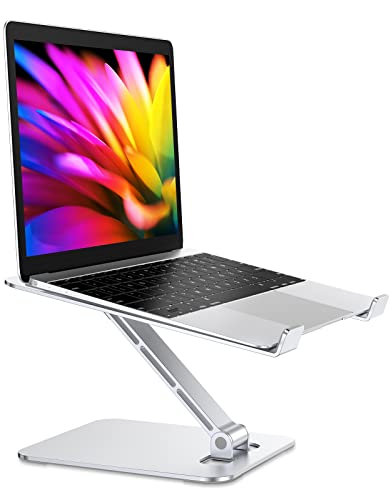
- The aluminum stand folds for storage and adjusts to raise a laptop up to 7.48 inches.
- It is listed as compatible with laptops from 10 to 16 inches.
- Open space beneath the laptop allows ventilation, and the base includes a storage slot.
Best For: Someone who works from a laptop in different rooms or locations.
10. Nulea M501 Wireless Trackball Mouse
A Different Kind of Mouse Control
Nulea M501 Wireless Trackball Mouse

- Cursor movement uses a thumb-operated trackball instead of moving the whole mouse.
- It can connect to up to three devices by Bluetooth or USB receiver.
- The rechargeable mouse has six buttons and four DPI levels.
Best For: A computer user curious about trackball control or working in a compact space.
11. ProtoArc EM11 NL Vertical Mouse
A Vertical Grip for the Desk
ProtoArc EM11 NL Vertical Mouse

- Its vertical shape is designed for right-handed users with hands under 7.5 inches long.
- It connects to up to three devices through Bluetooth or a USB-A receiver.
- The rechargeable mouse offers 1000, 1600, and 2400 DPI settings.
Best For: Someone with a small-to-medium right hand interested in a vertical mouse.
12. Acer 7-in-1 USB-C Hub
More Connections in One Adapter

- The hub adds HDMI, USB-A, USB-C, PD charging, and SD and microSD card slots.
- Its HDMI output supports up to 4K at 30Hz when the device supports video over USB-C.
- The PD port supports up to 100W charging with a compatible laptop and power supply.
Best For: A laptop user who needs extra ports or card-reader access.
13. Wireless Charging Desk Mat
A Roomy Mat with Phone Charging

- The 31.5-by-15.8-inch mat fits a keyboard, mouse, and other desk accessories.
- Its charging area supports listed wireless charging levels for compatible phones and earbuds.
- The mat has a non-slip rubber base, stitched edges, and a water-resistant surface.
Best For: Someone with desk space who wants a large mat and compatible wireless charging.
14. KVIDIO Hybrid Noise-Canceling Headphones
Quieter Focus for Work Sessions
KVIDIO Hybrid Noise-Canceling Headphones

- The over-ear Bluetooth headphones include active noise cancellation and transparency mode.
- Listed battery life is up to 40 hours with noise cancellation or 70 hours in standard mode.
- The package includes a 3.5mm audio cable and a USB-C charging cable.
Best For: Someone working or studying in a shared or noisy space.
15. Evershop Desktop Ring Light
A Compact Light for Video Calls

- The 5-inch USB-powered ring light has adjustable brightness and three lighting colors.
- Its stand can hold a phone or tablet and adjusts for different setups.
- The foldable design is intended for desks, travel, and video recording.
Best For: Someone who joins video calls or records tutorials at a desk.
16. SanDisk 2TB Extreme Portable SSD
Portable Space for Large Files
SanDisk 2TB Extreme Portable SSD

- The external solid-state drive offers 2TB of storage and a USB connection.
- Listed read and write speeds are up to 1050MB/s and 1000MB/s, respectively.
- It includes password protection with 256-bit AES hardware encryption.
Best For: Someone who backs up files or moves large projects between devices.
17. BenQ ScreenBar Pro Monitor Light
Focused Light Above the Screen
BenQ ScreenBar Pro Monitor Light

- The monitor-mounted light bar offers adjustable brightness and color temperature.
- Its motion sensor turns the light on nearby and off after five minutes of absence.
- The clamp fits listed monitor thicknesses from 0.17 to 2.56 inches and curvature from 1000 to 1800R.
Best For: Someone who reads or works at a monitor in the evening.
Choosing a Computer Accessory for Her
Start with the part of her computer routine that could be easier. A woman who spends most of her day typing may appreciate a full-size ergonomic keyboard, a vertical mouse, or a trackball. These are personal-fit gifts: hand size, handedness, desk space, and comfort preferences matter. A mouse with an unfamiliar shape can take time to get used to, so it helps to choose one with clear fit details and consider whether she enjoys trying a different style.
For someone who works across several windows, a large monitor, portable screen, or docking station may make more of a difference. A monitor is a substantial gift, so check available desk space and the devices she uses. A portable screen suits travel and shared workspaces; a dock is most useful when she regularly connects a laptop to monitors and peripherals. If her setup is already functional, a webcam, ring light, monitor lamp, or cable tray can improve a smaller part of the day without changing the whole desk.
Match the Gift to Your Budget
Smaller accessories such as a USB-C hub, laptop stand, mouse, ring light, or cable tray can make practical gifts without requiring a full workspace makeover. A desk mat or monitor light bar can feel more substantial while still serving a specific purpose. Bigger-ticket options in this list include the ultrawide monitor, docking station, portable monitor, headphones, and external SSD. Think about how often she would use the item and whether it solves a recurring problem, rather than choosing by size alone.
You can also build a thoughtful gift around one need. For example, a portable monitor is a useful standalone present for someone who travels with a laptop. A laptop stand pairs naturally with a keyboard or mouse if you are assembling a work-from-home setup, while a webcam light can complement frequent video calls. Keep the choice focused on the routine she already has.
Check Compatibility and Personalization
Before buying a computer accessory, check the ports, operating system, and physical fit that the product requires. USB-C hubs and docks may need a laptop port that supports video output or power delivery; a USB-C-shaped connector alone does not guarantee those functions. The Anker dock has specific display behavior on macOS, while the Acer hub lists a 4K HDMI mode at 30Hz. Review the supplied connection details against her laptop model if you can.
For monitor arms, confirm the screen’s size, weight, VESA pattern, and desk mounting options. For an under-desk cable tray, measure the desk edge and check for drawers or supports that might obstruct the clamps. A wireless charging mat is useful only if her phone supports compatible wireless charging. Personalization can also mean choosing a keyboard or desk accessory that suits her preferred colors, typing style, or available workspace; this guide includes several black or silver designs, so consider the look of her existing setup.
Plan Around Christmas and Last-Minute Choices
For a larger accessory that needs careful compatibility checks, start early enough to confirm the laptop, monitor, or desk details. A little research can prevent a gift that cannot connect or fit. If time is short, choose an accessory with a straightforward role and check the listed requirements before ordering: a mouse, laptop stand, or desk mat can be easier to match than a display or docking station, provided the recipient’s habits and setup are known.
A card explaining why you chose the item can make a practical computer gift feel personal. Mention the part of her routine you had in mind, such as carrying less equipment, keeping cables organized, or getting more room for creative work. The best computer accessory Christmas gift ideas for women are the ones that fit both her devices and the way she likes to work or relax at her desk.