
The right USB extension cable can make a cramped desk, hard-to-reach port, or awkward gaming setup much easier to use. The key is matching cable length, USB standard, connector type, and power requirements to your device.
We compared 10 USB extension cables ranging from compact braided leads to long active cables, with options for fast data transfer, home offices, peripherals, and basic charging or connectivity needs.
Best 10 USB Extension Cables Picks for 2026
Top High-Speed Pick
Cable Matters 10ft USB 3.0 Extension Cable

- Up to 5 Gbps data transfer
- Backward compatible with USB 2.0 and 1.x
- Shielded, gold-plated, durable construction
Best For: High-speed USB-A peripherals and VR headsets
Best Value 2-Pack
AINOPE 6.6ft USB 3.0 Extension Cables

- Two cables included
- Up to 5 Gbps transfer speeds
- Braided design with cable-management buckles
Best For: Multiple peripherals and tidy desktop setups
Best Extra-Long Option
Tripp Lite 25ft Active USB 2.0 Extension Cable

- 25-foot active extension length
- Built-in signal booster
- Supports up to 480 Mbps
Best For: Long USB-A runs to printers and scanners
Best Braided 10ft Pair
JSAUX 10ft USB 3.0 Extension Cables

- Two 10-foot cables included
- Up to 5 Gbps data transfer
- Nylon-braided build with 18-month warranty
Best For: Long, durable connections for peripherals and gaming devices
Reliable Everyday Pick
Amazon Basics USB-A 2.0 Extension Cable

- 6.5-foot USB-A male-to-female design
- Up to 480 Mbps transfer speed
- Shielded, gold-plated connectors
Best For: Everyday printers, cameras, mice, and keyboards
Durable Fast-Transfer Pick
QianLink USB 3.0 Extension Cable

- Up to 5 Gbps data transfer
- Braided nylon and reinforced joints
- 3-, 6-, and 10-foot options
Best For: Fast connections to drives, webcams, hubs, and peripherals
Long-Reach Choice
AINOPE USB 3.0 Extension Cable

- 10-foot USB-A extension length
- Up to 5 Gbps data transfer
- Braided cable with included sticky buckles
Best For: Gaming, charging, webcams, and distant USB-A devices
Best Braided Pair
UGREEN 3-Foot USB 3.0 Extension Cables
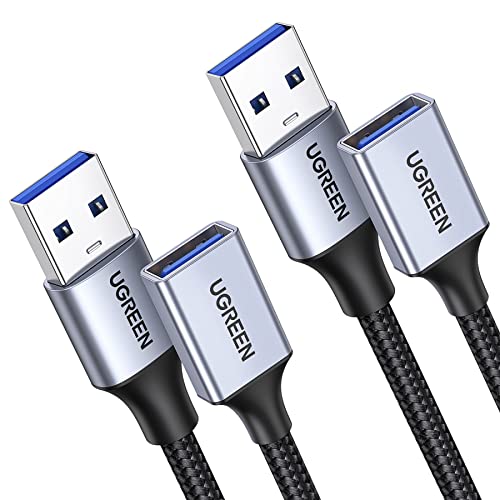
- Two-pack of 3-foot USB 3.0 extenders
- Up to 5 Gbps data transfer and 2A charging
- Braided jacket with aluminum alloy connectors
Best For: Desk setups needing two durable short extensions
Best Long Cable
ITD ITANDA 10-Foot USB 3.0 Extension

- Extra-long 10-foot male-to-female cable
- Up to 5 Gbps transfer with broad backward compatibility
- Braided nylon jacket and reinforced construction
Best For: Reaching TVs, consoles, and peripherals across larger spaces
Best Budget 3-Pack
6-Foot USB 2.0 Extension Cables
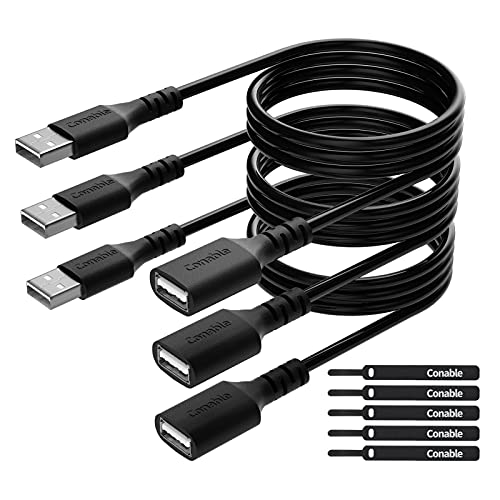
- Three 6-foot male-to-female cables
- Up to 480 Mbps USB 2.0 data transfer
- Includes five cable ties for cable management
Best For: Basic peripherals and multi-cable home or office setups
Top High-Speed Pick – Cable Matters 10ft USB 3.0 Extension Cable
If you need a dependable 10-foot option, this Cable Matters model is one of the most versatile USB extension cables for desktops, peripherals, and compatible VR headsets. It supports USB 3.0 transfer speeds up to 5 Gbps while remaining backward compatible with USB 2.0 and USB 1.x devices.
Best For: Extending high-speed peripherals, storage drives, printers, hubs, and compatible VR headsets.
Pros:
- Supports data transfer rates up to 5 Gbps.
- Compatible with USB 3.0, USB 2.0, and USB 1.x devices.
- Gold-plated connectors, copper conductors, and foil-and-braid shielding support reliable transmission.
- 10-foot length and molded strain relief provide useful reach and durability.
Cons:
- It has USB-A male-to-female connectors, so it is not intended for USB-C-only devices.
- Its round PVC construction may be less flexible than a braided cable.
This is a strong all-around choice when speed and broad USB-A compatibility matter. Its 10-foot length adds flexibility without requiring an active signal booster.
Best Value 2-Pack – AINOPE 6.6ft USB 3.0 Extension Cables
This AINOPE two-pack is a practical way to add reach to multiple setups. These USB extension cables provide USB 3.0 speeds up to 5 Gbps, support charging and data syncing, and include braided exteriors with cable-management buckles.
Best For: Buyers who need two durable USB-A extension cables for everyday peripherals and organized desktop setups.
Pros:
- Includes two 6.6-foot USB 3.0 male-to-female cables.
- Supports transfer speeds up to 5 Gbps and remains backward compatible with USB 2.0 and 1.1.
- Nylon braiding, reinforced joints, and all-metal connectors are designed for durability.
- Included sticky buckles help shorten and organize excess cable.
Cons:
- Each cable is shorter than the 10-foot options in this roundup.
- USB-A connectors limit compatibility with devices that lack USB-A ports.
For multi-device users, the two-pack offers useful flexibility and strong everyday construction. It is especially appealing when cable organization is as important as added length.
Best Extra-Long Option – Tripp Lite 25ft Active USB 2.0 Extension Cable
Tripp Lite Active USB 2.0 Extension Cable USB-A M/F 25ft 25' 7.6M (U026-025), Black
Check Price On AmazonWhen ordinary USB extension cables are not long enough, this 25-foot Tripp Lite active cable adds substantial reach with a built-in bus-powered signal booster. It supports USB 2.0 transfer rates up to 480 Mbps and works with USB-A computers, cables, printers, scanners, and other compatible devices.
Best For: Long-distance indoor connections to printers, scanners, and other USB-A devices.
Pros:
- Provides 25 feet of additional reach beyond a conventional USB cable.
- Built-in booster is designed to maintain USB 2.0 signal quality over the extended distance.
- Foil-and-braid shielding helps reduce EMI/RFI interference.
- Includes gold-plated connectors and a 3-year limited warranty.
Cons:
- USB 2.0 speeds are limited to 480 Mbps, much slower than USB 3.0 alternatives.
- Devices requiring more than 150mA may need an external power supply or powered USB 2.0 hub.
- It is designed for USB-A connections and may not suit newer USB-C-only devices.
This is the specialist choice for unusually long USB-A runs. Its active design addresses the signal-distance challenge, but the lower USB 2.0 speed and power limitation should be considered before purchase.
Best Braided 10ft Pair – JSAUX 10ft USB 3.0 Extension Cables
This JSAUX two-pack combines long reach with a braided exterior for everyday desktop, entertainment, and gaming setups. Each USB extension cable supports transfer speeds up to 5 Gbps and is compatible with USB 3.0, USB 2.0, and USB 1.1 devices.
Best For: Extending USB-A connections to webcams, cameras, consoles, hubs, storage drives, and other peripherals.
Pros:
- Includes two 10-foot USB 3.0 male-to-female cables.
- Supports data transfer rates up to 5 Gbps.
- Nylon braiding, gold-plated connectors, shielding, and molded joints support durability and signal clarity.
- Backed by an 18-month warranty and customer service.
Cons:
- USB-A connectivity may require an adapter for USB-C-only equipment.
- The two 10-foot cables may provide more length than needed for compact setups.
JSAUX is a good fit when you want two long, durable cables for several devices. The braided build and 18-month warranty add reassurance, while USB 3.0 support keeps it suitable for faster peripherals.
Reliable Everyday Pick – Amazon Basics USB-A 2.0 Extension Cable
Amazon Basics USB-A 2.0 Extension Cable, Male to Female, 480Mbps Transfer Speed, 6.5 Foot, Black
Check Price On AmazonFor basic peripheral setups, this USB extension cable adds 6.5 feet of reach to a USB-A connection. Its USB 2.0 design supports transfer speeds up to 480 Mbps and works with devices such as printers, cameras, mice, and keyboards.
Best For: Everyday office and home peripherals that need extra USB-A reach.
Pros:
- 6.5-foot male-to-female USB-A design extends short connections.
- Supports transfer speeds up to 480 Mbps.
- Gold-plated connectors and shielding help reduce interference.
- Compatible with common peripherals including printers, cameras, mice, and keyboards.
Cons:
- USB 2.0 is slower than the USB 3.0 options in this roundup.
- USB-A connectors are not suitable for devices requiring USB-C.
This is a straightforward choice when you need dependable extra length rather than maximum throughput. The 6.5-foot size is practical for desks and other indoor setups, while the shielded construction is designed to help maintain signal clarity.
Durable Fast-Transfer Pick – QianLink USB 3.0 Extension Cable
This USB extension cable combines USB 3.0 performance with a braided nylon exterior for demanding desk and entertainment setups. It supports data transfer speeds up to 5 Gbps and is backward compatible with USB 2.0, 1.1, and 1.0 devices.
Best For: Users extending webcams, storage drives, hubs, and other USB peripherals while prioritizing speed and durability.
Pros:
- USB 3.0 supports transfer speeds up to 5 Gbps.
- Nylon braided construction and reinforced joints are designed for durability.
- Available in 3-, 6-, and 10-foot length options.
- Works with webcams, cameras, phones, hubs, mice, keyboards, printers, hard drives, and headsets.
Cons:
- The supplied model is 3 feet long, which may be insufficient for distant setups.
- Performance depends on the connected devices and USB standard.
Choose this model when a shorter extension with higher bandwidth is more useful than maximum reach. Its braided jacket and reinforced construction make it a practical option for connections that are frequently handled or repositioned.
Long-Reach Choice – AINOPE USB 3.0 Extension Cable
When your USB port is far from where you use a device, this 10-foot USB extension cable provides substantial extra reach. It supports USB 3.0 data transfer up to 5 Gbps, charging up to 2A, and backward compatibility with USB 2.0 and USB 1.1 devices.
Best For: Long-distance connections for gaming, charging, webcams, and USB-A surveillance cameras.
Pros:
- 10-foot length suits sofas, gaming areas, and distant equipment.
- USB 3.0 supports up to 5 Gbps data transfer.
- Braided nylon, reinforced joints, and a metal-shelled connector improve durability.
- Included sticky buckles help manage excess cable length.
Cons:
- The cable uses USB-A connectors, so it is not a direct USB-C extension.
- A 10-foot cable can create extra slack in compact workspaces.
- Charging is rated up to 2A, so charging performance may vary by device.
This is the strongest fit when reach is the main concern. Its long cable, cable-management buckles, and reinforced braided construction help make extended USB-A connections more manageable, while USB 3.0 keeps data transfers faster than USB 2.0.
Best Braided Pair – UGREEN 3-Foot USB 3.0 Extension Cables
If you need flexible usb extension cables for a desk, entertainment setup, or home office, this two-pack from UGREEN offers a convenient short-distance solution. Each USB 3.0 male-to-female cable supports data transfer speeds up to 5 Gbps and charging up to 2A, while the braided construction is designed for everyday durability.
Best For: Extending webcams, hubs, keyboards, printers, hard drives, and other USB peripherals where two 3-foot cables are useful.
Pros:
- Two 3-foot cables provide flexible placement options.
- Supports USB 3.0 data transfer up to 5 Gbps and charging up to 2A.
- Braided shielding and aluminum alloy connectors are designed for durability and reduced interference.
- Plug-and-play design requires no drivers.
Cons:
- The 3-foot length may not be sufficient for installations across a room.
- It is intended for indoor use according to the product details.
Choose this UGREEN set when you want a durable pair of USB 3.0 extenders rather than one extra-long cable. It is especially practical for organizing peripherals around a desk or behind a TV.
Best Long Cable – ITD ITANDA 10-Foot USB 3.0 Extension
For setups where a short cable leaves you reaching behind furniture or sitting too close to a device, this 10-foot USB 3.0 extension cable provides extra room to work. It supports data transfer up to 5 Gbps, works with USB 2.0 and earlier devices, and uses a braided nylon jacket with reinforced connections.
Best For: Extending USB connections to TVs, gaming consoles, printers, cameras, keyboards, mice, and other peripherals across a larger desk or room.
Pros:
- 10-foot length offers substantial flexibility for distant connections.
- USB 3.0 performance reaches up to 5 Gbps and is backward compatible with USB 2.0, 1.1, and 1.0 devices.
- Nylon braiding, nickel-plated connectors, and an aluminum alloy case support durability.
- Designed to withstand more than 10,000 bend tests.
Cons:
- It is a single cable rather than a multi-pack.
- The longer length may create extra cable to manage in compact setups.
This is the most practical choice when reach is the main concern. Its 10-foot length helps place USB peripherals more comfortably, while the USB 3.0 specification keeps it suitable for faster data-transfer tasks.
Best Budget 3-Pack – 6-Foot USB 2.0 Extension Cables
If you need several affordable usb extension cables for basic peripherals, this three-pack provides three 6-foot USB 2.0 male-to-female cords. They support charging and data transfer at up to 480 Mbps, include cable ties for organization, and use PVC jackets with reinforced strain relief.
Best For: Printers, keyboards, mice, flash drives, controllers, cameras, and other standard USB 2.0 accessories where maximum speed is not essential.
Pros:
- Three 6-foot cables offer useful quantity and reach.
- Includes five cable ties for tidier installation.
- Supports plug-and-play charging and data transfer at up to 480 Mbps.
- Pure copper conductors, shielding, and reinforced strain relief support everyday use.
Cons:
- USB 2.0 speeds are slower than the USB 3.0 alternatives in this roundup.
- The PVC jacket may be less flexible or premium-feeling than braided cable.
- Normal charging speed is specified rather than fast charging.
This three-pack makes sense for basic home or office expansion where value and quantity matter more than high-speed transfers. For large file backups or other demanding data tasks, a USB 3.0 extension is likely the better fit.
How We Picked the Best USB Extension Cables
We focused on USB-A male-to-female extension cables because they cover common uses such as extending keyboards, mice, webcams, printers, flash drives, hubs, and game accessories. Our selection includes USB 2.0 and USB 3.0 models, single cables and multipacks, short desktop-friendly lengths, and longer options for rooms or workstations where ports are farther away.
We also considered advertised data-transfer speeds, cable construction, length options, brand reputation, and whether an active design is used for especially long runs. Compatibility still depends on the connected devices and ports, so verify specifications before buying.
Quick Comparison
| Best For | Recommended Type | What to Look For |
|---|---|---|
| Fast peripherals and storage | USB 3.0 | Up to 5Gbps advertised speed and a suitable host port |
| Keyboards, mice, and printers | USB 2.0 | Affordable pricing and adequate length |
| Webcams and cameras | USB 3.0 | Reliable shielding, firm connectors, and enough bandwidth |
| Long-distance setups | Active USB cable | Signal support designed for extended runs |
| Multiple work areas | Multipack | Several matching cables at different locations |
Key Buying Factors for USB Extension Cables
USB Standard and Speed
USB 2.0 cables generally support up to 480Mbps and are suitable for keyboards, mice, printers, and many basic accessories. USB 3.0, commonly advertised at up to 5Gbps, is the better choice for external storage, cameras, webcams, and other higher-bandwidth devices. Actual performance is limited by the slowest port or device in the chain.
Length and Signal Reliability
Choose the shortest cable that comfortably reaches your equipment. Longer passive cables can be more vulnerable to signal or power limitations, particularly with demanding devices. For very long extensions, an active USB cable may provide a more dependable connection.
Power and Device Compatibility
An extension cable does not automatically increase available power. Bus-powered hard drives, hubs, LED accessories, and other demanding devices may require a powered hub or a shorter, higher-quality connection. Check whether your setup uses USB-A, USB-C, or an adapter, and remember that these products are USB-A male-to-female cables.
Build Quality and Handling
Nylon braiding can improve flexibility and resistance to everyday abrasion, while molded strain relief helps protect the connector ends. A compact cable may be preferable for a desk, but a longer lead is more useful when routing around furniture or behind equipment.
Who Should Buy Which USB Extension Cables?
- For the fastest everyday connections: Choose a USB 3.0 cable from the roundup.
- For keyboards, mice, and printers: A USB 2.0 option is usually sufficient and often costs less.
- For webcams and cameras: Favor USB 3.0, a sturdy connector fit, and a length that avoids unnecessary slack.
- For long runs: Consider the active 25-foot option rather than relying on a very long passive cable.
- For multiple rooms or devices: A multipack offers convenient spare cables and may reduce the cost per cable.