
A dependable mesh WiFi system can eliminate dead zones while giving parents more practical control over when and how children connect. The right setup depends on your home’s size, internet plan, device count, and appetite for advanced features.
We compared 10 mesh systems across WiFi standards, coverage claims, band configuration, capacity, setup, and family-management tools to help you narrow the choices quickly.
Best 10 Mesh Wifi Systems with Parental Controls Hardware Picks for 2026
Simple Setup Pick

- Up to 3,800 sq. ft. coverage
- App-based parental controls
- Expandable Wi-Fi 5 mesh
Best For: Families seeking an easy-to-manage whole-home network
Feature-Rich Wi-Fi 6 Choice

- Wi-Fi 6 AX3000 mesh performance
- Up to 4,500 sq. ft. coverage
- Basic parental controls included
Best For: Busy homes with many devices and wired connections
Large-Home Coverage Pick

- Up to 5,600 sq. ft. coverage
- Parental controls with screen-time tools
- Four Gigabit ports per unit
Best For: Large or multi-story homes with many connected devices
Value Family Pick

- Up to 3,800 sq. ft. coverage
- Profile-based parental controls
- Seamless roaming with one network
Best For: Families seeking affordable coverage and basic controls
WiFi 7 Whole-Home Pick

- WiFi 7 speeds up to 5 Gbps
- Coverage up to 6,000 sq. ft.
- App management and guest WiFi
Best For: Large homes wanting fast, expandable WiFi 7 coverage
Family-Friendly 6E Choice

- Basic parental controls included
- Coverage up to 7,200 sq. ft.
- Tri-band WiFi 6E with 5,400 Mbps capacity
Best For: Families seeking broad coverage and straightforward controls
Simple Budget Family Pick
Google WiFi AC1200 Mesh System

- Parental controls in Google Home app
- Coverage up to 4,500 sq. ft.
- Easy three-router setup
Best For: Smaller homes wanting simple family network management
Best Value Coverage

- Wi-Fi 6 coverage up to 5,600 sq. ft.
- Basic parental controls through HomeShield
- Six Gigabit Ethernet ports for wired backhaul
Best For: Budget-conscious families needing broad coverage and simple network controls
Best for Busy Homes
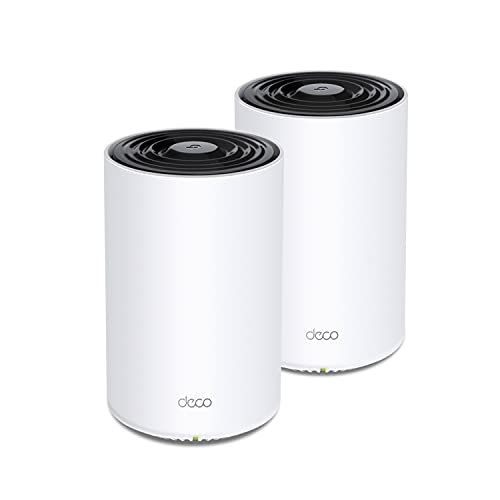
- Tri-band AX3600 Wi-Fi 6 performance
- Supports up to 150 devices
- Basic parental controls via HomeShield
Best For: Large, heavily connected homes with streaming and gaming demands
Best Wi-Fi 7 Upgrade

- Wi-Fi 7 with MLO, Multi-RUs, and 4K-QAM
- Coverage up to 6,500 sq. ft.
- 2.5Gbps ports plus basic parental controls
Best For: Homes upgrading to Wi-Fi 7 and multi-gig networking
Simple Setup Pick – Google WiFi 2-Pack
For shoppers comparing mesh wifi systems with parental controls hardware, the Google WiFi 2-Pack offers a straightforward dual-band Wi-Fi 5 setup with app-based management. It covers up to 3,800 square feet and supports expansion with additional WiFi points.
Best For: Homes and small offices that prioritize simple setup, broad coverage, and basic parental controls.
Pros:
- Coverage of up to 3,800 square feet helps reduce dead zones.
- App control and parental-control features simplify network management.
- Supports speeds up to 2.2 Gbps and can be expanded with more points.
- Includes WPA2-PSK and WPA3 security support.
Cons:
- Uses Wi-Fi 5 rather than the newer Wi-Fi 6 standard.
- The listed router firewall security level is basic.
- Each unit has a single 1,000 Mbps LAN port.
This is a practical choice for families wanting an uncomplicated mesh network with coverage and parental-control basics, though larger or more demanding networks may benefit from newer hardware and additional wired ports.
Feature-Rich Wi-Fi 6 Choice – TP-Link Deco X55 2-Pack
The TP-Link Deco X55 2-Pack is a strong option among mesh wifi systems with parental controls hardware, combining Wi-Fi 6 performance with coverage for up to 4,500 square feet. Its Deco app provides network management, while basic parental controls are included with HomeShield.
Best For: Busy households that need Wi-Fi 6, support for many connected devices, and multiple Ethernet ports.
Pros:
- Wi-Fi 6 AX3000 performance and coverage up to 4,500 square feet.
- Supports up to 150 connected devices.
- Six Gigabit Ethernet ports are included across the two units.
- Includes basic parental controls, QoS, and network security features.
Cons:
- Advanced HomeShield features may require a premium service.
- A modem is required for most internet service providers.
- It is a dual-band system rather than a tri-band design.
With broader coverage, newer wireless technology, and more wired connectivity than many basic mesh kits, the Deco X55 is a versatile family-network upgrade. Review the included versus premium HomeShield features before buying.
Large-Home Coverage Pick – DBIT AX1500 3-Pack
The DBIT AX1500 3-Pack targets large homes and complex layouts with up to 5,600 square feet of stated coverage. As mesh wifi systems with parental controls hardware go, it combines dual-band Wi-Fi 6, seamless roaming, app or web management, and family-focused controls.
Best For: Large homes, multi-story layouts, and households connecting many devices across several rooms.
Pros:
- Three nodes provide coverage for up to 5,600 square feet.
- Supports more than 120 simultaneous connections according to the supplied notes.
- Each unit includes four Gigabit Ethernet ports.
- Parental controls can block harmful content and manage screen time.
Cons:
- AX1500 throughput is lower than the Deco X55’s AX3000 rating.
- The three-pack may be more hardware than smaller homes need.
- Actual coverage and performance can vary with building layout and interference.
This system stands out for node count, wired-port availability, and family-management tools. It is best suited to buyers who need broad physical coverage and many connections rather than maximum wireless throughput.
Value Family Pick – TP-Link Deco S4 2-Pack
The TP-Link Deco S4 2-Pack is a budget-minded option for shoppers seeking mesh wifi systems with parental controls hardware. Its dual-band Wi-Fi 5 mesh covers up to 3,800 square feet, supports up to 75 devices, and offers profile-based website blocking and online-time limits.
Best For: Families wanting affordable whole-home coverage and clearly defined basic parental controls.
Pros:
- Two units cover up to 3,800 square feet.
- Parental controls can limit online time and block inappropriate websites by profile.
- Seamless roaming uses one network name and password.
- Four Gigabit Ethernet ports are included across the two units.
Cons:
- Uses Wi-Fi 5 rather than Wi-Fi 6.
- Supports up to 75 devices, fewer than some newer systems.
- Security support is listed as WPA-PSK and WPA2-PSK, without WPA3.
The Deco S4 makes sense when family controls and simple roaming matter more than the latest wireless generation. It provides useful coverage and management features, but heavier users may prefer a newer Wi-Fi 6 system.
WiFi 7 Whole-Home Pick – NETGEAR Orbi 370 Series
For shoppers comparing mesh wifi systems with parental controls hardware, the NETGEAR Orbi 370 Series is a high-speed WiFi 7 option designed for larger homes. Its router-and-satellite setup covers up to 6,000 square feet, supports up to 70 devices, and includes app-based network management. The supplied details mention security features, but they do not specifically confirm built-in parental controls.
Best For: Larger homes needing WiFi 7 speed, broad coverage, and simple app management.
Pros:
- Up to 6,000 square feet of mesh coverage from the three-piece system.
- WiFi 7 speeds up to 5 Gbps with Enhanced Backhaul for simultaneous connections.
- Orbi app supports setup, device management, and guest WiFi controls.
- Advanced Router Protection and automatic firmware updates are enabled out of the box.
Cons:
- The NETGEAR Armor security suite requires a separate subscription after its 30-day trial.
- The supplied information does not specifically list parental-control features.
- Coverage and real-world speeds vary with home construction, placement, devices, and internet plan.
This is the most future-ready choice of the three for households prioritizing newer wireless technology and whole-home capacity. However, families shopping specifically for confirmed parental controls should verify the current Orbi app features before buying.
Family-Friendly 6E Choice – TP-Link Deco XE75
The TP-Link Deco XE75 is a strong contender among mesh wifi systems with parental controls hardware, combining tri-band WiFi 6E with basic parental controls through TP-Link HomeShield. Its three nodes cover up to 7,200 square feet, while the dedicated 6 GHz band can help provide a cleaner backhaul or connect compatible devices.
Best For: Families wanting wide coverage, WiFi 6E capacity, and basic app-based parental controls.
Pros:
- Tri-band WiFi 6E coverage reaches up to 7,200 square feet.
- HomeShield includes basic parental controls, security scanning, QoS, and device identification.
- Supports up to 200 devices with combined speeds up to 5,400 Mbps.
- Deco app provides setup and remote network management, with Alexa support for guest WiFi commands.
Cons:
- The listed parental controls are the basic HomeShield features; advanced options may require additional service details.
- 6 GHz connectivity requires compatible devices, and a modem is required for most internet providers.
- Gigabit Ethernet ports may limit wired throughput compared with faster multi-gig systems.
With explicit basic parental controls and the largest stated coverage area here, the Deco XE75 is a practical family-oriented option. It is especially appealing if your home has compatible WiFi 6E devices or benefits from using 6 GHz as a dedicated mesh backhaul.
Simple Budget Family Pick – Google WiFi AC1200 Mesh System
For a straightforward entry into mesh wifi systems with parental controls hardware, this three-pack of Google WiFi AC1200 routers offers coverage up to 4,500 square feet and management through the Google Home app. The app can enable parental controls, manage connected devices, and create guest networks, making this a simple fit for everyday households.
Best For: Smaller homes and families wanting easy setup with app-based parental controls.
Pros:
- Three routers provide coverage for homes up to 4,500 square feet.
- Google Home app supports setup, device management, parental controls, and guest networks.
- Simple dual-band WiFi 5 design works well for common browsing, streaming, and smart-home use.
- Includes WPA3 security and a one-year warranty according to the supplied details.
Cons:
- WiFi 5 and AC1200 performance is less advanced than the WiFi 6E and WiFi 7 alternatives.
- The supplied details list three ports, so wired connectivity may be limited.
- Its stated coverage is lower than the other two systems.
This Google WiFi bundle prioritizes ease of use over cutting-edge speed. It is the most approachable choice for families that want confirmed parental-control management in the Google Home app and do not need the higher capacity of newer WiFi standards.
Best Value Coverage – TP-Link Deco X15 3-Pack
If you need mesh wifi systems with parental controls hardware for a larger home, the TP-Link Deco X15 3-Pack combines Wi-Fi 6 coverage, app-based management, and basic parental controls. It covers up to 5,600 square feet and supports up to 120 devices.
Best For: Families seeking affordable whole-home Wi-Fi coverage with straightforward parental controls and remote network management.
Pros:
- Wi-Fi 6 dual-band system rated up to AX1500, with coverage up to 5,600 square feet.
- Basic parental controls, security scanning, device identification, and weekly or monthly reports are available through HomeShield.
- Six Gigabit Ethernet ports across the three units support wired backhaul and flexible placement.
- Deco app setup, AI roaming, guest Wi-Fi, and Alexa or Google Assistant support simplify management.
Cons:
- It is a dual-band system, rather than the higher-capacity tri-band design offered by some alternatives.
- The listed parental-control and security features are basic; premium HomeShield features may require additional service.
- A modem is required for most internet service providers.
The X15 is a practical choice when broad coverage and family-friendly network controls matter more than maximum throughput. Its wired-backhaul support also gives households a way to improve performance where Ethernet cabling is available.
Best for Busy Homes – TP-Link Deco X68 2-Pack
The TP-Link Deco X68 is a strong fit among mesh wifi systems with parental controls hardware for homes with heavy streaming, gaming, and device demands. Its tri-band Wi-Fi 6 design covers up to 5,500 square feet and supports up to 150 devices.
Best For: Connected households that want additional wireless capacity for 4K streaming, gaming, and many simultaneous devices.
Pros:
- Tri-band AX3600 Wi-Fi 6 design is built for 4K streaming, gaming, and busy networks.
- Coverage reaches up to 5,500 square feet, with support for up to 150 devices.
- HomeShield includes basic parental controls, network security scanning, device identification, and usage reports.
- Each unit has two Gigabit Ethernet ports, while AI-driven roaming and a unified network name simplify movement around the home.
Cons:
- The two-pack has slightly less listed coverage than the three-pack X15 and Deco 7 systems.
- Parental controls are identified as basic, with premium HomeShield capabilities potentially requiring a subscription.
- The system is designed for internet plans up to 1 Gbps, according to the supplied product notes.
Choose the X68 when device capacity and wireless efficiency are priorities. Its tri-band architecture makes it the more suitable option for demanding households, while the Deco app keeps parental and security settings accessible away from home.
Best Wi-Fi 7 Upgrade – TP-Link Deco 7 BE23 3-Pack
For shoppers comparing mesh wifi systems with parental controls hardware and newer wireless standards, the TP-Link Deco 7 BE23 3-Pack brings Wi-Fi 7 features, broad coverage, and built-in family controls. The three-unit system covers up to 6,500 square feet and supports up to 150 devices.
Best For: Families and power users who want Wi-Fi 7 capabilities, multi-gig wired connections, and basic parental controls.
Pros:
- Wi-Fi 7 features including Multi-Link Operation, Multi-RUs, and 4K-QAM support newer compatible devices.
- Three units provide up to 6,500 square feet of coverage and support up to 150 devices.
- Each node includes two 2.5Gbps WAN/LAN ports for multi-gig wired connectivity.
- HomeShield provides basic network security, a private IoT network, and parental controls, with WPA3 encryption support.
Cons:
- Older client devices may not benefit fully from the system’s Wi-Fi 7 features.
- The supplied notes describe parental controls as free basic features, so advanced controls may require premium service.
- It is a dual-band system, not a tri-band design.
The Deco 7 BE23 is the forward-looking pick for households adding Wi-Fi 7 phones, laptops, or multi-gig internet. It combines generous three-node coverage with stronger wired connectivity and useful baseline parental controls.
How We Picked the Best Mesh Wifi Systems with Parental Controls Hardware
We focused on systems that combine multiple nodes with app-based management and useful parental-control options, rather than judging them by speed claims alone. The lineup includes affordable dual-band WiFi 5 and WiFi 6 systems, higher-capacity tri-band models, and newer WiFi 7 options.
We also considered the practical details that affect everyday ownership: advertised coverage, pack size, roaming behavior, device capacity, setup simplicity, Ethernet connectivity, and whether key family features may require a subscription. Manufacturer coverage figures are estimates and can vary substantially with walls, interference, placement, and client-device capability.
Quick Comparison
- Best for straightforward setup: Google WiFi systems offer a familiar app-led experience and simple whole-home expansion.
- Best value WiFi 6 options: TP-Link Deco X55, X15, and DBIT AX1500 systems balance modern wireless support with broad coverage claims.
- Best for larger or busier homes: Tri-band systems such as the Deco XE75 and X68 provide an additional band that can help manage mesh backhaul and traffic.
- Best for newer devices: WiFi 7 models, including the Orbi 370 and Deco BE23, are worth considering when you have compatible clients and a fast internet plan.
Key Buying Factors for Mesh Wifi Systems with Parental Controls Hardware
Coverage and Node Placement
Choose the number of nodes based on layout, not just square footage. A two-pack may suit a compact home, while a three-pack is more appropriate for multiple floors or difficult room arrangements. Place satellites where they still receive a strong signal from the main unit, not in the dead zone itself.
Dual-Band Versus Tri-Band
Dual-band systems are often sufficient for moderate households and can cost less. Tri-band systems add capacity and may provide a dedicated or less-congested path for communication between nodes. This can matter in larger homes, homes with many simultaneous streams, or installations where wired backhaul is unavailable.
Speed, Standards, and Wired Connections
Match the system to your internet service and devices. WiFi 6 is a strong general-purpose choice, while WiFi 6E adds access to the 6 GHz band under suitable conditions. WiFi 7 offers the most current capabilities but may deliver limited immediate benefit if most devices are older. Check Ethernet port speed and placement if you use wired backhaul, gaming systems, or multi-gig internet.
Parental Controls and Privacy
Look for profiles, schedules, pause controls, content filtering, usage insights, and guest-network separation. Confirm which features are included without a subscription, how controls are applied across devices, and whether the manufacturer requires a cloud account. Hardware controls can remain useful even when internet service changes, but feature behavior varies by brand and model.
Who Should Buy Which Mesh Wifi Systems with Parental Controls Hardware?
Choose an affordable dual-band system if you need reliable coverage for browsing, streaming, schoolwork, and ordinary smart-home devices. Choose a tri-band model if your home is larger, your network is busy, or wireless node-to-node traffic is a concern. Choose WiFi 7 if you are upgrading for the long term, use newer devices, or subscribe to especially fast broadband. Choose Google WiFi when simple installation and approachable app management matter most. For any system, prioritize dependable parental-control functions, sensible node placement, and clear support policies over headline speed alone.