
Heat can limit performance, increase fan noise, and shorten the life of computer components. The right air cooler can improve airflow without the cost or maintenance of liquid cooling.
This roundup covers desktop CPU coolers and laptop cooling pads under $100, with options for gaming PCs, compact builds, and portable workstations.
Best 10 Computer Air Coolers Under 100 Picks for 2026
Best Overall Desktop Cooler

- Dual-tower design with six heat pipes
- Two PWM fans with ARGB lighting
- Supports AM4, AM5, LGA1700, and more
Best For: Performance-focused desktop builds
Best Laptop Cooling Pad
TECKNET Triple-Fan Laptop Cooler

- Three USB-powered 1200 RPM fans
- Fits 12- to 17-inch laptops
- Two height settings and an extra USB port
Best For: Portable laptop cooling and elevation
Best Compact CPU Cooler

- 148mm single-tower design
- Four AGHP heat pipes with one PWM fan
- Supports AM4, AM5, LGA1700, and 1851
Best For: Medium-sized desktop cases
Best Adjustable Laptop Stand

- Five selectable fans with blue LEDs
- Six adjustable height settings
- Dual USB hub for extra peripherals
Best For: Adjustable laptop cooling at a desk
Best Compact ARGB Pick

- 133 mm compact design
- 800–2200 RPM PWM control
- Adjustable ARGB and fan height
Best For: Compact RGB gaming builds
Best Laptop Stand Cooler

- Two-fan metal mesh design
- Five adjustable height settings
- Two USB 2.0 ports
Best For: Laptops up to 15.6 inches
Portable Aluminum Cooling

- 160mm adjustable-speed fan
- Seven height settings with anti-slip baffles
- Lightweight aluminum design with two USB ports
Best For: Portable cooling and ergonomic laptop positioning
Quiet Tower CPU Cooling
Thermalright Assassin X 120R SE V2

- Four heat pipes with a copper base
- 120mm PWM fan with up to 66.17 CFM airflow
- Supports Intel and AMD socket families
Best For: Quiet cooling in compatible desktop cases
High-Airflow RGB Laptop Cooling
KeiBn 15-Fan Laptop Cooling Pad
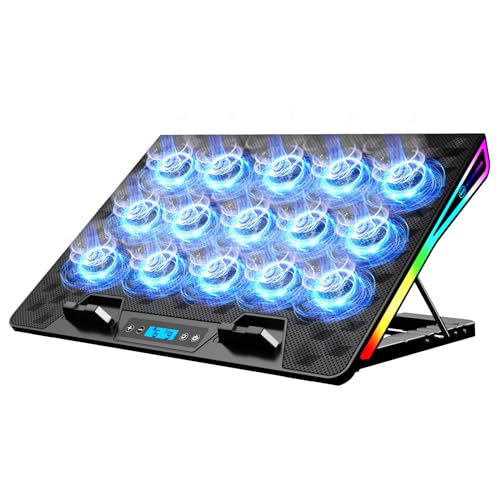
- 15 fans rated at 2200–2300 RPM
- LCD fan-speed and RGB-mode display
- Four height settings and dual USB-A ports
Best For: Large gaming laptops and RGB-focused desks
Best Overall Desktop Cooler – Peerless Assassin 120 SE ARGB
For shoppers comparing computer air coolers under 100, the Thermalright Peerless Assassin 120 SE ARGB is a strong desktop choice when you want a dual-tower design, six heat pipes, and two PWM fans. Its 155mm height and broad socket support make case clearance and compatibility worth checking before purchase.
Best For: Gaming and performance-focused desktop builds using compatible AMD or Intel sockets.
Pros:
- Dual-tower heatsink with six 6mm heat pipes and AGHP technology.
- Two 120mm PWM fans deliver up to 66.17 CFM each with stated noise up to 25.6 dB(A).
- Supports AMD AM4/AM5 and several Intel sockets, including LGA1700 and 1851.
- ARGB lighting and included mounting hardware add build flexibility.
Cons:
- The 155mm height and 125mm-wide design may require careful case and RAM-clearance checks.
- Its 0.97kg weight is substantial for a CPU cooler.
Choose this model when cooling capacity and a visually prominent dual-fan design matter more than compact dimensions. Verify your case clearance and socket support before ordering.
Best Laptop Cooling Pad – TECKNET Triple-Fan Laptop Cooler
If you are shopping for computer air coolers under 100 for a laptop, the TECKNET cooling pad combines three USB-powered fans with an adjustable stand. It fits 12- to 17-inch laptops and adds a spare USB port for connecting a peripheral.
Best For: Laptop users who want portable airflow, basic elevation, and broad size compatibility.
Pros:
- Three 110mm fans run at 1200 RPM to draw air beneath the laptop.
- USB-powered operation needs no external adapter, and a dedicated switch controls the fans.
- Two height settings provide a more comfortable viewing angle.
- Compatible with many 12- to 17-inch laptops, plus some tablets, routers, and game consoles.
Cons:
- The included cable is USB-A to USB-A, which may require an adapter for other ports.
- Only two height settings are available.
This is a practical, uncomplicated cooling pad for everyday work or extended laptop sessions. Its USB hub, blue activity indicators, and rubber pads add convenience without requiring a separate power supply.
Best Compact CPU Cooler – Assassin X120 Refined SE
Among computer air coolers under 100, the Thermalright Assassin X120 Refined SE suits builders who want a simpler single-tower CPU cooler with a 148mm height. Its four heat pipes, 120mm PWM fan, and wide AMD and Intel compatibility cover many mainstream desktop configurations.
Best For: Medium-sized cases and quieter, space-conscious desktop builds.
Pros:
- Compact 148mm height is designed for medium-sized computer cases.
- Four 6mm AGHP heat pipes transfer heat to the aluminum heatsink.
- The 120mm PWM fan reaches 1550 RPM and up to 66.17 CFM.
- Supports AMD AM4/AM5 and Intel sockets including LGA1200, 1700, and 1851.
Cons:
- It uses one fan and four heat pipes rather than the larger dual-tower arrangement of higher-capacity designs.
- Case clearance and socket compatibility should still be confirmed before installation.
This cooler is a sensible middle ground for a conventional desktop build: smaller and lighter than a large dual-tower model while retaining heat-pipe cooling and PWM control. Its 148mm height is the key specification to compare with your case.
Best Adjustable Laptop Stand – Kootek Five-Fan Cooling Pad
The Kootek cooling pad is a flexible option among computer air coolers under 100 for laptops measuring 12 to 17 inches. It provides five selectable fans, six height settings, and two extra USB ports, making it useful when cooling and desk ergonomics are both priorities.
Best For: Laptop users who want adjustable elevation and selectable multi-fan airflow.
Pros:
- Five built-in fans provide selectable operation for one, four, or all five fans.
- Six adjustable height settings help customize the viewing angle.
- Dual USB hubs allow connection of additional peripherals.
- Front stoppers and a metal mesh surface help keep 12- to 17-inch laptops secure.
Cons:
- The manufacturer recommends a 5V, 1A adapter for best performance; otherwise, fan speed may be reduced.
- Its 1.16kg weight and 14.96-by-11.81-inch footprint are less convenient for travel.
- The included connection is USB-to-USB, so Type-C devices may need an adapter.
Pick the Kootek when adjustable positioning and fan control are more important than a slim travel profile. The separate fan and LED switches let you limit operation when full airflow is unnecessary.
Best Compact ARGB Pick – Vetroo V3 CPU Air Cooler
For computer air coolers under 100, the Vetroo V3 is a compact option with customizable ARGB lighting and adjustable PWM performance. Its 133 mm height suits smaller builds, while the adjustable fan position can help create additional RAM clearance.
Best For: Compact gaming PCs that need motherboard-synchronized lighting and broad AM4, AM5, and Intel socket compatibility.
Pros:
- Compact 133 mm height for smaller cases
- 800–2200 RPM PWM range balances airflow and noise
- 5V 3-pin ARGB connection supports motherboard synchronization
- Adjustable fan height helps accommodate RAM
Cons:
- Limited to the listed AMD and Intel sockets
- Its 92 mm fan is smaller than the 120 mm fan used by some competing coolers
The Vetroo V3 stands out when case size, RAM clearance, and visual customization matter as much as basic air cooling. Confirm your motherboard socket and available case height before buying.
Best Laptop Stand Cooler – KeiBn S039 Laptop Cooling Pad
Among computer air coolers under 100, the KeiBn S039 is designed for laptops rather than desktop CPUs. Two fans, a metal mesh surface, five height settings, and two USB 2.0 ports make it a practical cooling and positioning accessory for laptops up to 15.6 inches.
Best For: Home or office laptop users who want added airflow, adjustable height, and convenient USB expansion.
Pros:
- Two fans and metal mesh promote airflow during extended use
- Five adjustable height positions provide flexible viewing angles
- Two USB 2.0 ports allow connection of peripherals
- Includes a hideable phone holder and laptop-retaining baffles
Cons:
- Compatibility is aimed at laptops up to 15.6 inches
- Its blue LED indicator may not suit every desk setup
- It is a laptop cooling pad, not a desktop CPU cooler
The S039 combines cooling-pad functionality with a basic laptop stand, making it useful for workstations that need better positioning and extra USB connectivity. Its portable 0.8 kg design is convenient for moving between spaces.
Best Low-Profile Performance Cooler – Thermalright SI-100 CPU Air Cooler
The Thermalright SI-100 is a low-profile choice among computer air coolers under 100, measuring 100 mm high for small and medium-sized cases. Six 6 mm heat pipes, a 120 mm PWM fan, and support for a wide range of AMD and Intel sockets make it a flexible desktop cooling option.
Best For: Small-form-factor and medium-case desktop builds that need a low 100 mm cooler with strong stated airflow.
Pros:
- 100 mm height fits many space-constrained cases
- Six 6 mm heat pipes use AGHP 3.0 technology
- 120 mm PWM fan delivers up to 72.37 CFM airflow
- Supports AM4, AM5, and numerous Intel sockets including LGA1700 and LGA1851
Cons:
- The 2,000 RPM fan can be more performance-focused than ultra-quiet
- Socket-specific mounting hardware should be checked before installation
- Its 0.64 kg weight may require careful handling during installation
With a 100 mm profile and a full-size 120 mm fan, the SI-100 offers a useful balance for compact desktop cases. Its broad socket support is an advantage, but verify case clearance and platform compatibility first.
Portable Aluminum Cooling – ICE COOREL Laptop Cooling Pad
For shoppers comparing computer air coolers under 100, the ICE COOREL is a lightweight laptop cooling stand that combines a large adjustable-speed fan with an aluminum surface. Its seven height settings and slim design make it useful for everyday work, video viewing, or travel.
Best For: Laptop users who want portable cooling, adjustable elevation, and extra USB connectivity.
Pros:
- Large 160mm fan offers adjustable speeds from 1000 to 1400 RPM.
- Aluminum alloy surface helps draw heat away from the laptop.
- Seven height settings and two anti-slip baffles support flexible positioning.
- Two USB 2.0 ports add convenient accessory or data connections.
Cons:
- Designed for laptops from 12 to 15.6 inches, so larger notebooks may not fit.
- Uses one fan, rather than a multi-fan setup.
- Requires a laptop USB port for power.
The ICE COOREL stands out as a compact, practical option when portability and ergonomic adjustment matter more than maximum fan count. Its aluminum build, quiet-focused design, and USB hub make it a well-rounded choice for smaller laptops.
Quiet Tower CPU Cooling – Thermalright Assassin X 120R SE V2
Among computer air coolers under 100, the Thermalright Assassin X 120R SE V2 is aimed at desktop builders who need a traditional CPU air cooler. It pairs four heat pipes and a copper base with a 120mm PWM fan, while supporting several current Intel and AMD sockets.
Best For: Medium-sized desktop cases and users seeking socket versatility with quiet PWM air cooling.
Pros:
- Four 6mm heat pipes and a pure copper base support heat transfer.
- 120mm PWM fan delivers up to 66.17 CFM of airflow at 1550 RPM.
- Listed noise level is no higher than 25.6 dB(A).
- Supports Intel LGA1150 through LGA1851 platforms and AMD AM4/AM5.
Cons:
- At 148mm tall, it still requires checking case CPU-cooler clearance.
- It is intended for desktop computers, not laptops.
- RGB lighting requires connecting the lighting interface.
This cooler is a strong fit for a conventional desktop build where broad socket compatibility and restrained noise are priorities. Confirm your case clearance and platform mounting requirements before buying.
High-Airflow RGB Laptop Cooling – KeiBn 15-Fan Laptop Cooling Pad
For gaming laptop shoppers browsing computer air coolers under 100, the KeiBn cooling pad offers an unusually high fan count, RGB lighting, and a built-in LCD display. Its broad metal mesh surface is designed for laptops from 10 to 17.3 inches and includes four height settings.
Best For: Larger gaming laptops and users who want strong airflow controls with visible RGB customization.
Pros:
- Fifteen fans operate at 2200–2300 RPM for substantial active airflow.
- LCD display shows fan speed and RGB mode for quick adjustments.
- Ten RGB lighting modes add gaming-oriented customization.
- Four height settings, anti-slip baffles, and two USB-A ports improve usability.
Cons:
- Its 1.6 kg weight makes it less portable than lighter cooling pads.
- Requires a USB-A port for connection according to the supplied guidance.
- The larger 15.75-by-11.4-inch mesh surface may be more desk-oriented.
The KeiBn is the feature-heavy choice in this group, especially for users with larger gaming laptops who value fan-speed visibility and lighting options. Its heavier construction and USB-A requirement are worth considering for a portable setup.
How We Picked the Best Computer Air Coolers Under 100
We selected these models for their cooling approach, compatibility, adjustability, noise-control features, and overall value. The list includes tower-style CPU heatsinks for desktop processors as well as laptop cooling pads that improve airflow beneath portable computers. We also considered practical details such as fan control, lighting, height adjustment, portability, USB connectivity, and laptop size support.
Before buying, confirm whether you need a cooler for a desktop CPU or a cooling stand for a laptop. These product types solve different problems and are not interchangeable.
Quick Comparison
| Best For | Look For | Recommended Type |
|---|---|---|
| Gaming desktop | Multiple heat pipes and dual fans | Dual-tower CPU cooler |
| Budget PC build | 120mm PWM fan and broad socket support | Single-tower CPU cooler |
| Compact desktop | Low height and clearance-friendly design | Low-profile CPU cooler |
| Gaming laptop | Adjustable stand, strong airflow, and USB controls | Multi-fan cooling pad |
| Travel or office use | Slim design and quiet operation | Portable laptop cooling pad |
Key Buying Factors for Computer Air Coolers Under 100
Compatibility and Clearance
For a desktop cooler, check the CPU socket, case height limit, RAM clearance, and graphics-card layout. A large dual-tower heatsink may cool exceptionally well but can conflict with tall memory modules or a narrow case. For laptop pads, measure the computer and verify that its vents align with the pad’s fans.
Cooling Performance and Airflow
Heat pipes transfer heat from the processor into the fin stack, while larger 120mm fans can move air at lower noise levels. Dual-fan designs generally offer more thermal headroom, but a well-designed single-tower cooler may be sufficient for mainstream processors. Laptop pads work best when the laptop’s intake vents are located on the underside and remain unobstructed.
Noise, Controls, and Power
PWM fans can automatically adjust speed according to CPU temperature. Look for fluid-dynamic or similarly durable bearings if long-term quiet operation matters. Laptop cooling pads typically draw power through USB, so consider whether they include pass-through USB ports and whether their fan controls are easy to reach.
Size, Ergonomics, and Extras
Adjustable laptop stands can improve typing posture and viewing height, while RGB lighting is primarily an appearance feature. For desktop builds, confirm that the cooler includes the mounting hardware needed for your platform. Installation space and weight also matter if you frequently move the system.
Who Should Buy Which Computer Air Coolers Under 100?
Choose a dual-tower CPU cooler if you run a performance-focused gaming or productivity desktop and have enough case clearance. A single-tower Thermalright, Vetroo, or comparable cooler is a practical choice for mainstream processors, budget upgrades, and quieter everyday systems. A low-profile model is better for compact cases where standard tower coolers will not fit.
Laptop owners should choose a multi-fan cooling pad for gaming sessions, sustained rendering, or other workloads that produce significant heat. A slimmer two-fan pad is more suitable for travel, office work, and smaller laptops. If posture and desk comfort are priorities, select an adjustable stand with multiple height settings. In every case, confirm dimensions and ventilation placement before ordering.