
The right USB extension cable can make a laptop setup easier to use, especially when ports are crowded, accessories sit out of reach, or a built-in cable is too short. This roundup compares 10 options across USB 2.0 and USB 3.0 designs, single cables and multipacks.
We focus on practical details including connector type, rated transfer speed, cable length, construction, and compatibility so you can choose an extender that fits your accessories and workspace.
Best 10 USB Extension Cables for Laptops Picks for 2026
Long-Range Performance Pick
Cable Matters 10ft USB 3.0 Extension

- 10-foot reach for flexible setups
- Up to 5 Gbps transfer speeds
- Shielded, reinforced connector design
Best For: Long-distance laptop-to-peripheral connections
Durable Everyday Pick
QianLink 3ft Braided USB 3.0 Extension

- Compact 3-foot office-friendly length
- Up to 5 Gbps data transfer
- Braided jacket with reinforced joints
Best For: Durable everyday laptop peripherals
Basic Budget Pick
Amazon Basics 6.5ft USB 2.0 Extension

- 6.5-foot reach for common accessories
- USB 2.0 speeds up to 480 Mbps
- Shielded, gold-plated connectors
Best For: Printers, keyboards, mice, and other USB 2.0 peripherals
Multi-Connection Value Pick
UGREEN 2-Pack 3ft USB 3.0 Extensions
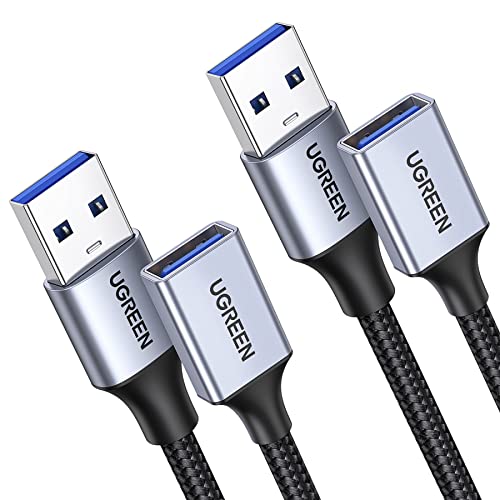
- Includes two 3-foot extension cables
- Up to 5 Gbps data transfer
- Braided, shielded construction
Best For: Multiple laptop workspaces or USB accessories
Compact Speed Pick
3ft USB-A 3.0 Extension Cable, 2-Pack

- Two 3ft USB-A male-to-female cables
- Up to 5Gbps data and 15W charging
- Braided, shielded, and backward compatible
Best For: Nearby laptop peripherals and compact desk setups
Long-Reach Choice
JSAUX 10ft USB 3.0 Extension Cable, 2-Pack

- Two extra-long 10ft cables
- Up to 5Gbps transfer speeds
- Nylon braided with shielded connectors
Best For: Distant webcams, hubs, printers, and other USB devices
Durability-Focused Pick
AINOPE 6.6ft USB 3.0 Extension Cable, 2-Pack

- Two 6.6ft USB-A extension cables
- Up to 5Gbps with charging and syncing
- Reinforced braided design with sticky buckles
Best For: Everyday laptop setups needing organized, durable extra reach
Best with Extra Features
ITANDA 10ft USB 3.0 Extension Cable

- 10-foot reach for flexible laptop setups
- Up to 5Gbps USB 3.0 data transfer
- Braided, reinforced construction
Best For: Long-distance connections to USB-A peripherals
Best for Organized Setups
AINOPE 10ft USB 3.0 Extension Cable

- Includes sticky cable-management buckles
- 10-foot USB-A extension length
- Up to 5Gbps transfer and 2A charging
Best For: Organized laptop desks and webcam setups
Best Multi-Pack Value
4-Pack 6ft USB 3.0 Extension Cables

- Four 6-foot cables in one pack
- Up to 5Gbps USB 3.0 transfer
- Braided cords with gold-plated connectors
Best For: Multiple USB-A peripherals and shared workspaces
Long-Range Performance Pick – Cable Matters 10ft USB 3.0 Extension
For shoppers comparing usb extension cables for laptops, the Cable Matters 10-foot USB 3.0 model stands out when you need extra reach without giving up high-speed transfers. It supports USB 3.0 speeds up to 5 Gbps while remaining backward compatible with USB 2.0 and USB 1.x devices.
Best For: Extending laptop connections to distant peripherals, including hard drives, hubs, printers, and compatible VR headsets.
Pros:
- Long 10-foot length for flexible desk or room setups
- Up to 5 Gbps USB 3.0 data transfer
- Gold-plated connectors, copper conductors, and layered shielding
- Molded strain relief and grip treads support easier handling
Cons:
- USB-A male-to-female design is not a direct USB-C extension
- Longer cable length may be unnecessary for compact setups
This is a strong choice when reach and transfer performance matter equally. Its construction also makes it suitable for frequent connection and disconnection of compatible peripherals.
Durable Everyday Pick – QianLink 3ft Braided USB 3.0 Extension
If you want usb extension cables for laptops that can handle routine office use, the QianLink 3-foot USB 3.0 extender combines a compact length with a nylon-braided jacket. It supports data rates up to 5 Gbps and works with USB 3.0, 2.0, 1.1, and 1.0 devices.
Best For: Everyday laptop setups using webcams, cameras, hubs, keyboards, mice, printers, or hard drives.
Pros:
- Compact 3-foot length helps reduce excess cable clutter
- Up to 5 Gbps transfer speed with backward compatibility
- Nylon-braided exterior and aluminum-alloy connector housing
- Designed to withstand more than 40,000 bend tests
Cons:
- Three feet may not provide enough reach for distant equipment
- USB-A extension design does not directly extend USB-C ports
The QianLink is a practical middle ground for a laptop workspace: short enough to stay manageable but long enough to move a peripheral away from a crowded port. Its reinforced braided construction is appealing for regular handling.
Basic Budget Pick – Amazon Basics 6.5ft USB 2.0 Extension
Amazon Basics USB-A 2.0 Extension Cable, Male to Female, 480Mbps Transfer Speed, 6.5 Foot, Black
Check Price On AmazonFor straightforward laptop connectivity, the Amazon Basics USB-A extension provides 6.5 feet of extra reach and a simple male-to-female design. It supports USB 2.0 transfer speeds up to 480 Mbps and is intended for common peripherals such as printers, cameras, mice, and keyboards.
Best For: Basic USB 2.0 laptop accessories where extended reach matters more than maximum transfer speed.
Pros:
- Useful 6.5-foot extension length
- Gold-plated connectors help resist corrosion
- Shielding helps reduce electromagnetic and radio-frequency interference
- Simple male-to-female plug-and-play format
Cons:
- USB 2.0 is limited to 480 Mbps
- Not the best fit for high-speed external storage or USB 3.0 devices
- USB-A connectors may not suit laptops with USB-C-only ports
This cable makes sense for uncomplicated extensions to slower peripherals. Choose a USB 3.0 model instead if you regularly move large files or need the higher bandwidth of modern USB devices.
Multi-Connection Value Pick – UGREEN 2-Pack 3ft USB 3.0 Extensions
The UGREEN two-pack is a flexible option for shoppers seeking usb extension cables for laptops in more than one workspace. Each 3-foot USB 3.0 male-to-female cable supports up to 5 Gbps data transfer, phone charging up to 2A, and a range of common peripherals.
Best For: Users who want two matching extensions for separate laptop stations or multiple USB accessories.
Pros:
- Two 3-foot cables provide useful setup flexibility
- Up to 5 Gbps data transfer and charging support up to 2A
- Braided shielding and aluminum-alloy connectors improve durability
- Plug-and-play operation requires no driver installation
Cons:
- Three-foot length may be insufficient for distant devices
- USB-A male-to-female format is not a USB-C extension
UGREEN’s two-pack offers particularly good practical value when you need extensions in multiple locations. The combination of USB 3.0 performance, braided construction, and broad peripheral compatibility makes it a versatile everyday choice.
Compact Speed Pick – 3ft USB-A 3.0 Extension Cable, 2-Pack
For laptop users who need a little extra reach, this 3ft pair is a practical choice among USB extension cables for laptops. It supports USB 3.0 transfer speeds up to 5Gbps and combines data transfer with charging up to 15W.
Best For: Extending nearby laptop accessories such as keyboards, mice, flash drives, printers, scanners, and other USB-A peripherals.
Pros:
- Includes two 3ft male-to-female extension cables.
- Supports up to 5Gbps USB 3.0 data transfer and 15W charging.
- Braided sheath, gold-plated connectors, shielding, and reinforced housings support durability and signal stability.
- Backward compatible with USB 2.0 and USB 1.0 devices.
Cons:
- The 3ft length may not provide enough reach for distant or hard-to-access devices.
- Uses USB-A connectors, so it is not a direct USB-C extension.
This pack makes the most sense when your laptop setup needs modest extra cable length rather than a long-distance run. Its USB 3.0 support and two-cable format add flexibility for everyday peripherals.
Long-Reach Choice – JSAUX 10ft USB 3.0 Extension Cable, 2-Pack
If a laptop, dock, or desktop setup needs substantial extra reach, the JSAUX pair stands out among USB extension cables for laptops. Each male-to-female cable is 10ft long and supports USB 3.0 transfer speeds up to 5Gbps.
Best For: Reaching devices positioned across a desk or room, including webcams, cameras, USB hubs, printers, hard drives, keyboards, mice, and gaming accessories.
Pros:
- Includes two 10ft extension cables for maximum reach.
- Supports data transfer speeds up to 5Gbps and backward compatibility with USB 2.0 and USB 1.1.
- Nylon-braided construction, gold-plated connectors, shielding, and molded joints support durability.
- Compatible with computers and a broad range of USB peripherals.
Cons:
- The 10ft length can be excessive for compact laptop workspaces.
- The supplied notes describe data extension but do not specify a charging wattage.
- Uses USB-A connectors rather than USB-C.
This is the stronger fit when distance is the main problem, such as placing a webcam or hub away from a laptop. The two-cable bundle also gives you a spare or lets you extend separate devices at once.
Durability-Focused Pick – AINOPE 6.6ft USB 3.0 Extension Cable, 2-Pack
The AINOPE 6.6ft pair balances added reach with durability, making it a useful option among USB extension cables for laptops. It supports USB 3.0 data syncing, charging, and transfer speeds up to 5Gbps while adding cable-management features.
Best For: Laptop users who want medium-length extensions for hubs, storage devices, input peripherals, cameras, or gaming controllers.
Pros:
- Includes two 6.6ft USB-A male-to-female extension cables.
- Supports USB 3.0 transfer and charging, with backward compatibility for USB 2.0 and USB 1.1.
- Nylon braiding, reinforced joints tested for 400,000-plus bends, and an all-metal connector shell support durability.
- Included sticky buckles help organize excess cable length.
Cons:
- Uses USB-A connectors, so USB-C-only laptop ports require an appropriate adapter or hub.
- The supplied notes list a maximum current of 2A but do not specify a charging standard.
Choose this pack when repeated bending and cable organization matter as much as reach. The 6.6ft length is more versatile than a short extension without being as long as a 10ft cable.
Best with Extra Features – ITANDA 10ft USB 3.0 Extension Cable
If you need usb extension cables for laptops that can reach across a desk or room, this 10-foot USB-A male-to-female cable is a practical option. It supports USB 3.0 transfer speeds up to 5Gbps and works with both newer and older USB peripherals.
Best For: Extending laptop connections to printers, storage drives, game consoles, cameras, keyboards, and other USB-A devices.
Pros:
- Extra-long 10-foot reach for desks, TVs, and hard-to-access ports
- USB 3.0 speeds up to 5Gbps with backward compatibility
- Braided nylon jacket, reinforced joints, and aluminum alloy housing
- Designed to withstand more than 10,000 bends
Cons:
- Uses USB-A connectors rather than USB-C
- A 10-foot cable may be more length than needed for compact setups
Choose this model when reach and physical durability matter most. Its long length and broad USB-A compatibility make it especially useful for laptop setups where peripherals are positioned away from the computer.
Best for Organized Setups – AINOPE 10ft USB 3.0 Extension Cable
For laptop users comparing usb extension cables for laptops, the AINOPE 10-foot extender combines long reach with cable-management features. It supports USB 3.0 data transfer up to 5Gbps, charging up to 2A, and includes sticky buckles to help keep excess cable organized.
Best For: Laptop desks, gaming setups, webcams, surveillance cameras with USB-A ports, and users who want help managing a long cable.
Pros:
- 10-foot length provides flexibility for remote peripherals
- Includes sticky buckles for shortening and organizing the cable
- USB 3.0 transfer speeds up to 5Gbps and charging up to 2A
- Nylon braid, reinforced joint, metal shell, and layered shielding
Cons:
- Designed around USB-A connections, not USB-C ports
- Charging is specified up to 2A, so it is not positioned as a high-power charging cable
This is a strong choice when a long extension cable could otherwise become messy. The included buckles and reinforced construction make it particularly convenient for permanent or semi-permanent laptop workstations.
Best Multi-Pack Value – 4-Pack 6ft USB 3.0 Extension Cables
If you need several usb extension cables for laptops, this four-pack provides four 6-foot USB-A male-to-female extenders. Each cable supports USB 3.0 transfer rates up to 5Gbps, making the pack useful for connecting multiple peripherals without buying separate cables.
Best For: Multi-device laptop desks, offices, gaming areas, and households that need several USB-A extensions.
Pros:
- Four cables included for multiple devices or backup use
- Six-foot length helps reach ports positioned away from a laptop or PC
- Up to 5Gbps USB 3.0 data transfer with USB 2.0 backward compatibility
- Nylon braided construction and gold-plated connectors
Cons:
- Six feet may not provide enough reach for some room-scale setups
- USB-A connectors are not designed for USB-C-only laptops without an adapter
- All four cables in the listed package are black
This pack makes the most sense when you need extensions for several USB-A accessories at once. Its moderate 6-foot length is easier to manage than a 10-foot cable while still offering useful reach for typical laptop and desktop setups.
How We Picked the Best USB Extension Cables for Laptops
We selected these cables based on the specifications most likely to affect everyday laptop use: USB standard, advertised data rate, length, connector format, cable construction, and pack size. The list includes USB-A male-to-female extenders for common peripherals such as keyboards, mice, webcams, printers, game controllers, hubs, and external storage.
USB 3.0 models generally offer substantially faster transfers than USB 2.0 cables, but actual performance also depends on the laptop, accessory, and connected storage device. Braided jackets may improve flexibility and resistance to wear, while longer cables provide more reach but can be less convenient to manage.
Quick Comparison
- Best for long reach: Look for 10-foot options, especially for webcams, desktop accessories, or devices positioned away from the laptop.
- Best for everyday peripherals: A 3- to 6.6-foot USB 3.0 cable offers a useful balance of reach and speed.
- Best for multiple devices: Two- and four-packs are practical for outfitting a home office or keeping spares in different locations.
- Best for basic, low-bandwidth accessories: A USB 2.0 extender can work well for keyboards, mice, and similar devices.
Key Buying Factors for USB Extension Cables for Laptops
Connector and Port Compatibility
Check that the cable has a USB-A male connector on one end and a USB-A female port on the other if you need to extend a standard USB-A accessory. USB-A extension cables do not directly solve a USB-C-only port problem; that setup may require a USB-C adapter or a different cable.
Speed and Power Requirements
For external drives, cameras, and large file transfers, prioritize USB 3.0-rated cables with advertised speeds around 5Gbps. USB 2.0 cables are slower but usually sufficient for input devices. Extension cables can also introduce limitations with power-hungry devices, so confirm the accessory’s power requirements and avoid assuming that a higher data rating guarantees faster charging.
Length and Construction
Choose the shortest cable that comfortably reaches your device. Longer models are useful for flexible placement, but excess cable can create clutter. Braided options may be preferable for frequent repositioning, while a simple PVC cable can be lighter and easier to coil.
Who Should Buy Which USB Extension Cables for Laptops?
Choose a long 10-foot cable if your webcam, controller, printer, or other accessory needs to sit several feet from the laptop. Choose a 3- to 6-foot USB 3.0 model for a desk setup where speed and manageable cable length matter most. Choose a multipack if you use several peripherals or want backup cables for travel and home use. Choose USB 2.0 when the accessory is a keyboard, mouse, or other low-bandwidth device and affordability is the priority.