
Long USB runs can be convenient, but distance, power demand, and connection speed all affect whether a cable works reliably. The best USB extension cables under $50 use active repeaters or signal-boosting chipsets to maintain performance beyond standard cable lengths.
We selected 10 affordable options covering USB 2.0 and USB 3.0 connections, 15- to 50-foot lengths, reinforced designs, and use cases ranging from printers and webcams to VR headsets and charging accessories.
Best 10 USB Extension Cables Under 50 Picks for 2026
Best Shielded USB 2.0 Cable
50ft Active USB 2.0 Extension Cable

- Active repeater supports 480 Mbps
- Triple-layer signal shielding
- Works with Windows, Mac, Linux, and Chrome OS
Best For: Reliable long-distance USB 2.0 data connections
Best Simple 15ft Cable
Monoprice 15ft USB 2.0 Extension

- USB-A male-to-female design
- Gold-plated connectors
- Lifetime warranty
Best For: Basic moderate-length USB-A extensions without active circuitry
Best Long-Reach Pick
BlueRigger 50-Foot Active USB Extension

- 50-foot USB 2.0 male-to-female reach
- Up to 480 Mbps data and 1A charging
- CL3-rated for in-wall installations
Best For: Long USB runs with data and light charging needs
Best Classroom Setup
Braided 50-Foot USB 2.0 Extension

- 50-foot reach for lectern and desk connections
- 480 Mbps USB 2.0 data support
- Braided, multi-layer shielded construction
Best For: Low-current classroom and office peripherals
Best Signal-Focused Pick
LDKCOK 50-Foot USB Repeater Cable

- Built-in USB 2.0 signal booster
- 480 Mbps data transfer support
- Triple-shielded cable for interference resistance
Best For: Long-distance data connections to low-current peripherals
Long-Run USB 3.0 Pick
MutecPower 50-Foot Active Extension
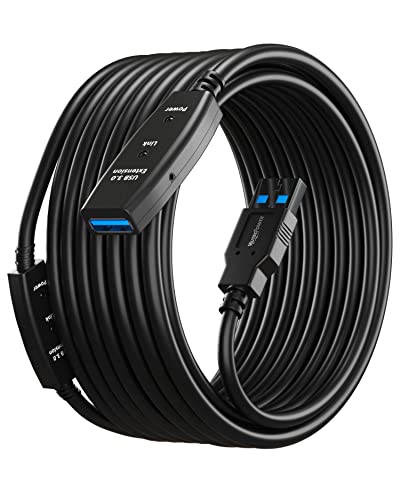
- Active USB 3.0 repeater design
- Supports USB 3.0 and USB 2.0 devices
- AC power supply included
Best For: Long-distance peripheral connections
Best Long-Range Speed – 50ft USB 3.0 Active Extension Cable
For shoppers comparing USB extension cables under 50, this 50-foot USB 3.0 active cable is a strong option when you need extended reach plus faster data transfer. Its two signal boosters support speeds up to 5 Gbps and maintain backward compatibility with USB 2.0 and 1.1 devices.
Best For: Extending connections to VR headsets, printers, webcams, storage devices, gaming consoles, and other USB peripherals over long indoor or outdoor runs.
Pros:
- Supports USB 3.0 transfer rates up to 5 Gbps.
- Two signal amplifiers help reduce attenuation across the 50-foot length.
- Plug-and-play design requires no driver installation.
- Shielding and tinned copper conductors support stable, error-free transmission.
Cons:
- USB Type-A connectors limit compatibility with devices using other connector types.
- Designed for indoor use according to the recommended product use, despite an outdoor-usage listing.
This is the most capable choice here for users who need long-distance USB 3.0 performance. The 12-month warranty adds some reassurance for a cable intended for demanding extended setups.
Best Powered Option – 50ft USB 2.0 Active Extension Cable
Among USB extension cables under 50, this 50-foot USB 2.0 active model stands out for including an AC power adapter. The extra power option can help support longer cable runs or devices that require more power, while the repeater chipset maintains data speeds up to 480 Mbps.
Best For: Printers, scanners, cameras, gaming consoles, keyboards, mice, and other USB peripherals that may benefit from supplemental power over a long run.
Pros:
- Includes an AC power adapter and built-in LED power indicator.
- Signal amplifier supports stable USB 2.0 speeds up to 480 Mbps.
- Uses 22AWG power wire, shielding, and gold-plated connectors.
- Includes five cable ties and a two-year warranty.
Cons:
- USB 2.0 is slower than the USB 3.0 alternative.
- Not designed for extending video signals or charging devices.
- The included power adapter may add extra setup clutter.
The included adapter makes this a practical pick when a standard long USB cable may not provide enough power. It is better suited to data-connected peripherals than charging or video applications.
Best Shielded USB 2.0 Cable – 50ft Active USB 2.0 Extension Cable
This 50-foot active USB 2.0 cable is a sensible choice among USB extension cables under 50 when dependable data transmission matters more than USB 3.0 speed. Its repeater technology supports up to 480 Mbps, while triple-layer shielding helps protect the signal from interference.
Best For: Extending connections to printers, scanners, keyboards, mice, security cameras, gaming consoles, and other standard USB 2.0 data devices.
Pros:
- Active repeater technology supports stable 480 Mbps transmission.
- Triple-layer shielding helps reduce electromagnetic interference.
- Compatible with Windows, Mac, Linux, and Chrome OS.
- Flexible jacket and gold-plated connectors are designed for regular use.
Cons:
- Not intended for charging or high-power devices.
- USB 2.0 speeds are limited to 480 Mbps.
- Listed for indoor usage.
Choose this model when signal integrity and broad computer-platform compatibility are priorities. Its active design is appropriate for long data connections, but users needing charging support or USB 3.0 performance should consider another option.
Best Simple 15ft Cable – Monoprice 15ft USB 2.0 Extension
For shoppers seeking USB extension cables under 50 without active electronics, this 15-foot Monoprice USB 2.0 cable offers a straightforward way to add reach. It uses USB-A male-to-female connectors, gold plating, and separate 28AWG data and 24AWG power conductors.
Best For: Extending a USB cable or a fixed USB-A device, such as an AC adapter, when a moderate 15-foot reach is sufficient.
Pros:
- Simple plug-and-play USB 2.0 extension design.
- Gold-plated connectors help provide corrosion-free connections.
- 24AWG power conductors support the cable’s power lines.
- Backed by a lifetime warranty.
Cons:
- USB 2.0 transfer speed is limited to 480 Mbps.
- Shorter than the 50-foot active alternatives.
- No built-in signal booster is included.
This is the uncomplicated choice for shorter extensions where active amplification is unnecessary. Its 15-foot length and lifetime warranty make it especially suitable for basic indoor setups and fixed USB-A equipment.
Best Long-Reach Pick – BlueRigger 50-Foot Active USB Extension
If you need usb extension cables under 50 for a distant peripheral, this 50-foot BlueRigger USB 2.0 cable provides a long male-to-female connection for compatible devices. It supports data transfer up to 480 Mbps and charging up to 5V/1A, making it more versatile than data-only alternatives.
Best For: Extending USB connections to VR headsets, game consoles, printers, scanners, webcams, keyboards, mice, and other compatible peripherals.
Pros:
- 50-foot reach helps place devices away from a computer or hard-to-reach USB port.
- Supports USB 2.0 data speeds up to 480 Mbps and charging up to 5V/1A.
- CL3-rated, shielded construction is suitable for in-wall installations.
- Backed by a lifetime warranty and US-based customer support.
Cons:
- USB 2.0 performance is slower than newer USB standards.
- Charging is limited to up to 1A.
- Its 50-foot length may be excessive for compact setups.
The BlueRigger stands out when reach and installation flexibility matter. Its support for both charging and data, broad device compatibility, and in-wall rating make it a practical all-around choice for longer indoor USB runs.
Best Classroom Setup – Braided 50-Foot USB 2.0 Extension
Among usb extension cables under 50, this braided 50-foot USB 2.0 model is designed for extending one low-current data connection. It supports up to 480 Mbps and uses layered shielding to help reduce interference, but it is not intended for charging.
Best For: Classroom lecterns, control desks, and low-current peripherals such as keyboards, mice, flash drives, card readers, printers, and scanners.
Pros:
- 50-foot cable provides convenient reach between a computer and a lectern or nearby desk.
- Supports USB 2.0 data transfer speeds up to 480 Mbps.
- Braided construction with foil, braid, and ground shielding helps reduce EMI/RFI interference.
- Compatible with Windows, macOS, Linux, and Chrome OS systems.
Cons:
- Not for charging devices.
- Limited to one compatible low-current peripheral.
- Not recommended for cameras, DVRs, bus-powered hard drives, or higher-current devices.
This cable is a focused data-extension solution rather than a general-purpose charging cable. Its braided, shielded design makes it a sensible option for organized classroom or office connections when the attached device has modest power requirements.
Best Signal-Focused Pick – LDKCOK 50-Foot USB Repeater Cable
LDKCOK USB 2.0 Type A Male to A Female Active Repeater Extension Cable 50ft, High Speed 480 Mbps
Check Price On Amazon
LDKCOK USB 2.0 Type A Male to A Female Active Repeater Extension Cable 50ft, High Speed 480 Mbps
Check Price On AmazonFor shoppers comparing usb extension cables under 50, this 50-foot active repeater cable uses a built-in signal booster to extend USB 2.0 connections up to 480 Mbps. Its design is aimed at low-current peripherals and data transfer, not device charging.
Best For: Extending connections to printers, scanners, keyboards, mice, flash drives, card readers, wireless adapters, and other compatible USB peripherals.
Pros:
- Active repeater circuitry helps maintain USB 2.0 signal quality across the 50-foot length.
- Supports data transfer speeds up to 480 Mbps.
- Triple shielding and a tin-plated copper core help resist interference.
- Gold-plated connectors and a flexible, abrasion-resistant outer design support regular use.
Cons:
- Cannot be used for charging devices.
- Not suitable for DVRs, cameras on longer configurations, or devices requiring more current.
- Designed for indoor or outdoor use, but the supplied notes do not specify weatherproofing.
The LDKCOK is a strong fit when stable long-distance USB 2.0 data connectivity is the priority. Its repeater chipset and triple shielding are useful for low-current peripherals, provided you stay within its stated power limitations.
Long-Run USB 3.0 Pick – MutecPower 50-Foot Active Extension
For shoppers comparing usb extension cables under 50, this MutecPower model is a strong choice when you need a 50-foot reach for USB 3.0 peripherals. Its active repeater design supports USB 3.0 and USB 2.0 devices, including hard drives, hubs, printers, cameras, mice, and keyboards.
Best For: Extending USB connections to high-speed peripherals across a large room or workspace.
Pros:
- USB 3.0 support with claimed transfer speeds up to 5 Gbps.
- Dual-bus architecture maintains compatibility with USB 2.0 devices.
- Includes two extension chipsets and an AC power supply for long-distance signal support.
- Gold-plated connectors, copper conductors, shielding, and molded strain relief support durability.
Cons:
- Designed for extending peripheral connections rather than charging high-power devices.
- The 50-foot length may be excessive for compact desk setups.
Choose this cable when data performance and maximum reach matter more than portability. The included power supply and active circuitry make it particularly practical for long runs to USB peripherals.
Most Versatile Active Cable – 50-Foot USB 3.0 Extension with USB-C Port
Among usb extension cables under 50, this 50-foot active USB 3.0 cord stands out for combining long-distance data extension with a side USB-C charging port. It is intended for devices such as webcams, game consoles, printers, cameras, hubs, flash drives, and hard drives.
Best For: Users who want long USB 3.0 reach plus a convenient USB-C charging option.
Pros:
- Supports USB 3.0 data transfer up to a claimed 5 Gbps and backward compatibility with USB 2.0, 1.1, and 1.0.
- Built-in two-chipset signal booster helps support remote connections.
- Side 5V USB-C port supports charging USB-C devices.
- Braided shielding and aluminum alloy, gold-plated connectors are designed for durability and signal clarity.
Cons:
- Charging is listed at up to 2A, so it is not intended as a high-power charging solution.
- At 50 feet, it may be more cable than a typical desktop setup needs.
This is the most feature-rich option of the three for mixed setups. Its USB-C charging port adds flexibility, while active USB 3.0 extension keeps it suited to data-heavy peripherals.
Budget Long-Reach Option – 50-Foot Active USB 2.0 Repeater
If you need usb extension cables under 50 for basic peripherals, this 50-foot USB 2.0 repeater cable focuses on dependable reach and compatibility. Its built-in signal booster supports connections to keyboards, mice, webcams, printers, cameras, storage devices, controllers, and other USB peripherals.
Best For: Extending standard USB devices where 480 Mbps is sufficient and charging is not required.
Pros:
- Active repeater design supports a 50-foot connection with up to 480 Mbps data transfer.
- Compatible with a broad range of computers and USB peripherals.
- Five-layer shielding, pure copper conductors, and a reinforced jacket help reduce interference and improve durability.
- Gold-plated connectors and an all-metal aluminum alloy shell support signal clarity and wear resistance.
Cons:
- USB 2.0 speeds are substantially lower than USB 3.0 alternatives.
- Cannot be used to charge devices.
- Best suited to indoor use.
This cable makes sense when your priority is affordable long-distance connectivity for everyday USB accessories. For external drives or other speed-sensitive devices, a USB 3.0 model would be the better fit.
How We Picked the Best USB Extension Cables Under 50
We focused on cables that offer practical value for long-distance USB connections rather than judging them by length alone. Our selection includes active repeater models with built-in signal boosters, standard passive extensions for shorter runs, and USB 2.0 and USB 3.0 options for different speed requirements.
We also considered connector type, advertised transfer rate, construction, power support, compatibility, and the likely needs of common setups. Product claims should still be checked against your computer, peripheral, and operating system because performance can vary by device.
Quick Comparison
| Type | Best For | Typical Strength | Potential Limitation |
|---|---|---|---|
| USB 2.0 active | Printers, keyboards, mice, and basic webcams | Affordable long-distance connectivity | Up to 480Mbps theoretical speed |
| USB 3.0 active | VR accessories, storage, and faster peripherals | Higher bandwidth than USB 2.0 | More dependent on device and port compatibility |
| Passive USB extension | Shorter cable runs | Simple, low-cost installation | Less suitable for very long distances |
| Braided or reinforced cable | Frequent handling or exposed setups | Improved physical durability | May be less flexible |
Key Buying Factors for USB Extension Cables Under $50
USB Version and Speed
USB 2.0 supports up to 480Mbps under ideal conditions and is usually sufficient for printers, input devices, and many basic cameras. Choose USB 3.0 when you need faster data transfer or are connecting compatible storage, cameras, or VR equipment. The entire connection—including the computer port and peripheral—must support the claimed standard.
Active Repeater Versus Passive Cable
For a 50-foot run, an active cable is generally the safer choice. Its repeater or signal-boosting chipset helps compensate for signal loss over distance. Passive cables can work well for shorter extensions, but they are less predictable as length increases.
Power and Charging
USB data transfer and USB charging are not identical. A cable may connect a device successfully without delivering enough power for fast charging or demanding peripherals. Check current ratings, included power connectors, or USB-C charging ports when power delivery is important.
Connector and Compatibility
Most products here use USB-A male-to-female connectors. Confirm that your computer, hub, and peripheral use the required USB-A or USB-C connection. For specialized devices such as VR headsets, verify compatibility and bandwidth requirements before buying.
Build Quality and Placement
Braided jackets, strain relief, and gold-plated connectors can improve durability or corrosion resistance, but they do not automatically guarantee better speed. Measure the route first, allow some slack, and avoid sharp bends or high-traffic areas.
Who Should Buy Which USB Extension Cables Under 50?
Choose a USB 2.0 active extension for affordable, dependable connections to printers, keyboards, mice, and basic webcams. A USB 3.0 active model is the better fit for compatible high-bandwidth devices, including some VR and storage setups. Select a shorter passive Monoprice-style cable when the run is modest and simplicity matters more than maximum distance. For frequently moved or exposed installations, a braided cable can offer useful added protection.