
A good KVM extender lets you keep a gaming PC in one room while using its display, keyboard, and mouse from another. The right model can preserve sharp 4K detail, high refresh rates, and responsive USB control without forcing your setup to stay near the computer.
This roundup compares 10 KVM extenders across short- and long-distance installations, including copper Ethernet, fiber optic, 4K, HDR, high-refresh, and 1080p options. Use the buying guide below to match bandwidth, range, cabling, and gaming requirements.
Best 10 Kvm Extenders for Gaming Setups Picks for 2026
Best High-Refresh Pick

- 1080p at 240Hz and 2K at 144Hz
- 4K at 60Hz with 4:4:4 color
- Four USB ports with one-way PoC
Best For: Competitive gaming setups with a remote PC
Best Compact 230ft Option
- 4K at 60Hz up to 230 feet
- HDR, Dolby Vision, and HDCP 2.2 support
- USB KVM and HDMI loop-out
Best For: Long-distance 4K gaming and media rooms
Best Long-Range Cat6 Pick

- 4K at 60Hz across 100m
- 1080p at 120Hz support
- Four USB ports plus RS232 and audio
Best For: Large rooms and long Cat6 installations
Best Fiber Distance

- Up to 10km over single-mode fiber
- Uncompressed 4K at 60Hz and 4:4:4
- HDR, Dolby Vision, and HDMI loop-out
Best For: Professional and ultra-long-distance installations
Best Overall

- 4K at 30Hz and 1080p at 120Hz
- 390-foot HDMI, audio, and USB extension
- Three USB ports plus network-based deployment
Best For: Long-distance gaming setups with remote peripherals
Best Budget-Friendly 1080p Pick

- 1080p at 60Hz over distances up to 400 feet
- HDMI loop-out for local monitoring
- USB 1.1 keyboard and mouse support
Best For: Simple 1080p gaming and home theater runs
Best 4K60 Option
AV Access 4K60 HDMI KVM Extender
- 4K at 60Hz with 4:4:4 color and HDR10
- 230-foot extension over Cat6/6A/7
- Single-adapter PoC and multichannel audio
Best For: 4K/60Hz gaming and compact AV installations
Compact 50m Control
- 1080p at 60Hz
- Up to 50m over Cat6/7
- Keyboard and mouse control
Best For: Simple Full HD gaming and PC extensions
Long-Range Metal Build
- 1080p at 60Hz up to 80m
- Two USB 2.0 ports
- Metal enclosure with PoE
Best For: Long-distance Full HD gaming and PC control
Gaming-Room Flexibility
50m HDMI KVM Extender with Loop-Out

- 1080p at 60Hz and 3D
- Dual USB 2.0 ports
- HDMI loop-out included
Best For: Relocating a Full HD gaming rig or media PC
Best High-Refresh Pick – 50m 4K Gaming KVM Extender
For gaming setups that need a remote PC without giving up responsive gameplay, this AV Access extender combines 50m reach with 4K at 60Hz, 1080p at 240Hz, and 2K at 144Hz support. It also provides full keyboard-and-mouse control through four USB device ports.
Best For: Competitive gaming desks, quiet home offices, and setups needing high refresh rates over a moderate distance.
Pros:
- Supports 1080p at 240Hz and 2K at 144Hz for smooth high-frame-rate gaming.
- Delivers 4K at 60Hz with 4:4:4 color and visually lossless compression.
- Offers four USB ports, audio de-embedding, EDID control, and one-way PoC.
Cons:
- USB connectivity is USB 2.0 rather than a faster standard.
- The maximum extension distance is 50m, shorter than some professional alternatives.
This is one of the most gaming-focused kvm extenders for gaming setups in the group, particularly if high refresh rates matter more than maximum range. Its 50m limit and USB 2.0 ports are the main trade-offs.
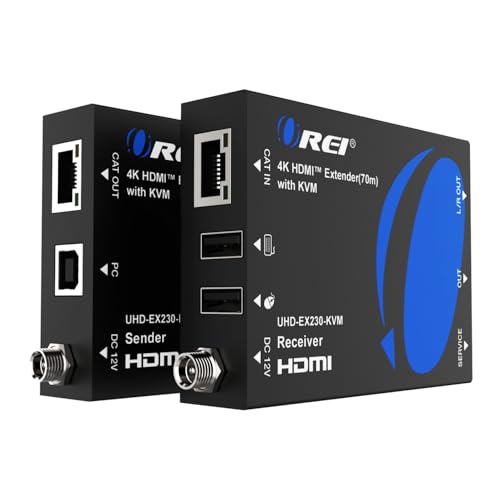
Best Compact 230ft Option – OREI 4K KVM Over Ethernet
This OREI extender is a practical choice for kvm extenders for gaming setups when you need 4K at 60Hz across a longer room or building connection. It runs over Cat6 or Cat7 cable, adds USB keyboard-and-mouse control, and includes a transmitter HDMI loop-out for a local display.
Best For: Gamers wanting long-distance 4K extension, HDR compatibility, and a local-monitor connection.
Pros:
- Extends 4K at 60Hz up to 230 feet over Cat6 or Cat7 cable.
- Supports HDR formats including HDR10, HDR10+, Dolby Vision, and HLG.
- Includes USB KVM control, HDMI loop-out, analog audio output, and EDID pass-through.
Cons:
- The supplied notes specify USB KVM Extension 1.1, limiting it to basic peripheral control.
- Unlike the first model, no high-refresh 1080p or 2K gaming rates are listed.
Choose this model when distance, HDR support, and a clean plug-and-play installation are priorities. It is less clearly aimed at high-refresh competitive play, but its 230-foot range and loop-out are useful for flexible gaming and media rooms.
Best Long-Range Cat6 Pick – AV Access 100m KVM Extender
For kvm extenders for gaming setups that need maximum copper-cable reach, this AV Access model sends 4K video up to 100m over one Cat6, Cat6a, or Cat7 cable. Its four USB ports support remote keyboard, mouse, storage, camera, and other peripherals.
Best For: Large gaming rooms, rack-mounted PCs, offices, and installations requiring up to 330 feet of reach.
Pros:
- Provides 4K at 60Hz up to 100m/330ft over a single network cable.
- Supports 1080p at 120Hz for smoother motion than standard 60Hz output.
- Includes four USB ports, RS232, analog stereo audio, EDID control, and PoH.
Cons:
- The listed 4K mode uses 4:2:0 color rather than 4:4:4.
- The supplied notes do not list 144Hz or 240Hz gaming support.
This is the strongest fit when cable distance is the deciding factor. It offers useful gaming performance at 1080p and reliable 4K extension, while its professional control and audio features may be more than a simple desk setup needs.
Best Fiber Distance – OREI 10km 4K KVM Extender
When ordinary Ethernet cabling is not enough, this fiber-based option extends HDMI and USB KVM signals up to 10km over single-mode fiber. For demanding kvm extenders for gaming setups, it combines uncompressed 4K at 60Hz, 4:4:4 color, and zero-latency transmission with a transmitter HDMI loop-out.
Best For: Professional gaming venues, control rooms, broadcast environments, and installations spanning multiple buildings or very long distances.
Pros:
- Reaches up to 10km over single-mode fiber and up to 300m over OM4 multimode fiber.
- Supports uncompressed 4K at 60Hz with 4:4:4 color and up to 18Gbps bandwidth.
- Offers HDR, HDR10+, Dolby Vision, USB KVM, HDMI loop-out, and advanced audio support.
Cons:
- Fiber infrastructure and 10G SFP+ connections are more specialized than Cat6 cabling.
- The supplied notes list USB KVM Extension 1.1 rather than a higher-speed USB standard.
This is the specialist choice for extreme distances and uncompromised 4K image transmission. It is likely excessive for a typical home gaming desk, but its fiber range and professional-grade video support stand out for large-scale installations.
Best Overall – AV Access 4K KVM Extender
For demanding gaming setups, the AV Access 4K HDMI USB KVM Extender combines long-distance video transmission with remote keyboard, mouse, and peripheral control. It sends signals up to 390 feet over a single Cat5e/6/6a/7 cable and can also operate through an existing IP network.
Best For: Gamers who want to place a PC or console away from the display while retaining access to USB peripherals and higher-refresh 1080p gameplay.
Pros:
- Supports 4K at 30Hz and 1080p at 120Hz.
- Extends HDMI, audio, and USB signals up to 390 feet.
- Receiver includes three USB 2.0 ports for peripherals such as gamepads and flash drives.
- Supports up to 16 paired extender sets on the same network.
Cons:
- 4K output is limited to 30Hz.
- Network-based installation may require a Gigabit switch for stable high-bandwidth transmission.
This is the most flexible option of the group for a centralized gaming or workstation arrangement. Its 1080p/120Hz support, controller compatibility, and long reach make it especially practical when smooth gameplay matters more than 4K/60Hz output.
Best Budget-Friendly 1080p Pick – VPFET HDMI KVM Extender
The VPFET HDMI KVM USB Extender is a straightforward choice for 1080p gaming setups that need up to 400 feet of reach over Cat5e/6/7 cabling. It includes HDMI loop-out monitoring and plug-and-play keyboard and mouse control, though its USB support is limited.
Best For: Basic 1080p gaming or home theater installations using a standard keyboard and mouse over a long Ethernet run.
Pros:
- Extends 1080p video up to 400 feet at 60Hz.
- Includes an HDMI loop-out function for local monitoring.
- Provides status indicators and a reset button for easier troubleshooting.
- Compatible with Windows, Mac OS, and Linux systems listed by the manufacturer.
Cons:
- USB 1.1 supports standard keyboards and mice but not gaming peripherals or switches.
- Both the transmitter and receiver require power.
- Requires an IEEE-568B-wired UTP cable.
This model works best when the goal is dependable 1080p extension rather than advanced gaming-peripheral support. The loop-out feature is useful for checking the local signal, but players using specialized controllers or USB accessories should consider a more capable KVM extender.
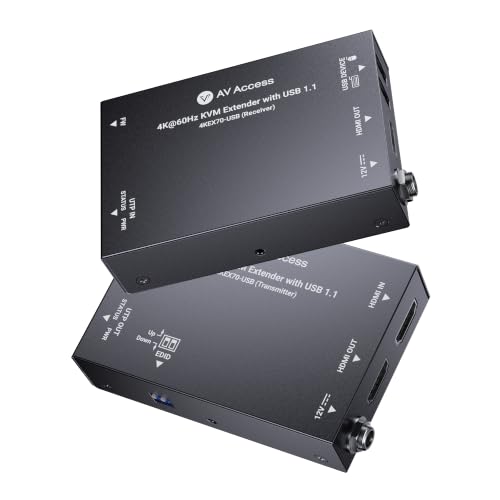
Best 4K60 Option – AV Access 4K60 HDMI KVM Extender
For gaming setups where 4K/60Hz clarity is the priority, this AV Access extender sends 4K HDMI video and USB keyboard-and-mouse signals up to 230 feet over Cat6/6A/7 cable. HDR10 support, 4:4:4 color, and HDCP 2.3 make it suited to modern displays and media hardware.
Best For: 4K gaming and AV installations that need sharp 60Hz video with a compact, installer-friendly connection.
Pros:
- Supports 4K at 60Hz with 4:4:4 chroma and HDR10.
- Extends video and USB control up to 230 feet.
- Bi-directional PoC can power both units with one adapter.
- Passes Dolby Atmos, DTS:X, and PCM 7.1 audio.
Cons:
- USB support is limited to 1.1 keyboard and mouse signals.
- Its 230-foot range is shorter than the other two options.
- Gaming controllers and other USB peripherals are not specified as supported.
This is the strongest fit for a 4K/60Hz display chain, particularly when clean installation and simplified power are important. Its USB feature set is basic, so it is better for keyboard-and-mouse control than for a full collection of gaming accessories.
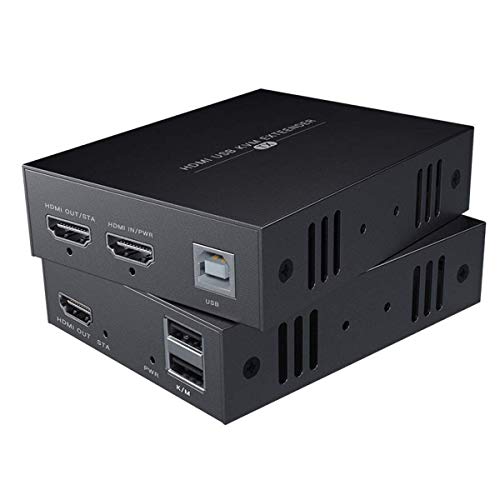
Compact 50m Control – 1080p HDMI KVM Extender
For gaming setups that need a remote screen and USB control, this HDMI KVM extender sends 1080p video and keyboard/mouse signals over Cat5e, Cat6, or Cat7 cable. It reaches up to 50m with Cat6/7 and uses a straightforward transmitter-and-receiver connection.
Best For: Gamers and PC users extending a 1080p display and basic keyboard/mouse control to another room or desk.
Pros:
- Supports 1080p at 60Hz for Full HD gaming and desktop use.
- Extends HDMI and USB KVM signals up to 50m over Cat6/7.
- Works with Windows, Mac, and Linux systems.
Cons:
- Its 50m maximum is shorter than some longer-range KVM extenders.
- The notes recommend Cat6 or Cat7 for better distance and signal quality.
This is a sensible pick for a simple Full HD gaming setup where dependable remote keyboard and mouse control matters more than higher resolutions or advanced features.
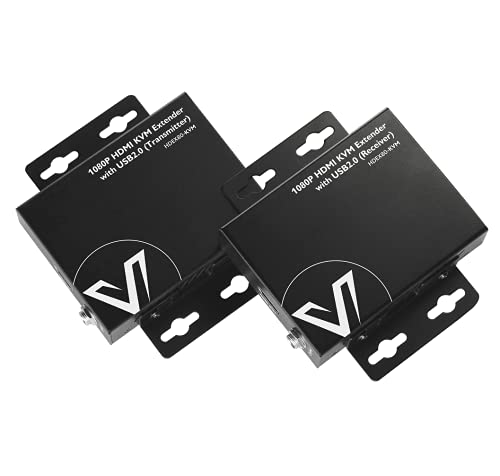
Long-Range Metal Build – AV Access 80m HDMI KVM
This AV Access model is one of the more practical kvm extenders for gaming setups that span a room or building. It carries 1080p at 60Hz and USB signals up to 80m over a single Cat5e, Cat6, Cat6a, or Cat7 cable, with plug-and-play operation.
Best For: Long-distance gaming PCs, NVRs, or consoles that need remote 1080p display and keyboard/mouse access.
Pros:
- Extends 1080p at 60Hz and USB signals up to 80m.
- Two USB 2.0 ports support remote keyboard and mouse control.
- Metal casing helps with durability, heat dissipation, and EMI/RFI reduction.
- Two-way PoE can allow one power supply at either side.
Cons:
- It is limited to 1080p rather than higher-resolution gaming output.
- The recommended receiver-side power arrangement may require planning around the installation.
Choose this extender when cable length and a sturdy enclosure are priorities. Its 80m reach gives it more placement flexibility than shorter-range alternatives while retaining simple, driver-free setup.
Gaming-Room Flexibility – 50m HDMI KVM Extender with Loop-Out
For gaming setups that hide a noisy PC or place a display in another room, this 50m HDMI KVM extender carries 1080p at 60Hz plus keyboard and mouse signals over Cat5e/6/7. It also includes HDMI loop-out and a plug-and-play design for quick installation.
Best For: Gamers, streamers, and home theater users relocating a Full HD gaming rig while keeping local USB control.
Pros:
- Supports 1080p at 60Hz and 3D video with claimed zero-latency operation.
- Dual USB 2.0 ports allow remote keyboard and mouse use.
- HDMI loop-out can support a local display connection.
- Compatible with Windows, macOS, and Linux, with a USB cable included.
Cons:
- The supplied guidance recommends careful power planning for longer runs.
- Wired or 2.4GHz peripherals are recommended instead of 5.8GHz wireless devices.
- It supports Full HD rather than 1440p or 4K output.
This model stands out for flexible gaming-room layouts: HDMI loop-out and dual USB ports make it useful when you want remote play without giving up local display or peripheral access.
How We Picked the Best Kvm Extenders for Gaming Setups
We evaluated these extenders by the features that matter most in a gaming installation: supported resolution and refresh rate, maximum transmission distance, USB keyboard-and-mouse functionality, cable compatibility, video reliability, and setup flexibility. We also considered practical extras such as loop-out ports, HDR support, HDCP compatibility, power over cable, and fiber connectivity.
Distance ratings are maximum claims and can vary with cable quality, termination, interference, and network hardware. For demanding gaming signals, use the recommended cable category and avoid assuming that any Ethernet switch will pass an HDMI KVM signal unless the product specifically supports networked operation.
Quick Comparison
- Best for competitive gaming: Choose a model rated for 1080p at 240Hz or 1440p at 144Hz.
- Best for modern 4K gaming: Look for 4K at 60Hz with 4:4:4 chroma and HDR support.
- Best for long cable runs: Fiber models offer substantially greater reach and resistance to electrical interference.
- Best for standard office-style gaming: A 1080p at 60Hz extender is usually the simplest and most affordable choice.
- Best for flexible installations: Models with loop-out ports let you keep a local monitor connected at the source.
Key Buying Factors for Kvm Extenders for Gaming Setups
Resolution, Refresh Rate, and Chroma
Match the extender to the signal you actually play. A 4K 60Hz model suits visually focused single-player games, while high-refresh 1080p or 1440p support is more important for competitive play. Confirm whether the advertised mode uses full 4:4:4 chroma, especially if you also use the display for desktop text.
Range and Cable Type
Cat5e, Cat6, Cat6A, and Cat7 models are convenient for runs up to roughly 50–120 meters, depending on the product. Use high-quality solid-core cable for permanent installations. Fiber is the better choice for very long distances, electrically noisy environments, or links between buildings, but it may require more careful handling and compatible fiber hardware.
USB and Signal Requirements
Check whether the USB connection supports only keyboard and mouse control or also slower peripherals such as storage devices. Confirm the required USB type, power adapters, HDCP version, audio support, and whether the transmitter and receiver need a direct cable, dedicated network, or managed network configuration.
Who Should Buy Which Kvm Extenders for Gaming Setups?
Competitive players should prioritize high-refresh support and low-latency operation over maximum resolution. 4K console and PC gamers should select a 4K 60Hz model with suitable chroma and HDR support. Remote-room users should choose a longer-range Cat6/Cat6A extender or fiber option based on the actual cable path. Budget buyers and older systems can save money with a 1080p 60Hz unit. Finally, streamers and multi-display users should look for loop-out functionality, while anyone crossing long or electrically noisy routes should favor fiber for a more robust link.