
ACEMAGIC K1 Mini PC review is about fit, not novelty.
If you want a compact Windows desktop with wired networking, modern USB-C, and support for multiple monitors, this is a sensible candidate.
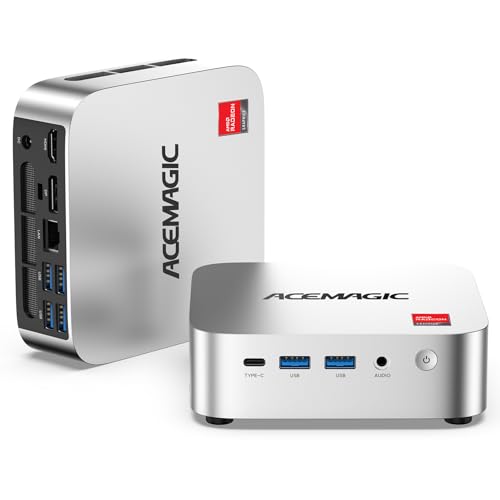
K1 Mini PC Review Summary
The ACEMAGIC K1 Mini PC makes the most sense for buyers who want a small, practical Windows 11 Pro machine for office work, browsing, media playback, and light multitasking.
Its strongest appeal is the combination of a Ryzen R2544 processor, triple 4K display support, and expansion-friendly hardware in a chassis that should disappear on a desk, behind a monitor, or inside a small office setup.
Verdict: this is a utility-first mini PC.
It is not positioned as a gaming tower or creator workstation, but it does have enough modern connectivity and display flexibility to serve well in a home office, shared workstation, or compact media setup.
Review Scorecard
| Category | Score | Buyer-focused rationale |
|---|---|---|
| Everyday productivity | 8/10 | The Ryzen 4-core/8-thread design is aimed at office apps, browsing, online learning, and general multitasking. |
| Display flexibility | 9/10 | Three 4K outputs through HDMI, DisplayPort, and USB-C are a major strength for multi-monitor users. |
| Connectivity | 8/10 | USB-C 10Gbps, six USB 3.2 ports, Gigabit Ethernet, WiFi 5, and Bluetooth 4.2 cover most desk setups. |
| Upgrade potential | 8/10 | Dual DDR4 slots and expandable storage make it easier to grow beyond the base configuration. |
| Home server potential | 7/10 | Wake-on-LAN, RTC Wake, and Auto Power On are useful for NAS-style or always-on scenarios. |
| Value for small spaces | 9/10 | The mini PC form factor is the main advantage for buyers prioritizing space savings and tidy cabling. |
| Heavy-work suitability | 5/10 | The listing supports light content creation and multitasking, but this is still a compact mainstream system. |
Key Features and Specifications of K1 Mini PC
The K1 Mini PC is built around an AMD Ryzen R2544 processor with 4 cores and 8 threads, a base clock of 3.35GHz, and boost speeds up to 3.7GHz.
The listing positions it for office productivity, web browsing, online learning, media playback, and light content creation.
The graphics side uses integrated AMD Radeon Graphics, and the listing emphasizes smoother visuals for office work, entertainment, and light graphics tasks.
That matters more than raw speed claims because the audience here is likely to care about practical responsiveness, not benchmark bragging rights.
Core hardware and connectivity highlights:
| Spec | What it means for buyers |
|---|---|
| 8GB DDR4 RAM | Enough for light daily multitasking, though heavier browser sessions will benefit from an upgrade. |
| 256GB M.2 SSD | Fast boot and app loading, with room to expand for users who keep lots of files locally. |
| Dual DDR4 SO-DIMM slots | Lets buyers increase memory up to 32GB, which is useful if the machine becomes a primary desktop. |
| Storage expansion up to 4TB | Makes the K1 more adaptable for file storage, media libraries, or a small shared workstation. |
| USB-C Gen 2 | Adds 10Gbps transfer speed, DP 1.4 video output, and PD power delivery support. |
| 6x USB 3.2 ports | Helpful for peripherals, external storage, adapters, and office accessories. |
| HDMI 2.0 + DP 1.4 + USB-C display output | Supports up to three 4K monitors for productivity-heavy workflows. |
| Gigabit Ethernet | Important for stable wired networking, especially in office and server-style setups. |
| WiFi 5 and Bluetooth 4.2 | Covers wireless networking and peripheral pairing without needing extra dongles. |
| Auto Power On, RTC Wake, Wake-on-LAN | Useful for unattended systems, remote access, and home server scenarios. |
| Upgraded cooling design | The listing describes a 2000+ RPM fan, aluminum profile, and dual air outlets for stable daily use. |
The configuration is straightforward: a compact Windows 11 Pro mini computer with enough baseline capacity for everyday use, plus room to expand if the system becomes more central to your work.
That is a strong practical combination, even if the base 8GB/256GB setup is modest.
Pros and Cons of K1 Mini PC
Pros
- Strong monitor support for a compact machine, including up to three 4K displays.
- Useful modern ports, especially USB-C 10Gbps and multiple USB 3.2 connections.
- Upgradeable design with dual memory slots and expandable storage.
- Good fit for small offices because it covers core productivity needs without taking up space.
- Server-friendly features like Wake-on-LAN and Auto Power On add flexibility.
Cons
- Base memory is limited at 8GB for buyers who keep many apps and browser tabs open.
- Storage starts modestly at 256GB, so local file hoarders may want an upgrade early.
- WiFi 5 and Bluetooth 4.2 are serviceable, but not cutting-edge.
- Not built for demanding creative work or high-end gaming based on the listing focus.
Who Should Buy K1 Mini PC?
This mini PC is a good match for buyers who want a small Windows desktop with real workstation convenience.
It fits office users, remote workers, students, and home users who care about a tidy desk, multiple displays, and dependable everyday responsiveness.
It also makes sense for light server or always-on roles where Gigabit Ethernet, Wake-on-LAN, Auto Power On, and RTC Wake matter more than premium graphics power.
If the goal is a compact NAS-style box, a firewall appliance, or a digital signage player, the feature set is unusually practical for the size.
You should probably skip it if you want sustained heavy rendering, demanding gaming, or a system that feels overbuilt from day one.
The base configuration is fine for daily use, but users with large media libraries, many virtual desktops, or heavier multitasking habits will want to budget for upgrades.
Performance and Use Cases of K1 Mini PC
Office and Browsing Workloads
For office documents, email, spreadsheets, video calls, and general browser use, the Ryzen R2544 and SSD-backed setup should feel responsive enough for typical day-to-day work.
The listing’s focus on productivity is credible because the hardware targets exactly that kind of workload.
Triple-Display Setups
The triple 4K display support is the clearest practical differentiator here.
A compact machine that can run three monitors from HDMI, DisplayPort, and USB-C is valuable for finance, admin, support, content review, and multitasking-heavy desks where screen space matters more than raw compute.
Home Server and Always-On Roles
Features like Wake-on-LAN, RTC Wake, and Auto Power On are not flashy, but they are genuinely useful.
They point to a machine that can sit quietly in the background, power up predictably, and support light home-server duties without needing constant user attention.
Upgrade Path and Longevity
The upgrade story is important because the base configuration is conservative.
Dual DDR4 slots and storage expansion up to 4TB give the K1 room to age better than a fixed-entry mini PC, especially if you buy it for a primary desk and expect its needs to grow.
Alternatives to K1 Mini PC
If you want similar compact desktop ideas on Amazon, the main comparison set is usually between mini PCs from brands that emphasize either value, portability, or workstation-style connectivity.
Beelink and GMKtec are the most obvious alternates if you want to compare compact Windows systems with similar office-first positioning.
MeLE is worth checking if your focus is fanless or appliance-like use, while Intel NUC searches are useful if you want a more established small-form-factor ecosystem.
Is K1 Mini PC Worth It?
Yes, if your priority is a compact, practical Windows desktop with strong monitor support, decent expansion, and everyday productivity features.
The ACEMAGIC K1 Mini PC is most compelling for buyers who want a tidy office machine, a flexible multi-display setup, or a light always-on system rather than a performance-first PC.
If you value space savings, wired networking, and useful connectivity more than peak speed, this is a worth-considering mini PC.
If your workload is substantially heavier than office multitasking or media use, you should look at a higher-spec alternative instead.