
Case fans with LCD screens add more than style: they turn your cooling setup into a live display for temperatures, animations, system stats, and custom visuals.
If you want a build that looks premium while still delivering strong airflow and easy cable management, this roundup focuses on the best options for 2026.
Best 10 Case Fans with LCD Screens Picks for 2026
Wireless LCD Trio
Lian Li UNI Fan SL LCD 120 White Triple Pack

- 1.6-inch LCD with custom media support
- 2.4 GHz wireless fan and RGB control
- Triple pack includes controller and PWM cable
Best For: Showcase builders who want wireless LCD case fans with a tidy daisy-chain setup.
LCD AIO Value Pack

- 2.4-inch IPS LCD on the waterblock
- Three 120mm ARGB fans included
- Built for Intel and AMD high-performance builds
Best For: Performance-focused builders who want an LCD display plus 360mm liquid cooling.
Triple Screen Fan Set
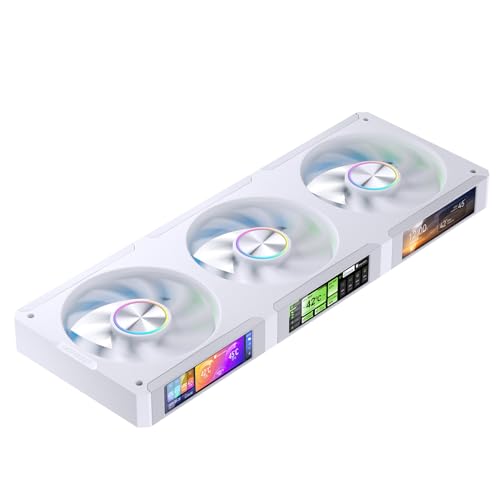
- Three separately configurable 3.38-inch LCD screens
- Custom patterns, data, and video playback support
- Dual ball bearings with up to 2400 RPM speed
Best For: PC builders who want three independent LCD fan displays in one 360mm set.
Premium Wireless LCD Cooling
Lian Li UNI FAN TL Wireless LCD 3-Pack

- Built-in LCD display with infinity mirror styling
- Wireless synchronisation cuts down on cable clutter
- Up to 1,900 RPM with quiet 31 dB(A) operation
Best For: premium builds needing LCD fans with strong airflow and easier installation
Internal LCD Monitor Panel

- 8-inch IPS LCD with 1280x800 resolution
- Shows CPU, GPU, RAM, FPS, and HDD data
- Single USB-C or 9-pin connection for easy setup
Best For: monitoring stats and adding an internal display inside a PC case
Flex Display Fan Kit
Lian Li UNI Fan TL LCD Flex 3-Pack

- 1.8-inch LCD with 480 x 480 resolution and 60Hz refresh rate
- Supports MP4, GIF, JPG, and PNG visual uploads
- Controller not included, but flexible motherboard and L-Connect 3 control
Best For: customizable LCD fan visuals with flexible control options
Modular LCD Performer
Interstellar V4 LCD 120mm Case Fan

- 1.5-inch LCD supports photos, GIFs, and videos
- Single-cable modular connection reduces clutter
- Up to 61.54 CFM with 600-2100 RPM PWM control
Best For: clean-looking builds that want LCD visuals and straightforward cable management
Premium Display Trio
Lian Li UNI Fan SL-INF LCD Flex 120mm

- 1.8-inch LCD screen with media upload support
- 3-pack uses motherboard PWM or L-Connect 3 control
- Controller not included, and it is a normal-blade model
Best For: builders who want a larger LCD fan display and already have compatible control gear
Universal Screen Add-On
Lian Li 8.8-inch PC LCD Display Panel

- 8.8-inch USB-powered secondary display
- Can mount to fan frames, panels, or flat surfaces
- ARGB lighting and L-Connect 3 customization
Best For: builders who want a larger companion display for stats and visuals
Wireless LCD Trio – Lian Li UNI Fan SL LCD 120 White Triple Pack
If you want case fans with LCD screens and a cleaner wireless setup, this Lian Li triple pack is built around 2.4 GHz control, daisy-chain mounting, and a 1.6-inch LCD on each fan. It is a normal-blade model, so airflow direction matters, but the included controller and PWM cable make it easier to get a tidy install in a compatible case.
Best For: Builders who want a three-fan LCD set with wireless control, synchronized lighting, and straightforward cable management.
Pros:
- 1.6-inch LCD screen with support for MP4, GIF, JPG, and PNG uploads
- Wireless 2.4 GHz control for fan speed and RGB lighting
- Triple pack includes the controller and a PWM 1-to-3 cable
- Interlocking daisy-chain design helps simplify installation
Cons:
- Normal-blade fan only; not the reverse-blade version
- Case compatibility should be checked before buying
- Single-pack buyers need to purchase the controller separately
This is a strong pick if you want a premium, software-managed fan kit with both display appeal and practical cable reduction. The LCD and RGB features are the headline, but the included mounting ecosystem is what makes the set appealing for modern showcase builds.
LCD AIO Value Pack – PCCOOLER DS360 Display Black
For buyers comparing case fans with LCD screens as part of a full cooling solution, this PCCOOLER 360mm liquid cooler bundles three ARGB fans with a 2.4-inch IPS display on the waterblock. It is aimed at high-output systems, pairing a 315W TDP claim with a 27mm aluminum radiator, high-speed fans, and broad Intel and AMD socket support.
Best For: High-performance PC builds that need LCD monitoring, strong cooling, and an all-in-one 360mm package.
Pros:
- 2.4-inch IPS LCD on the waterblock for temps, stats, or animated logos
- Three included 120mm ARGB fans with up to 2500 RPM
- High airflow and static pressure ratings for demanding systems
- Supports a wide range of Intel and AMD sockets
Cons:
- It is a liquid cooler, not just a standalone fan kit
- Fan noise can reach 39.8 dBA at top speed
- Requires case support for a 360mm radiator
This is the most cooling-focused option in the group, so it makes sense if performance matters as much as the display. The LCD is useful for monitoring, but the real value is the combination of radiator capacity, pump design, and included ARGB fans.
Reverse Blade Wireless LCD – Lian Li UNI Fan TL LCD Black
This Lian Li single-pack fan is a good fit if you want case fans with LCD screens and a cleaner, cable-light aesthetic. It uses 2.4 GHz wireless control, includes an LCD that supports MP4, GIF, JPG, and PNG, and features a reverse-blade design for builds where airflow direction and appearance both matter.
Best For: Builders who need a reverse-blade LCD fan for a cleaner look and wireless control in a showcase PC.
Pros:
- Reverse-blade design for airflow orientation flexibility
- 2.4 GHz wireless control for fan speed, RGB, and LCD functions
- Supports custom media formats on the LCD screen
- Includes a receiver for the wireless setup
Cons:
- Controller is not included and must be purchased separately
- Single-pack format adds extra setup cost
- Case compatibility should be checked before purchase
Compared with a standard fan package, this one is mainly about flexibility and appearance. If you already plan to use L-Connect 3 and want a reverse-blade LCD fan to match a specific airflow layout, it is a very targeted option.
Triple Screen Fan Set – JONSBO ZC-360W 3.38-Inch LCD
If you are shopping for case fans with LCD screens and want each fan to display separate information, this JONSBO 360mm set is built around three magnetic 3.38-inch screens. The software can show CPU, GPU, RAM, fan, or HDD status, and it also supports custom patterns, video uploads, and synchronized ARGB lighting.
Best For: Users who want a 360mm fan kit with three separate LCDs and deep display customization.
Pros:
- Three 3.38-inch LCD screens can be set separately
- Supports custom display patterns and video playback
- ARGB lighting syncs through a 3-pin 5V header or controller
- Dual ball bearings and up to 2400 RPM rated speed
Cons:
- Software is not currently optimized for Linux
- Software defaults to Chinese before switching to English
- Requires motherboard or controller connection for ARGB control
This model stands out for turning the fans themselves into the display surface, rather than relying on a single center screen. It is best suited to builders who want a visually busy, highly customizable front-of-case setup and do not mind using the vendor software.
Premium Wireless LCD Cooling – Lian Li UNI FAN TL Wireless LCD 3-Pack
If you want case fans with LCD screens that also prioritize clean cable management and strong cooling, this Lian Li 3-pack is built for a polished high-end build. The reverse-blade design, wireless synchronisation, and included controller make it easier to install while still delivering adjustable airflow, RGB lighting, and a built-in LCD display.
Best For: Builders who want a premium-looking fan kit with an LCD display, low cable clutter, and strong airflow for cases or radiators.
Pros:
- Includes a built-in LCD display plus infinity mirror styling
- Wireless synchronisation and modular design reduce cable clutter
- Strong airflow up to 1,900 RPM with 2.83 mmH₂O static pressure
- Rubber dampeners help keep vibration and noise down
Cons:
- LCD feature is part of a premium fan package, which may be more than basic builds need
- Reverse-blade format requires checking airflow direction before buying
- 3-pack size may be unnecessary for smaller setups
Overall, this is a strong pick if your priority is combining case fans with LCD screens and a refined visual setup. It balances style, cooling performance, and simpler installation better than most RGB-focused fan kits.
Internal LCD Monitor Panel – WOWNOVA 8 Inch PC Case Screen
For buyers comparing case fans with LCD screens against internal monitoring displays, this WOWNOVA panel serves a different but useful role inside the case. It works as a smart temperature and usage monitor, and can also switch to desktop display mode, making it a practical add-on for builders who want real-time system info in view.
Best For: PC builders who want an internal LCD screen for monitoring stats, custom themes, or extended desktop use.
Pros:
- 8-inch IPS LCD panel with 1280×800 resolution
- Displays CPU, GPU, RAM, FPS, and HDD data through software
- Supports desktop extended display mode and customizable video themes
- Simple one-cable USB-C or 9-pin connection with no HDMI required
Cons:
- Not a cooling fan, so it does not move air through the case
- Requires Windows 10/11 for the described software features
- Focuses on monitoring and display rather than hardware cooling
This is a good fit if your goal is more visual system monitoring than actual fan upgrades. It adds a bright internal screen and useful desktop-style functionality without much cabling hassle.
Flex Display Fan Kit – Lian Li UNI Fan TL LCD Flex 3-Pack
If you want case fans with LCD screens and prefer a flexible control setup, this Lian Li 3-pack keeps the display and lighting features front and center. The 1.8-inch high-resolution screen supports media files like MP4, GIF, JPG, and PNG, while the fan also offers ARGB lighting and multiple control paths for speed and display management.
Best For: Enthusiasts who want customizable LCD fan visuals with motherboard or L-Connect 3 control options.
Pros:
- 1.8-inch LCD with 480 x 480 resolution and 60Hz refresh rate
- Supports MP4, GIF, JPG, and PNG files for personalized visuals
- ARGB lighting can be managed through 5V 3-pin motherboard control
- USB 9-pin connection unlocks full LCD functionality in L-Connect 3
Cons:
- Controller is not included
- Must double-check airflow direction and model type before purchase
- Full LCD features depend on the USB 9-pin cable and software setup
Overall, this model suits builders who want more control over both display content and fan behavior. It is a strong choice when you want a customizable LCD fan setup and are comfortable adding the needed control hardware separately.
Modular LCD Performer – Interstellar V4 LCD 120mm Case Fan
If you want case fans with LCD screens that also help keep cabling under control, the Interstellar V4 LCD 120mm fan is built around a modular, daisy-chain design. It pairs a customizable 1.5-inch LCD screen with ARGB lighting, while also aiming for strong airflow and low noise in everyday PC builds.
Best For: Builders who want a tidy single-cable setup, customizable screen visuals, and solid cooling performance in a white-forward build.
Pros:
- Modular single-cable connection helps reduce cable clutter.
- 1.5-inch LCD supports pictures, GIFs, and videos.
- ARGB lighting is designed to sync with major lighting ecosystems.
- 600-2100 RPM PWM range with up to 61.54 CFM airflow.
Cons:
- Only one fan is included, not a full multi-fan set.
- Maximum noise is listed at 29 dB, so silent-first buyers may still want to compare.
- The modular design may be more specific than standard fan wiring.
This is a strong pick if you value both presentation and practicality. The Interstellar V4 combines visual customization, neat cabling, and respectable cooling specs in one fan.
Premium Display Trio – Lian Li UNI Fan SL-INF LCD Flex 120mm
For buyers comparing case fans with LCD screens, the Lian Li UNI Fan SL-INF LCD Flex stands out by combining a larger 1.8-inch display with flexible control options. It is a normal-blade 3-pack with multi-zone lighting and LCD customization through L-Connect 3, but note that the controller is not included.
Best For: Users who want a 3-pack of LCD case fans with a larger screen and software-based customization, and who already have or plan for compatible control hardware.
Pros:
- 1.8-inch LCD offers a larger visual area than many fan screens.
- Supports video and photo uploads through L-Connect 3.
- Flexible control via motherboard PWM or L-Connect 3.
- Wireless functionality and simplified cable management are supported.
Cons:
- Controller is not included.
- This is a normal blade model, not a reverse blade fan.
- USB control mode requires the LCD Flex Receiver and 9-pin connection.
This pack is best when display size and ecosystem control matter more than an all-in-one bundle. Just make sure your setup matches the normal-blade orientation and controller requirements before buying.
Universal Screen Add-On – Lian Li 8.8-inch PC LCD Display Panel
If your goal is more display space than a standard fan screen can offer, this Lian Li 8.8-inch universal screen is a practical companion piece for builds that feature case fans with LCD screens. It works as a USB-powered secondary display and can show hardware stats, media, or custom visuals through L-Connect 3.
Best For: PC builders who want a larger screen for system info and custom visuals, with flexible mounting instead of a fan-mounted LCD.
Pros:
- 8.8-inch LCD gives much more display area than fan-mounted screens.
- USB-powered secondary display can work independently.
- Mounting options include fan frames, case panels, or adhesive pads.
- Built-in diffused ARGB lighting adds build aesthetics.
Cons:
- Not a cooling fan, so it does not add airflow.
- L-Connect 3 does not support Linux.
- Installation requires attention to the specified screw guidance.
This is a good option if you want the LCD aesthetic to go beyond fan hubs and blades. It is more of a display add-on than a fan product, but that flexibility is exactly the appeal.
How We Picked the Best Case Fans with LCD Screens
We prioritized screen quality, cooling performance, installation simplicity, software control, and overall value. The best models should look good in a finished build, but they also need to move air effectively, stay reasonably quiet, and fit common PC layouts without unnecessary hassle.
We also considered whether a product works as a true fan solution or is better suited as a screen accessory, since buyers often compare both when shopping for Case Fans with LCD Screens.
Quick Comparison: What Matters Most
Some options focus on compact fan-mounted LCDs for an integrated look, while others use larger standalone panels for broader system monitoring. Fan-based models are usually better if you want a cleaner aesthetic and synchronized lighting. Larger display panels are better if your priority is readability, desk visibility, or showing more detailed stats.
Screen Size Vs. Build Style
Smaller LCDs blend into the fan frame and keep the build sleek. Larger screens make a stronger visual statement and can be easier to read from across the room.
Controller and Cabling
Look for wireless control, daisy-chain support, or bundled controllers if you want a simpler install. Missing accessories can increase the total cost and complexity.
Key Buying Factors for Case Fans with LCD Screens
Display quality: Check resolution, viewing angles, brightness, and whether the screen supports custom images, animations, or live telemetry.
Airflow and acoustics: A good display should not come at the expense of cooling. Review fan speed range, static pressure, and noise levels, especially if the fan is used on radiators or restrictive front panels.
Software support: Reliable software makes it easier to change themes, monitor temperatures, and coordinate RGB effects. Poor software can make even a premium-looking fan frustrating to use.
Compatibility: Confirm size, mounting, motherboard headers, PWM support, and whether the product needs extra controllers or hubs. This matters even more for Case Fans with LCD Screens because display features sometimes depend on proprietary control systems.
Use case: A showcase gaming build, compact productivity PC, and open-frame system may all favor different screen sizes and fan styles.
Who Should Buy Which Case Fans with LCD Screens?
If you want the cleanest all-in-one look, choose fan-based LCD models with daisy-chain or wireless control. If you care most about system monitoring or desktop-style visibility, a larger standalone screen may be the better buy. Builders who want minimal setup should favor kits that include the controller and all required cables. Enthusiasts who enjoy customization will get the most out of models with flexible display software and strong theme support.
In short, the best choice depends on whether you want the LCD to be a subtle part of your cooling setup or the centerpiece of the entire build.