
If you are searching for a G11 Lightweight Wireless Gaming Mouse review, the main appeal is clear: it packs tri-mode connectivity, a high-DPI sensor claim, and lightweight FPS-friendly hardware into one compact shell.
For players who want a versatile mouse for gaming and everyday use, the G11 looks targeted rather than generic.
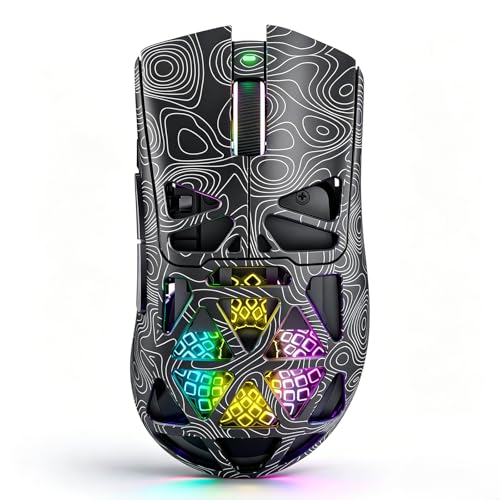
G11 Mouse Review Summary
The G11 Lightweight Wireless Gaming Mouse makes sense for buyers who want a flexible, feature-dense mouse without moving into a heavier enthusiast tier.
Its strongest argument is combination value: Bluetooth 5.1, 2.4GHz wireless, USB-C wired use, a PAW3311 sensor claim, programmable controls, and a lightweight honeycomb frame all point toward a mouse built for fast cursor movement and low-fuss switching between setups.
Buy it if you want a lightweight wireless mouse that can handle FPS play, casual productivity, and laptop travel without needing a separate office mouse.
Skip it if you want a more minimal shape, a premium metal build, or a model with a long track record behind the sensor and software ecosystem.
Review Scorecard
| Category | Score | Rationale |
|---|---|---|
| FPS responsiveness | 8 | The listing emphasizes a PAW3311 sensor, up to 22,000 DPI, and a fast trigger button for rapid clicks. |
| Connectivity flexibility | 9 | Bluetooth 5.1, 2.4GHz wireless, and USB-C wired support make it easy to use across devices. |
| Customization | 8 | Programmable buttons, macros, DPI settings, polling-rate tuning, and RGB control are all listed features. |
| Comfort and portability | 8 | The lightweight honeycomb shell and ergonomic shape should help reduce fatigue during long sessions. |
| Day-to-day usefulness | 8 | Compatibility with Windows, macOS, desktops, laptops, and wired/wireless operation broadens its appeal. |
| Build confidence | 6 | The feature set is strong, but the listing gives less detail about long-term switch feel, feet, or shell durability. |
Key Features and Specifications of G11 Mouse
The G11 Lightweight Wireless Gaming Mouse is positioned as a multi-role mouse rather than a single-purpose esports tool.
The listing highlights a PAW3311 optical sensor, adjustable DPI up to 22,000, up to 1000Hz polling rate, and low-latency wireless performance for gaming and desktop use.
It supports three connection modes: Bluetooth 5.1 for convenience, 2.4GHz wireless for faster play, and USB-C wired use when you want a direct connection or need to charge while using it.
That makes it practical for a desktop PC, gaming laptop, or Mac setup that changes over time.
Other listed details include:
- Built-in 500mAh rechargeable battery
- USB-C charging with play-while-charging support
- Lightweight hollow honeycomb shell
- Ergonomic shape aimed at reducing hand fatigue
- Six programmable buttons
- Three independent side buttons
- Dedicated fast trigger button for rapid clicking
- Driver software for macros, DPI, polling rate, and RGB lighting
- Compatibility with Windows, macOS, PCs, laptops, and Mac devices
- 1-year warranty and lifetime technical support
The feature mix is broad enough that the G11 Lightweight Wireless Gaming Mouse review question is less about raw specs and more about whether the shape and software fit your workflow.
If you want a mouse that can jump from FPS play to office tasks without changing hardware, the design direction is sensible.
Pros and Cons of G11 Mouse
Pros
- Very flexible connectivity: tri-mode support is useful if you switch between gaming, office work, and travel.
- Strong gaming-oriented feature set: high DPI claims, polling-rate support, macro programming, and a fast trigger button all fit competitive play.
- Lightweight design: the honeycomb shell should be attractive to players who prefer quick movements and less hand strain.
- Useful for mixed use: the listing explicitly targets gaming, study, productivity, and remote work.
- Rechargeable convenience: USB-C charging and play-while-charging reduce downtime.
Cons
- Honeycomb shells are not for everyone: some buyers dislike the open feel or the look of perforated designs.
- Software matters here: the macro and RGB claims depend on driver support, so setup comfort will matter.
- No premium-material story: the listing focuses on function, not a high-end chassis or luxury finish.
- Feature depth may exceed some needs: if you only want a basic office mouse, much of this may be unnecessary.
Who Should Buy G11 Mouse?
The G11 Lightweight Wireless Gaming Mouse is a good fit for players who care about speed, shortcuts, and connection flexibility more than brand prestige.
It should appeal most to FPS players, MMO users who use extra buttons, and laptop owners who want one mouse that can move between home, work, and gaming without a cable mess.
It also makes sense for buyers who like the idea of a lighter mouse but still want wireless freedom and a charging cable option.
The G11 Lightweight Wireless Gaming Mouse review case is strongest when you need a practical all-rounder with gaming-first cues.
This is probably not the best match if you prefer a solid-shell mouse, dislike driver-based customization, or want something with a simpler plug-and-play profile.
Buyers who prioritize a very conservative office look may also prefer a more traditional design.
Gaming Fit and Everyday Use of G11 Mouse
FPS Movement and Aim
The listing’s focus on a PAW3311 sensor, 22,000 DPI ceiling, and 1000Hz polling-rate support suggests a mouse aimed at quick aiming and responsive movement.
That does not guarantee elite performance by itself, but it does place the G11 Lightweight Wireless Gaming Mouse in the right category for fast-paced shooters.
Button Layout and Macros
Six programmable buttons, three side buttons, and software-based macro support make the mouse more useful than a plain two-button shell.
For MMO skills, productivity shortcuts, or browser navigation, that extra control can matter more than headline DPI numbers.
Comfort and Weight
The lightweight honeycomb body is one of the most important design choices here.
Less mass can make flicks feel easier, and the ergonomic shell should help during longer sessions, but the open-shell style is a taste issue as much as a performance one.
Battery and Device Switching
A 500mAh battery and USB-C charging suggest the G11 is meant to stay usable across long sessions without becoming a battery-management chore.
The real convenience is tri-mode use: if you move between a desktop, laptop, and Mac, this mouse is built to reduce friction.
Alternatives to G11 Mouse
If you want similar options on Amazon, compare the G11 Lightweight Wireless Gaming Mouse with:
These are credible comparisons because they cover the same broad decision space: wireless gaming performance, lightweight handling, and everyday usability.
If you want a more established software ecosystem, Logitech and Razer are the safer references.
If you want to stay closer to the lightweight wireless idea, the Corsair and SteelSeries options are sensible to check.
Is G11 Mouse Worth It?
Yes, if you want a feature-rich lightweight wireless mouse that can cover FPS gaming, general productivity, and multi-device use in one package.
The G11 Lightweight Wireless Gaming Mouse looks most worthwhile for buyers who value tri-mode flexibility, extra buttons, and a lower-fatigue shell over premium branding.
If you want a straightforward, compact, and configurable mouse with gaming-first positioning, this is a reasonable buy to consider.
If you care more about a traditional solid shell or a more established premium lineup, it is better to compare alternatives first.