
If you are building your first flight sim setup, pedals can make a bigger difference than most new pilots expect. They improve rudder control, make takeoffs and landings smoother, and help you fly more naturally.
This roundup of flight simulator pedals for beginners focuses on easy setup, sensible pricing, and the features that matter most when you are learning.
Best 10 Flight Simulator Pedals for Beginners Picks for 2026
Beginner-Friendly Precision
Thrustmaster TFRP Rudder Pedals

- Long travel for smooth rudder input
- Self-centering axis helps new pilots
- Works with PS5, Xbox Series X|S, and PC
Best For: New sim pilots who want simple, accurate rudder pedals
All-in-One Starter Bundle
Logitech G Pro Flight Yoke + Rudder Bundle

- Includes yoke system and rudder pedals
- Self-centering pedals with toe brakes
- 54 programmable controls for flexibility
Best For: Beginners building a fuller cockpit setup
Adjustable Console-Friendly Choice
Turtle Beach VelocityOne Rudder Pedals
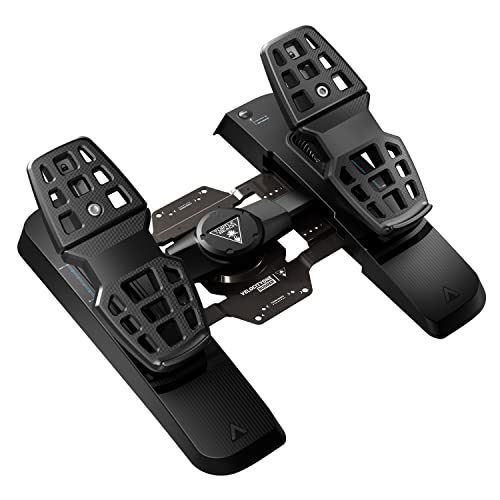
- Ultra-smooth axis with swappable springs
- Adjustable width and pedal positions
- Hall effect sensors on all axes
Best For: Beginners who want adjustable PC/Xbox pedals
Metal Base Stability
Thrustmaster TPR Pendular Rudder Pedals

- Pendular mechanism for fluid motion
- HallEffect tech for precise inputs
- Metal base adds strong stability
Best For: Beginners wanting a premium, stable pedal set
Premium PC Rudder Control
Logitech G Pro Flight Rudder Pedals

- Self-centering pedals for smooth control
- Adjustable tension dial changes pedal feel
- Differential toe brakes help on landing and taxiing
Best For: New sim pilots who want adjustable rudder pedals on PC
Starter HOTAS Bundle
ThrustMaster TFRP Rudder Pedals & T16000M FCS HOTAS

- S.M.A.R.T slide rails for smooth steering
- Includes rudder pedals plus a joystick bundle
- Ergonomic heel-rests support different foot positions
Best For: Beginners who want a full PC flight control bundle
Aluminum Upgrade Pick
Honeycomb Aeronautical Charlie Rudder Pedals

- Durable aluminum build with belt drive system
- Magnetic Hall Effect sensors for precise control
- High-friction strips and carpet spikes reduce slipping
Best For: Beginner sim pilots who want a premium PC or Mac pedal set
Premium Rudder Control
Logitech Pro Flight Rudder Pedals & Switch Panel
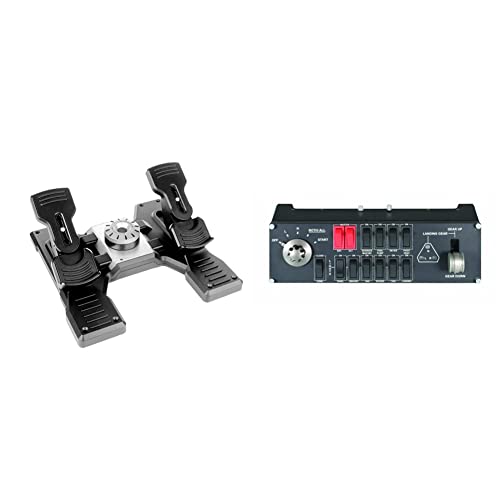
- Self-centering pedals for smooth rudder input
- Adjustable tension dial changes pedal resistance
- Includes a modular switch panel for added cockpit control
Best For: Beginners who want a more complete, expandable flight sim control setup
Precision Pedal Upgrade
Thrustmaster TPR Rudder Pedals

- Pendular design creates smooth, natural rudder motion
- HallEffect sensors support frictionless precision
- Adjustable springs let you tune pedal resistance
Best For: PC sim pilots who want premium precision and customizable pedal feel
All-in-One Starter Kit
Thrustmaster T-Flight Full Kit HOTAS with Rudder Pedals

- Bundle includes HOTAS controls and rudder pedals
- Smooth S.M.A.R.T slide rail pedal system
- Works with Xbox Series S and PC
Best For: Beginners who want a complete flight control bundle with pedals included
Beginner-Friendly Precision – Thrustmaster TFRP Rudder Pedals
If you’re looking for flight simulator pedals for beginners, the Thrustmaster TFRP is a practical way to add realistic rudder control without overcomplicating your setup. It offers long pedal travel, a self-centering axis, and smooth sliding motion to help new sim pilots make controlled turns and coordinated landings.
Best For: Beginners who want an affordable-feeling step up into more realistic rudder control on PC, PlayStation, or Xbox.
Pros:
- Long rudder travel helps with smooth, accurate inputs.
- Self-centering axis adds predictable control for learning.
- Advanced S.M.A.R.T. rail system aims for friction-free motion.
- Compatible with PS5, Xbox Series X|S, and PC.
Cons:
- Not as feature-rich as higher-end metal pedal sets.
- Plastic-and-rail design may feel less premium than pro-level options.
Overall, this is a straightforward beginner choice if you want precise rudder inputs and broad platform support. It focuses on the fundamentals that matter most when learning flight sim control.
All-in-One Starter Bundle – Logitech G Pro Flight Yoke + Rudder Bundle
This bundle is a strong pick if you want flight simulator pedals for beginners plus a yoke in one package. The rudder pedals add self-centering control and differential toe brakes, while the yoke system provides a realistic introduction to flight sim handling and a large set of programmable controls.
Best For: Beginners who want an all-in-one cockpit-style starter setup with room to grow.
Pros:
- Includes both a yoke system and rudder pedals.
- Self-centering pedals improve realistic control.
- Differential toe brakes help with runway stopping control.
- 54 programmable controls add flexibility as you learn.
Cons:
- More complex than buying pedals alone.
- Likely overkill if you only need basic rudder input.
For beginners building a serious sim setup, this bundle covers the core controls in one purchase. It makes sense if you want a more complete flight training feel from the start.
Adjustable Console-Friendly Choice – Turtle Beach VelocityOne Rudder Pedals
If you want flight simulator pedals for beginners with a modern feature set, the Turtle Beach VelocityOne Rudder Pedals are built around smooth, adjustable control. The ultra-smooth rudder axis, adjustable pedal width, and swappable springs make it easier to tailor the feel as you get comfortable.
Best For: New sim pilots who want adjustable pedals with Hall effect sensors and PC/Xbox support.
Pros:
- Ultra-smooth rudder axis is designed for easy, consistent inputs.
- Adjustable pedal width helps fit different users.
- Swappable springs and pedals let you change the feel.
- Hall effect sensors across all axes support precise control.
Cons:
- Xbox use requires the VelocityOne Flight Control System.
- More adjustment options may take extra setup time.
This is a flexible option if you want beginner-friendly control that can be tuned over time. It stands out for adjustability and sensor technology rather than keeping things minimal.
Metal Base Stability – Thrustmaster TPR Pendular Rudder Pedals
For flight simulator pedals for beginners who want a more premium feel from the start, the Thrustmaster TPR uses a suspended pendular mechanism and HallEffect technology for smooth, precise motion. Its adjustable resistance, multiple pedal positions, and metal base make it a stable choice for home cockpits or desk use.
Best For: Beginners who want a sturdy, highly adjustable pedal set with a more advanced mechanical design.
Pros:
- Pendular mechanism is designed for smooth, fluid movement.
- H.E.A.R.T. HallEffect tech supports precise, frictionless action.
- Adjustable spring positions and pedal angles add customization.
- Metal base improves stability even without a cockpit.
Cons:
- More advanced than a basic starter pedal set.
- Metal construction and cockpit-oriented design may be more than some beginners need.
This model makes sense if you want to start with a premium-feeling pedal setup rather than upgrading later. It emphasizes stability, precision, and adjustability in a way that can grow with your skills.
Premium PC Rudder Control – Logitech G Pro Flight Rudder Pedals
If you want flight simulator pedals for beginners that still feel like a long-term upgrade, the Logitech G Pro Flight Rudder Pedals are a solid place to start. The self-centering mechanism and adjustable tension dial make it easier to tune the feel for different aircraft, while differential toe brakes add more precise runway control.
Best For: New sim pilots who want adjustable, realistic rudder control on PC.
Pros:
- Self-centering rudder action helps keep inputs smooth and predictable.
- Adjustable tension dial lets you choose a lighter or firmer pedal feel.
- Differential toe brakes give you better control when taxiing and stopping.
- USB 2.0 PC compatibility keeps setup straightforward.
Cons:
- Windows-only compatibility limits use to PC setups.
- 9-bit rudder and 7-bit toe brake axes are not the highest-resolution spec in this group.
Overall, this is a beginner-friendly option if you want pedals that are easy to understand now but still offer enough adjustability to grow with your setup. The practical controls and solid build make it a dependable choice for learning rudder coordination.
Starter HOTAS Bundle – ThrustMaster TFRP Rudder Pedals & T16000M FCS HOTAS
This bundle is a practical way to get into flight simulator pedals for beginners because it pairs rudder pedals with a joystick and HOTAS-style control. The TFRP pedals use the S.M.A.R.T slide rails system for smooth steering, and the ergonomic heel-rest design makes it easier to find a comfortable foot position.
Best For: Beginners who want a complete PC flight control setup with pedals included.
Pros:
- S.M.A.R.T slide rails are designed for smooth pedal motion.
- Large differential brake pedals add useful control for landing and taxiing.
- Ergonomic heel-rests can be removed for different foot positions.
- Bundle includes both rudder pedals and the T.16000M FCS HOTAS joystick.
Cons:
- The bundle is PC-focused, so console use is limited and depends on compatible hardware.
- It may be more control than a first-time buyer needs if they only want basic pedals.
For beginners building a full sim cockpit from scratch, this package offers a lot of value because it covers both steering and primary flight controls. The pedals are designed for smooth operation, while the included joystick makes the setup more complete right away.
Aluminum Upgrade Pick – Honeycomb Aeronautical Charlie Rudder Pedals
If you’re comparing flight simulator pedals for beginners but want something that feels more premium, the Honeycomb Aeronautical Charlie Rudder Pedals stand out with their aluminum construction and belt drive system. They also use magnetic Hall Effect sensors, which are meant to improve precision and reduce the amount of correction you need in flight.
Best For: Beginner sim pilots who want a durable, adjustable pedal set for PC or Mac.
Pros:
- Durable aluminum construction adds a more premium feel.
- Belt drive system and Hall Effect sensors are built for precision.
- Adjustable design helps fit different pilot preferences.
- High-friction strips and carpet spikes help keep the pedals planted.
Cons:
- Xbox Series X/S use requires the Honeycomb Xbox Hub.
- Software compatibility is focused on Microsoft Flight Simulator, X-Plane 12, and Prepar3D.
This is a strong step-up choice if you want beginner-friendly controls with more premium hardware underneath. The combination of adjustable fit, stable footing, and magnetic sensing makes it a compelling pick for a first serious pedal setup.
Premium Rudder Control – Logitech Pro Flight Rudder Pedals & Switch Panel
If you want flight simulator pedals for beginners with room to grow, this Logitech setup offers smooth rudder input and simple adjustability. The self-centering pedals and adjustable tension dial make it easier to find a comfortable feel, while the included switch panel adds extra cockpit control once you’re ready to expand.
Best For: New sim pilots who want responsive rudder pedals now and a modular setup they can build on later.
Pros:
- Self-centering pedals provide smooth, accurate rudder control.
- Adjustable tension dial lets you choose a lighter or heavier pedal feel.
- Differential toe brakes add useful runway stopping control.
- Switch panel expands the setup with realistic cockpit functions.
Cons:
- The full bundle may be more than a beginner needs on day one.
- Modular expansion is useful, but also adds setup complexity.
This is a practical choice if you want beginner-friendly rudder pedals that still feel like a serious sim upgrade. The pedal set handles the basics well, and the extra switch panel gives you a path toward a more complete cockpit layout.
Precision Pedal Upgrade – Thrustmaster TPR Rudder Pedals
These Thrustmaster TPR rudder pedals are aimed at flight simulator pedals for beginners who already know they want a serious, precision-focused upgrade. The pendular mechanism and HallEffect sensors are built for exceptionally smooth, accurate rudder work, and the adjustable spring system lets you tailor the feel to your flying style.
Best For: Sim pilots who want high-end rudder precision and don’t mind a more advanced, heavier pedal set.
Pros:
- Pendular suspended mechanism delivers fluid, natural pedal motion.
- H.E.A.R.T magnetic sensors provide frictionless, precise input.
- Adjustable spring system lets you tune resistance.
- Built for durable, professional-grade PC flight sim use.
Cons:
- These are a premium, serious-flight-enthusiast option rather than a casual starter pick.
- The 20.2-pound design is substantial and may be less convenient to move around.
If your priority is realistic control and long-term accuracy, this set stands out for its refined mechanics. It is less of a first-step bargain and more of a commitment to a higher-end sim cockpit feel.
All-in-One Starter Kit – Thrustmaster T-Flight Full Kit HOTAS with Rudder Pedals
For flight simulator pedals for beginners who want an easy all-in-one path, this Thrustmaster kit bundles a HOTAS setup with rudder pedals included. The TFRP pedals use a smooth S.M.A.R.T slide rail system, and the full kit adds throttle, stick, and plenty of buttons so you can learn flight controls without piecing everything together separately.
Best For: New Xbox or PC flyers who want a complete starter package with pedals already included.
Pros:
- Includes rudder pedals, throttle, and stick in one package.
- S.M.A.R.T slide rail system is designed for smooth pedal movement.
- Full-foot pedal design and removable heel rests support comfortable sessions.
- 14 programmable buttons and a detachable throttle add plenty of control options.
Cons:
- Best if you want a full control system, not just standalone pedals.
- More controls can mean a bigger learning curve for absolute beginners.
This is the most straightforward starter option if you want everything in one box. It gives beginners a complete cockpit-style layout while keeping rudder control smooth and approachable.
How We Picked the Best Flight Simulator Pedals for Beginners
For Flight Simulator Pedals for Beginners, we prioritized simple setup, broad compatibility, stable construction, and controls that are easy to learn. We also favored models with smooth centering, adjustable tension, and toe brakes where they add value without making the pedals harder to use.
Because new sim pilots often start with a mix of aircraft and control styles, we looked for options that work well in civilian flight, military-style flying, and general PC or console setups.
Quick Comparison: What Matters Most
The easiest way to narrow your choice is by matching the pedal type to your setup and experience level. Basic plastic pedals are often the most affordable and straightforward. Midrange sets usually add better feel and more adjustment. Premium pedals offer stronger build quality and more realistic motion, but they are not always necessary for a first purchase.
- Best budget value: simple USB pedals with plug-and-play setup
- Best all-around choice: balanced pedals with toe brakes and steady centering
- Best premium feel: metal-based pedals with higher precision and adjustability
Key Buying Factors for Flight Simulator Pedals for Beginners
Compatibility
Check whether the pedals support your platform before buying. Some models are PC-only, while others support Xbox or bundle with yokes and HOTAS systems. If you play across devices, cross-platform compatibility can be worth paying extra for.
Pedal Feel and Resistance
Beginners usually do best with pedals that feel smooth and predictable rather than overly stiff. A stable center point helps with taxiing, coordinated turns, and runway alignment.
Toe Brakes
Toe brakes are useful if you want more realistic ground handling. They are especially helpful for runway control and parked braking, but they can be optional if you are trying to keep things simple at first.
Size, Mounting, and Comfort
Make sure the pedal base fits under your desk or sim rig. Wider pedal sets can feel more natural, but they should not slide around during use. Rubber feet, grip surfaces, and easy mounting all matter for comfort.
Learning Curve
If you are new, choose pedals that do not overcomplicate setup. The best Flight Simulator Pedals for Beginners are the ones you will actually use consistently because they are intuitive and reliable.
Who Should Buy Which Flight Simulator Pedals for Beginners?
Choose a budget-friendly model if you want to learn rudder control without a major investment.
Choose a midrange pedal set if you plan to fly regularly and want a better balance of comfort, precision, and durability.
Choose a premium option if you already know you will stay in the hobby and want a more realistic long-term setup.
Choose a bundle if you are starting from scratch and want the simplest path to a complete flight control system.
In short, the best choice depends less on raw specs and more on how you fly, what platform you use, and how much realism you want on day one.