
Choosing the right flight simulator pedals for gaming rooms can make taxiing, coordinated turns, and rudder control feel far more authentic. The best options also fit your setup, whether you fly on PC, Xbox, or PS5.
Below, we focus on practical buying factors like compatibility, build quality, resistance feel, and bundle value so you can choose pedals that match your sim style and space.
Best 10 Flight Simulator Pedals for Gaming Rooms Picks for 2026
All-in-One Xbox Flight Kit
Thrustmaster T-Flight Full Kit HOTAS

- Includes rudder pedals with S.M.A.R.T slide rails
- Official Xbox integration with dedicated buttons
- Full HOTAS bundle with throttle, stick, and 5 axes
Best For: Xbox and PC users who want a complete flight control bundle
Pro Yoke Desk Setup
Logitech G PRO Flight Yoke System
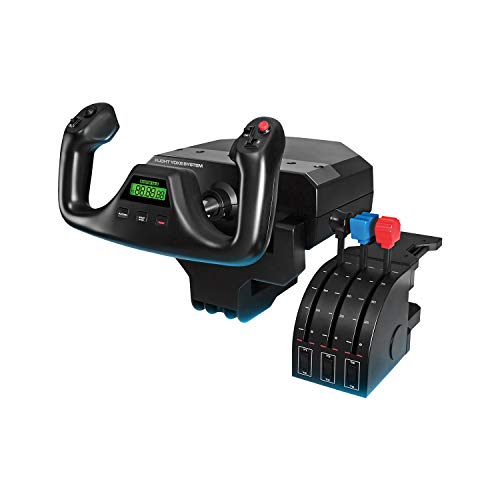
- Realistic yoke controls for a cockpit-style feel
- Up to 54 programmable controls across the system
- Includes throttle quadrant and desk clamps
Best For: PC pilots who want a mounted yoke setup for desk-based sims
Standalone Rudder Upgrade
Thrustmaster TFRP Flight Sim Pedals

- Dedicated rudder pedals for smoother yaw control
- S.M.A.R.T rail system with four aluminum rails
- Works with PS5, Xbox Series X|S, and PC
Best For: Players who want dedicated rudder pedals to add to an existing setup
PC Flight Pack Bundle
Thrustmaster T16000M FCS Flight Pack

- Includes joystick, throttle, and pedals
- H.E.A.R.T precision technology for consistent control
- T.A.R.G.E.T software for custom mappings
Best For: PC beginners who want a complete flight-control bundle with pedals
Pro Flight Control Bundle
Logitech G Pro Yoke + Rudder Pedals

- Self-centering rudder pedals for accurate control.
- Differential toe brakes for runway and taxi use.
- 14-button yoke with 54 programmable controls.
Best For: Sim pilots wanting a realistic yoke-and-pedal bundle.
Adjustable Sim Rig Stand
Marada Universal Flight and Racing Stand

- 40mm square-tube frame for structural stability.
- Highly adjustable in multiple directions.
- Supports many flight and racing devices.
Best For: Gamers building a customizable sim rig around existing hardware.
Precision Rudder Pedals
MOZA MRP Metal Flight Controls

- Metal frame with steel linkage for durability.
- Hall sensors on rudder and brake axes.
- Adjustable angles and travel for fit and feel.
Best For: PC flight sim users wanting precision rudder pedals.
Thrustmaster Precision Rudder Pedals

- Smooth PENDUL_R suspended mechanism
- HallEffect sensing for precise control
- Metal base with cockpit mounting holes
Best For: Dedicated sim rooms needing stable, adjustable rudder pedals
Logitech Pro Control Pedals
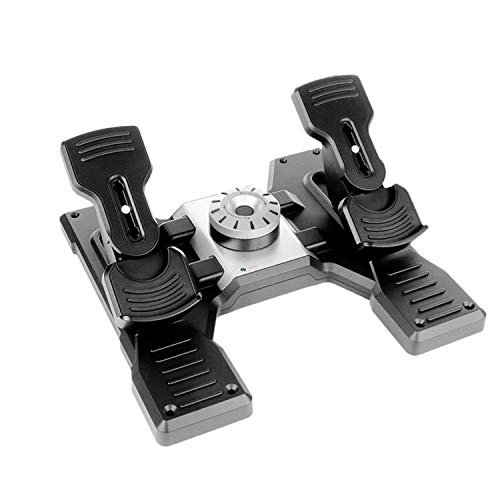
- Self-centering pedals with adjustable tension
- Differential toe brakes for runway control
- USB 2.0-compliant for Windows PCs
Best For: PC sim pilots who want adjustable tension and toe brakes
Logitech X56 Bundle Rudder Set
X56 H.O.T.A.S. + Pro Flight Pedals

- Includes X56 throttle/joystick plus pedals
- Customizable controls with RGB backlighting
- Pedals add self-centering feel and toe brakes
Best For: Gamers building a fuller cockpit-style flight setup
All-in-One Xbox Flight Kit – Thrustmaster T-Flight Full Kit HOTAS
If you want flight simulator pedals for gaming rooms without piecing together separate gear, this Thrustmaster full kit gives you the stick, throttle, and rudder pedals in one package. It is built for Xbox Series X|S and PC, with dedicated console buttons and smooth TFRP pedals that make taxiing and coordinated turns feel more controlled.
Best For: Xbox and PC sim racers who want a complete HOTAS setup with included rudder pedals.
Pros:
- Includes rudder pedals with Thrustmaster’s S.M.A.R.T slide rail system for smoother yaw control.
- Official Xbox integration with Guide, View, and Menu buttons for easier console navigation.
- Ergonomic full-foot pedal design with removable heel rests for longer sessions.
- Complete HOTAS layout with detachable throttle, 5 axes, 14 buttons, and hat switch.
Cons:
- Large, multi-piece setup may take more desk or floor space than simpler controllers.
- Best suited to Xbox and PC users rather than players on other platforms.
This is a practical pick if you want a ready-to-fly bundle and prefer not to shop for pedals separately. The included rudder pedals are the standout for adding more realistic directional control in a gaming room setup.
Pro Yoke Desk Setup – Logitech G PRO Flight Yoke System
For flight simulator pedals for gaming rooms that are built around a desktop cockpit feel, this Logitech yoke system focuses on realistic aircraft control and a wide control layout. It comes with a yoke, throttle quadrant, and desk clamps, making it a strong match for sim pilots who want a more traditional flying style with lots of programmable inputs.
Best For: PC sim pilots who want a realistic yoke-and-throttle setup with secure desk mounting.
Pros:
- Realistic yoke controls help build muscle memory for flight sim handling.
- Up to 54 programmable controls with POV hat, 14 buttons, and a 3-position mode switch.
- Includes dual desk clamps for secure mounting on a range of desks.
- Comes with a throttle quadrant for a more complete cockpit-style setup.
Cons:
- Designed for Windows PC use, not console platforms.
- Requires optional software download for some flight sim titles.
If your gaming room is set up around a desk and you prefer a yoke over a stick, this system delivers a very simulation-focused experience. The included clamps and throttle quadrant make it feel more like a permanent flight station than a casual controller.
Standalone Rudder Upgrade – Thrustmaster TFRP Flight Sim Pedals
If you already have a stick or HOTAS and only need flight simulator pedals for gaming rooms, the Thrustmaster TFRP is the most focused option here. These pedals are made for PS5, Xbox Series X|S, and PC, with a long rudder travel range and a smooth rail system that helps deliver more accurate yaw control.
Best For: Sim players who want dedicated rudder pedals as an upgrade to an existing flight control setup.
Pros:
- Dedicated rudder pedals for more realistic aviation control.
- Long travel and self-centering axis support smooth, precise input.
- Advanced S.M.A.R.T rail system uses four aluminum rails for friction-free motion.
- Compatible with PS5, Xbox Series X|S, and PC.
Cons:
- Pedals only, so you still need a stick or HOTAS for full controls.
- Less comprehensive than bundled kits that include throttle and stick.
This is the cleanest choice if your priority is adding proper rudder control rather than replacing your whole setup. It should fit well in a gaming room where you want a smaller, purpose-built accessory instead of a full cockpit bundle.
PC Flight Pack Bundle – Thrustmaster T16000M FCS Flight Pack
For PC gamers looking at flight simulator pedals for gaming rooms, this Thrustmaster bundle is an easy way to get started with a joystick, throttle, and pedals in one package. It is designed for Windows PC and adds a full set of flight controls, including twist rudder capability, plus software support for building custom mappings.
Best For: PC users who want a full starter flight-control bundle with pedals included.
Pros:
- Includes flight stick, throttle, and pedals in one PC-focused package.
- 16 action buttons plus an 8-way POV hat switch for more control options.
- H.E.A.R.T technology is designed for precision that does not decrease over time.
- T.A.R.G.E.T software supports custom profiles and mappings per game.
Cons:
- PC-only compatibility limits it for console gamers.
- Twist rudder on the stick may be redundant if you mainly want to rely on the included pedals.
This bundle makes sense if you want a complete entry point without shopping for each component separately. The included pedals help round out the setup, while the software and button count give you room to tailor the controls to different sims.
Pro Flight Control Bundle – Logitech G Pro Yoke + Rudder Pedals
If you’re building out flight simulator pedals for gaming rooms and want a more complete control setup, this Logitech bundle combines a realistic yoke with self-centering rudder pedals. It’s aimed at PC flight sim users who want hands-on control, programmable inputs, and a more authentic runway feel.
Best For: Sim pilots who want an all-in-one yoke and pedal bundle for a more realistic desktop cockpit.
Pros:
- Self-centering rudder pedals add smooth, accurate yaw control.
- Differential toe brakes provide better control when taxiing and stopping.
- Yoke includes 14 buttons, a POV hat, and a 3-position mode switch for up to 54 programmable controls.
- Adjustable foot rests with non-slip materials help fit different users.
Cons:
- Only compatible with Windows PCs.
- The bundle is more than pedals alone, so it takes more room and setup effort.
This is a strong pick if you want pedal control plus a full yoke-based setup in one package. The adjustable, non-slip pedal design and broad button count make it practical for serious sim use at a gaming desk.
Adjustable Sim Rig Stand – Marada Universal Flight and Racing Stand
For gaming rooms that need a sturdy base for flight simulator pedals and other gear, this Marada stand is built around a 40mm square-tube frame and wide adjustability. It works as a modular support for flight and racing setups, but it does not include pedals or other controls.
Best For: Users who need a highly adjustable stand to organize a flight or racing simulator setup.
Pros:
- 40mm square-tube construction is designed for structural stability.
- Multiple handle bolts allow adjustment front to back, up and down, and side to side.
- Modular design supports different simulator configurations and equipment.
- Compatible with a wide range of flight and racing hardware, including several Logitech, Thrustmaster, and Honeycomb devices.
Cons:
- Flight yoke, pedals, throttle, joystick, and other controls are not included.
- Best suited to users who already own their sim hardware.
This stand is more about creating a stable, flexible cockpit layout than replacing actual controls. If you’re pairing flight simulator pedals with a full rig in a gaming room, it gives you the adjustability to dial in a comfortable position.
Precision Rudder Pedals – MOZA MRP Metal Flight Controls
If you’re shopping for flight simulator pedals for gaming rooms and want a dedicated PC rudder set, the MOZA MRP focuses on precision and durability. Its metal frame, Hall effect sensors, and adjustable pedal angles make it a strong option for sim users who value smooth movement and long-term reliability.
Best For: PC sim pilots who want durable, precision-focused rudder pedals with flexible mounting angles.
Pros:
- Aluminum alloy frame with steel swing arms and pedal plates for durability.
- Hall effect sensors on rudder and brake axes support precision and contactless operation.
- Swing-arm mechanism offers smooth linear movement with up to 15 cm of travel.
- Stepless pedal angle adjustment helps fit different seating positions.
Cons:
- PC-only compatibility limits use outside desktop setups.
- Wired design may be less convenient than wireless alternatives.
This is the most focused pedal-first option in the group, with features that favor accuracy and repeatable control. It’s a good fit if you want a rugged rudder pedal set to anchor a dedicated flight sim space.
Thrustmaster Precision Rudder Pedals – Flight Rudder TFRP
If you are building flight simulator pedals for gaming rooms, the Thrustmaster Flight Rudder TFRP focuses on stability and fine control. Its suspended PENDUL_R mechanism and H.E.A.R.T. HallEffect technology are designed for smooth, frictionless action, while the adjustable springs and five pedal positions help you tune the feel to your setup.
Best For: Sim pilots who want a stable, adjustable rudder pedal set for desk or cockpit use.
Pros:
- PENDUL_R suspended mechanism for smooth, fluid pedal movement
- H.E.A.R.T. HallEffect AccuRate Technology for precise, frictionless input
- Adjustable spring resistance and five pedal angle positions
- Metal base adds stability, with 4 M6 mounting holes for cockpit installation
Cons:
- USB wired design may be less convenient than wireless options
- Built around desktop and cockpit mounting rather than portable use
Overall, this set stands out for users who want a solid, adjustable pedal base that can stay planted during longer flying sessions. The combination of stability, angle options, and precise sensing makes it a practical fit for a dedicated sim room.
Logitech Pro Control Pedals – G Pro Flight Rudder Pedals
For flight simulator pedals for gaming rooms, the Logitech G Pro Flight Rudder Pedals deliver a straightforward focus on realism and control. The self-centering pedals, adjustable tension dial, and differential toe brakes are built to give you a more natural feel whether you are taxiing, lining up on the runway, or making small rudder corrections.
Best For: PC flight sim users who want adjustable pedal tension and toe-brake control.
Pros:
- Self-centering rudder pedals provide smooth, accurate control
- Adjustable Tension Dial lets you tailor the feel from light to firm
- Differential toe brakes add useful runway and taxiing control
- USB 2.0-compliant and designed for Windows 7/8/8.1/10
Cons:
- Platform support is listed for Windows PCs only
- No cockpit-specific mounting details are provided in the supplied notes
This is a sensible pick if you want a clean, adjustable pedal setup that emphasizes practical flight-sim control. The tension dial is the key feature for tailoring the feel to different aircraft styles and personal preference.
Logitech X56 Bundle Rudder Set – X56 H.O.T.A.S. + Pro Flight Pedals
If you are shopping flight simulator pedals for gaming rooms and also want a full control setup, this Logitech bundle pairs the X56 H.O.T.A.S. throttle and joystick with Pro Flight Rudder Pedals. The bundle is aimed at immersive PC sim use, with the X56 offering customizable controls, mini analog stick surfaces, RGB backlighting, and VR-friendly ergonomics alongside the pedals’ self-centering response and adjustable tension dial.
Best For: Sim builders who want a combined HOTAS and rudder pedal package for a more complete cockpit feel.
Pros:
- Bundles the X56 throttle and joystick with Pro Flight Rudder Pedals
- X56 includes customizable controls and mini analog stick surfaces
- RGB backlighting can match the rest of a gaming rig
- Pedals include self-centering action, adjustable tension, and differential toe brakes
Cons:
- Bundle is larger and likely better suited to a dedicated gaming room
- Many advanced features are concentrated in the X56 controller rather than the pedals alone
This bundle makes the most sense when you want to build out a more complete flight station in one purchase. The added HOTAS controls give it a broader role than a stand-alone pedal set, which is helpful for immersive sim setups.
How We Picked These Flight Simulator Pedals for Gaming Rooms
We prioritized compatibility, control precision, pedal travel, adjustability, and overall value. For gaming rooms, we also considered desk-friendly setups, cable management, and whether a pedal set works well with a yoke, HOTAS, or full cockpit frame.
Quick Comparison
At a glance, some picks are better for beginners who want a simple plug-and-play upgrade, while others suit dedicated sim pilots building a more realistic home cockpit. Bundles can offer the best value if you need matching throttles, sticks, or a yoke system alongside rudder control.
Key Buying Factors for Flight Simulator Pedals for Gaming Rooms
Compatibility
Check platform support first. Some models are PC-only, while others support Xbox or PS5 as well. If you use multiple devices, make sure the pedals work with your preferred sim titles and connection type.
Pedal Feel and Precision
Look for smooth axis response, stable centering, and enough resistance to make small corrections easy. Better pedal feel improves rudder input during landing, crosswind control, and ground handling.
Space and Mounting
Gaming rooms vary in size, so measure the floor space under your desk or cockpit frame. Wider pedals may feel more stable, but compact sets can be easier to place and store.
Adjustability and Comfort
Adjustable spacing, non-slip bases, and optional heel rests can make long sessions more comfortable. If multiple people use the setup, comfort adjustability matters even more.
Build Quality and Ecosystem
Durable materials are important if you fly often. It can also make sense to stay within one brand ecosystem if you want easier software setup and compatible add-ons across your sim gear.
Who Should Buy Which Flight Simulator Pedals for Gaming Rooms?
Beginners usually benefit from simpler pedal sets or bundles that include the core controls they need without overcomplicating setup. PC-focused sim pilots who want more realism may prefer higher-end standalone pedals or matched yoke bundles. Console users should narrow the list to officially supported options first. If you are building a more complete cockpit, the best choice is often the set that balances precision, compatibility, and the amount of space available in your gaming room.