
Choosing the right rudder pedals can make a bigger difference in a sim setup than many pilots expect. Better yaw control, smoother taxiing, and more precise crosswind landings all start here.
This roundup of the best flight simulator pedals for PC focuses on comfort, realism, compatibility, and value so you can match the right set to your flying style and budget.
Best 10 Flight Simulator Pedals for PC Picks for 2026
Premium PC Rudder Pedals
Logitech G Pro Flight Rudder Pedals

- Self-centering rudder action
- Adjustable tension dial
- Differential toe brakes
Best For: PC sim pilots wanting adjustable rudder control and toe brakes
Budget-Friendly PC Starter Set
ThrustMaster TFRP & T16000M HOTAS Bundle

- S.M.A.R.T slide-rail pedals
- Ergonomic heel-rest design
- Includes T.16000M stick with Hall sensors
Best For: PC flyers wanting a bundled HOTAS and rudder-pedal setup
Midrange Immersion Upgrade
Honeycomb Charlie Rudder Pedals

- Aluminum build with belt drive
- Hall Effect sensors for precision
- High-friction strips and carpet spikes
Best For: PC simmers wanting a durable, realistic pedal set
Complete Flight Control Bundle
Logitech G Pro Yoke + Rudder Pedals Bundle

- Matched yoke and rudder set
- Self-centering pedals with toe brakes
- 54+ programmable controls
Best For: PC sim pilots wanting a full yoke-and-pedal setup
Universal Rudder Pedals
Turtle Beach VelocityOne Flight Control
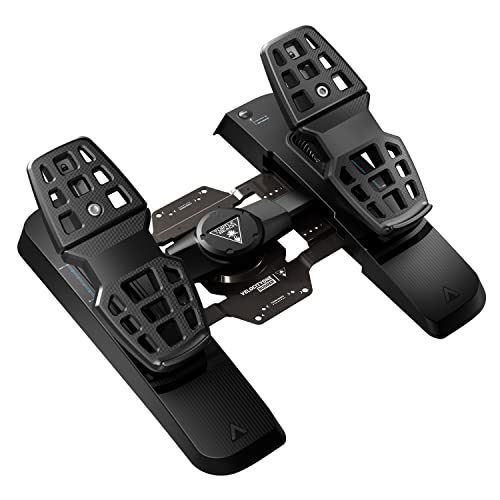
- Ultra-smooth rudder axis with swappable springs
- Adjustable pedal width and two pedal sets
- Hall effect sensors and differential brakes
Best For: PC sim pilots who want adjustable pedals with Xbox compatibility
H.O.T.A.S. Bundle
Logitech G X56 with Rudder Pedals

- Joystick, throttle, and rudder pedals in one bundle
- Adjustable pedal tension with self-centering action
- Differential toe brakes for more precise control
Best For: PC simmers building a full HOTAS setup with pedals
Precision Rudder Pedals
Thrustmaster TFRP Rudder Pedals

- Long-range rudder axis with self-centering response
- S.M.A.R.T. sliding system with four aluminum rails
- Compatible with PS5, Xbox Series X|S, and PC
Best For: Pilots wanting smooth, dedicated rudder pedals for multiple platforms
Slip-Reducing Upgrade
Enlarged Footrests for Thrustmaster TFRP

- Wider footrests for better placement
- Helps reduce slipperiness
- Made for Thrustmaster TFRP pedals
Best For: TFRP owners wanting a more stable, realistic foot feel
Premium Precision
Thrustmaster TPR Rudder Pedals for PC

- Pendular mechanism for smooth control
- HallEffect magnetic sensors for accuracy
- Adjustable resistance for custom feel
Best For: Serious PC sim pilots seeking high-end rudder precision
All-in-One Starter Set
Thrustmaster T-Flight Full Kit HOTAS with Pedals

- Includes TFRP rudder pedals
- Complete HOTAS throttle and stick setup
- Compatible with Xbox and PC
Best For: Beginners wanting a full flight control bundle with pedals
Premium PC Rudder Pedals – Logitech G Pro Flight Rudder Pedals
If you’re comparing flight simulator pedals for pc, the Logitech G Pro Flight Rudder Pedals are built around smooth rudder control, adjustable tension, and differential toe brakes. They’re a solid fit if you want a more realistic feel than twist-rudder controls and need a set that can adapt to lighter prop-plane handling or the more planted feel of larger aircraft.
Best For: PC sim pilots who want adjustable, self-centering rudder pedals with toe brakes for more realistic runway control.
Pros:
- Self-centering rudder action designed for smooth, accurate control
- Adjustable tension dial lets you change the pedal feel
- Differential toe brakes add useful runway and taxi control
- PC compatible over USB with Windows support
Cons:
- Windows-focused compatibility may limit non-PC use
- Requires desk or floor space for a full pedal setup
Overall, this is a practical choice if you want a more serious rudder pedal upgrade for PC flying without moving into niche or specialized hardware. The adjustable feel and toe brakes make it especially useful for simmers who care about control fidelity.
Budget-Friendly PC Starter Set – ThrustMaster TFRP & T16000M HOTAS Bundle
For buyers building out flight simulator pedals for pc on a budget, this ThrustMaster bundle combines TFRP rudder pedals with the T.16000M FCS HOTAS. The pedals use S.M.A.R.T slide rails for smooth steering, while the stick adds Hall Effect magnetic sensors and multiple action buttons, making this a broad PC flight-control package.
Best For: PC flyers who want a bundled joystick and rudder-pedal setup with smooth pedal motion.
Pros:
- TFRP pedals use S.M.A.R.T slide rails for smooth motion
- Ergonomic heel-rest design with removable rests for different foot positions
- Differential brake pedals help with precise ground handling
- T.16000M stick adds Hall Effect magnetic sensors and 16 action buttons
Cons:
- Bundle includes more than pedals, so it may be more than some buyers need
- Compatibility details are primarily centered on PC use
This bundle makes sense if you want to cover both stick and rudder control in one purchase. The pedal system focuses on smooth, ergonomic operation, while the included HOTAS adds extra controls for a fuller PC sim setup.
Midrange Immersion Upgrade – Honeycomb Charlie Rudder Pedals
If you want flight simulator pedals for pc that emphasize realism, the Honeycomb Aeronautical Charlie Rudder Pedals bring aluminum construction, a belt drive system, and Hall Effect sensors into the mix. They’re aimed at sim pilots who want more precise coordination, adjustable pedal fit, and practical anti-slip features for a stable cockpit setup.
Best For: PC simmers looking for a durable, realistic pedal set with adjustable fit and magnetic sensing.
Pros:
- Durable aluminum construction with a belt drive system
- Hall Effect sensors for more precise coordination in flight
- Adjustable feet angles to better fit different pilots
- High-friction strips and deployable carpet spikes help reduce slipping
Cons:
- Compatibility is centered on PC and select Honeycomb systems
- Xbox Series X or S support requires the Honeycomb Xbox Hub
These pedals are a strong pick if you want a more refined feel and visible attention to stability. The combination of aluminum build quality, magnetic sensing, and grip features makes them well suited to a dedicated PC sim desk or cockpit.
Complete Flight Control Bundle – Logitech G Pro Yoke + Rudder Pedals Bundle
When you’re shopping for flight simulator pedals for pc and want a matching control setup, this Logitech bundle pairs the Pro Flight Yoke System with the Pro Flight Rudder Pedals. It combines self-centering pedals, differential toe brakes, and a yoke with multiple programmable controls, making it a practical all-in-one option for PC flight simmers.
Best For: PC sim pilots who want a matched yoke-and-rudder package with plenty of programmable controls.
Pros:
- Includes Logitech G Pro Flight Rudder Pedals and the Pro Flight Yoke System
- Self-centering pedals with differential toe brakes
- Yoke offers POV hat, 14 buttons, and a 3-position mode switch
- At least 54 programmable controls for broader cockpit mapping
Cons:
- Bundle is larger than a standalone pedal purchase
- Best suited to users who want the full yoke-and-pedal experience
This is the right pick if you’d rather buy a coordinated control setup than piece one together separately. The package is especially appealing for simmers who want toe brakes, programmable inputs, and a more complete flight-control layout on PC.
Universal Rudder Pedals – Turtle Beach VelocityOne Flight Control
If you want flight simulator pedals for pc that also leave the door open for console use, the Turtle Beach VelocityOne Universal Rudder Pedals are built around smooth, adjustable control. The ultra-smooth rudder axis, swappable springs, and adjustable pedal width make them a flexible fit for different flying styles, while the Hall effect sensors aim for consistent input across all axes.
Best For: Sim pilots who want adjustable, PC-ready pedals with Xbox support.
Pros:
- Ultra-smooth rudder axis with swappable springs for tuning the feel
- Adjustable pedal width and two sets of swappable pedals for fit and comfort
- Differential brakes and hall effect sensors in all axes
- Stable, non-slip base for desktop or cockpit use
Cons:
- Xbox use requires the VelocityOne Flight Control System
- Bulkier than simpler pedal sets at 13.3 pounds
Overall, this is a feature-rich pedal set for users who care about adjustability and smooth response more than keeping things minimal. It is a strong choice if you want a modern, PC-focused setup that can also support an Xbox flight rig.
H.O.T.A.S. Bundle – Logitech G X56 with Rudder Pedals
This Logitech bundle pairs a flight stick and throttle with rudder pedals, making it a straightforward way to build out flight simulator pedals for pc alongside a full control setup. The X56 adds military-grade precision, lots of inputs, and RGB backlighting, while the included rudder pedals bring smooth self-centering action, adjustable tension, and differential toe brakes for more complete flight control.
Best For: PC simmers who want a full HOTAS bundle with pedals included.
Pros:
- Includes joystick, throttle, and Pro Flight Rudder Pedals in one bundle
- Rudder pedals offer self-centering control and an adjustable tension dial
- Differential toe brakes add more precise runway handling
- X56 side provides many controls and customizable options for complex sims
Cons:
- Compatible with Windows only
- Bundle may be more controller than some users need for basic flying
This bundle is a good pick if you are starting from scratch or want a more complete sim cockpit in one purchase. It leans heavily into customization and control density, which makes it well suited to demanding PC flight sims and space sims alike.
Precision Rudder Pedals – Thrustmaster TFRP Rudder Pedals
If you are comparing flight simulator pedals for pc and want a focused, no-frills set, the Thrustmaster TFRP is built around smooth rudder control and steady handling. Its long travel axis, self-centering response, and four-aluminum-rail S.M.A.R.T. sliding system are aimed at giving you accurate, friction-free inputs during long sessions.
Best For: Sim pilots who want dedicated rudder pedals with smooth motion and broad platform support.
Pros:
- Long-range rudder axis for smooth, accurate turns
- S.M.A.R.T. sliding system with four aluminum rails for friction-free motion
- Self-centering axis helps keep control inputs predictable
- Compatible with PS5, Xbox Series X|S, and PC
Cons:
- Less adjustable than some higher-end pedal sets
- No mention of extra pedal width options or removable pedal faces
The TFRP makes sense if you value reliable rudder performance over extra customization. It is a practical choice for flight simmers who want a dedicated pedal set that stays comfortable and stable through longer flights.
Slip-Reducing Upgrade – Enlarged Footrests for Thrustmaster TFRP
If you already own Thrustmaster TFRP flight simulator pedals for PC and want a simpler, more comfortable feel, this add-on is designed to widen the foot contact area and reduce slipperiness. It is a focused accessory rather than a full pedal set, so it makes the most sense when you like the TFRP base but want a more realistic underfoot experience.
Best For: TFRP owners who want a wider, less slippery footrest feel.
Pros:
- Enlarged and widened footrests for a more stable foot placement
- Designed to make the TFRP pedals feel less slippery and more realistic
- Simple 2-piece add-on for Thrustmaster TFRP flying pedals
Cons:
- Only compatible with Thrustmaster TFRP pedals
- Plastic construction may not appeal to everyone
This is a practical comfort upgrade for current TFRP users, especially if you are looking for small tweaks instead of replacing your existing setup. It improves the foot interface, but it does not add new control features or change the pedals themselves.
Premium Precision – Thrustmaster TPR Rudder Pedals for PC
For buyers comparing flight simulator pedals for PC, the Thrustmaster TPR is aimed at serious sim pilots who want smooth, precise rudder input. Its pendular mechanism and magnetic sensor setup are built for realistic motion and accurate control, making it a strong pick for detailed flying sessions.
Best For: Serious PC sim pilots who want premium rudder precision and realistic motion.
Pros:
- Pendular mechanism delivers smooth, realistic rudder movement
- H.E.A.R.T HallEffect magnetic sensor technology for precise, wear-free input
- Adjustable spring system lets you tune pedal resistance
- Built for demanding long-session flight simulation on PC
Cons:
- PC-only compatibility limits cross-platform use
- Higher-end design is likely more than casual flyers need
This is the most performance-focused option in the group, with clear attention to precision, durability, and realism. If you want a dedicated rudder solution for a serious desktop setup, the TPR stands out on control quality alone.
All-in-One Starter Set – Thrustmaster T-Flight Full Kit HOTAS with Pedals
If you want flight simulator pedals for PC as part of a complete setup, this Thrustmaster bundle combines a HOTAS system with the included TFRP rudder pedals. It is geared toward players who want one package that covers throttle, stick, and yaw control without piecing components together separately.
Best For: Beginners or casual sim players who want a complete flight control bundle.
Pros:
- Includes rudder pedals with Thrustmaster’s S.M.A.R.T slide rail system
- Full HOTAS layout adds throttle, stick, and multiple programmable controls
- Ergonomic full-foot pedal design with removable heel rests
- Works with Xbox and PC for broader compatibility
Cons:
- Bundle approach may be more than you need if you only want pedals
- Included pedals are part of a wider starter kit, not a standalone premium pedal system
This kit makes the most sense when you want an integrated flight-sim package instead of buying each control individually. The pedals are a strong convenience feature here, but the real value is the complete cockpit-style control layout.
How We Picked These Flight Simulator Pedals for PC
We focused on products that offer reliable PC compatibility, responsive rudder input, and practical features that matter in day-to-day sim flying. We also considered build quality, adjustability, toe brakes, and whether each option makes sense for beginners, intermediate users, or advanced sim pilots.
Because the best choice depends on your setup, we included standalone pedals, bundle options, and more specialized models so you can compare performance against price and ecosystem fit.
Quick Comparison
At a glance, budget-oriented pedals are best for newcomers who want better yaw control without a big investment. Midrange models usually deliver the best balance of smoothness, realism, and durability. Premium Flight Simulator Pedals for PC are the better choice if you want heavier construction, more precise inputs, and a cockpit-like feel.
Key Buying Factors for Flight Simulator Pedals for PC
Toe Brakes and Axis Control
For most users, toe brakes are a major upgrade because they improve taxiing and ground handling. If you fly airliners, GA aircraft, or anything that demands precise braking, prioritize pedals with clearly defined toe brake axes.
Resistance, Travel, and Stability
Pedal feel affects control more than many buyers realize. Smoother movement can help in helicopters and aerobatics, while firmer resistance may feel more realistic for fixed-wing aircraft. A wide base, grip pads, or mounting options also help keep pedals steady on carpet or hard floors.
Compatibility and Ecosystem
Make sure the pedals work with your sim platform and any existing controls. Some sets are best when paired with matching yokes or HOTAS gear, while others are more universal. If you already own part of a brand’s ecosystem, sticking with compatible hardware can simplify setup and improve overall ergonomics.
Build Quality and Size
Plastic construction can still be perfectly fine for casual use, but heavier metal pedals often feel more durable and refined. Also check the footprint, since larger rudder sets may be uncomfortable in compact desk setups.
Who Should Buy Which Flight Simulator Pedals for PC?
New sim pilots should usually start with a value-focused set that offers straightforward setup and solid rudder control. If you want a more immersive home cockpit, look for pedals with toe brakes and better adjustability. Advanced users and frequent flyers will likely get the most benefit from premium Flight Simulator Pedals for PC that emphasize precision, weight, and long-term durability.
If you are shopping for a bundle, it can be a smart way to build a coordinated control setup quickly. If you already own a yoke or HOTAS, standalone pedals may be the better value because you only pay for the control you actually need.