
Choosing the right desktop can make coding faster, smoother, and far less frustrating. For developers, the best system is usually the one that balances CPU performance, memory capacity, storage speed, and room to grow.
This roundup of the best desktop computers for programming in 2026 focuses on practical workstation features that matter for IDEs, containers, virtual machines, local databases, and multi-monitor setups.
Best 10 Desktop Computers for Programming Picks for 2026
Business-Grade Programming Tower

- 14-core Intel Core i5-14500 vPro
- 128GB DDR5 and 4TB PCIe SSD
- Supports two 4K displays
Best For: Developers and office users who want a secure, high-memory programming desktop
Compact Multitasking Desktop

- Core i7-14700 with 20 cores and 28 threads
- Small form factor for saving desk space
- HDMI and DisplayPort for dual displays
Best For: Programmers who want a compact, high-performance business desktop
Expandable AI-Ready Tower

- Core Ultra 7-265 with built-in AI features
- Supports four FHD or two 4K monitors
- Tool-less access for easier upgrades
Best For: Developers who want an upgradable tower with strong monitor support
Budget Renewed Coding PC

- 32GB DDR4 RAM and 1TB SSD
- Windows 11 Pro with dual-monitor support
- Includes keyboard, mouse, and Wi-Fi adapter
Best For: Budget buyers who need a renewed desktop for basic programming
Deluxe Business Pick
Dell Pro Business Desktop with i5-14500

- 14-core Intel i5-14500 for fast multitasking
- DDR5 and PCIe SSD support for upgrades
- Wi-Fi 6, Bluetooth, and USB-C connectivity
Best For: Developers who want a dependable business desktop with upgrade room
Space-Saver Choice

- Compact mini PC with i7-12700T processor
- 32GB RAM and 1TB NVMe SSD included
- Dual-display support and VESA mounting
Best For: Programmers who need a tiny, business-ready desktop
High-Output Developer Tower
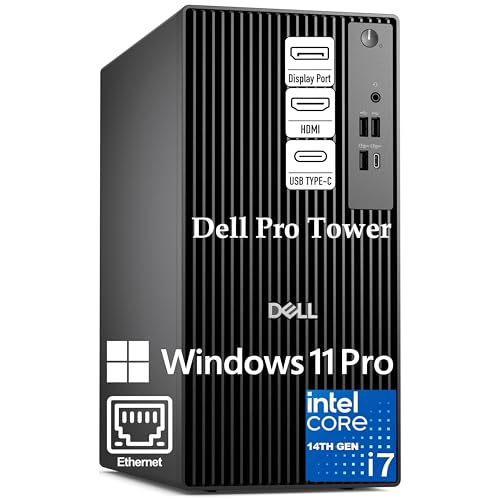
- 20-core i7-14700 for demanding multitasking
- 1TB PCIe SSD and DDR5 memory
- Dual 4K monitor support with Windows 11 Pro
Best For: Power users running IDEs, VMs, and containers
Compact Everyday Business Pick
HP ProDesk SFF for Reliable Office Work

- Compact SFF design fits tight desks.
- 16GB RAM and 1TB SSD handle daily tasks.
- Dual 4K display support boosts multitasking.
Best For: Light programming and everyday office use
Balanced Power Performer
Dell i7 Tower for Faster Development

- Core i7-12700K delivers strong multitasking.
- 32GB DDR5 RAM and 1TB SSD feel fast.
- Dual 4K monitor support suits coding setups.
Best For: Coders who want fast everyday and advanced multitasking
High-End Productivity Tower
Dell i9 Desktop for Heavier Coding

- Core i9-12900K is the fastest CPU here.
- 32GB DDR5 RAM supports heavy multitasking.
- Dual 4K support fits advanced desk setups.
Best For: Advanced developers and heavy multitaskers
Business-Grade Programming Tower – Dell Pro Tower i5-14500 vPro
If you want desktop computers for programming that can also handle analytics, big spreadsheets, and lots of browser tabs, this Dell Pro Tower is built for that kind of everyday development workload. The Core i5-14500 vPro, DDR5 memory, and PCIe SSD make it a strong fit for a home office or business setup where speed and stability matter.
Best For: Developers, IT-managed offices, and power users who need a secure tower for coding, multitasking, and dual-monitor productivity.
Pros:
- Intel Core i5-14500 vPro with 14 cores and 20 threads for responsive multitasking
- 128GB DDR5 and a 4TB PCIe NVMe SSD for heavy files and fast load times
- Intel UHD Graphics 770 supports two 4K displays for a productive coding layout
- Windows 11 Pro and vPro security features suit business environments
Cons:
- Integrated graphics only, so it is not intended for graphics-heavy workloads
- Best matched to desk setups rather than a portable workflow
This is a practical programming desktop when you want a lot of memory, plenty of storage, and business-focused security in one compact tower. It leans toward professional productivity more than flashy specs, which is often exactly what many developers need.
Compact Multitasking Desktop – HP ProDesk SFF 400 G9
For desktop computers for programming in a tight workspace, this HP ProDesk SFF 400 G9 focuses on strong processor performance in a small form factor. Its Core i7-14700, DDR5 memory, and multiple display outputs make it a solid fit for coding, testing, and day-to-day office multitasking.
Best For: Programmers and business users who need a compact desktop with strong CPU performance and dual-display support.
Pros:
- Intel Core i7-14700 with 20 cores and 28 threads for demanding multitasking
- DDR5 memory and 1.5TB storage for fast daily use and plenty of file room
- Small form factor design saves desk space
- HDMI, DisplayPort, USB, and Ethernet support a practical work setup
Cons:
- Space-saving design leaves less room for internal expansion than larger towers
- Integrated graphics limits use for GPU-heavy work
This HP desktop makes sense if you want a compact machine that still feels serious for programming and business workloads. It is a straightforward choice for a neat desk setup where CPU strength and connectivity matter more than size.
Expandable AI-Ready Tower – Dell Tower Core Ultra 7
If you are comparing desktop computers for programming and want a newer platform with room to grow, this Dell Tower stands out for its Intel Core Ultra 7 processor and easy upgrade access. It is aimed at business, education, and multimedia use, but the multiple-monitor support and tool-less design also make it attractive for a development desk.
Best For: Developers who want an AI-capable tower with simple upgrades and strong multi-monitor support.
Pros:
- Intel Core Ultra 7-265 with built-in AI features for modern productivity
- Supports up to four FHD monitors or two 4K displays
- Tool-less entry and removable side panel make upgrades easier
- Hardware TPM security chip adds a business-friendly security layer
Cons:
- Comes with Windows 11 Home rather than Pro
- Integrated graphics are best for general use, not demanding visual workloads
This Dell Tower is a good pick if you value flexibility and future upgrades as much as raw specs. It offers a clean path for a coding workstation that can adapt over time, especially if you like using multiple monitors.
Budget Renewed Coding PC – Dell OptiPlex 7050 SFF
For buyers shopping desktop computers for programming on a tighter budget, this renewed Dell OptiPlex 7050 SFF offers a simple path to a Windows 11 Pro workstation. It combines an older Core i7 chip, 32GB of RAM, and a 1TB SSD, which is enough for light development, testing, and everyday productivity.
Best For: Budget-conscious buyers who want a renewed desktop for basic programming and general office work.
Pros:
- 32GB DDR4 RAM and a 1TB SSD help keep apps and files moving quickly
- Windows 11 Pro is included for a more business-ready setup
- Dual-monitor support via HDMI and DisplayPort
- Comes with keyboard, mouse, and Wi-Fi adapter included
Cons:
- Intel Core i7-7700 is an older 4-core processor
- Renewed condition and 90-day warranty are less reassuring than a new system
This OptiPlex makes sense when cost is the priority and your programming needs are fairly modest. It is not the fastest option here, but the included accessories and solid memory/storage setup make it a workable starter desktop.
Deluxe Business Pick – Dell Pro Business Desktop with i5-14500
If you’re comparing desktop computers for programming, this Dell Pro business desktop offers a strong mix of speed, expandability, and clean workstation features. The Intel i5-14500, DDR5 memory support, and PCIe SSD storage make it well suited for everyday coding, compiling, and multitasking in a compact office setup.
Best For: Developers who want a reliable business desktop with modern connectivity and room to grow.
Pros:
- Intel i5-14500 with 14 cores and 20 threads for responsive multitasking
- DDR5 memory support up to 64GB and PCIe M.2 SSD support up to 4TB
- Wide port selection including USB-C, HDMI, DisplayPort, Ethernet, Wi-Fi 6, and Bluetooth
- Includes Windows 11 Pro plus keyboard and mouse
Cons:
- 16GB RAM may be modest for heavier development environments at stock config
- Integrated graphics only
- Best fit is a business desktop, not a performance-tuned creator tower
Overall, this Dell is a practical choice if you want a modern, quiet desktop for programming with solid upgrade paths. It covers the essentials well and is easy to slot into a work-focused setup.
Space-Saver Choice – HP Pro Mini 400 G9 for Work
For desktop computers for programming in tight spaces, the HP Pro Mini 400 G9 is built around a compact footprint without giving up core productivity features. Its i7-12700T processor, 32GB RAM, and 1TB SSD make it a capable option for coding, browsing documentation, running tools, and handling day-to-day business workloads.
Best For: Programmers who need a very small PC for a clean desk, dual monitors, and office work.
Pros:
- 12-core Intel i7-12700T with 20 threads for solid multitasking
- 32GB RAM and 1TB NVMe SSD provide fast, roomy storage and smooth workflow
- Dual monitor support via DisplayPort and HDMI helps productivity
- Ultra-compact design with VESA mounting option for space-saving setups
Cons:
- Uses integrated graphics only
- DDR4 instead of newer DDR5 memory
- Best suited to compact business use rather than heavy workstation demands
In practice, this HP mini PC is a strong fit when desk space matters as much as performance. It gives programmers plenty of memory and storage in a tiny, business-ready chassis.
High-Output Developer Tower – Dell Pro Tower i7-14700
If your programming workflow includes multiple IDEs, virtual machines, or Docker containers, this Dell Pro tower is built for heavier multitasking. Among desktop computers for programming, it stands out with a 20-core i7-14700, DDR5 memory, and a 1TB PCIe SSD aimed at keeping development work moving quickly.
Best For: Developers and power users running demanding, multitasking-heavy workflows.
Pros:
- Intel i7-14700 with 20 cores and 28 threads is well suited to demanding dev workloads
- 16GB DDR5 memory and 1TB PCIe SSD support quick launches and efficient file handling
- Dual 4K monitor support helps keep code, docs, and tools visible at once
- Windows 11 Pro adds business-focused security and remote desktop features
Cons:
- No built-in Wi-Fi
- 16GB RAM may be limiting for especially heavy virtual machine use
- Integrated graphics only
This is the most performance-oriented option in the group for code compilation and multitasking. It makes the most sense if you want a tower that can stay responsive under a busy development workload.
Compact Everyday Business Pick – HP ProDesk SFF for Reliable Office Work
If you want desktop computers for programming that stay practical and space-efficient, this HP ProDesk SFF is a sensible entry-level option for lighter coding, web apps, documentation, and everyday office work. Its compact small-form-factor design keeps the desk clear, while Windows 11 Pro and the included keyboard and mouse make setup straightforward.
Best For: Light programming, remote work, and office environments that need a compact Windows 11 Pro desktop.
Pros:
- Compact SFF chassis saves desk space.
- 16GB RAM and 1TB SSD support smooth everyday multitasking.
- Dual 4K display support helps with coding and reference windows.
- Wi-Fi, Bluetooth, HDMI, and DisplayPort improve connectivity.
Cons:
- Pentium Gold G5905 is better for basic development than heavy workloads.
- Integrated graphics are limited for graphics-heavy tasks.
- Best suited to everyday productivity rather than demanding builds or virtualization.
This model makes the most sense for budget-conscious buyers who need a compact machine for routine development tasks. It is not the fastest option here, but it covers the essentials well for a simple, reliable workspace.
Balanced Power Performer – Dell i7 Tower for Faster Development
For desktop computers for programming that need real headroom, this Dell tower offers a strong balance of speed and practicality. The Core i7-12700K, 32GB of DDR5 RAM, and 1TB PCIe SSD give you the responsiveness you want for multitasking across IDEs, browsers, terminals, and local tools.
Best For: Developers who want strong all-around performance for coding, multitasking, and heavier daily workloads.
Pros:
- Intel Core i7-12700K with 12 cores and 20 threads supports demanding multitasking.
- 32GB DDR5 RAM and a 1TB PCIe SSD deliver fast, responsive performance.
- Dual 4K monitor support is useful for code, docs, and debugging.
- USB-C, Wi-Fi, Bluetooth, and multiple USB ports make it easy to connect peripherals.
Cons:
- Integrated graphics are fine for productivity but not ideal for GPU-heavy work.
- Max RAM is listed as 32GB in the details, which may limit future expansion.
- More power than basic users need, so it may be overkill for simple tasks.
This is the strongest all-round choice in the group if you want a programming desktop that feels fast without moving into workstation territory. It is especially appealing if you keep many apps open or rely on a dual-monitor coding setup.
High-End Productivity Tower – Dell i9 Desktop for Heavier Coding
If you are comparing desktop computers for programming and want the most powerful option here, this Dell tower stands out with its Core i9-12900K and 32GB of DDR5 memory. It is built for advanced multitasking, content creation, and data-heavy work, so it makes sense for developers who run demanding local environments or keep many tools active at once.
Best For: Power users, advanced developers, and anyone who needs top-tier CPU performance for intensive workloads.
Pros:
- Core i9-12900K with 16 cores and 24 threads is built for heavy multitasking.
- 32GB DDR5 RAM and 1TB PCIe SSD provide fast, responsive performance.
- Dual 4K support and USB-C make it flexible for modern desk setups.
- TPM security chip, lock slot, and padlock loop add business-friendly security features.
Cons:
- Integrated graphics are not aimed at graphics-intensive or gaming-focused workloads.
- Details list max RAM as 32GB, so expansion may be more limited than expected.
- More performance than casual programmers may need.
This is the premium pick if speed and headroom matter more than value. For serious development workflows, it offers the most power of the three and the most confidence for handling heavier everyday computing.
How We Picked the Best Desktop Computers for Programming
We prioritized processors that can handle modern development workloads, enough RAM for multitasking, SSD storage for fast boot and project load times, and business-class designs that are easier to maintain. We also looked for useful extras like dual-display support, compact form factors, and upgrade paths.
Quick Comparison
For most developers, the biggest differences come down to CPU class, memory ceiling, and chassis size. Tower desktops generally offer the best expansion and cooling, while small-form-factor and mini PCs are better when desk space matters more than future upgrades.
Key Buying Factors for Desktop Computers for Programming
Processor Performance
Choose a newer Core i5, i7, or i9 class CPU if you run heavy IDEs, Docker, local testing environments, or multiple apps at once. More cores and threads help with compiles, background services, and virtual machines.
Memory and Storage
16GB RAM is a workable starting point, but 32GB is a better target for most serious developers. A 1TB SSD is ideal if you keep large repositories, tools, and virtual machine images locally. If you expect growth, look for systems that can expand beyond the base configuration.
Form Factor and Upgradability
Towers are usually the best long-term buy because they are easier to upgrade with more RAM, storage, and sometimes better cooling. SFF and mini desktops fit cramped spaces but can be less flexible later.
Display and Connectivity
Support for two monitors can improve productivity dramatically, especially for coding, debugging, and documentation. Also check for enough USB ports, Wi-Fi, Bluetooth, and the video outputs your setup requires.
Who Should Buy Which Desktop Computers for Programming?
If you want the best all-around choice for Desktop Computers for Programming, pick a newer midrange tower with 32GB RAM or upgrade potential. If your work is mostly web development, scripting, or light app building, a strong Core i5 system may be enough. If you rely on virtual machines, large builds, or data-heavy workloads, step up to an i7 or i9 configuration with plenty of memory and SSD space.
For small desks or office environments, a compact SFF or mini PC can still be an excellent developer machine as long as it has the RAM and monitor support you need. Matching the desktop to your workflow matters more than chasing the highest spec sheet.