
Choosing the right starter machine can make the difference between a fun first project and a frustrating learning curve. The best 3D printers for beginners focus on simple setup, dependable leveling, and easy-to-manage print settings.
In this roundup, we’ve prioritized models that are approachable for first-time users while still offering enough performance to grow with your skills.
Best 10 3d Printers for Beginners Picks for 2026
Speedy Beginner Pick

- Full-auto calibration reduces setup hassle.
- Fast printing with active flow compensation.
- Optional AMS lite enables multi-color prints.
Best For: Beginners who want speed, automation, and upgrade potential
Fast All-Rounder

- One-click auto leveling simplifies first-layer setup.
- 600mm/s speed supports quick turnaround prints.
- Run-out sensing and power recovery add convenience.
Best For: Beginners who want a fast, low-fuss printer for regular use
Compact Starter Bundle
Bambu Lab A1 mini with Lamp Kit

- Automatic calibration and simple setup reduce friction.
- Compact, quiet design suits home or desk use.
- LED Lamp Kit adds a beginner-friendly project.
Best For: Beginners, kids, and small-space creators
Workshop-Speed Choice
Flashforge Adventurer 5M Beginner

- Hyper-speed printing cuts down wait times.
- Auto bed leveling supports reliable first layers.
- Smart monitoring and run-out sensing add convenience.
Best For: Beginners who want speed, precision, and room to expand
Premium Multicolor Pick
Anycubic Kobra X Multicolor 3D Printer

- One-click setup and 15-minute startup
- LeviQ 3.0 auto leveling for easier first layers
- Supports 4-color printing, expandable to 19 colors
Best For: Beginners who want an easy start with room to explore multicolor printing.
Kid-Friendly Starter Pick

- Fully assembled and starts in as fast as 8 minutes
- Guided Poloprint Cloud app with AI tools and modules
- Compact, quiet design with auto leveling
Best For: Kids, families, and first-time users who want a simple starter printer.
Easy Setup Value Pick

- Quick assembly with CR Touch auto leveling
- Sprite direct drive extruder handles PLA, PETG, and TPU
- 250mm/s printing with quiet operation
Best For: Beginners wanting an easy setup and dependable everyday performance.
Easy Setup Pick
TINA2 Mini 3D Printer for Beginners
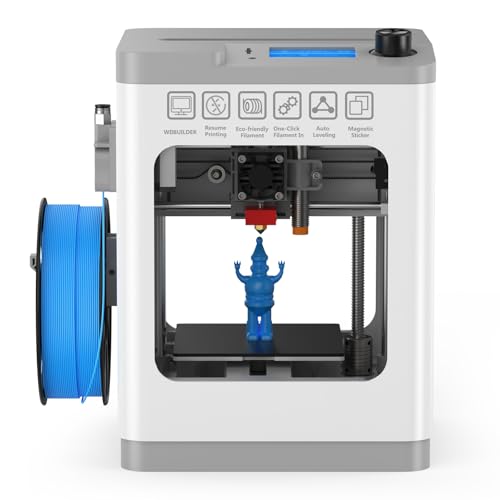
- Fully assembled out of the box
- One-touch auto bed leveling
- Includes sample PLA and model files
Best For: Beginners who want a compact, low-hassle starter printer
Starter Kit Choice
TINA2S Fully Assembled Mini Printer

- Includes filament, SD card, and accessories
- Auto leveling with one-touch filament loading
- Supports Mac, Windows, Linux, and common slicers
Best For: Kids and first-time users who want an all-in-one starter kit
Speedy Beginner Pick – Bambu Lab A1 3D Printer
If you want one of the most capable 3d printers for beginners, the Bambu Lab A1 focuses on easy setup and fast, polished results. Its full-auto calibration, active flow rate compensation, and quiet operation reduce the usual trial-and-error, while the optional AMS lite opens the door to multi-color printing.
Best For: Beginners who want a ready-to-use printer with automation, speed, and room to grow into multi-color projects.
Pros:
- Full-auto calibration handles Z-offset, bed leveling, and other setup steps automatically.
- High acceleration and active flow rate compensation support fast, accurate prints.
- Quiet operation and a simple touchscreen make it friendly for home use.
- 1-Clip quick swap nozzle adds convenience for maintenance and versatility.
Cons:
- Multi-color printing requires the AMS lite, which is sold separately unless you buy the combo.
- It may be more advanced than absolute beginners need if they only want basic single-color prints.
The A1 is a strong pick if you want a beginner printer that feels modern and low-stress without sacrificing speed. It is especially appealing for users who value automation and may want to expand into multi-color printing later.
Fast All-Rounder – FLASHFORGE Adventurer 5M
For shoppers comparing 3d printers for beginners, the Flashforge Adventurer 5M stands out for quick setup and fast everyday printing. Its one-click auto leveling, high-speed Core XY design, and simple recovery features are aimed at making the first prints smoother and less frustrating.
Best For: Beginners who want fast printing, easy bed leveling, and practical reliability right out of the box.
Pros:
- Full-auto one-click leveling helps deliver a strong first layer with less manual effort.
- Up to 600mm/s speed and Core XY acceleration are built for fast turnaround.
- Filament run-out detection and power-loss recovery add convenience and peace of mind.
- Quick heating, vibration compensation, and detachable nozzle support efficient everyday use.
Cons:
- The open-frame design is best used in a well-ventilated space.
- Its speed-focused design may be more than some beginners actually need.
The Adventurer 5M is a practical choice if you want a beginner-friendly printer that emphasizes speed and low-friction operation. It balances automation with useful safeguards, which makes it a solid home or maker-space option.
Compact Starter Bundle – Bambu Lab A1 mini with Lamp Kit
If you want a compact option among 3d printers for beginners, the Bambu Lab A1 mini is built to make the learning curve feel gentle. Automatic calibration, simple setup, and quiet operation keep the experience straightforward, while the included LED Lamp Kit adds a fun project path for decorative prints.
Best For: Beginners, kids, and small-space users who want an easy printer with a creative starter project.
Pros:
- Automatic calibration and simple setup make it approachable from day one.
- Compact size and quiet printing fit well in a home, studio, or workspace.
- Included LED Lamp Kit gives you an immediate creative use case.
- Access to MakerWorld and the Bambu Handy app supports a guided ecosystem.
Cons:
- The smaller footprint may limit larger print projects.
- It is geared toward ease and convenience rather than maximum build volume.
The A1 mini is a smart starting point if you want something friendly, compact, and ready for everyday creativity. The bundled lamp kit makes it especially appealing for new users who want an easy first project.
Workshop-Speed Choice – Flashforge Adventurer 5M Beginner
Among 3d printers for beginners, the Flashforge Adventurer 5M is aimed at users who want speed and guided convenience without giving up precision. With auto bed leveling, a CoreXY frame, and smart features like filament sensing and remote monitoring, it is built to shorten the learning curve while supporting more demanding projects.
Best For: Beginners who want a fast printer that can also grow into a home workshop or maker setup.
Pros:
- Hyper-speed printing and high acceleration help reduce wait times.
- Auto bed leveling and pressure-sensor compensation improve first-layer consistency.
- CoreXY frame with anti-vibration design supports stable, accurate printing.
- Smart features like filament sensing, remote monitoring, and quick-swap parts improve usability.
Cons:
- The speed and feature set may be more than a casual beginner needs.
- Some advanced configurations, like enclosure building, go beyond simple plug-and-print use.
This model is a good fit if you want a beginner-friendly printer that does not feel entry-level for long. It offers a strong mix of speed, precision, and convenience features for users ready to print more often.
Premium Multicolor Pick – Anycubic Kobra X Multicolor 3D Printer
If you’re comparing 3d printers for beginners but want room to grow, the Anycubic Kobra X stands out for its one-click setup, automatic leveling, and support for advanced multi-color projects. It is aimed at users who want a smoother first experience without giving up speed, quiet operation, or material flexibility.
Best For: Beginners who want an easy start now with stronger creative potential later.
Pros:
- True plug-and-play setup can get you printing in as little as 15 minutes.
- LeviQ 3.0 full-auto leveling helps deliver a reliable first layer with less guesswork.
- Supports 4-color standard printing and expands up to 19 colors with additional accessories.
- High-speed printing up to 600mm/s suits fast-moving projects.
Cons:
- Its multicolor and high-speed features may be more than a first-time user needs.
- Advanced material and accessory support adds complexity beyond basic beginner printing.
This is a strong choice if you want a beginner-friendly machine that does more than the basics. The combination of quick setup, auto leveling, and broad material support makes it especially appealing for users who expect to print beyond simple starter models.
Kid-Friendly Starter Pick – Entina Tina2C Mini 3D Printer
For families shopping for 3d printers for beginners, the Entina Tina2C keeps the experience simple with a fully assembled design, guided app setup, and auto leveling. Its compact size and low-noise operation make it a practical starter printer for home, classroom, or office use.
Best For: Kids, families, and first-time users who want the simplest possible start.
Pros:
- Fully assembled and designed to start printing in as fast as 8 minutes.
- Poloprint Cloud app adds guided setup, AI search, and photo-to-print features.
- Auto leveling and power-loss recovery help reduce beginner frustration.
- Compact, quiet design works well in home and classroom settings.
Cons:
- Very small 3.9 × 3.9 × 3.9 inch build volume limits larger projects.
- Best suited to simple learning and small creative builds rather than bigger prints.
The Tina2C is a straightforward starter option if ease of use matters more than print size. Its app-driven workflow, small footprint, and beginner-focused features make it a friendly entry into 3D printing.
Easy Setup Value Pick – Creality Ender 3 V3 SE
The Creality Ender 3 V3 SE is a practical option for 3d printers for beginners who want a fast setup and dependable everyday printing. With auto leveling, automatic Z-offset calibration, and a direct drive extruder, it focuses on making the first prints easier while still offering faster speeds than many basic starter machines.
Best For: Beginners who want a reliable entry printer with stronger everyday performance.
Pros:
- Fast, straightforward assembly with CR Touch auto leveling and automatic Z-offset calibration.
- Sprite direct drive extruder supports PLA, PETG, and TPU.
- 250mm/s print speed and 2500mm/s² acceleration help complete projects faster.
- Silent mainboard and flexible build plate improve comfort and print removal.
Cons:
- Heavier, larger frame is less compact than mini beginner printers.
- Higher-speed focus may be unnecessary for users only making very small projects.
If you want a beginner-friendly printer that feels more like a long-term everyday machine, the Ender 3 V3 SE is a solid fit. It balances easy setup with useful printing features that can support a wider range of simple and intermediate projects.
Easy Setup Pick – TINA2 Mini 3D Printer for Beginners
If you want 3d printers for beginners that are simple to set up and start using quickly, the TINA2 is built around convenience. It arrives fully assembled, includes a sample PLA roll and model files on micro SD, and adds auto bed leveling so you can focus on learning rather than calibrating.
Best For: Beginners, students, and home users who want a compact printer with minimal setup.
Pros:
- Fully assembled and ready to use out of the box
- One-touch auto-leveling helps reduce setup hassle
- Pause and resume printing adds helpful recovery control
- Compact build with a removable magnetic plate for easier part removal
Cons:
- Uses a mini format, so build space is limited
- Basic operation is centered on PLA, PLA Pro, and TPU compatibility
The TINA2 makes sense if your priority is an easy first printer that keeps the learning curve low. Its open-source software support and compact footprint add flexibility without making the machine feel overwhelming.
Starter Kit Choice – TINA2S Fully Assembled Mini Printer
The TINA2S is a strong option for 3d printers for beginners because it bundles the basics into one starter kit. You get the mini printer fully assembled, PLA filament, a microSD card with designs and software, plus auto leveling and one-touch filament loading to simplify the first prints.
Best For: Kids, first-time makers, and small spaces like bedrooms, dorms, or classrooms.
Pros:
- Complete starter kit with filament, software, and accessories included
- Fully assembled design avoids build-time mistakes
- Auto leveling, dual Z-axis rail, and flexible magnetic plate support easy printing
- Works with Mac, Windows, and Linux and supports common slicing software
Cons:
- Compact size means limited print volume
- Requires the included or comparable magnetic metal plate for proper sensor function
For beginners who want a guided start, the TINA2S stands out because it includes almost everything needed to begin printing. The WiFi capability and open-source compatibility also give it room to grow with your skills.
Speed-Focused Entry Pick – Fully Assembled Mini Starter Kit
If you are comparing 3d printers for beginners and want a quicker machine without giving up easy setup, this fully assembled mini printer is worth a look. It comes ready to use with a test PLA roll and SD card, and its auto leveling, one-button filament loading, and nozzle cleaning are designed to keep the first-print experience straightforward.
Best For: Beginners who want a ready-to-use mini printer with faster print speed and simple operation.
Pros:
- Fully assembled and ready to print out of the box
- High top speed of 250mm/s with claimed 0.01mm precision
- Auto leveling, nozzle cleaning, and one-touch filament loading simplify use
- Includes PEI heated bed and a starter roll of filament
Cons:
- Mini form factor limits overall print size
- 1kg filament use requires a compatible printed holder
This model is a practical pick if you want beginner-friendly controls but also care about print speed. The included warranty and lifetime technical support add extra reassurance for new users.
How We Picked the Best 3d Printers for Beginners
For 3d Printers for Beginners, ease of use matters as much as print quality. We looked for models with straightforward assembly, auto or assisted bed leveling, clear controls, stable extrusion systems, and strong owner feedback on reliability. We also considered whether the printer is truly ready for a first-time user, not just marketed that way.
Quick Comparison
In general, the fastest and most feature-rich printers are better for users who want to experiment often, while compact mini printers are usually the easiest path for kids, classrooms, and small desks. Larger build volumes are useful if you want to make functional parts, but they can add complexity and take up more space.
Key Buying Factors for 3d Printers for Beginners
Setup and Assembly
Look for fully assembled or near-ready machines if you want the shortest path to your first print. Less assembly usually means fewer calibration headaches.
Auto-Leveling and Bed Surface
Auto-leveling helps reduce one of the most common first-print failures. A flexible PEI bed or similarly forgiving surface can also make print removal easier.
Print Speed Vs. Ease of Use
Fast printers can save time, but beginner users should prioritize consistency over raw speed. A machine that prints a little slower but succeeds more often is usually the better choice.
Build Volume and Noise
Choose a size that matches your projects and your workspace. Smaller printers are easier to place in a bedroom, dorm, or classroom, while larger beds suit bigger models and parts.
Software and Connectivity
Simple apps, Wi-Fi printing, and clear slicer profiles can make the learning process smoother. Beginners benefit from printers with approachable software and strong community support.
Who Should Buy Which 3d Printers for Beginners?
If you want the easiest all-around start, choose a printer that is fully assembled, auto-leveling, and designed for quick setup. If you care most about speed and want to grow into more advanced prints, a higher-performance desktop model may be worth it. If you’re buying for a child, classroom, or shared space, compact mini printers are often the safest and least intimidating option.
Ultimately, the best choice depends on how much space you have, how involved you want setup to be, and whether you value simplicity, speed, or room to expand. For most first-time users, the best 3d Printers for Beginners are the ones that minimize friction and help you print successfully on day one.