
Choosing the right NAS enclosure under 500 means balancing drive bays, performance, noise, and upgrade flexibility. The best option depends on whether you want simple backup storage, a media server, or a DIY build with room to grow.
Below, we focus on practical picks that fit real-world home and small-office needs, so you can match the enclosure to your storage goals without overspending.
Best 10 Nas Enclosure Under 500 Picks for 2026
Home Cloud Starter
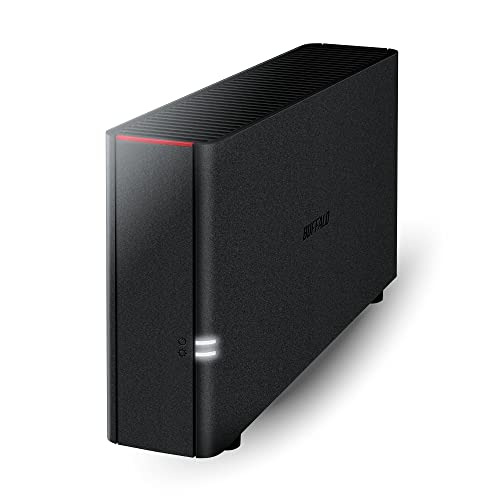
- 2TB single-bay NAS with HDD included
- Subscription-free personal cloud storage
- 24/7 US support and 2-year warranty
Best For: Home users who want simple shared storage and backups
Raspberry Pi NAS Builder
Pironman 5-MAX Raspberry Pi 5 Case
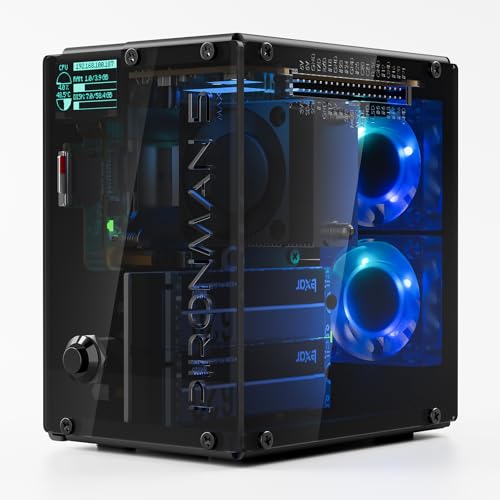
- Dual NVMe slots with RAID 0/1 support
- Tower cooler plus dual RGB fans
- OLED display and safe shutdown features
Best For: DIY Raspberry Pi 5 NAS and home automation builds
Drive Dock Utility
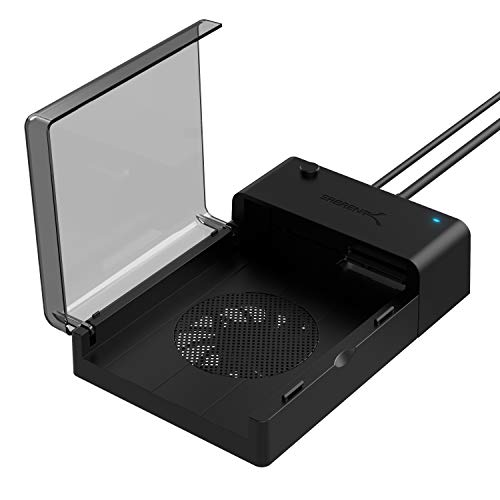
- Supports 2.5-inch and 3.5-inch SATA drives
- Built-in fan and plug-and-play setup
- Includes Acronis cloning software
Best For: Backup, cloning, and bare-drive access
Feature-Rich NAS

- Holds 5 HDDs plus 2 NVMe SSDs
- Dual 2.5GbE and multiple RAID modes
- VM, Docker, and AI album support
Best For: Power users wanting a flexible, app-heavy NAS platform
DIY Mini-ITX Private Cloud

- 4 hot-swap bays for 2.5" or 3.5" drives
- Mini-ITX + Flex PSU design saves desk space
- 12cm fan, USB ports, and front power button
Best For: DIY TrueNAS or OpenMediaVault home builds
RAID Backup Expansion Box
ORICO 4 Bay RAID Hard Drive Enclosure

- 8 RAID modes for backup and redundancy
- Up to 88TB total capacity, 22TB per drive
- Built-in 150W PSU with aluminum cooling
Best For: Backup-focused users needing flexible RAID storage
USB-C Media Docking Storage
WAVLINK 4-Bay Hard Drive Enclosure

- Up to 10Gbps USB-C transfer speed
- Supports 3.5" and 2.5" SATA drives
- Dual fans and HDMI add versatility
Best For: Fast external storage with extra display connectivity
8-Bay DIY Storage Pick
8 Bay Mini ITX/Micro ATX Hot-Swap NAS Case

- 8 hot-swap bays for 3.5-inch HDDs and 2.5-inch SSDs
- Dual airflow paths with 3 quiet temperature-controlled fans
- Mini-ITX/Micro-ATX support with 58mm cooler clearance
Best For: DIY NAS builders needing lots of bays and easy drive swapping
Hybrid RAID Performance Pick
ACASIS 4-Bay USB4 RAID Enclosure

- 2 SATA bays plus 2 NVMe bays in one hybrid enclosure
- USB4 40Gbps with RAID 0/1 options and 8K@60Hz output
- Aluminum case with active cooling and 96W power supply
Best For: Users needing fast NVMe performance and flexible RAID storage
Home Cloud Starter – Buffalo LinkStation 210 2TB
If you want a basic nas enclosure under 500 that focuses on simple shared storage and backups, the Buffalo LinkStation 210 is built around easy home use. It includes a 2TB drive, connects to your router, and can act as a centralized place for files, photos, music, and device backups without monthly fees.
Best For: Families or home users who want straightforward network storage with included hard drive space and low-maintenance setup.
Pros:
- 2TB capacity with the HDD included, so you can start using it right away.
- Subscription-free personal cloud for storing and accessing media anytime.
- Designed for centralized storage, backup, and secure file sharing.
- Includes 24/7 US-based support and a 2-year warranty.
Cons:
- Single-bay design limits expansion compared with multi-drive NAS options.
- macOS compatibility note says NAS Navigator 2 is for macOS 15 and earlier.
The LinkStation 210 makes sense if you want a simple, bundled NAS solution rather than a feature-heavy platform. Its value is in the included drive, basic security-focused design, and easy home backup workflow.
Raspberry Pi NAS Builder – Pironman 5-MAX Raspberry Pi 5 Case
If you’re building a compact NAS enclosure under 500 around a Raspberry Pi 5, the Pironman 5-MAX adds dual NVMe support, RAID 0/1 capability, and active cooling in one case. It is aimed at power users who want a high-speed Pi-based storage or home automation setup rather than a ready-made NAS appliance.
Best For: Raspberry Pi 5 users who want to build a fast DIY NAS with NVMe storage and advanced cooling.
Pros:
- Dual NVMe M.2 slots with RAID 0/1 support for storage builds.
- Includes a tower cooler plus dual RGB fans for airflow.
- Smart OLED display shows system info like CPU, memory, temperature, IP, and disk status.
- Supports safe shutdown, HDMI ports, RTC battery support, and GPIO extension.
Cons:
- Raspberry Pi 5 is not included.
- Requires a DIY setup, so it is not a turnkey NAS solution.
The Pironman 5-MAX is best viewed as a premium enclosure for a custom Pi storage project. If you want flexible NVMe-based NAS hardware with cooling and status features, it offers a lot in a compact case.
Drive Dock Utility – Sabrent USB 3.0 SATA Dock
The Sabrent USB 3.0 to SATA dock is a practical companion if you’re looking for a nas enclosure under 500 workflow centered on drive testing, cloning, or quick backups. It is not a network NAS, but it does make it easy to swap in 2.5-inch or 3.5-inch SATA drives and move data quickly over USB 3.0.
Best For: Users who need a simple dock for backups, drive cloning, and working with bare SATA drives.
Pros:
- Supports standard 2.5-inch and 3.5-inch SATA hard drives.
- Built-in cooling fan helps keep drives running cooler.
- Hot-swappable, plug-and-play design with no drivers required.
- Includes free Acronis True Image for Sabrent cloning software.
Cons:
- It is a USB drive dock, not a true network-attached NAS.
- Works with SATA drives only.
For users who mainly want convenient access to bare drives, this Sabrent dock is a solid utility pick. Its speed, cooling, and cloning support make it useful for backups and migrations.
Feature-Rich NAS – Orico HS500 Diskless NAS
If you want a more advanced nas enclosure under 500 with broad storage and app features, the ORICO HS500 is positioned as a diskless network storage box with room for HDDs and NVMe SSDs. It adds RAID support, dual 2.5GbE, HDMI, and software tools for media, virtual machines, Docker, and AI photo organization.
Best For: Power users who want a diskless NAS with flexible RAID, fast networking, and app-heavy features.
Pros:
- Supports up to 5 HDDs plus 2 M.2 NVMe SSDs for high capacity.
- Offers multiple RAID modes, including RAID 0, 1, 5, 6, and 10.
- Includes 2.5GbE networking, HDMI, USB-A, and USB-C ports.
- Features virtual machine, Docker, media center, and AI album capabilities.
Cons:
- Diskless design means you still need to buy storage drives separately.
- Feature set is complex if you only need basic file sharing.
The HS500 stands out for buyers who want more than just file storage. Its mix of capacity, network speed, and software features makes it the most capable all-rounder in this group.
DIY Mini-ITX Private Cloud – K3 4 Bay Mini ITX NAS Case
If you want a compact nas enclosure under 500 that’s built for a hands-on home server build, the K3 gives you four hot-swap drive bays, Mini-ITX support, and a practical layout for private cloud or RAID use. It’s aimed at users who want a small desktop footprint without giving up multi-drive storage, airflow, or front-panel convenience.
Best For: DIY builders setting up a compact TrueNAS or OpenMediaVault private cloud.
Pros:
- Four hot-swap bays support 2.5-inch or 3.5-inch drives for flexible storage builds.
- Mini-ITX and Flex PSU compatibility keeps the enclosure compact at 26.5 × 19 × 18 cm.
- 12cm rear fan and side ventilation help support 24/7 operation.
- Front power button and two USB 2.0 ports make daily access easier.
Cons:
- Motherboard, CPU, and power supply are not included.
- It’s a DIY enclosure, so setup will take more effort than a ready-made appliance.
The K3 is a solid pick if you want a small, practical chassis for a custom NAS build and value easy drive access plus decent cooling in a desktop-friendly design.
RAID Backup Expansion Box – ORICO 4 Bay RAID Hard Drive Enclosure
For buyers comparing a nas enclosure under 500 with strong backup features, the ORICO 4-bay enclosure stands out for its eight RAID modes and built-in power supply. It’s designed as a direct-attached storage box for users who want straightforward expansion, centralized file management, and better data protection than a basic single-purpose enclosure.
Best For: Users who want flexible RAID options for backups and large-capacity storage.
Pros:
- Supports 8 RAID modes including RAID 0, 1, 3, 5, 10, JBOD, CLONE, and CLEAR.
- Handles up to 88TB total capacity with support for 22TB per disk.
- Built-in 150W power supply avoids needing a separate large adapter.
- Aluminum body, vents, and an 80mm silent fan help with heat dissipation.
Cons:
- Supports 3.5-inch SATA disks, so it’s not the most flexible choice for mixed-drive setups.
- Trayless design may not appeal to everyone.
If RAID flexibility and backup security matter more than extra features, this ORICO enclosure is a practical storage box for larger home or work data sets.
USB-C Media Docking Storage – WAVLINK 4-Bay Hard Drive Enclosure
The WAVLINK 4-bay enclosure is a strong option if you want a nas enclosure under 500 that doubles as a fast USB-C storage dock. It supports both 3.5-inch and 2.5-inch SATA drives, includes dual fans for cooling, and adds HDMI output for users who want storage and display connectivity in one unit.
Best For: Users who want fast external storage with extra connectivity and cooling.
Pros:
- USB 3.2 Type-C supports up to 10Gbps transfer speeds.
- Works with 3.5-inch and 2.5-inch SATA HDDs and SSDs.
- Dual built-in fans activate automatically at 48°C.
- Includes HDMI output and an extra USB-C port for broader connectivity.
Cons:
- 2.5-inch drives need additional mounting brackets, which are not included.
- HDMI output depends on host USB-C video support and the correct cable.
This WAVLINK model is best if you want an enclosure that goes beyond basic storage and offers fast transfers, cooling, and desktop-friendly expansion.
8-Bay DIY Storage Pick – 8 Bay Mini ITX/Micro ATX Hot-Swap NAS Case
If you want a flexible nas enclosure under 500 for a DIY home server or small office backup box, this 8-bay case stands out for its hot-swap drive support and wide motherboard compatibility. It is built around Mini-ITX and Micro-ATX systems, with room for 3.5-inch HDDs or 2.5-inch SSDs, plus separate airflow paths to help keep drives and components from fighting for cooling.
Best For: Builders who want maximum bay count, hot-swap convenience, and flexible DIY assembly for media, backup, or surveillance storage.
Pros:
- 8 hot-swap bays support both 3.5-inch HDDs and 2.5-inch SSDs.
- Dual air-channel design and 3 temperature-controlled fans help manage heat and noise.
- Works with Mini-ITX and Micro-ATX boards, 1U/FLEX PSUs, and low-profile CPU coolers up to 58mm.
- Full steel chassis with per-bay power and read/write indicators adds durability and drive status visibility.
Cons:
- Motherboard, CPU, and other core components are not included.
- Limited CPU cooler clearance may restrict some builds.
- Best suited to users comfortable assembling a DIY NAS.
Overall, this is a strong pick if your priority is high-capacity, hands-on storage with easy drive replacement and broad platform compatibility. The tradeoff is that you have to build the system yourself, but the included accessories make setup more straightforward.
Compact USB-C Expansion Pick – WAVLINK 4-Bay USB-C HDD Enclosure
For buyers comparing a nas enclosure under 500 with simple external expansion in mind, this WAVLINK 4-bay unit focuses on speed, cooling, and convenience rather than full internal DIY assembly. It supports 3.5-inch and 2.5-inch SATA drives, offers up to 10Gbps over USB 3.2 Type-C, and adds an HDMI output for setups that need display connectivity as well as storage.
Best For: Users who want a compact multi-bay storage enclosure for backups, large media libraries, and fast USB-C connectivity.
Pros:
- Four SATA bays support both 3.5-inch and 2.5-inch HDDs and SSDs.
- USB 3.2 Type-C connection delivers up to 10Gbps transfer speeds.
- Built-in fans automatically activate at 48°C to help control drive temperature.
- Independent bay power switches and hot-swap support add everyday convenience.
Cons:
- 2.5-inch drives need separate mounting brackets, which are not included.
- HDMI output depends on host USB-C video support and the correct cable.
- It is a dock-style external enclosure, not a full internal NAS chassis.
This is a practical choice if you want straightforward multi-drive expansion with fast USB-C connectivity and active cooling. It is especially appealing for users who value plug-in convenience over a more complex internal NAS build.
Hybrid RAID Performance Pick – ACASIS 4-Bay USB4 RAID Enclosure
If your goal is a high-performance nas enclosure under 500 for mixed workloads, the ACASIS hybrid design is built to separate archival HDD storage from faster NVMe SSD tasks. It combines dual SATA bays and dual M.2 NVMe bays in one chassis, with USB4/Thunderbolt support for fast transfers, RAID options, and display output for creative workflows.
Best For: Power users who want one enclosure for backup storage, fast SSD projects, and RAID flexibility.
Pros:
- Hybrid design combines 2 SATA bays and 2 NVMe bays in one enclosure.
- Supports RAID 1 on HDDs and RAID 0 on NVMe for flexible storage setups.
- USB4 40Gbps support is compatible with Thunderbolt 3/4/5 and USB4 ports.
- Premium aluminum chassis, active cooling fan, and included 96W power supply support demanding use.
Cons:
- Full 40Gbps performance requires RAID mode and a compatible USB4 or Thunderbolt host.
- NVMe speed and capacity depend on the drives you install.
- Setup is more advanced than a simple plug-and-play hard drive enclosure.
Overall, this enclosure is the most performance-oriented option in the group, especially if you need both high-capacity HDD storage and fast NVMe access in one box. It is a strong match for editors, enthusiasts, and users who want RAID flexibility without splitting storage across multiple devices.
How We Picked the Best Nas Enclosure Under 500
To build this list, we prioritized enclosure type, bay count, cooling, connectivity, RAID support, and ease of setup. We also looked for models that make sense for a Nas Enclosure Under 500, whether you want a prebuilt unit, a direct-attached enclosure, or a DIY NAS case.
We favored products that offer a good mix of value and expandability, since buyers in this range usually want dependable storage first, then extra features like hot-swap trays, 2.5 GbE, USB-C, or NVMe support if the budget allows.
Quick Comparison: What Matters Most
For simple backups, a 1-bay or 2-bay model is usually enough. For media libraries, photo archives, or shared household storage, 4-bay and 5-bay options offer a better balance of capacity and redundancy. If you are building from scratch, mini-ITX and Micro-ATX NAS cases give you the most flexibility, but they require more parts and assembly.
Direct-attached enclosures are easier to use and often faster to set up, while networked NAS units are better if you need remote access, multiple users, and always-on sharing.
Key Buying Factors for a Nas Enclosure Under 500
Bay Count and RAID Support
More bays generally mean more capacity and better redundancy options. RAID 1 is useful for mirroring important files, while RAID 5 or similar setups can improve usable space on larger multi-bay systems.
Drive Type and Size
Check whether the enclosure supports 3.5-inch HDDs, 2.5-inch SSDs, or both. Some models also add M.2 NVMe slots, which can help with caching or faster application storage in hybrid builds.
Connectivity and Network Speed
USB 3.0, USB-C, and 10Gbps connections suit direct-attached storage, while 2.5 GbE or faster networking is important for a true NAS experience. Faster links matter most if you plan to edit video, stream media, or move large files regularly.
Cooling and Noise
Multi-drive enclosures generate heat. Look for temperature-controlled fans, airflow-focused cases, and hot-swap trays if you expect long uptime or heavier workloads.
Who Should Buy Which Nas Enclosure Under 500?
If you want the simplest setup, choose a prebuilt network NAS. If you want the best raw flexibility, a DIY NAS case is the smarter path. If your priority is backup speed and convenience, a USB or Thunderbolt-style direct-attached enclosure may be enough. For expanding media libraries and shared home storage, a 4-bay or 5-bay enclosure is usually the sweet spot in the Nas Enclosure Under 500 category.
In short, buy for your workflow first: easy cloud-style access, large local archives, or a custom home server. That keeps you from paying for features you will not use.