
Choosing among drawing tablets with 4K display can feel overwhelming, especially when screen size, pen tech, color gamut, and touch support all vary. The right model depends on how you work, whether you sketch, illustrate, animate, or edit professionally.
This roundup focuses on standout options for 2026 across premium studio displays, midrange workhorses, and more affordable entry picks. Use it to narrow down the best fit for your budget, workflow, and desk space.
Best 10 Drawing Tablets with 4K Display Picks for 2026
Editor’s Pick

- 27-inch 4K canvas for wide workflows
- PenTech 4.0 with 2g activation force
- sRGB, Adobe RGB, and DCI-P3 modes
Best For: Large-canvas artists who want a premium color-accurate pen display
Premium Pro Choice

- 27-inch 4K UHD panel with 120 Hz refresh
- Pro Pen 3 with 8,192 pressure levels
- 8 ExpressKeys and multi-touch controls
Best For: Pro studios and serious creators who want advanced control and color
Best Value Large Screen

- 23.8-inch 4K UHD display
- 16,384 pressure levels with PenTech 4.0
- Quantum Dot color with wide gamut coverage
Best For: Artists who want a desk-friendly 4K display with wide color gamut
Compact Pro Option

- 22-inch 4K display with 120 Hz refresh
- Pro Pen 3 with 8,192 pressure levels
- 8 ExpressKeys and multi-touch gestures
Best For: Creators who want a smaller Wacom 4K pen display with pro controls
Professional 4K Studio Pick

- 23.8-inch 4K UHD screen for expansive creative work
- Full lamination and anti-glare glass improve pen precision
- 140% sRGB, HDR, and Keydial Mini support pro workflows
Best For: Large desk setups, color-focused creators, and multitaskers
Compact Beginner-Friendly Display
Wacom One HD Creative Pen Display

- 13.3-inch HD pen display for simple creative tasks
- Wide software and device compatibility across major platforms
- Customizable pen button and full lamination add convenience
Best For: Students, hobbyists, and first-time pen display buyers
Immersive Color-Accurate Choice

- 18.4-inch 4K Ultra HD display for detailed work
- Factory-calibrated ΔE < 1.3 with wide Adobe RGB gamut
- 10-point touch and K30 remote speed up workflow
Best For: Color-critical artists who want touch controls and shortcut efficiency
Best with Extra Features
HUION KAMVAS Pro 16 Plus 4K UHD
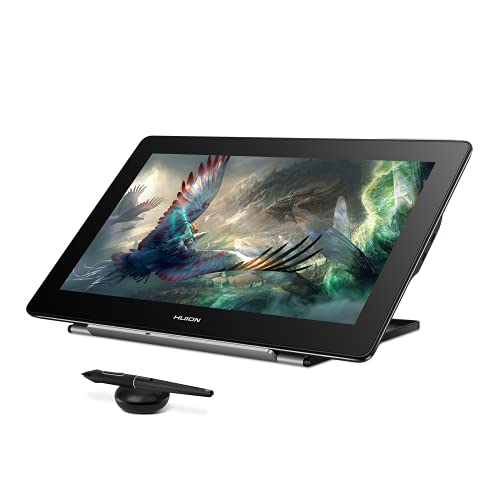
- 15.6-inch 4K UHD display
- 145% sRGB with Quantum Dot color
- PenTech 3.0, 8192 pressure levels
Best For: Color-critical artists and illustrators
Workflow Pick
HUION Kamvas Pro 16 with Touch Bar

- 15.6-inch full-laminated screen
- 6 express keys and touch bar
- 120% sRGB color coverage
Best For: Creators who want shortcut controls and a compact pen display
Large Canvas Pick

- 18.4-inch 4K UHD panel
- 99% sRGB, ΔE<1.5 factory calibration
- 16,384 pressure levels with tilt
Best For: Artists who want a larger accurate 4K drawing workspace
Editor’s Pick – HUION Kamvas Pro 27 4K UHD
If you want drawing tablets with 4k display that feel built for large-scale creative work, the HUION Kamvas Pro 27 is aimed squarely at that use case. Its 27-inch 4K screen gives you a wide canvas for concept art, painting, photo editing, and panel work, while the laminated, anti-glare glass helps keep the image clear in bright studios.
Best For: Artists and designers who want a big 4K pen display with strong color coverage and multi-touch controls.
Pros:
- 27-inch 4K display reduces the need for constant zooming and panning.
- PenTech 4.0 supports 2g activation force and tilt auto-alignment for controlled strokes.
- Wide color support includes sRGB, Adobe RGB, and DCI-P3 modes.
- Factory calibration and 3D LUT hardware calibration aim for professional color accuracy.
Cons:
- Not a standalone tablet and must be connected to another device.
- Large 27-inch footprint may be more than some desks can comfortably handle.
This is the most expansive option in the group, and it stands out when screen space and color handling matter as much as pen feel. If your workflow benefits from a desktop-sized display, it is a strong premium pick.
Premium Pro Choice – Wacom Cintiq Pro 27
Among drawing tablets with 4k display, the Wacom Cintiq Pro 27 is designed for creators who want high-end control as much as high-end image quality. The 27-inch 4K UHD panel pairs 10-bit color with 99% Adobe RGB and 98% DCI-P3, while the 120 Hz refresh rate helps the workspace feel fluid during drawing and navigation.
Best For: Professional artists and studios that want a top-tier 4K pen display with advanced customization.
Pros:
- 4K UHD 27-inch display with 120 Hz refresh rate.
- Pro Pen 3 offers 8,192 pressure levels and customizable grip/balance options.
- 8 customizable ExpressKeys plus improved multi-touch and pen gestures.
- Includes bonus software trials for creative workflows.
Cons:
- Requires a separate host device; it is not a standalone tablet.
- High-end feature set is geared more toward pros than casual users.
If you want a refined pen display with a strong focus on responsiveness and customization, this model has a clear pro-studio orientation. It is especially compelling for animation, VFX, game art, and 3D work.
Best Value Large Screen – HUION Kamvas Pro 24 Gen 3
If you’re comparing drawing tablets with 4k display and want a more manageable large-screen option, the HUION Kamvas Pro 24 (Gen 3) fits that middle ground well. Its 23.8-inch 4K UHD panel, Quantum Dot color, and multi-touch support make it a practical pick for artists who want a roomy workspace without stepping up to a 27-inch class display.
Best For: Creators who want a spacious 4K pen display with strong color coverage and a desk-friendly size.
Pros:
- 23.8-inch 4K UHD screen offers a large canvas in a smaller footprint.
- PenTech 4.0 supports 16,384 pressure levels and 2g activation force.
- Quantum Dot panel covers 99% sRGB, 99% Adobe RGB, 98% DCI-P3, and 98% Display P3.
- Factory calibration and 3D LUT aim for reliable color accuracy.
Cons:
- Not a standalone device and must be connected to a computer or compatible device.
- Still a sizable desktop display, so space planning matters.
This model is a strong fit if you want a big, color-rich display without going all the way up to a 27-inch screen. It balances workspace, image quality, and desk practicality very well.
Compact Pro Option – Wacom Cintiq Pro 22
The Wacom Cintiq Pro 22 is a smart choice if you want drawing tablets with 4k display but prefer a more compact workstation than a 27-inch model. Its 22-inch Ultra HD panel still delivers the 120 Hz refresh rate, multi-touch support, and Pro Pen 3 controls that Wacom users expect, making it a practical fit for focused creative setups.
Best For: Artists and designers who want Wacom’s 4K 120 Hz experience in a slightly smaller display size.
Pros:
- 22-inch Ultra HD 4K display with 120 Hz refresh rate.
- Pro Pen 3 includes 8,192 pressure levels and customizable grips.
- 8 ExpressKeys plus improved multi-touch and pen gestures.
- Includes Easy Stand and extra accessories for setup and customization.
Cons:
- Smaller screen than the 27-inch alternatives in this roundup.
- Like the other models here, it needs a connected computer to operate.
If you want Wacom’s premium pen display features but do not need the largest possible canvas, this version is easier to fit into a tighter workspace. It keeps the key performance features while trimming down the footprint.
Professional 4K Studio Pick – HUION KAMVAS Pro 24 4K UHD
If you want drawing tablets with 4k display for serious multitasking, the HUION Kamvas Pro 24 (4K) gives you a spacious 23.8-inch canvas and sharp 3840×2160 detail. Its full lamination, anti-glare glass, and Quantum Dot color handling make it well suited to long creative sessions where precision and clarity matter.
Best For: Artists, designers, and editors who want a large 4K pen display for color-aware work and multitasking.
Pros:
- 23.8-inch 4K UHD screen offers plenty of room for split workspaces and large timelines.
- Full lamination and anti-glare glass help cursor tracking feel precise and reduce distracting reflections.
- 140% sRGB color gamut, 1.07 billion colors, and HDR support are aimed at vivid, natural-looking output.
- Included Keydial Mini and metal integrated stand support a more efficient, ergonomic workflow.
Cons:
- It is not a standalone tablet and must be paired with a computer, laptop, or compatible Android device.
- The large size is less portable than smaller pen displays.
This is the most workstation-like option in the group, especially if your priority is screen space, color-rich output, and desk-based productivity. If you want a big 4K display that behaves like a second monitor for creative work, it fits that brief well.
Compact Beginner-Friendly Display – Wacom One HD Creative Pen Display
The Wacom One is a practical entry point if you are comparing drawing tablets with 4k display alternatives but want a simpler, smaller pen display for everyday creative tasks. Its 13.3-inch HD screen, full lamination, and broad software compatibility make it a straightforward choice for note taking, sketching, and basic photo or video editing.
Best For: Hobbyists, students, and educators who want a compact pen display from a trusted brand.
Pros:
- 13.3-inch full-color display is easy to place on smaller desks.
- Works with Mac, PC, Chromebook, Android OS, and most software programs.
- Customizable pen button helps speed up shortcuts like undo or copy/paste.
- Full lamination adds a more direct pen-on-screen feel.
Cons:
- Native 1920×1080 resolution is not 4K.
- Smaller screen may feel limiting for users who want a larger workspace.
This model makes sense if you value Wacom’s ecosystem and want a manageable display size over maximum resolution. It is a solid everyday pen display, but it is not aimed at the high-detail 4K class.
Immersive Color-Accurate Choice – DIGIDRAW Turing Pro 19 4K
For buyers comparing drawing tablets with 4k display options, the DIGIDRAW Turing Pro 19 stands out with an 18.4-inch 4K Ultra HD panel and factory calibration aimed at professional color accuracy. The large screen, touch controls, and shortcut remote make it a strong fit for detailed drawing, retouching, and design work where efficiency matters.
Best For: Creators who want a color-accurate 4K display with touch controls and shortcut convenience.
Pros:
- 18.4-inch 4K Ultra HD screen provides a large, detailed workspace.
- Factory calibration with ΔE < 1.3 and wide Adobe RGB gamut supports accurate color work.
- 10-point touch control and 16,384 pressure levels create a responsive drawing experience.
- Included K30 wireless remote adds 11 shortcut keys for faster workflow control.
Cons:
- Requires the official driver to fully customize shortcut keys and pressure curves.
- Advanced features depend on compatible systems and the latest software support.
This is a compelling option if you want a big 4K pen display that prioritizes accuracy and workflow speed. Between the calibrated panel, touch input, and shortcut remote, it is built for creators who want fewer interruptions while working.
Best with Extra Features – HUION KAMVAS Pro 16 Plus 4K UHD
If you want drawing tablets with 4k display quality in a compact 15.6-inch format, the HUION Kamvas Pro 16 Plus is built for detailed work. Its 4K UHD panel, full lamination, anti-glare glass, and Quantum Dot color tech make it a strong choice for artists who care about sharp visuals and accurate color.
Best For: Professional artists, illustrators, and designers who want a color-accurate 4K pen display for connected workstation use.
Pros:
- 15.6-inch 4K UHD display with full lamination for crisp, detailed viewing
- 145% sRGB wide gamut and Quantum Dot tech for vivid, color-critical work
- PenTech 3.0 pen with 8192 pressure levels and ±60° tilt support
- Dual USB-C connectivity and broad compatibility with Windows, Mac, Linux, and Android
Cons:
- Not a standalone device and must be connected to a computer or compatible phone/tablet
- 15.6-inch screen may feel small if you prefer a larger canvas
Overall, this model stands out for buyers who want a premium 4K pen display with strong color performance in a desk-friendly size. It is especially appealing if visual fidelity matters as much as pen feel.
Workflow Pick – HUION Kamvas Pro 16 with Touch Bar
This HUION model is a practical option if you’re comparing drawing tablets with 4k display features but want shortcut-focused workflow tools instead of ultra-high resolution. The 15.6-inch full-laminated screen, anti-glare glass, and 120% sRGB color coverage give it a comfortable, creative drawing experience for daily design work.
Best For: Artists and students who value shortcut controls, a pen display, and a portable 15.6-inch workspace.
Pros:
- 15.6-inch full-laminated screen with anti-glare glass for immersive viewing
- 120% sRGB color gamut and 1000:1 contrast for vivid artwork
- 6 express keys plus touch bar help speed up common tasks
- Includes an adjustable stand for more comfortable drawing angles
Cons:
- Not a standalone tablet and requires connection to a computer
- Native resolution is 1920×1080, not 4K
For creators who want an efficient pen display with handy controls, this tablet offers solid value and a familiar work surface. It’s less about maximum pixel density and more about smooth, organized productivity.
Large Canvas Pick – GAOMON Pro 19 18.4" 4K UHD
The GAOMON Pro 19 is a strong pick among drawing tablets with 4k display support if you want more room to work. Its 18.4-inch 4K UHD panel, fully laminated anti-glare surface, and factory-calibrated color make it well suited to detailed illustration, design, and long creative sessions.
Best For: Illustrators, designers, and instructors who want a larger 4K pen display with accurate color and a paper-like feel.
Pros:
- 18.4-inch 4K UHD display with full lamination and anti-glare finish
- 99% sRGB, 98% DCI-P3, and factory calibration to ΔE<1.5
- Battery-free pen with 16,384 pressure levels and ±60° tilt
- Pre-attached adjustable stand and included cables for easier setup
Cons:
- Requires connection to a computer or compatible Android device
- Large screen may take up more desk space than 15.6-inch alternatives
This model is ideal if you want a bigger working area without giving up sharp 4K detail. It balances display size, color accuracy, and pressure sensitivity in a way that should appeal to serious creators.
How We Picked the Best Drawing Tablets with 4K Display
We focused on the features that matter most for real creative work: 4K resolution clarity, pen responsiveness, screen size, color accuracy, build quality, and compatibility with common creative setups. For Drawing Tablets with 4K Display, the strongest choices also balance low-latency input with a comfortable viewing angle and reliable driver support.
We also considered practical differences between premium studio models and value-oriented displays, since many buyers do not need every top-end feature to get excellent results.
Quick Comparison
In this category, larger 24- to 27-inch models are best for detailed professional workflows and desktop replacement setups, while 16- to 19-inch displays are easier to fit on a smaller desk and cost less. Touch support, refresh rate, and color gamut can be major differentiators: artists who prioritize motion and pen feel may prefer high-refresh premium models, while illustrators and general digital painters may value color coverage and screen size more.
Key Buying Factors for Drawing Tablets with 4K Display
Screen Size and Workspace
A larger display gives you more room for tool palettes and broad strokes, but it also demands more desk space. If you work long sessions on detailed artwork, a 22- to 27-inch panel may feel far more natural than a compact 13- or 16-inch screen.
Pen Performance and Pressure Sensitivity
Look for strong pressure levels, tilt support, and stable hover tracking. The best pen tech should feel accurate at low pressure and remain consistent during fast line work, not just look good on paper.
Color Accuracy and Panel Quality
If you do print work, concept art, or client-facing illustration, color gamut matters. Higher Adobe RGB or sRGB coverage can help ensure your work looks closer to the intended final output, though calibration still matters.
Refresh Rate, Touch, and Connectivity
Higher refresh rates can make stylus movement feel more fluid, especially for fast sketching and navigation. Touch support can be useful, but some artists prefer a pen-only workflow for fewer accidental inputs. Also verify your computer ports and adapter needs before buying.
Who Should Buy Which Drawing Tablets with 4K Display?
Choose a premium 4K pen display if you want maximum screen space, strong color performance, and a more traditional studio setup. Pick a mid-size model if you want a better balance of price, desk footprint, and precision. Go smaller if you are a student, travel frequently, or are upgrading from a basic pen tablet and want an easier entry into screen drawing.
If you are shopping specifically for Drawing Tablets with 4K Display, the best choice is usually the one that matches your workflow first, then adds the extras you will actually use every day.