
Choosing the right video conferencing touchscreen controller can make meetings faster to start, easier to manage, and less dependent on laptops or remote clicks.
Below, we focus on practical room-control options for common ecosystems like Teams, Poly, and Yealink, with an eye on touch quality, compatibility, and installation flexibility.
Best 10 Video Conferencing Touchscreen Controller Picks for 2026
Quad-Screen PTZ Control
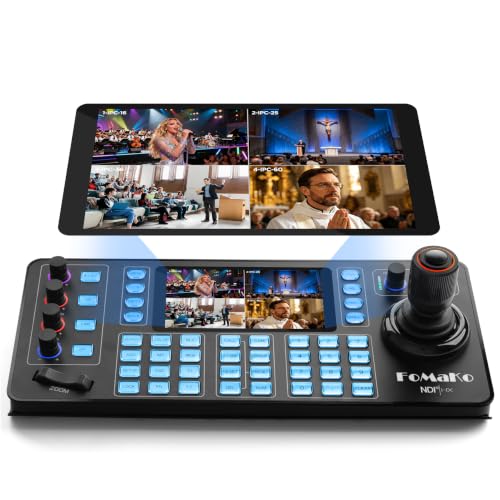
- 5.5-inch capacitive touchscreen with Android 10
- Quad-screen 4K preview up to 4K@30fps
- Supports VISCA, Pelco, and NDI HX
Best For: Multi-camera PTZ control in worship, education, and live events
Room Scheduling Panel

- 10-inch touch display with clear controls
- Works outside the room or inside as a controller
- Single-cable setup with Zoom certification
Best For: Conference rooms needing scheduling plus simple meeting controls
Meeting Control Pad

- 8-inch touch display for conference control
- Wireless presentation device support
- Includes a human motion sensor
Best For: Small meeting rooms that need simple conferencing and presentation control
Wall-Mount Conference Controller

- Wall-mountable conference-room controller
- LED indicator for status feedback
- Compact form factor for fixed installations
Best For: Fixed conference rooms that need a clean wall-mounted controller
Wired Control Panel
Yealink MTouch Plus Conference Control

- Ethernet connectivity for instant wired access
- Supports SIP ITU-T conferencing recommendations
- Single-unit setup for simple deployment
Best For: Wired conference-room control with SIP support
Poly Room Controller
Poly TC8 8-Inch Touch Controller

- 8-inch high-resolution touch screen
- Works with Poly Studio X Family and G7500
- Wireless design reduces cable clutter
Best For: Poly rooms needing a compact wireless controller
All-in-One Room System
Yealink A10 with CTP18 Touch Panel

- Includes an 8-inch CTP18 touch panel
- 4K camera with auto framing and speaker tracking
- Certified for Teams and Zoom rooms
Best For: Small rooms needing an integrated Teams/Zoom solution
Premium Compact Touch Control

- 8-inch high-resolution touch display
- PoE reduces cable clutter
- One-touch joining via integrated calendar
Best For: Poly Studio X family and G7500 users needing a clean dedicated controller
Modern BYOD Room Controller
Yealink CTP25 for MeetingBar A40

- 10.1-inch touchscreen with slim bezels
- USB-C supports sharing, BYOD, and power
- Android 13 and MDEP support
Best For: MeetingBar A40 rooms needing a larger controller with wired sharing
Universal PoE Room Control
7H Meeting Room Touch Controller

- PoE allows single-cable installation
- Wall-mountable for flexible placement
- Universal compatibility with meeting systems
Best For: Conference rooms wanting a tidy wall-mounted controller with broad compatibility
Quad-Screen PTZ Control – KC608N Multi-Channel Preview
If you need a video conferencing touchscreen controller for multi-camera PTZ work, the FoMaKo KC608N focuses on fast monitoring and precise control. Its 5.5-inch capacitive touchscreen, quad-screen 4K preview, and 4D Hall joystick are aimed at live production environments where you want to see multiple feeds and make smooth camera adjustments from one panel.
Best For: Churches, campuses, studios, conferences, and live-stream teams managing multiple PTZ cameras.
Pros:
- Quad-screen 4K preview with up to 4K@30fps monitoring.
- 5.5-inch HD capacitive touchscreen with Android 10 for responsive control.
- 4D Hall joystick supports smooth pan, tilt, zoom, focus, and exposure adjustments.
- Broad protocol support including VISCA, Pelco-P, Pelco-D, and NDI HX.
Cons:
- More specialized than a general meeting-room touch panel.
- Designed around PTZ and streaming workflows, not simple room scheduling.
- Setup may be more involved for users without network camera experience.
This is the most production-oriented option in the group, with the screen, preview, and protocol support to handle larger camera setups. If your priority is controlling and monitoring PTZ cameras during live events, it is built for that job.
Room Scheduling Panel – Poly TC10 Touch Control
The Poly TC10 is a practical video conferencing touchscreen controller for room scheduling and in-room meeting control. Its 10-inch touch display, Zoom certification, and single-cable design make it a clean fit when you want simple controls for scheduling, sharing content, and starting video calls without extra clutter.
Best For: Conference rooms that need an outside-the-room scheduler and an inside-the-room meeting controller.
Pros:
- Can be used outside the room for scheduling or inside the room for control.
- 10-inch touch display with clear, easy-to-find controls.
- Single cable for both power and connectivity keeps installation tidy.
- Zoom Certified for easier meeting-room use with Zoom workflows.
Cons:
- Focused on room control rather than camera preview or PTZ operation.
- Best fit is tied to conference-room scheduling and meeting management.
- Wall or glass mounting is great for rooms, but less flexible for mobile use.
If your priority is a polished room-control interface rather than advanced camera handling, the TC10 is a straightforward choice. It is especially appealing when you want scheduling and meeting controls in a compact wall-mounted panel.
Meeting Control Pad – Yealink MTouch II 8-Inch
The Yealink MTouch II is a compact video conferencing touchscreen controller aimed at conference control and presentation use. With an 8-inch display, wireless presentation support, and a human motion sensor, it suits meeting rooms that need a dedicated touch interface for everyday collaboration rather than a full production control surface.
Best For: Small to midsize meeting spaces that want simple conference control and wireless presentation support.
Pros:
- 8-inch display offers a dedicated touch interface for conference control.
- Wireless presentation support adds convenience for hybrid meetings.
- Human motion sensor can help the device respond more intuitively in active rooms.
- Compact footprint makes it easy to place in a meeting space.
Cons:
- Less detail is provided here about mounting or cabling options.
- Not positioned as a preview-heavy or PTZ-focused controller.
- May be better suited to simple meeting workflows than advanced room management.
For teams that want a straightforward touch endpoint for conferencing and presentation control, the MTouch II keeps the feature set focused. It looks best suited to rooms where ease of use matters more than specialized camera or production functions.
Wall-Mount Conference Controller – Poly TC10 Black
The Poly TC10 Black is a wall-mountable video conferencing touchscreen controller built for room control rather than camera production. With its LED indicator, compact wall-mounted form factor, and dedicated meeting-room design, it fits neatly into spaces where you want a fixed control point for video conferencing workflows.
Best For: Wall-mounted conference rooms that need a clean, fixed touch controller.
Pros:
- Wall-mountable design keeps the control point in a fixed location.
- LED indicator can provide at-a-glance status feedback.
- Compact form factor suits modern conference-room installations.
- Designed specifically for video conferencing use.
Cons:
- No touchscreen size is listed in the provided details.
- Information here is limited compared with the other TC10 listing.
- Best for room control, not advanced PTZ camera operation.
This TC10 variant is a good fit when you want a neat, fixed wall controller for a meeting room. It is a simple option for conference spaces that need reliable video conferencing access without extra production features.
Wired Control Panel – Yealink MTouch Plus Conference Control
If you need a video conferencing touchscreen controller that keeps meeting-room control simple, the Yealink MTouch Plus is built around direct Ethernet connectivity and SIP-based conferencing support. It’s a straightforward fit for setups that want a dedicated control surface rather than a general-purpose tablet.
Best For: Teams that want a dedicated conference control touch panel with wired network connectivity.
Pros:
- Ethernet connectivity supports instant wired network access.
- Supports SIP ITU-T recommendations for enhanced conferencing performance.
- Compact single-unit design keeps deployment simple.
Cons:
- Supplied notes do not specify screen size or touch-panel features.
- No detailed compatibility list is provided in the notes.
Overall, this is a practical choice if your priority is a purpose-built conference control device with wired connectivity and SIP support. It reads more like a core room-accessory than an all-in-one collaboration system.
Poly Room Controller – Poly TC8 8-Inch Touch Controller
The Poly TC8 is a video conferencing touchscreen controller made for users who want a dedicated, high-resolution touch display for Poly room systems. Its 8-inch screen and wireless design make it a clean fit for controlling meetings in compatible conference spaces.
Best For: Poly Studio X Family and G7500 rooms that need a compact wireless touch controller.
Pros:
- 8-inch high-resolution touch screen for dedicated meeting control.
- Works with Poly Studio X Family and G7500 systems.
- Wireless design helps reduce cable clutter.
- Renewed option may appeal to budget-conscious buyers.
Cons:
- Compatibility is limited to supported Poly systems.
- Renewed condition may not suit buyers who want brand-new hardware.
For Poly-based meeting rooms, this controller is a focused, no-frills control interface that keeps room operation straightforward. If your environment already runs on supported Poly hardware, it’s an easy way to add touch-based control.
All-in-One Room System – Yealink A10 with CTP18 Touch Panel
If you want a video conferencing touchscreen controller bundled into a full room system, the Yealink A10 package combines a 4K meeting bar with the CTP18 8-inch touch panel. It’s aimed at small rooms and home offices that need camera, audio, computing, and touch control in one certified Teams and Zoom solution.
Best For: Small meeting rooms and home offices that want an all-in-one Teams or Zoom room system with touch control.
Pros:
- Includes the CTP18 8-inch touch panel for intuitive meeting control.
- 4K camera with auto framing and speaker tracking for smarter framing.
- Built-in 8 MEMS microphones, speaker, and computing unit simplify setup.
- Certified for Microsoft Teams and Zoom for native room experiences.
Cons:
- Designed for small rooms, so it may be more system than a simple controller-only purchase.
- Heavier and larger than a standalone touch controller.
This is the most complete option in the group if you want the controller to be part of a ready-to-run collaboration system. It trades standalone simplicity for an integrated, feature-rich room setup.
Premium Compact Touch Control – Poly TC8 Touch Controller
If you want a video conferencing touchscreen controller that keeps room controls simple and polished, the Poly TC8 is built for exactly that. Its 8-inch high-resolution display makes meeting controls easy to read, while PoE helps reduce cable clutter on the desk.
Best For: Teams using Poly Studio X family systems or G7500 who want a clean, dedicated touch interface for meetings.
Pros:
- 8-inch high-resolution touchscreen with clear, accessible controls
- Single-cable Power over Ethernet setup helps reduce clutter
- Integrated calendar supports one-touch joining for meetings
- Intuitive interface is designed for productive collaboration
Cons:
- Compatibility is limited to Poly Studio X family and Poly G7500
- Designed as a business controller, so it is not a general-purpose tablet
Overall, the TC8 is a straightforward fit if your priority is a dedicated controller that looks clean on the table and works tightly with Poly video systems. It focuses on practical meeting-room control rather than extra features.
Modern BYOD Room Controller – Yealink CTP25 for MeetingBar A40
The Yealink CTP25 is a video conferencing touchscreen controller aimed at keeping meeting-room interaction fast and flexible. Its 10.1-inch screen, Android 13 support, and USB-C wired content sharing/BYOD support make it a practical control point for modern conference setups.
Best For: MeetingBar A40 rooms that need a larger touch controller with wired sharing and BYOD support.
Pros:
- 10.1-inch display with an ultra-high screen-to-body ratio
- Supports Android 13 and MDEP
- USB-C wired content sharing, BYOD, and power support
- Ultrasonic technology and multiple deployment methods add flexibility
Cons:
- Specifically listed for use with the MeetingBar A40
- Limited warranty coverage is only 90 days
For teams that want a larger, feature-oriented controller, the CTP25 delivers a practical mix of touch control and wired connectivity. It is best treated as a room accessory for Yealink-based setups rather than a universal controller.
Universal PoE Room Control – 7H Meeting Room Touch Controller
7H-952000085 Meeting Room Touch Controller with PoE Connectivity, Tap IP, Graphite
Check Price On AmazonAs a video conferencing touchscreen controller, the 7H meeting room unit is built around simplicity and installation convenience. It offers a professional touch screen interface, PoE connectivity for single-cable power and network, and a wall-mountable design suited to conference rooms.
Best For: Conference rooms that want a wall-mounted PoE controller with broad system compatibility.
Pros:
- PoE support enables single-cable power and network installation
- Wall-mountable design offers flexible room placement
- Professional touch controller interface for meeting management
- Universal compatibility with various meeting room systems
Cons:
- No screen size or resolution details are provided
- Compatibility is broad, but specific platform integrations are not listed
This controller is a good fit when installation simplicity matters as much as day-to-day room control. Its PoE wiring and wall-mount option make it appealing for tidy, fixed meeting-room setups.
How We Picked the Best Video Conferencing Touchscreen Controller
We prioritized controllers that make everyday conferencing simpler: responsive touchscreens, reliable platform compatibility, clear meeting controls, and deployment features like PoE or wall-mount support. We also looked at how well each option fits real meeting rooms, from small huddle spaces to larger conference setups.
Quick Comparison
In general, smaller controllers are best when you want a compact tabletop footprint and straightforward meeting control. Larger displays can improve readability and make room scheduling or multi-step actions easier. If your room relies on a specific ecosystem, match the controller first, then compare screen size, mounting style, and power/network requirements.
Key Buying Factors for a Video Conferencing Touchscreen Controller
Compatibility
Start with platform support. Some controllers are designed for Teams Rooms, others for Poly Studio or Yealink systems, and a few are better suited to PTZ camera control or broader AV workflows. The best choice is the one that integrates cleanly with your existing hardware and meeting software.
Screen Size and Usability
A larger screen can make it easier to navigate scheduling, mute controls, camera presets, and participant tools. Smaller units are often better for tight desks or wall-mount installations where space is limited.
Installation and Connectivity
Look for PoE, wall-mount options, and simple cabling if you want a cleaner install. These features matter a lot in corporate meeting spaces, where reliability and a tidy setup are often more important than extra features.
Room Use Case
Some rooms need a basic touch panel for joining meetings and controlling volume, while others benefit from advanced camera control, multi-channel preview, or scheduling functions. Choose the feature set that matches how your team actually uses the room.
Who Should Buy Which Video Conferencing Touchscreen Controller?
If you want a straightforward room-control device for Microsoft Teams or a similar UC environment, choose a controller built for that platform rather than a generic touchscreen. If your setup centers on Poly hardware, a Poly-compatible panel is the safest route. Yealink users should stay within the Yealink ecosystem for the smoothest experience, especially in rooms with dedicated meeting bars or all-in-one systems.
If you need camera operation and live preview in addition to meeting controls, a more advanced controller may be worth it. For scheduling-heavy conference spaces, prioritize panels that are easy to wall mount and simple for non-technical users to operate. In short, the best Video Conferencing Touchscreen Controller is the one that fits your room’s ecosystem, installation plan, and daily workflow.