
If you want a more immersive home cockpit, a good flight simulator radio panel can make tuning COM, NAV, and transponder functions feel far more natural than using a mouse or keyboard.
In this roundup, we focus on the 10 best options for 2026, from simple USB add-ons to advanced airliner-style panels designed for serious simmers.
Best 10 Flight Simulator Radio Panel Picks for 2026
Classic Radio Stack Choice
Logitech G USB Pro Flight Radio Panel

- Physical knobs and LED displays
- Twin dials for faster tuning
- Standby-to-active frequency switching
Best For: PC sim pilots wanting a dedicated radio stack
Compact All-in-One Cockpit
Octavi IFR-1 Compact Control Panel

- Controls COM, NAV, FMS, autopilot, and XPDR
- LED-backlit buttons with precise rotary input
- Compact USB-C desktop-friendly design
Best For: Pilots wanting one compact multifunction cockpit controller
Autopilot Panel Upgrade
Logitech G USB Pro Flight Multi Panel

- Dedicated autopilot controls and LED display
- Mounts to Logitech yoke or home cockpit
- Works with Windows PCs
Best For: Pilots expanding a Logitech cockpit with autopilot controls
Realistic 737 Layout Pick

- 1:1 Boeing 737 radio layout
- VHF, HF, and AM tuning support
- Desktop stand plus MobiFlight support
Best For: Boeing 737 cockpit builders seeking realism
Switch panel pick
Reliable cockpit control for sim setups

- 14-button panel for gear, lights, and engine start
- LED gear-status indicators with FSX support
- Modular mounting works with other instrument panels
Best For: Sim pilots who want simple, realistic switch-based cockpit control and easy expansion.
Integrated radio unit
Compact all-in-one radio management panel

- Combines radio management, TCAS, and warning-panel functions
- Works with IVAO, VATSIM, and other PC sim networks
- Plug-and-play support across major PC platforms
Best For: Airbus-focused sim pilots who want an integrated radio management and ATC-style control panel.
Radio bundle choice
Starter cockpit bundle with radio controls

- Includes both radio and switch panels
- Twin concentric dials speed up frequency tuning
- Real-time LED displays support compatible sim software
Best For: Sim pilots who want an easy way to add both radio tuning and core cockpit switches at once.
Premium A320-Style FCU
MiYee Wingflex A320 FCU Cube Control Unit

- Full mold design with real-aircraft-inspired controls
- Aviation aluminum body with adjustable lighting
- Plug-and-play data-driven and stream-driven modes
Best For: A320 sim pilots building a realistic cockpit feel
Lighting and Weather Module
Rowsfire A112 CKPT-LT + WXR Radar Panel
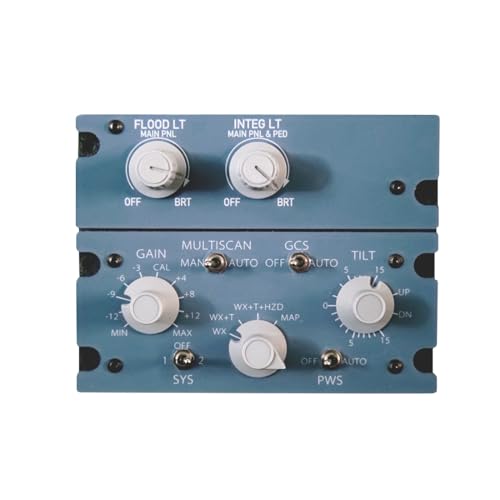
- 1:1 replica with cockpit-lighting and weather-radar layout
- Uniform backlighting and aluminum alloy shell
- Mobiflight support with future RowsfireApp path
Best For: MSFS cockpit builders needing a dedicated backlit lighting/radar module
Integrated Cockpit Panel
Rowsfire A113 TACS + CKPT-LT + DFOR Module

- Combined TACS, CKPT-LT, and DFOR cockpit functions
- Backlit aluminum shell with rail-mount design
- Mobiflight support with planned RowsfireApp migration
Best For: Home cockpit builders wanting an integrated Airbus-style panel
Classic Radio Stack Choice – Logitech G USB Pro Flight Radio Panel
If you want a straightforward flight simulator radio panel with real knobs and live readouts, this Logitech option keeps cockpit communication controls easy to reach. It’s built for Windows PC sims and lets you tune frequencies without constantly opening on-screen menus.
Best For: Sim pilots who want a dedicated, physical radio stack for Microsoft Flight Simulator X/2004, X-Plane, or Prepar3D.
Pros:
- Twin concentric dials make frequency changes faster and more precise.
- Standby switch lets you set frequencies and activate them with one press.
- Real-time LED displays reduce the need to bring up the radio stack onscreen.
- Includes mounting bracket and screws for cockpit-style setup.
Cons:
- Compatibility is focused on older Microsoft Flight Simulator versions and supported PC sims.
- Requires Windows, so it is not a cross-platform pick.
Overall, this is a practical, no-frills radio panel if your priority is physical control and familiar cockpit interaction. It favors simplicity and direct frequency management over all-in-one features.
Compact All-in-One Cockpit – Octavi IFR-1 Compact Control Panel
This flight simulator radio panel goes beyond basic comms by combining radios, transponder, autopilot, FMS, and navigation controls into one compact unit. If you want a space-saving cockpit module with tactile controls and LED-backlit buttons, the IFR-1 is aimed at a more complete desktop setup.
Best For: Sim pilots who want a compact all-in-one control box for MSFS 2020/2024 or X-Plane 11+.
Pros:
- Combines COM, NAV, FMS, autopilot, XPDR, BARO, HDG, and VOR controls in one device.
- LED-backlit buttons and dual-axis rotary encoder support precise input.
- Compact footprint makes it easier to fit on a desk or small cockpit rig.
- USB-C to USB-A cable is included for simple setup.
Cons:
- Not compatible with Xbox.
- Its broad feature set may be more than needed if you only want a simple radio-only panel.
For users building a compact simulator station, the IFR-1 offers a lot of controls in a small package. It is a strong choice when you want realistic tactile input without filling your desk with separate panels.
Autopilot Panel Upgrade – Logitech G USB Pro Flight Multi Panel
While not a dedicated flight simulator radio panel, this Logitech multi panel is a useful companion if you want physical autopilot controls in the same style as a cockpit stack. It mounts to a Pro Flight yoke or a custom home cockpit and keeps key flight settings visible on the built-in LED display.
Best For: PC sim users who want a physical autopilot panel to pair with other Logitech Pro Flight hardware.
Pros:
- Full autopilot panel with dedicated setting controls.
- LED display helps keep flight settings visible in real time.
- Mounts to the Pro Flight Yoke System or a home cockpit setup.
- Works with Windows 7, 8, 8.1, 10, or newer.
Cons:
- Does not provide radio tuning functions like a true comms panel.
- Best suited to Microsoft Flight Simulator X/2004 compatibility rather than newer sim ecosystems listed for some competing panels.
This is a solid add-on if your build needs clearer autopilot handling and you already use Logitech cockpit gear. It is less of a radio solution and more of a flight management companion.
Realistic 737 Layout Pick – B737 1:1 Radio Tuning Panel
If you want a flight simulator radio panel that mirrors a Boeing 737 cockpit layout, this 1:1 RTP is built around realistic communication and navigation tuning. It uses physical knobs and buttons, active/standby displays, and MobiFlight support for flexible setup in supported sim environments.
Best For: Boeing 737 sim builders who want a realistic desktop or DIY cockpit radio module.
Pros:
- 1:1 B737 cockpit layout recreates the real radio control arrangement.
- Combines VHF, HF, and AM communication control with navigation frequency tuning.
- Active/standby dual display and one-press TFR switching improve workflow.
- Angled stand and sturdy enclosure support desktop or cockpit-frame use.
Cons:
- Built for PC simulation setups, so it is not a broad cross-platform option.
- MobiFlight configuration adds setup complexity for some users.
This panel is aimed at simmers who care about airline-specific realism and want their radio module to feel like the actual aircraft layout. It makes the most sense in a dedicated Boeing-style cockpit build.
Switch panel pick – Reliable cockpit control for sim setups
If you’re building a practical flight simulator radio panel setup, the Logitech G Pro Flight Switch Panel adds straightforward cockpit controls for gear, lights, engine start, and other common functions. It’s a solid pick for simmers who want a dedicated control module that fits neatly into a larger Logitech/Saitek-style stack.
Best For: Sim pilots who want simple, realistic switch-based cockpit control and easy expansion.
Pros:
- Includes 14 buttons for landing gear, lights, engine start, and more
- LEDs indicate landing gear status with FSX integration
- Modular design can be mounted above, beside, or near other instrument panels
- Works with major PC sims including FSX, Prepar3D 2.2+, and X-Plane 10
Cons:
- Focused on switches rather than radio controls
- Requires a compatible Windows PC setup
- Best value comes when paired with other panels
Overall, this is a dependable add-on for building out a realistic cockpit layout, especially if you want a tidy, customizable panel system rather than a standalone all-in-one unit.
Integrated radio unit – Compact all-in-one radio management panel
The Wingflex A320RMP CUBE is a more specialized flight simulator radio panel for pilots who want radio management, TCAS, and warning-panel style functions in one compact unit. It’s aimed at simmers who fly serious Airbus-style workflows and want streamlined access to ATC frequency handling on PC.
Best For: Airbus-focused sim pilots who want an integrated radio management and ATC-style control panel.
Pros:
- Combines radio management, TCAS, and warning-panel functions in one device
- Supports IVAO, VATSIM, and other online flight sim networks for frequency management
- Includes native XPD functionality for advanced ATC display and control
- Plug-and-play compatibility across major PC flight simulation platforms
Cons:
- Designed specifically around Airbus-style cockpit workflows
- PC-only compatibility limits flexibility for other platforms
- More specialized than a basic radio panel
For simmers who want a focused radio management solution instead of a general-purpose controller, this unit stands out for combining multiple cockpit functions into a single compact panel.
Radio bundle choice – Starter cockpit bundle with radio controls
If you want a flight simulator radio panel plus matching switch controls in one package, this Logitech G bundle is the most complete option here. The Radio Panel adds twin concentric dials and standby frequency control, while the Switch Panel handles gear, lights, engine power, and other cockpit tasks.
Best For: Sim pilots who want an easy way to add both radio tuning and core cockpit switches at once.
Pros:
- Includes both the Radio Panel and Switch Panel in one bundle
- Radio Panel uses twin concentric dials for quicker frequency selection
- Standby switch makes it easy to set and activate frequencies
- Real-time LED display support works with compatible sim software
Cons:
- Compatibility is listed for specific PC sim titles and Windows systems
- Bulkier than a single-panel solution
- Best suited to desktop cockpit setups with room for mounting
This bundle is a strong buy for anyone who wants to build a more functional cockpit without shopping for each panel separately, especially if radio tuning is a priority.
Premium A320-Style FCU – MiYee Wingflex A320 FCU Cube Control Unit
If you’re shopping for a flight simulator radio panel-style upgrade that feels closer to a real airliner, this MiYee Wingflex A320 FCU Cube is built around realism and tactile control. It uses a full mold design, aviation aluminum parts, and synchronized dimmer knobs to mimic the look and feel of an A320 cockpit module while staying plug-and-play on major sim platforms.
Best For: Sim pilots who want an A320-focused control unit with realistic knobs, lighting, and a true cockpit-style layout.
Pros:
- Full mold design with real-aircraft-inspired layout and 80% scale sizing
- Aviation aluminum housing and knobs with metal baking paint finish
- Separate adjustment for screen backlight and full-unit backlighting
- Plug-and-play support with data-driven and stream-driven modes
Cons:
- Designed specifically around A320-style controls, so it is less universal
- Size and realism focus may make it better for dedicated cockpit setups
- Requires a compatible Windows flight sim environment
This is a strong pick if realism matters more than general-purpose flexibility. The tactile push-pull levers, crisp button travel, and detailed lighting make it feel like a premium cockpit component rather than a basic desktop accessory.
Lighting and Weather Module – Rowsfire A112 CKPT-LT + WXR Radar Panel
This flight simulator radio panel alternative is aimed at cockpit builders who want a dedicated lighting and weather-radar module for MSFS. The Rowsfire A112 is a 1:1 replica of CKPT-LT and WXR-Radar hardware, with a backlit control surface, aluminum alloy shell, and a rail-mount design that fits neatly into a home cockpit setup.
Best For: MSFS-focused cockpit builders who want a backlit lighting and weather-radar module with clean integration.
Pros:
- True 1:1 replica of a cockpit-lighting and weather-radar panel
- Uniform custom backlighting for easier visibility in low light
- Durable aluminum alloy shell with stable SMD PCB architecture
- Uses Mobiflight now, with planned RowsfireApp support later
Cons:
- Initial support is centered on MSFS 2020/2024 rather than broad simulator coverage
- X-Plane 12 support is planned, not fully established in the notes
- Some aircraft support is still rolling out through updates
For simmers building a modular cockpit, the A112 stands out for its lighting and radar focus rather than general controls. It is a practical choice if you want a purpose-built panel that blends into a wider cockpit peripheral setup.
Integrated Cockpit Panel – Rowsfire A113 TACS + CKPT-LT + DFOR Module
For buyers comparing a flight simulator radio panel against more integrated cockpit hardware, the Rowsfire A113 is built as a combined home-cockpit module with TACS, CKPT-LT, and DFOR functions. It targets MSFS 2020/2024 first, supports Fenix and FBW early on, and uses a backlit aluminum-shell design with rail-mount hardware for a tidy cockpit install.
Best For: Home cockpit users who want an integrated, backlit panel with multiple Airbus-style functions in one unit.
Pros:
- Integrated TACS + CKPT-LT + DFOR layout for a consolidated cockpit module
- Premium aluminum alloy shell with custom backlit panel
- Dual-driver flexibility with Mobiflight now and RowsfireApp planned
- Rail-mount design and rear Type-C port simplify installation
Cons:
- Initial support is centered on MSFS 2020/2024 and specific aircraft families
- Driver startup order matters, according to the notes
- Best suited to Airbus-style setups rather than general-purpose sim use
The A113 is a good fit if you want one module to do more of the cockpit workload without adding separate panels. Its strength is integration: a sturdy build, backlighting, and broad cockpit-peripheral compatibility in a single unit.
How We Picked the Best Flight Simulator Radio Panel
We prioritized realism, simulator compatibility, build quality, and ease of setup. For a Flight Simulator Radio Panel, the best choices should offer reliable inputs, readable displays, and controls that match how you actually fly.
We also looked at whether each unit is suited to casual desktop use, a dedicated home cockpit, or airliner-specific setups, since the right choice depends heavily on your aircraft and sim platform.
Quick Comparison
At a high level, the lineup breaks into three groups: simple USB panels for general-purpose flying, multifunction units that add autopilot or switch controls, and aircraft-specific radio management panels for Airbus or Boeing-style cockpits.
If you fly a mix of aircraft, a versatile panel is usually the safest buy. If you mainly fly one airframe, a model matched to that cockpit can feel much more authentic.
Key Buying Factors for a Flight Simulator Radio Panel
Compatibility
Check support for MSFS 2020, MSFS 2024, X-Plane 12, and any add-on aircraft you use. Some panels are broadly compatible, while others are built around a specific aircraft family or plugin ecosystem.
Controls and Display Quality
Look for crisp digits, responsive knobs, and buttons that feel accurate under your fingers. A strong Flight Simulator Radio Panel should make frequency changes fast and reduce the need for on-screen menus.
Aircraft Fit
General aviation flyers may prefer straightforward COM/NAV and transponder functions. Airliner enthusiasts may benefit more from radio management, autopilot, or integrated cockpit modules that mirror Airbus or Boeing layouts.
Setup and Space
Some panels are compact enough for a desk mount, while others are better suited to a full cockpit frame. Consider cable management, power requirements, and whether the unit includes plug-and-play support or needs extra configuration.
Who Should Buy Which Flight Simulator Radio Panel?
Choose a basic USB panel if you want an affordable upgrade and fly different aircraft types. Go with a multi-function unit if you want to consolidate more cockpit tasks into one device.
If you are building a serious home cockpit or mainly fly specific airliners, a purpose-built radio panel or integrated cockpit module will usually deliver the most convincing experience. The best Flight Simulator Radio Panel is the one that matches your aircraft, your space, and how deep you want to go into cockpit realism.