
If you need a reliable way to send live video to RTMP, SRT, HLS, or IP workflows, a dedicated encoder can simplify the whole chain. The right hardware video encoder for streaming can improve stability, lower CPU load, and keep your broadcast consistent.
Below, we’ve grouped 10 strong options for different budgets, resolutions, and input types so you can match the encoder to your camera, production, and platform needs.
Best 10 Hardware Video Encoder for Streaming Picks for 2026
URayCoder Multi-Protocol Encoder
1080P H.265 HDMI to IP Encoder

- 1080P H.265/H.264 encoding at 60fps
- Supports RTSP, RTMPS, SRT, HLS, UDP
- Up to 4 simultaneous output streams
Best For: multi-platform HDMI streaming with flexible output control
EXVIST HDMI Encoder with Recording
H.265 HDMI to IP Encoder with SD Slot
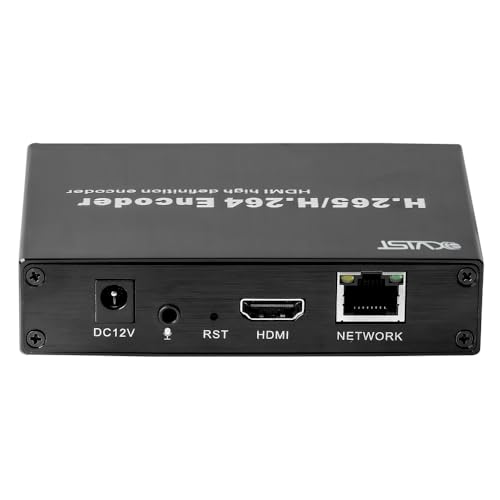
- H.265/H.264 HDMI-to-network conversion
- SD card slot supports up to 128GB
- Web interface for setup and control
Best For: basic streaming setups that need local recording backup
UNISHEEN Adjustable Streaming Encoder
1080p60 H.265 Encoder with Video Tools
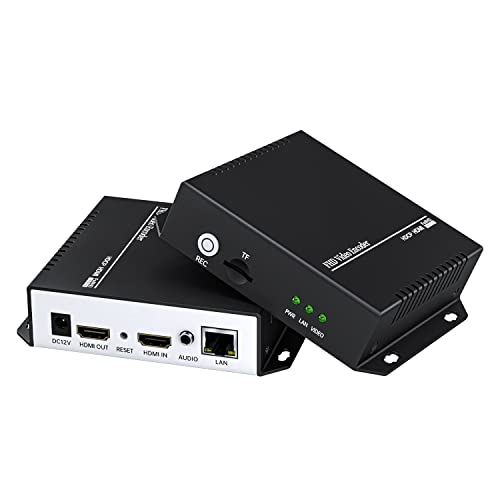
- 1080p60 output with H.264/H.265 encoding
- Rotate, flip, mirror, clip, and enhance video
- Supports SRT, RTSP, RTMPS, UDP, and NVR
Best For: hands-on streamers who want advanced video adjustments
URayCoder 4K Streaming Encoder
4K H.265 HDMI to Ethernet Encoder

- 4K UHD input/output up to 30fps
- Supports WebRTC, TRTC, SRT, RTMP, HLS
- Outputs up to 4 streams at once
Best For: 4K live streaming with broad protocol support
SDI Broadcast Encoder
3G SDI to IP Live Streaming Encoder

- 4 simultaneous streams
- Wide protocol support
- SDI input with customization
Best For: SDI live streaming and multi-platform distribution
Compact HDMI Encoder
Pocket 2K Hardware Live Encoder

- Tiny 2.95-inch form factor
- 2.4W low-power design
- SRT plus cloud management
Best For: Portable HDMI streaming and space-limited installations
4K HDMI Streaming Encoder

- 4K input up to 30fps
- 4 simultaneous output streams
- Wide platform and protocol support
Best For: UHD HDMI streaming and multi-platform delivery
UNISHEEN 1080P60 Pick
1080P60 HDMI Encoder with SRT and WebRTC

- Encodes 1080P60 with H.265/H.264 hardware compression
- Supports SRT, RTMP, RTSP, HLS, WebRTC, and more
- Browser-based setup with compact low-power design
Best For: Live broadcasts and compact always-on streaming setups
ORIVISION Mini Encoder Choice
Ultra Mini HDMI Encoder with Recording

- Supports local recording to USB drive or TF card
- 1080P30 H.265/H.264/MJPEG with HDMI loopout
- Cropping, rotation, mirror, and flip functions
Best For: Small rooms and portable setups that need compact encoding plus recording
URayCoder 4K Streamer Pick
4K HDMI to IP Encoder with Multi-Stream Output

- Handles 4K UHD input/output up to 30fps
- Can output 4 streams with different protocols
- Includes overlays, cropping, rotation, and mirroring
Best For: 4K live streaming and multi-platform distribution from one source
URayCoder Multi-Protocol Encoder – 1080P H.265 HDMI to IP Encoder
If you need a hardware video encoder for streaming that can handle everyday live production without much setup friction, this URayCoder unit is a strong fit. It converts HDMI sources to network video and supports H.265/H.264 encoding, 1080P input, and multiple live protocols, making it practical for multi-platform streaming and IPTV-style workflows.
Best For: Streamers and teams who want a compact HDMI-to-IP encoder with broad protocol support and easy web-based control.
Pros:
- Supports H.265/H.264 encoding with 1080P at 60fps.
- Works with RTSP, RTMPS, UDP, HLS, SRT, and more.
- Can output up to 4 streams with different protocols.
- Includes text, logo, timestamp, crop, rotate, flip, and mirror options.
Cons:
- Only handles one HDMI input channel.
- No built-in recording storage is listed.
- Customization features may be more than casual users need.
Overall, this model stands out when you want flexible streaming outputs and a lot of control over the final feed. Its strongest value is the combination of stable network transmission, broad platform compatibility, and lightweight hardware operation.
EXVIST HDMI Encoder with Recording – H.265 HDMI to IP Encoder with SD Slot
This hardware video encoder for streaming is aimed at straightforward HDMI-to-network conversion with a useful backup feature. It supports H.265/H.264 compression, common streaming protocols, and a built-in SD card slot for standalone recording, which makes it a practical choice for basic streaming and capture workflows.
Best For: Users who want a simple encoder with local SD recording and standard network protocol support.
Pros:
- Encodes HDMI video and audio into a network stream.
- Supports H.265 and H.264 compression.
- Includes SD card recording up to 128GB in MP4 format.
- Web-based interface makes setup and monitoring easier.
Cons:
- Protocol list is narrower than some higher-end options.
- Only one HDMI input is supported.
- Best suited to basic workflows rather than advanced stream customization.
If you want a no-frills encoder with local backup recording, this one covers the essentials well. Its mix of web configuration, standard protocol support, and SD card storage makes it especially useful for simple surveillance or streaming setups.
UNISHEEN Adjustable Streaming Encoder – 1080p60 H.265 Encoder with Video Tools
For buyers comparing a hardware video encoder for streaming with more image-tuning tools, this UNISHEEN model is notable. It supports 1080p60 output, H.264/H.265 encoding, multiple streaming protocols, and a long list of video adjustments, making it a flexible option for live production and server-based workflows.
Best For: Users who want detailed video adjustment options alongside multi-protocol HDMI streaming.
Pros:
- Supports 1080p60 streaming with H.264/H.265 compression.
- Includes rotate, flip, mirror, clip, deinterlace, and enhancement tools.
- Supports SRT, RTSP, RTMPS, UDP, and NVR outputs.
- Can output multiple streams at once using different protocols.
Cons:
- TF card support is listed, but the workflow may be more involved than simpler units.
- No 4K support is listed.
- Some features may be unnecessary if you only need basic encoding.
This encoder is a good pick when stream quality tuning matters as much as transport. The combination of multi-stream output, EDID support, and broad video adjustments gives it a strong place in more hands-on streaming setups.
URayCoder 4K Streaming Encoder – 4K H.265 HDMI to Ethernet Encoder
If your priority is a hardware video encoder for streaming that can handle higher-resolution sources, this URayCoder model is the most capable in the group. It supports 4K input and output, H.265/H.264 encoding, and a wide protocol list including WebRTC and TRTC, which makes it well suited to modern live delivery workflows.
Best For: Creators and teams that need 4K HDMI encoding with broad protocol compatibility.
Pros:
- Supports 4K UHD input/output at up to 30fps.
- Can reach up to 120fps at 2K and lower resolutions.
- Supports RTSP, RTMPS, SRT, HLS, WebRTC, TRTC, and more.
- Can output 4 streams with different protocols at once.
Cons:
- 4K is limited to 30fps.
- Only one HDMI source input is described.
- Advanced feature set may be more than needed for simple streaming jobs.
This is the strongest option if you need 4K support and modern delivery protocols in one box. It also keeps the URayCoder strengths of multi-stream output, customization, and straightforward network-based operation.
SDI Broadcast Encoder – 3G SDI to IP Live Streaming Encoder
If you need a hardware video encoder for streaming from an SDI source, this URayCoder unit is built for flexible broadcast workflows. It supports H.265/H.264 encoding, up to four simultaneous streams, and a wide set of delivery protocols, making it a practical fit for live distribution to multiple destinations.
Best For: SDI-based live streaming setups that need multi-protocol output and stream customization.
Pros:
- Supports HTTP, RTSP, RTMP(S), SRT, HLS, UDP, RTP, MP4, Multicast, Unitcast, FLV, and ONVIF.
- Can output up to 4 video streams at the same time, with different protocols per stream.
- Includes video customization options like text, scrolling text, logo, time, crop, rotate, flip, and mirror.
- Offers lifetime technical support, warranty, and SDK/API/CGI documents for development work.
Cons:
- Built specifically around SDI input, so it is not the right choice for HDMI-only sources.
- Customization and advanced protocol options may be more than a basic one-platform stream needs.
Overall, this is a strong pick when you want a feature-rich SDI encoder with broad protocol support and room for advanced deployment needs. Its multi-stream output and lifetime support make it especially appealing for professional environments.
Compact HDMI Encoder – Pocket 2K Hardware Live Encoder
This hardware video encoder for streaming is designed for users who want a tiny, low-power HDMI solution without giving up core live-production features. It supports up to 1080P60 input, 1080P30 encoding output, and key protocols like SRT, RTMP, RTMPS, HLS, RTSP, and UDP, so it fits compact rigs and mobile workflows.
Best For: Portable HDMI streaming setups that need low power draw, SRT support, and remote management.
Pros:
- Very compact and lightweight, making it easy to use in tight or mobile setups.
- Consumes just 2.4W and can be powered via USB or the HDMI source.
- Supports dual-stream output and real-time OSD overlays.
- Includes cloud management through DDMALL LinkCloud for remote monitoring and control.
Cons:
- Encoding output is listed at 1080P30, so it is not aimed at higher-frame-rate output workflows.
- Its small size and feature set make it more specialized than a larger rack-style encoder.
If your priority is portability and simple deployment, this encoder stands out for its tiny footprint and very low power use. It is a sensible choice for streaming on the go, smaller installations, or any setup where space is at a premium.
4K HDMI Streaming Encoder – UHD Streaming Server Encoder
For buyers comparing a hardware video encoder for streaming with 4K input support, this URayCoder model is built around UHD HDMI workflows. It accepts up to 3840×2160 input at 30fps, supports H.265/H.264 encoding, and can send up to four streams over major protocols like RTSP, RTMP(S), SRT, HLS, UDP, and more.
Best For: 4K HDMI streaming setups that need broad protocol support and multi-stream output.
Pros:
- Supports 4K UHD input up to 30fps and up to 120fps at 2K and lower resolutions.
- Can output 4 video streams simultaneously using different protocols.
- Supports a wide range of platforms and protocols, including YouTube, Facebook, Twitch, Vimeo, WebRTC, and TRTC.
- Includes stream customization tools such as text, captions, logos, timestamps, crop, rotate, flip, and mirror.
Cons:
- 4K output is capped at 30fps, so it is not designed for 4K high-frame-rate streaming.
- Its feature depth is geared more toward advanced users than simple plug-and-play use cases.
This is a strong fit if you need UHD input and broad delivery options in one encoder. The combination of 4-stream output, flexible controls, and lifetime support makes it well suited to more demanding live streaming setups.
UNISHEEN 1080P60 Pick – 1080P60 HDMI Encoder with SRT and WebRTC
If you need a hardware video encoder for streaming that balances quality, bandwidth savings, and broad protocol support, this UNISHEEN HDMI unit is built for practical live production. It encodes at 1080P60 in H.265 or H.264, and its browser-based setup means you can get it running without installing software or drivers.
Best For: Live broadcasts, IP distribution, and always-on streaming setups that need a compact encoder with flexible network output.
Pros:
- 1080P60 hardware H.265/H.264 encoding for crisp live output.
- Supports many delivery protocols, including SRT, RTMP, RTSP, HLS, WebRTC, UDP, and more.
- Browser-based configuration simplifies setup from any modern browser.
- Compact, low-power design suits racks, shelves, and 24/7 operation.
Cons:
- Single HDMI input, so it is not meant for multi-source switching.
- Best suited to users comfortable managing network settings like DHCP and IP access.
Overall, this is a strong pick if you want a straightforward encoder that can serve live events, remote monitoring, or digital signage without needing extra software. The built-in OSD and audio support add useful flexibility for professional-looking streams.
ORIVISION Mini Encoder Choice – Ultra Mini HDMI Encoder with Recording
This hardware video encoder for streaming is a good fit when space is tight but you still need flexible IP output and useful extras. The ORIVISION EH1211 supports H.265, H.264, and MJPEG at up to 1080P30, plus local recording to USB or TF card for workflows that need a backup copy on-site.
Best For: Small classrooms, conference rooms, and portable live streaming setups that benefit from recording and cropping features.
Pros:
- Ultra-compact design is easy to place in small or mobile installations.
- Supports local recording to USB drive or TF card.
- Built-in cropping, rotation, mirror, and flip options add flexibility.
- Multiple protocols and ONVIF compatibility support common streaming and IPTV workflows.
Cons:
- Maximum input/output resolution is 1080P30, not 1080P60.
- Uses a single HDMI input, so it is not designed for multi-source production.
For users who want a compact encoder with practical editing tools and local storage support, this model stands out. It is especially useful when you need to adapt one HDMI source for classrooms, signage, or live broadcasting without taking up much space.
URayCoder 4K Streamer Pick – 4K HDMI to IP Encoder with Multi-Stream Output
If you want a more capable hardware video encoder for streaming UHD sources, this URayCoder model is built around 4K input with broad protocol support and multi-stream output. It handles 4K UHD at up to 30fps, supports HDCP 1.4 decryption, and can push multiple simultaneous streams for platform distribution.
Best For: 4K live streaming, multi-platform distribution, and users who want customizable encoding controls.
Pros:
- Supports 4K UHD input and output up to 30fps, with higher frame rates at lower resolutions.
- Can output up to 4 streams with different protocols at the same time.
- Wide protocol support includes HTTP, RTSP, RTMP(S), SRT, HLS, WebRTC, and more.
- Offers cropping, rotation, flipping, mirroring, text, logos, and timestamp overlays.
Cons:
- 4K is limited to 30fps, so it is not meant for high-frame-rate UHD workflows.
- Single HDMI input means it is focused on source encoding, not switching.
This is a strong option for creators or teams who need one encoder to serve multiple destinations from a single HDMI source. The customizable overlays and live parameter controls make it suitable for branded streams and more advanced IP workflows.
How We Picked the Best Hardware Video Encoder for Streaming
We focused on the features that matter most in a Hardware Video Encoder for Streaming: supported protocols, input/output flexibility, resolution and frame-rate support, audio handling, and deployment options such as SD card recording, cloud compatibility, and loopout. We also looked for models that fit common live-production use cases, from simple HDMI workflows to SDI and multi-channel IP setups.
Quick Comparison
In simple terms, HDMI encoders are the best fit for most camera, switcher, and desktop capture setups. SDI encoders are better for professional video chains and longer cable runs. If you need portability, compact low-power units are easier to deploy. If you need more flexibility, choose a model that supports multiple protocols like SRT, RTMP/RTMPS, RTSP, HLS, and WebRTC so you can switch platforms without changing hardware.
Key Buying Factors for a Hardware Video Encoder for Streaming
Input Type and Resolution
Match the encoder input to your source first. HDMI is common for mirrorless cameras, camcorders, and computers. SDI is better for broadcast gear. Then confirm the real output resolution and frame rate you need, such as 1080p60 or 4K.
Streaming Protocol Support
For live delivery, protocol support matters as much as image quality. SRT is useful for contribution and long-distance reliability, RTMP/RTMPS works well for major platforms, RTSP is common in IP workflows, and HLS or WebRTC can help with distribution and low-latency viewing.
Encoding Format and Compatibility
H.264 is widely compatible, while H.265 can save bandwidth at similar quality. If you’re working in mixed environments, a dual-codec encoder can make integration easier with cameras, NVRs, and streaming platforms.
Operational Features
Look for practical features such as loopout, audio pass-through, recording, multicast, and temperature-friendly designs if the encoder will run continuously. For unattended streaming, management tools like DDNS, cloud support, or web-based configuration can also be valuable.
Who Should Buy Which Hardware Video Encoder for Streaming?
If you’re a creator or small team using a single camera, an HDMI encoder with broad protocol support is usually the best starting point. If you need professional reliability or longer cable runs, an SDI model is the smarter choice. If you want portability or a compact desk setup, choose a mini encoder with low power draw. For venues, studios, or multi-source workflows, a higher-end 4K or multi-channel unit is the most flexible option.
In short, the best Hardware Video Encoder for Streaming is the one that matches your source, your platform, and your long-term workflow—not just the highest spec sheet on paper.