
Building a reliable multi-camera setup takes more than just good cameras. You also need the right switcher, audio, connectivity, and control tools to keep your live production smooth.
This roundup of streaming equipment for multiple cameras focuses on practical gear for creators, churches, schools, conferences, and small studios that want better workflow without unnecessary complexity.
Best 10 Streaming Equipment for Multiple Cameras Picks for 2026
Portable All-in-One Multicam Control

- Includes switcher, 14" monitor, and mounting plates
- 4 HDMI/SDI inputs, 2 HDMI outputs, 2 USB ports
- AC, DC, or USB power bank support
Best For: Mobile creators needing an integrated multicamera streaming kit
Flexible Pro Switching Hub

- 4 SDI, 4 HDMI, USB-C, NDI HX, and playback support
- Built-in GUI, software, and Companion control options
- Chromakey, PIP, DSK, and multi-platform streaming
Best For: Pro users building a flexible multicamera switching setup
Four-Voice Mobile Audio Kit

- Four-mic simultaneous recording for group content
- 2.4GHz wireless with up to 164 feet range
- Noise reduction plus 360° omnidirectional pickup
Best For: Groups needing wireless audio for four-person recordings
Hybrid ISO Streaming Switcher
8-Channel 4K/1080p Live Production Hub

- 4 HDMI + 4 SDI inputs for mixed camera setups
- ISO records all 8 channels to external storage
- RTMP, SRT, NDI HX, and dual USB outputs
Best For: Corporate AV, education, and live events with mixed camera sources
PTZ Camera Bundle
4K NDI Auto-Tracking Control Kit

- Two 4K NDI PTZ cameras with 20X optical zoom
- 7-inch LCD controller with quad-screen preview
- AI auto-tracking, presets, and LAN/PoE support
Best For: Churches, schools, and live production teams using PTZ cameras
Wireless Multi-Cam Kit
3-Pack App-Controlled HD Cameras
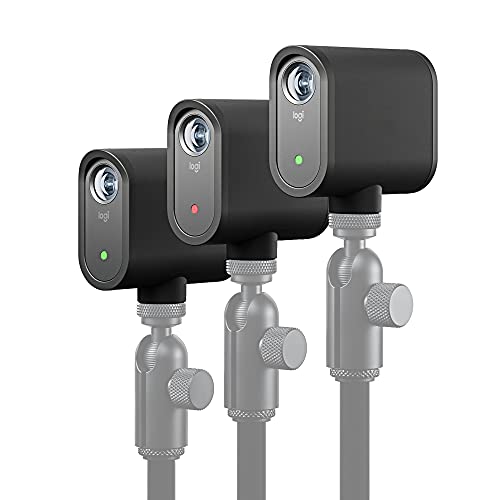
- Syncs up to three cameras for multi-angle streaming
- Wireless Wi-Fi setup with smartphone app control
- 1080p recording and Auto-Director support
Best For: Portable creators who want a cable-free multi-camera workflow
Portable All-in-One Multicam Control – Osee GoStream Duet Kit
If you need streaming equipment for multiple cameras that is built for mobility, this Osee GoStream Duet Kit bundles the switcher, 14-inch monitor, and mounting hardware into one compact rig. It is designed to simplify multi-camera live production while keeping video monitoring, power, and connectivity in one portable setup.
Best For: Mobile creators who want an all-in-one multi-camera streaming kit with built-in monitoring and flexible power options.
Pros:
- Includes a GoStream Duet switcher plus a 14″ 1080×1920 screen and mounting plates
- Offers 4 HDMI/SDI inputs, 2 HDMI outputs, and 2 USB ports for flexible multicam workflows
- Can be powered by AC, DC, or a USB power bank, with USB DC 5V out for extra devices
- Compact 5 kg design makes it easier to transport for mobile live streaming
Cons:
- More of a complete kit than a simple switcher, so it may be more than some users need
- Best suited to users who want an integrated setup rather than a minimal desk-only system
Overall, this is a strong pick if you want a ready-to-go multicam kit with the ports and monitoring needed for live switching on the move. Its biggest advantage is consolidation: fewer separate pieces to carry, power, and mount.
AI-Tracked 4K Camera Kit – EMEET PIXY Dual-Camera PTZ
For streaming equipment for multiple cameras where the priority is a smart, self-adjusting camera, the EMEET PIXY kit stands out with dual-camera AI tracking and PTZ movement. It is built to keep subjects framed and focused in dynamic scenes like fitness, demos, teaching, and live content.
Best For: Streamers and presenters who want an AI-powered 4K PTZ camera that automatically tracks movement and maintains framing.
Pros:
- Dual-camera system combines a 4K main camera with an auxiliary AI camera for tracking and exposure optimization
- PDAF and AI autofocus are designed for fast focusing, with PTZ pan/tilt movement for active scenes
- Includes a tripod with adjustable height and 360° swivel head for flexible angles
- Three-mic array offers Live, Noise Canceling, and Original Sound modes
Cons:
- It is a single camera system, not a full multi-camera switcher setup
- Some advanced controls rely on the EMEET STUDIO software
This is a good choice if you want one camera to behave like a much smarter production tool. It is especially useful when you need smooth subject tracking and clean audio without adding extra gear.
Flexible Pro Switching Hub – Osee GoStream Duet Mixer
Osee GoStream Duet Multiple Camera SDI and HDMI Live Stream Video Mixer Switcher
Check Price On AmazonIf you are shopping for streaming equipment for multiple cameras and want a switcher with broad input support, the Osee GoStream Duet is built around HDMI, SDI, USB-C, NDI HX, and playback flexibility. It is meant for users who need to mix several sources, apply live transitions, and stream to multiple destinations.
Best For: Multi-camera producers who want a compact switcher with rich input options and strong live production effects.
Pros:
- Supports 4 SDI, 4 HDMI, USB-Type C, NDI HX source, and SD/SSD playback
- Offers multiple control methods, including built-in GUI, computer software, and Bitfocus Companion
- Includes key effects such as chroma key, picture-in-picture, DSK, and several transition styles
- Can stream to up to 3 platforms at once and works with OBS and vMix
Cons:
- Sold as the switcher only, so you will need your own cameras and monitor setup
- More feature-rich than a basic starter switcher, which may feel complex for simple use cases
This model makes sense if your priority is input flexibility and live production control rather than an all-in-one kit. It gives you a lot of room to build a multicamera workflow around your existing gear.
Four-Voice Mobile Audio Kit – 4-Pack Wireless Lavalier Mics
Good streaming equipment for multiple cameras is not just about video; audio needs to keep up too. This 4-pack wireless lavalier system is aimed at group recording, giving up to four speakers their own clip-on mic for interviews, podcasts, team vlogs, and live broadcasts.
Best For: Groups of up to four people who need a simple wireless lavalier setup for multi-person recording and streaming.
Pros:
- Supports simultaneous pairing of up to 4 microphones for four-person recording
- Uses 2.4GHz wireless transmission with up to 164 feet of range
- Includes smart noise reduction and 360° omnidirectional pickup
- Compatible with iPhone, Android, computers, and tablets via 3.5mm or USB-C adapter
Cons:
- Battery life is listed at up to 6 hours, which may be limiting for longer sessions
- Android use requires enabling OTG in settings
- Designed for audio capture, so it does not replace video switching gear
For multi-person shoots, this is a practical way to keep voices separated and clear without post-production work. It pairs well with camera setups that need reliable dialogue capture for interviews and group content.
Hybrid ISO Streaming Switcher – 8-Channel 4K/1080p Live Production Hub
If you need streaming equipment for multiple cameras, the Osee GoStream Duet 8 ISO is built for mixed-input live production. It combines 4 HDMI and 4 SDI sources, adds ISO recording for every channel, and supports hardware streaming plus remote transmission options like SRT and custom RTMP.
Best For: Corporate AV teams, education setups, and live event producers mixing HDMI and SDI cameras.
Pros:
- 8 physical inputs: 4 HDMI and 4 SDI for flexible camera/source routing.
- Records clean ISO feeds from all 8 channels to external SSDs or SD cards.
- Triple streaming support with RTMP, SRT, NDI HX, and dual USB outputs.
- Professional audio options with 2 balanced XLR and 2 3.5mm inputs.
Cons:
- Designed for more advanced live-production workflows rather than casual use.
- Relies on external storage for ISO recording.
- Onboard control is intended to be used with an external monitor.
For multi-camera productions that need both switching and recovery-friendly recording, this switcher offers a lot of capability in one box. It stands out most when you want PC-free operation, pro audio, and the flexibility to manage several camera types at once.
PTZ Camera Bundle – 4K NDI Auto-Tracking Control Kit
For streaming equipment for multiple cameras where smooth remote control matters, this Tenveo bundle pairs 4K NDI PTZ cameras with a 7-inch LCD joystick controller. It is aimed at live production spaces that want IP-based video output, preset control, and auto-tracking for consistent framing during church services, conferences, and other events.
Best For: Churches, schools, and event teams that want tracked PTZ cameras with a dedicated controller.
Pros:
- Includes two 4K NDI PTZ cameras plus a 7-inch quad-screen controller.
- 20X optical zoom and HDMI, USB 3.0, and LAN/PoE connectivity.
- Dual human body and face auto-tracking with presenter and autoframing modes.
- Controller offers live preview, presets, and PTZ adjustments from one panel.
Cons:
- No built-in microphone is included.
- Best suited to teams comfortable working with PTZ and network camera workflows.
- PoE requires a compatible PoE switch for LAN power/network setup.
This bundle is strongest when you want camera coverage that can be steered and tracked from a central control point. It’s a practical fit for productions where fixed-framing and quick switching between camera views are more important than handheld shooting.
Wireless Multi-Cam Kit – 3-Pack App-Controlled HD Cameras
If you want streaming equipment for multiple cameras without a rack of cabling, the Mevo Start 3-pack is designed for wireless multi-angle production. It lets you sync up to three cameras, stream in 1080p, and control the setup through the Mevo Multicam app over Wi-Fi.
Best For: Creators who want a portable, cable-free multi-camera setup controlled from a smartphone.
Pros:
- Three-camera package supports HD multi-camera streaming right out of the box.
- Streams and records in 1080p with crisp detailed imaging.
- Wireless operation via Wi-Fi with no cables required.
- App control includes features like Auto-Director for easier production.
Cons:
- Limited to 1080p rather than 4K.
- Uses a fixed-focus design instead of a more adjustable lens system.
- Wireless workflows depend on strong Wi-Fi for the best experience.
This is a straightforward choice for creators who value mobility and simplicity over wired pro-video infrastructure. The three-pack makes it easy to build a clean multi-camera stream without extra switching hardware.
AI-Tracking PTZ Pick – TONGVEO Conference Room PTZ Camera System
If you need streaming equipment for multiple cameras in a live production setup, this TONGVEO PTZ camera is built for controlled, repeatable shots. It combines AI auto-tracking, 20X optical zoom, and HDMI/USB output, so it can fit into church streaming, conference rooms, or OBS-based workflows where stable framing matters.
Best For: churches, classrooms, and conference setups that want automated subject tracking and preset PTZ control.
Pros:
- AI tracking supports both single-person tracking and multi-person auto framing.
- 20X optical zoom helps keep distant subjects sharp without digital zoom loss.
- HDMI and USB 3.0 plug-and-play output works with OBS, vMix, Zoom, Teams, and YouTube.
- Up to 255 presets make angle changes fast during live production.
Cons:
- It is a stationary PTZ camera, so it is not a true wireless multicam unit.
- The included details emphasize 1080p rather than 4K capture.
- Setup may still require some workflow planning if you are building a multi-camera system.
This is a strong choice when your priority is dependable automated framing and quick repositioning rather than compact portability. For teams building a more structured multi-camera stream, the preset control and direct connectivity are the standout advantages.
Wireless Multicam Starter – Logitech Mevo Start Wireless Live Streaming Camera
The Logitech Mevo Start is a practical option if you want streaming equipment for multiple cameras without a complicated rig. It streams in 1080p HD, can run on Wi-Fi, Ethernet, or LTE, and supports up to three Mevo Start cameras for easy multicam setups from a phone.
Best For: creators who want a simple wireless multicam setup with app-based control.
Pros:
- Supports multi-camera streaming with up to three Mevo Start cameras.
- Wireless control through the smartphone app with Auto-Director.
- Can stream using Wi-Fi, Ethernet, or a smartphone LTE connection.
- Built-in mic plus external audio support gives some setup flexibility.
Cons:
- Video resolution is 1080p, not 4K.
- It uses fixed focus rather than optical zoom.
- Battery life is listed at about 6 hours, so longer events may need power planning.
For creators who value quick setup and wireless control, this camera makes multicam streaming approachable. It is especially useful when you want to move around or keep the production lightweight while still covering multiple angles.
4K Connected Streamer – AVKANS GO Wireless Live Streaming Camera
If you are shopping for streaming equipment for multiple cameras and want a more connected production workflow, the AVKANS GO is a feature-heavy option. It delivers 4K video, supports HDMI, USB, RTMP, RTMPS, NDI, and SRT, and can stream while recording a clean ISO feed to microSD.
Best For: sports, church, and creator streams that need 4K output, wireless control, and advanced connection options.
Pros:
- 4K Ultra HD recording and live streaming with simultaneous ISO recording.
- Multiple output options include HDMI, USB, RTMP, RTMPS, NDI, and SRT.
- Wireless app control adds overlays, lower thirds, music, scoreboard, and more.
- 3X optical zoom and a 90-degree wide-angle lens add framing flexibility.
Cons:
- Stable live streaming is recommended over Wi-Fi or wired Ethernet rather than mobile data.
- The app is still being expanded with additional features.
- Wireless setup may require firmware and app version checks for best reliability.
This model stands out for users who want a lot of output and workflow options in one camera. It is a strong fit when your production needs go beyond basic streaming and into recording, overlays, and platform flexibility.
How We Picked the Best Streaming Equipment for Multiple Cameras
We looked for Streaming Equipment for Multiple Cameras that balances ease of use, connectivity, and room to grow. Priority went to systems with multiple input options, stable streaming outputs, useful audio support, and flexible control for real-world live production.
We also favored products that fit different setups, from compact creator kits to more advanced switchers and PTZ camera systems.
Quick Comparison
In a multi-camera workflow, the main choices usually fall into three groups: switchers and recorders, cameras, and audio accessories. Switchers help you manage HDMI, SDI, NDI, or USB sources. Cameras determine image quality, zoom, and tracking. Microphones and audio interfaces shape how polished the final stream sounds.
Key Buying Factors for Streaming Equipment for Multiple Cameras
Input Types and Expansion
Check whether your gear uses HDMI, SDI, USB-C, NDI, or wireless app control. HDMI is common for creator setups, while SDI and NDI are often better for longer cable runs and more structured productions. If you expect to expand later, choose hardware with extra inputs and support for mixed source types.
Switching, Recording, and Streaming Output
Some buyers only need live switching, while others want built-in recording, ISO capture, or direct streaming to RTMP and similar platforms. If your team edits highlights after the event, ISO recording can save time. If you are streaming live only, prioritize fast, dependable switching and simple output options.
Camera Features That Matter
For multi-camera productions, look for autofocus accuracy, zoom range, low-light performance, and tracking features. PTZ and AI-tracking cameras are especially useful in churches, stages, classrooms, and conferences where a single operator needs to cover multiple speakers.
Audio Quality
Video quality matters, but bad audio can still sink a stream. Wireless lavalier kits are useful for panel discussions, interviews, and on-the-go recording. For larger setups, make sure your switcher or controller supports clean audio routing and external inputs.
Who Should Buy Which Streaming Equipment for Multiple Cameras?
If you want the simplest all-in-one route, choose a bundled switcher kit or a multi-camera package that reduces setup time. If you need a scalable production system, a dedicated switcher with HDMI and SDI is usually the smartest core purchase. If your priority is hands-off framing, PTZ and AI-tracking cameras are the best fit. And if your stream sounds weak, add wireless lavaliers before upgrading anything else.
For most buyers, the best Streaming Equipment for Multiple Cameras is the gear that matches your workflow today while leaving room to add cameras, better audio, and more output options later.