
An M.2 Wi-Fi 7 card can bring newer wireless connectivity to a compatible desktop or laptop without replacing the whole computer. But the right choice depends on more than the speed printed on the listing: motherboard support, operating system, antennas, and even the card’s keying matter.
These 10 listings include Intel BE200-based options, Intel Killer branding, and EDUP BE9300 and BE6500 models. Here’s how to narrow them down to an upgrade that will actually fit and work in your PC.
Best 10 M 2 Wi Fi 7 Card Picks for 2026
Intel 12th-Gen Upgrade

- Tri-band Intel BE200 Wi-Fi 7
- Bluetooth 5.4 included
- Intel 12th-gen+ and M.2 E-key required
Best For: Compatible Intel PCs needing Wi-Fi 7 and Bluetooth
Gaming-Focused Pick

- Tri-band Wi-Fi 7, up to 5.8 Gbps advertised
- Bluetooth 5.4 included
- Windows 11 and Intel-based PC required
Best For: Windows 11 gaming builds with M.2 PCIe Key E
AMD-Compatible Option

- MT7925 Wi-Fi 7 with MLO
- Supports listed AMD and Intel platforms
- Needs Windows 11 or Linux 6.7+
Best For: AMD or Intel PCs with a standard M.2 A/E-key slot
High-Speed AMD/Intel Pick

- 320 MHz 6 GHz support advertised
- AMD and Intel M.2 A/E-key compatibility
- Windows 11 or Linux kernel 6.8+ required
Best For: Compatible PCs paired with a Wi-Fi 7 router
Best Desktop Kit

- Includes antennas, cables, and brackets
- Tri-band Wi-Fi 7 with Bluetooth 5.4
- Requires Intel platform and M.2 E-key slot
Best For: Intel desktop upgrades needing antenna hardware
Best Laptop Upgrade

- BE200NGW tri-band Wi-Fi 7
- Bluetooth 5.4 and WPA3
- Needs Intel CPU and M.2 Key A/E
Best For: Compatible Intel laptops with a Key A/E wireless slot
Best for Linux Planning
- Lists Linux kernel 6.5+ support
- Tri-band Wi-Fi 7 with MLO
- Intel platform required; not for AMD
Best For: Intel-system upgrades requiring stated Linux compatibility
Best with Extra Features

- MT7927 with 320 MHz 6 GHz support
- Bluetooth 5.4 and WPA3
- Windows 11 or Linux kernel 6.8+
Best For: Compatible laptops needing a BE9300-class wireless upgrade
Best Heavy-Duty Pick

- MT7925 tri-band BE6500 module
- Includes antennas and low-profile bracket
- Check M.2 A/E-key adapter requirements
Best For: Desktop upgrades needing bundled antenna hardware
High-Bandwidth Module Pick
- MT7927 supports 320 MHz on 6 GHz
- Bluetooth 5.4 and WPA3
- Card-only M.2 2230 A/E-key module
Best For: Compatible laptops prioritizing 6 GHz Wi-Fi 7 capability
Intel 12th-Gen Upgrade – NICGIGA BE200 NGW
This m 2 wi fi 7 card uses Intel’s BE200 module to add tri-band Wi-Fi 7 and Bluetooth 5.4 to a compatible PC. Its platform requirements matter more than the headline speed: the listing specifies an M.2 E-key network slot and an Intel 12th-generation or newer CPU.
Best For: Intel 12th-generation-and-newer systems with an M.2 E-key network slot.
Pros:
- Supports 6 GHz, 5 GHz, and 2.4 GHz Wi-Fi bands.
- Includes Bluetooth 5.4.
- Lists Windows 10/11 64-bit and Linux support, plus a one-year warranty.
Cons:
- Does not support AMD processors.
- Requires separate Wi-Fi and Bluetooth driver installation.
Check the CPU, slot, and driver availability before ordering. The advertised 5,800 Mbps figure is a maximum for the 6 GHz band, not a guaranteed connection speed.
For a gaming-oriented m 2 wi fi 7 card, the Intel Killer BE200 1750x pairs tri-band Wi-Fi 7 with Bluetooth 5.4. Intel advertises speeds up to 5.8 Gbps and low latency, but those speeds require a compatible Wi-Fi 7 router and depend on distance and configuration.
Best For: Windows 11 gamers with an Intel-based PC and an available M.2 PCIe Key E slot.
Pros:
- Supports 2.4 GHz, 5 GHz, and 6 GHz bands.
- Advertised maximum Wi-Fi speed of 5.8 Gbps with suitable equipment.
- Includes Bluetooth 5.4 and a one-year manufacturer warranty.
Cons:
- Requires 64-bit Windows 11.
- Does not support AMD-based systems.
This is a focused choice if its Windows and Intel platform requirements match your build. Do not treat the advertised maximum as a speed you will necessarily see in your room.
This m 2 wi fi 7 card uses an MT7925 chipset and is listed for both AMD and Intel PCs, giving buyers an alternative to the Intel-only BE200 options. It offers tri-band Wi-Fi 7, Bluetooth 5.4, and an advertised BE6500 speed class.
Best For: AMD or Intel systems with a standard M.2 2230 A/E-key slot and a supported operating system.
Pros:
- Listed for both AMD and Intel platforms.
- Supports 6 GHz, 5 GHz, and 2.4 GHz Wi-Fi, with Multi-Link Operation.
- Includes Bluetooth 5.4 and a listed three-year warranty.
Cons:
- Requires Windows 11 64-bit or Linux kernel 6.7 or newer.
- Does not fit CNVi/CNViO2 or Mini PCIe slots.
Verify that your slot supports a standard A/E-key module rather than CNVi before buying. The listed 6.5 Gbps combines band-specific maximums; it should not be read as a guaranteed single-connection speed.
If you are shopping for an m 2 wi fi 7 card with an advertised 320 MHz channel on 6 GHz, the EDUP BE9300 uses an MT7927 chipset and lists support for both AMD and Intel motherboards. Its Wi-Fi 7 features, including Multi-Link Operation, require suitable network equipment to be useful.
Best For: AMD or Intel users with an M.2 2230 A/E-key slot, a Wi-Fi 7 router, and Windows 11 or recent Linux.
Pros:
- Supports 320 MHz bandwidth on 6 GHz and advertises up to 5,764 Mbps on that band.
- Lists Multi-Link Operation, Bluetooth 5.4, and WPA3.
- Supports Windows 11 64-bit and Linux kernel 6.8 or newer.
Cons:
- Does not support Windows 10, CNViO2, or Mini PCIe.
- Its advertised 9.3 Gbps totals band-specific maximums rather than promising one connection at that rate.
Confirm your operating system and slot type first, then check whether your router supports the Wi-Fi 7 features you want. This card’s appeal is its listed 6 GHz capability, not a guarantee of real-world 9.3 Gbps throughput.
Best Desktop Kit – CORN BE200 with Antennas
This m 2 wi fi 7 card stands out for its included IPEX cables, 8 dBi antennas, and brackets, making it a practical choice for an Intel-based desktop upgrade. The BE200 module supports 2.4 GHz, 5 GHz, and 6 GHz Wi-Fi plus Bluetooth 5.4.
Best For: Intel desktop owners who need a BE200 card bundled with antennas and mounting hardware.
Pros:
- Includes IPEX cables, 8 dBi antennas, and brackets.
- Tri-band Wi-Fi 7 and Bluetooth 5.4.
- Listed for Windows 10/11 64-bit and Linux.
Cons:
- Not compatible with AMD systems.
- Requires an appropriate M.2 2230 E-key network slot and Intel Wi-Fi and Bluetooth drivers.
Choose this bundle if your Intel motherboard has the right slot and you need the external antenna hardware; check physical fit before ordering.
Best Laptop Upgrade – Binardat BE200NGW
For a compatible Intel laptop, this m 2 wi fi 7 card offers a BE200NGW-based upgrade with tri-band connectivity and Bluetooth 5.4. Its listed 8,774 Mbps is an aggregate of advertised rates across the three bands, not a single-device speed guarantee.
Best For: Intel laptop owners replacing a wireless card in an M.2 Key A or E slot.
Pros:
- Supports 2.4 GHz, 5 GHz, and 6 GHz, including a stated 320 MHz channel capability.
- Bluetooth 5.4 supports wireless peripherals.
- Lists OFDMA, MU-MIMO, and WPA3 support.
Cons:
- Does not support AMD CPUs or SSD-style M.2 Key M/B slots.
- The listing calls for Windows 11 or a Windows 10 Dev version for its 6 GHz features; Intel drivers must be installed.
This is a straightforward module-only option if your slot and Intel platform match. Verify your Windows version and driver support before counting on 6 GHz access.
Best for Linux Planning – DERAPID BE200NGW
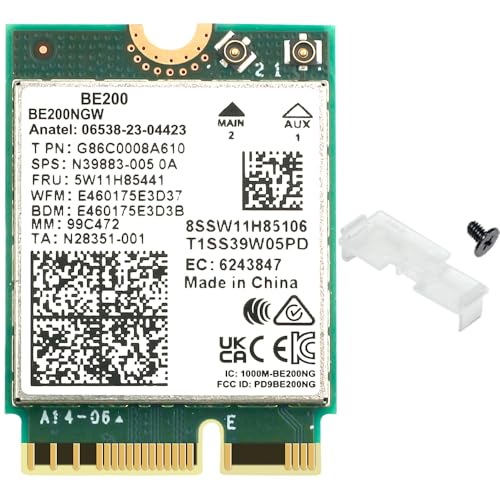
This m 2 wi fi 7 card is worth a look if Linux compatibility is part of your upgrade checklist: the listing specifies Linux kernel 6.5 or newer alongside Windows 10/11 64-bit support. Its BE200NGW chip provides tri-band Wi-Fi 7 and Bluetooth 5.4 for a compatible Intel system.
Best For: Intel-system owners planning a Wi-Fi 7 upgrade who need a stated Linux kernel requirement.
Pros:
- Lists Linux kernel 6.5+ and Windows 10/11 64-bit compatibility.
- Supports 2.4 GHz, 5 GHz, and 6 GHz, with Multi-Link Operation listed.
- Includes a screw and plastic clip.
Cons:
- Not for AMD motherboards or AMD-based systems.
- Requires a compatible M.2 Key E slot; the listing highlights Intel 12th Gen or newer.
The clear Linux kernel note helps narrow your compatibility check. Confirm your Intel platform, slot, and operating system before buying for a gaming or everyday PC.
Best with Extra Features – EDUP BE9300 Wi-Fi 7 Module
This m 2 wi fi 7 card is a compact upgrade for a compatible laptop with an M.2 2230 A/E-key slot. Its MT7927 chipset supports tri-band Wi-Fi 7, including 320 MHz channels on 6 GHz when paired with suitable network equipment.
Best For: Windows 11 or Linux laptop owners who want a BE9300-class wireless module with Bluetooth 5.4.
Pros:
- Listed link rates reach 5764 Mbps on 6 GHz, 2882 Mbps on 5 GHz, and 688 Mbps on 2.4 GHz.
- Supports Wi-Fi 7 features including MLO, Multi-RU, and 4K-QAM with a compatible router.
- Includes Bluetooth 5.4 and WPA3 support.
Cons:
- Requires Windows 11 64-bit or Linux kernel 6.8 or newer; Windows 10 is not supported.
- Does not fit CNViO2 or Mini PCIe interfaces.
Check the laptop’s slot type, antenna connections, and operating system before ordering. The advertised Wi-Fi 7 capabilities also depend on your router and network setup.
Best Heavy-Duty Pick – MSAFF BE6500 Wi-Fi 7 Card
This m 2 wi fi 7 card targets desktop upgrades rather than a bare laptop-module swap. The MT7925-based BE6500 package includes antennas, an IPEX cable, and a low-profile bracket, but you should verify that your desktop has a suitable M.2 2230 A/E-key installation path and any required adapter.
Best For: Desktop owners seeking a tri-band Wi-Fi 7 upgrade with external antennas and Bluetooth 5.4.
Pros:
- Listed link rates are 2882 Mbps on both 5 GHz and 6 GHz, plus 688 Mbps on 2.4 GHz.
- Supports MLO and WPA3.
- Package lists two 5 dBi antennas, an IPEX cable, and a low-profile bracket.
Cons:
- Requires Windows 11 64-bit or Linux kernel 6.7 or newer.
- Not compatible with CNVi/CNViO2 or Mini PCIe slots; an adapter may be needed for desktop installation.
The bundled antenna parts make this a practical desktop-oriented option, provided you confirm the motherboard interface and adapter requirements before buying.
High-Bandwidth Module Pick – EDUP BE9300 M.2 Card
This m 2 wi fi 7 card is an EDUP BE9300 module for compatible M.2 2230 A/E-key systems. Its MT7927 chipset supports 320 MHz channels on 6 GHz, making it worth considering if you have a suitable Wi-Fi 7 router and want the higher listed 6 GHz link rate.
Best For: Compatible Windows 11 or Linux laptops whose owners prioritize 6 GHz Wi-Fi 7 capability.
Pros:
- Lists up to 5764 Mbps on 6 GHz, 2882 Mbps on 5 GHz, and 688 Mbps on 2.4 GHz.
- Supports MLO, Multi-RU, 4K-QAM, OFDMA, and MU-MIMO.
- Provides Bluetooth 5.4 and WPA3 support.
Cons:
- Supports Windows 11 64-bit or Linux kernel 6.8 and newer, not Windows 10.
- Incompatible with CNViO2 and Mini PCIe; the listed package contains only the card.
Its specifications closely match the other EDUP BE9300 listing here, so choose between them based on slot compatibility and the current listing details rather than expecting a stated performance difference.
How We Picked the Best M 2 Wi Fi 7 Card
We grouped the 10 selected listings by their stated chip family, platform support, wireless bands, Bluetooth version, and included installation hardware. Several listings have very similar names, so the count represents listings—not necessarily 10 distinct chipsets. We also treated advertised rates as theoretical link speeds, not real-world download speeds. Confirm the seller’s current specifications before ordering, especially where a title is incomplete or compatibility claims differ.
Quick Comparison: Which Type Fits Your Upgrade?
Intel BE200 and Intel Killer BE200 listings suit buyers with a confirmed compatible Intel-based system who want an M.2 Wi-Fi 7 upgrade. Check the exact motherboard or laptop support rather than relying on processor brand alone. EDUP BE9300 listings advertise AMD and Intel compatibility and are worth comparing if you have an AMD PC; verify the chipset and driver requirements for the exact listing. BE6500 listings offer another tri-band option, but compare their stated band support and maximum link rates instead of assuming all Wi-Fi 7 cards perform alike. A BE200 bundle that includes antennas, cables, and brackets may be more convenient for a desktop without existing antenna hardware.
Key Buying Factors for an M.2 Wi-Fi 7 Card
Slot, Keying, and Physical Fit
Look for a compatible M.2 Key E or A+E wireless slot, commonly sized for a 2230 card. An M.2 slot intended only for an NVMe SSD is not interchangeable. Laptop owners should check the service manual for supported modules and any platform restrictions; desktop owners should check whether the motherboard has a dedicated wireless slot.
Platform, Drivers, and Bands
Wi-Fi 7 capability does not guarantee every feature will be available on every PC. Check the card’s stated Intel or AMD compatibility, supported operating system, and current driver availability. For 6 GHz access, you also need an appropriate router, regional availability, and OS support. Without a Wi-Fi 7 router, a new card may still connect to older networks, but it cannot deliver Wi-Fi 7 features.
Antennas and Bluetooth
Check whether antennas are already installed in your laptop or supplied with your desktop upgrade. Compare connector and cable requirements before buying; a bare M.2 card alone may not give a desktop a usable antenna setup. These listings advertise Bluetooth 5.4, but Bluetooth operation may also depend on the host’s wiring and drivers.
Who Should Buy Which M 2 Wi Fi 7 Card?
Choose an Intel BE200-based listing if your system’s support documentation confirms it fits and you already have the necessary antennas. Consider the Killer-branded option if you specifically want its advertised software or latency features, after checking driver support. For an AMD system, start with a listing that explicitly claims AMD compatibility, then verify that claim against your motherboard and the seller’s documentation. If you are upgrading a desktop without antennas, prioritize a complete antenna-and-bracket bundle. If you only need a replacement for an existing card, prioritize verified compatibility over the biggest speed figure.