
If you need 10GbE without giving up a full-size PCIe slot, an M.2 10GbE network card can be a smart upgrade. It’s especially useful in compact desktops, small-form-factor builds, and some NAS systems where expansion space is limited.
Below, we focus on cards that balance speed, compatibility, cooling, and connector type so you can choose the right option for your build and network gear.
Best 10 M.2 10GbE Network Card Picks for 2026
SFP+ M.2 Adapter
Intel 82599 SFP+ M.2 10GbE Adapter

- Intel 82599 chipset
- Includes 35cm SFF-8087 cable
- Supports PXE, UEFI, DPDK, SR-IOV
Best For: Compact systems needing SFP+ 10GbE from an M.2 slot
Synology Combo Card
Synology E10M20-T1 10GbE + M.2 Card
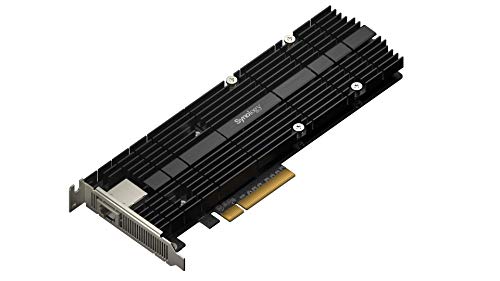
- One RJ-45 10GbE port
- Dual M.2 NVMe cache slots
- 5-year warranty
Best For: Compatible Synology NAS builds needing network and cache expansion
Compact 10GbE M.2 NIC
IO CREST 10GbE M.2 Ethernet Card

- Supports 10GbE, 5GbE, 2.5GbE, and 1GbE
- Low-power M.2 form factor
- Includes low-profile bracket and cable
Best For: Compact Windows or Linux systems needing a flexible M.2 NIC
Space-Saving 10GbE Adapter
REKONG Marvell AQC113 M.2 10GbE Card

- Marvell AQC113 controller
- Auto-negotiates 10G to 100Mbps
- Dual brackets included
Best For: Small-form-factor PCs and NAS builds that need a PCIe-free 10GbE upgrade
Desktop-Ready 10G Reliability
SABRENT 10Gb PCIe Network Card
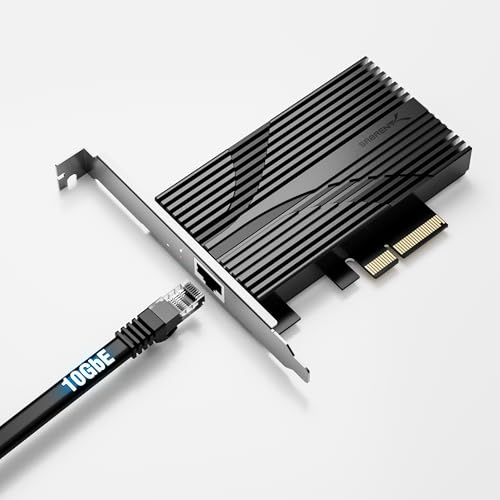
- Marvell AQC113 with oversized aluminum heatsink
- Supports x4/x8/x16 slots and full-height cases
- Works with Windows, Linux, Unraid, QNAP, and Proxmox
Best For: Users wanting a reliable full-height 10GbE RJ45 PCIe card
M.2 Expansion Pick
Euqvos Intel 82599 M.2 to RJ45 NIC

- Intel 82599 controller with 1GbE/10GbE support
- Includes standard and low-profile brackets
- Works with Windows, Linux, ESXi, FreeBSD, and more
Best For: M.2-based systems needing a specialized 10GbE RJ45 adapter
Best Bundle Value

- Up to 10Gbps with automatic speed negotiation
- Includes low-profile bracket and 1.5m Cat6 cable
- Supports Windows, Linux, and DSM 7.2+
Best For: Users wanting a simple 10GbE PCIe card with bundled accessories
Compact M.2 SFP+ Adapter
Intel 82599 M.2 10GbE SFP+ Adapter
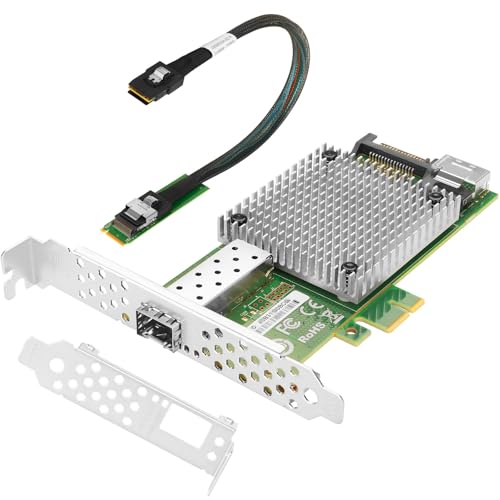
- Intel 82599 controller with low-latency 10GbE
- Includes full-size and low-profile brackets
- Supports PXE, SR-IOV, Jumbo Frame, FCoE, and iSCSI
Best For: Compact servers and small PCs needing SFP+ 10GbE
Industrial M.2 SFP+ Adapter
Intel 82599 X520-DA1 M.2 10GbE Card

- Intel 82599EN chipset for stable 10Gbps links
- SFP+ port works with module, DAC, or AOC
- Includes converter card, cable, and low-profile bracket
Best For: Industrial and server systems with M.2 NVMe x4 slots
SFP+ M.2 Adapter – Intel 82599 SFP+ M.2 10GbE Adapter
If you want an M.2 10GbE network card for a compact build, this M.2 M-Key to 10GbE SFP+ adapter is aimed at users who need high-speed wired networking without using a PCIe slot. It uses an Intel 82599 controller and includes a 35cm SFF-8087 cable, but you should confirm your motherboard supports M.2 expansion and that M.2 and PCIe can operate together on your system. Power also comes from a 15-pin SATA hard drive cable, which is not included.
Best For: Compact desktops, internet café deployments, and users who need SFP+ 10GbE from an M.2 slot.
Pros:
- Intel 82599 chipset with low latency and low power use
- Supports PXE, UEFI, DPDK, Jumbo Frame, FCoE, iSCSI, and SR-IOV
- Broad OS support, including Windows, Linux, VMware ESXi, and FreeBSD
- Includes 35cm SFF-8087 cable for installation
Cons:
- Requires a compatible M.2 slot and system support for M.2/PCIe coexistence
- Needs external SATA power, but the power lead is not included
- Win11 support depends on correct Win10 driver setup
Overall, this is a specialized M.2 10GbE network card for buyers who specifically need SFP+ connectivity and are comfortable verifying hardware compatibility before purchase.
Synology Combo Card – Synology E10M20-T1 10GbE + M.2 Card
This Synology M.2 10GbE network card combines a single 10GbE RJ-45 port with dual M.2 NVMe cache slots, making it a strong option for compatible Synology systems where you want both networking and storage acceleration in one card. It is designed to reach up to 10 Gbps and to boost random I/O performance while freeing up primary drive bays for data storage. Before buying, check Synology’s compatibility list, since supported models are limited.
Best For: Compatible Synology NAS owners who want 10GbE networking plus NVMe cache expansion in one add-on.
Pros:
- Combines 10GbE RJ-45 networking with dual M.2 2280/22110 NVMe slots
- Helps accelerate random I/O performance through dedicated cache slots
- Frees up primary drive bays for more data storage
- Backed by a 5-year warranty
Cons:
- Compatible only with selected Synology models
- Includes just one 10GbE port
- Not a general-purpose card for non-Synology desktops
For Synology users, this is a practical all-in-one upgrade that adds faster networking and cache expansion without needing separate hardware.
Compact 10GbE M.2 NIC – IO CREST 10GbE M.2 Ethernet Card
The IO Crest M.2 10GbE network card is built for compact systems that need fast Ethernet in an M.2 form factor. It supports 10GbE, 5GbE, 2.5GbE, and 1GbE, and includes features like checksum offloading, VLAN tagging, jumbo frames, and TCP segmentation. If you are working with a laptop or desktop that has the right M.2 support, this is a flexible networking add-on with a low-power design.
Best For: Small-form-factor desktops or laptops that need a versatile M.2 Ethernet upgrade.
Pros:
- Supports 10GbE down to 1GbE for flexible networking
- Includes VLAN tagging, jumbo frames, and checksum offloading
- Low-power design suited to compact devices
- Comes with a low-profile bracket, cable, and manual
Cons:
- Requires a compatible M.2 environment
- Limited to Windows and Linux support in the supplied notes
- May need careful installation in tight systems
This is a straightforward M.2 10GbE network card for users who want broad speed support and a compact footprint rather than a more specialized NAS-focused feature set.
Space-Saving 10GbE Adapter – REKONG Marvell AQC113 M.2 10GbE Card
This M.2 10GbE network card is aimed at users who want a compact way to add fast wired networking without consuming a PCIe slot. It uses a Marvell AQC113 controller and auto-negotiates from 10G down to 100Mbps, which makes it easier to fit into mixed-speed networks. The card is described as a B+M Key M.2 design and comes with dual brackets, so it is intended for a range of small-form-factor builds.
Best For: SFF PCs, NAS setups, and creators who want a simple 10GbE upgrade from an M.2 slot.
Pros:
- Marvell AQC113 controller for stable, low-latency 10GbE
- Auto-negotiates across 10G, 5G, 2.5G, 1G, and 100Mbps
- Compact M.2 design frees up PCIe slots
- Includes dual-profile brackets for flexible installation
Cons:
- Requires M.2 B+M Key support
- Windows 10 is the minimum listed OS version
- Warranty is shorter than some competing options
For buyers prioritizing a space-saving M.2 10GbE network card with broad speed negotiation and modern OS support, this model is a practical upgrade path.
Desktop-Ready 10G Reliability – SABRENT 10Gb PCIe Network Card
If you want an M.2 10GbE network card alternative that focuses on straightforward desktop expansion, the SABRENT NT-10PE is a strong PCIe option. It adds a 10GBASE-T RJ45 port with backward support for 5GbE, 2.5GbE, 1GbE, and 100Mbps, making it a practical fit for fast NAS access, backups, and high-throughput workstation use.
Best For: Desktop or server users who need a dependable full-height 10GbE RJ45 card with broad OS support.
Pros:
- Marvell AQC113 controller with a heavy aluminum heatsink for sustained transfers.
- Fits PCIe x4, x8, or x16 slots and ships with a full-height bracket.
- Supports Windows, Linux, Unraid, QNAP, and Proxmox.
- Status LEDs make link speed and activity easy to see at a glance.
Cons:
- Not designed for low-profile or small-form-factor cases.
- Requires CAT6a or better for full 10GbE performance.
- Synology DSM 7.2+ no longer bundles AQC113 support.
This card is best when you want a simple, well-cooled 10GbE add-in solution and do not need M.2 installation. Its focus on cooling and broad compatibility makes it a practical choice for sustained network workloads.
M.2 Expansion Pick – Euqvos Intel 82599 M.2 to RJ45 NIC
This M.2 10GbE network card is aimed at systems that need an internal expansion path from an M.2 slot to a 10GBASE-T RJ45 port. The Euqvos adapter uses an Intel 82599 controller and includes an SFF-8087 cable, making it a specialized option for compatible desktops or servers that can provide the required SATA power connection.
Best For: Builders who need an M.2-based 10GbE RJ45 expansion card with wide OS and server support.
Pros:
- Intel 82599 controller with low power consumption and low latency.
- Supports 1GbE and 10GbE, plus PXE, DPDK, SR-IOV, and jumbo frames up to 15.5KB.
- Includes both standard and low-profile brackets for flexible installation.
- Broad support across Windows, Windows Server, VMware ESXi, Linux, and FreeBSD.
Cons:
- Must be powered by a 15-pin SATA power cable.
- Requires an M.2 M-key compatible setup and an included cable connection.
- More specialized than a standard PCIe plug-in NIC.
If your build is designed around M.2 expansion, this card offers a feature-rich path to 10GbE with strong compatibility and enterprise-friendly features. The tradeoff is added installation complexity, so it fits best in systems planned around its power and cabling needs.
Best Bundle Value – Cudy 10GB PCIe Network Card
If you are shopping for an M.2 10GbE network card alternative for a standard PC build, the Cudy PE10G is a practical PCIe 10GBase-T adapter. It delivers up to 10 Gbps, supports automatic speed negotiation, and includes a 1.5m Cat6 cable, which lowers the number of extras you need to buy.
Best For: Buyers who want a simple 10GbE PCIe adapter with a low-profile bracket and bundled cable.
Pros:
- 10GBase-T support with backward compatibility for lower-speed connections.
- Includes both standard and low-profile brackets.
- Ships with a 1.5m Cat6 cable in the box.
- Supports Windows 11/10, Windows Server 2022, Linux, and DSM 7.2+.
Cons:
- Limited to PCIe 3.0 desktop expansion, not M.2 installation.
- Driver and OS support is narrower than some enterprise-focused cards.
- Only one RJ45 port, so it is not meant for multi-port networking.
For a straightforward single-port 10GbE upgrade, this card stands out because it bundles the bracket and cable many buyers end up needing anyway. That makes it a convenient choice for compact or standard desktops that just need fast wired networking.
Compact M.2 SFP+ Adapter – Intel 82599 M.2 10GbE SFP+ Adapter
If you need an M.2 10GbE network card for a small form factor PC or server, this Intel 82599-based adapter is built around SFP+ connectivity and includes the brackets and cable needed for installation. It is aimed at users who want low-latency 10GbE performance with broad OS support and features like PXE, DPDK, SR-IOV, Jumbo Frame, FCoE, and iSCSI support.
Best For: Small-form-factor systems, Linux or Windows servers, and builds that need SFP+ 10GbE with Intel 82599 compatibility.
Pros:
- Original Intel 82599 controller for high performance, low latency, and low power use
- Supports PXE, DPDK, SR-IOV, Jumbo Frame up to 15.5KB, FCoE, and iSCSI
- Includes profile and low-profile brackets for easier fitment in compact cases
- Wide OS support, including Windows, Windows Server, VMware ESXi, Linux, and FreeBSD
Cons:
- Requires 15-pin SATA power during installation
- SFP+ port means you’ll need compatible SFP+ module, DAC, or AOC
- Designed for M.2 M-key systems, so compatibility depends on your host hardware
Overall, this is a practical choice if you want an M.2 10GbE network card with server-friendly features and strong compatibility across common operating systems. The included cooling and bracket options make it better suited to compact builds than many bulkier 10GbE adapters.
Single-Slot RJ45 Upgrade – VunLink 10Gb PCIe RJ45 Network Card
For buyers who want an M.2 10GbE network card alternative in a simple RJ45 form factor, this PCIe 4.0 x1 adapter focuses on easy network upgrades with multi-gig auto-negotiation. It is a straightforward option for PCs, NAS boxes, and compact systems that need 10GbE over standard Ethernet cabling.
Best For: PCs, NAS systems, and compact builds that want 10G/5G/2.5G/1G RJ45 connectivity over Cat5e/Cat6/Cat6a.
Pros:
- Realtek RTL8127AT controller with up to 10Gbps throughput
- Supports 10G/5G/2.5G/1G/100Mbps auto-negotiation for flexible upgrades
- PCIe 4.0 x1 design suits mini PCs and other slot-limited systems
- Low CPU usage hardware offload and includes standard plus low-profile brackets
Cons:
- Requires a PCIe slot rather than M.2 installation
- Designed for Windows 10/11, Linux, Windows Server, and mainstream virtualization platforms
- RJ45 design depends on compatible multi-gig networking hardware and cabling
This is a strong pick if you want an easy-to-deploy 10GbE upgrade without moving to SFP+ optics or specialty cabling. Its compact x1 layout and broad auto-negotiation make it practical for everyday home lab and NAS use.
Industrial M.2 SFP+ Adapter – Intel 82599 X520-DA1 M.2 10GbE Card
This M.2 10GbE network card is built for users who want Intel 82599-based server networking in a compact adapter with SFP+ support. It targets systems that can use an M.2 NVMe PCIe Gen 2.0 x4 interface and need stable 10Gbps connectivity for data-center-style workloads.
Best For: Server, workstation, and industrial builds that can use M.2 NVMe PCIe Gen 2.0 x4 and need SFP+ 10GbE.
Pros:
- Intel 82599EN chipset for stable 10Gbps networking and reduced packet loss
- Single SFP+ port supports modules, DAC, and AOC for flexible deployment
- Includes low-profile bracket, cable, driver disc, and M.2 converter card
- Broad compatibility across Windows, Windows Server, Linux, FreeBSD, Solaris, and VMWare ESX
Cons:
- Supports M.2 NVMe PCIe Gen 2.0 x4 only; M.2 SATA is not supported
- SFP+ networking requires compatible transceivers, DAC, or AOC
- Installation may be more involved than a standard PCIe add-in card
As an M.2 10GbE network card, this model stands out for its Intel enterprise chipset and included installation accessories. It is best suited to systems where M.2 NVMe expansion is available and SFP+ flexibility matters more than plug-and-play simplicity.
How We Picked the Best M.2 10GbE Network Cards
We focused on real-world fit and performance, not just raw 10Gbps claims. The best M.2 10GbE Network Card for most buyers should have solid driver support, a controller with proven stability, sensible power and heat behavior, and a form factor that works in cramped cases or NAS enclosures.
We also weighed whether each option uses RJ45 or SFP+, since that choice affects cable type, switch compatibility, distance, and total upgrade cost.
Quick Comparison: Which Type Makes Sense?
RJ45 models are usually the easiest path if your existing router, switch, or NAS already uses copper Ethernet. They’re convenient and familiar, but they can run warmer and may cost a bit more in the long run if you need better cabling or a multi-gig switch.
SFP+ models are often a better fit for short, high-performance links and users who already have SFP+ networking gear. They can be efficient and flexible, but they’re less plug-and-play if your network is built around standard Ethernet ports.
Key Buying Factors for an M.2 10GbE Network Card
Connector and Network Type
Choose RJ45 if you want direct connection to standard Ethernet. Choose SFP+ if your switch, DAC cable, or transceiver setup already supports it. The wrong port type can create extra cost or compatibility headaches.
Controller and Driver Support
Look for known controllers with strong support across Windows and Linux, especially if the card will live in a NAS, homelab, or workstation. Stable drivers matter more than benchmark peaks for 24/7 use.
Thermals and Physical Clearance
An M.2 10GbE Network Card can generate meaningful heat. Check whether the design includes a heatsink, airflow-friendly layout, and enough clearance for nearby components. This matters even more in SFF systems.
Host Compatibility
Make sure your motherboard or device exposes the right M.2 slot and lane configuration. Some boards support NVMe only, while others can handle networking add-in cards through a key-compatible slot and proper PCIe routing.
Who Should Buy Which M.2 10GbE Network Card?
If you want the simplest upgrade, pick an RJ45 model with broad OS support. If your setup is a compact PC or NAS with limited expansion, an M.2 10GbE Network Card can free up PCIe slots for storage or other add-ins. If you already use SFP+ switching, the SFP+ versions are often the cleaner, more efficient choice.
For mixed-use systems, prioritize compatibility and thermals first, then decide between copper convenience and fiber/DAC flexibility. That approach will usually lead you to the best long-term fit.