
If you need a clean, reliable way to connect a USB-C laptop, tablet, or handheld to a DisplayPort monitor, the right adapter makes a major difference in resolution, refresh rate, and compatibility.
In this roundup, we focus on the best options for 2026, with choices that suit everything from office displays to high-refresh gaming and creator workflows.
Best 10 USB-C to DisplayPort 2.1 Adapter Picks for 2026
Top-Tier Bandwidth Pick
80Gbps USB-C to DisplayPort 2.1 Adapter

- Up to 16K@60Hz with 80Gbps bandwidth
- Works with Thunderbolt 5/4, USB4, and USB-C
- Metal housing and plug-and-play setup
Best For: High-end displays, VR, and cutting-edge gaming setups
Compact 8K Value Pick
Short USB-C to DisplayPort Cable Adapter

- 0.6 ft compact adapter for tight setups
- Supports 8K@60Hz and 4K@144Hz
- Braided nylon jacket with gold-plated connectors
Best For: Travel, small desks, and tidy single-monitor setups
Portable Premium Pick
Foldable 4K@240Hz USB-C to DP Adapter

- Pocket-sized adapter with foldable tether cable
- Supports 4K@240Hz and 8K@60Hz HDR
- Works with USB4, Thunderbolt 4, and VR headsets
Best For: Portable high-refresh setups and travel-friendly workstations
Feature-Rich Gaming Pick
8K USB-C to DisplayPort 1.4 Adapter

- 8K@60Hz and 4K@144Hz support
- Dynamic HDR, VRR, ALLM, and MST included
- Braided nylon cable with aluminum casing
Best For: Gaming monitors and users who want extra video/audio features
Editors’ Pick
Cable Matters 32.4Gbps USB-C to DP 1.4 Adapter

- Up to 8K@60Hz / 4K@240Hz
- Metal housing with gold-plated connectors
- USB-C to DisplayPort only, with DP Alt Mode support
Best For: dependable high-refresh external monitor use on supported USB-C devices
Performance Pick
UGREEN USB-C to DisplayPort 2.1 Adapter

- DisplayPort 2.1 with up to 80Gbps
- Up to 16K@60Hz and 4K@240Hz
- Braided cable and aluminum alloy case
Best For: high-end gaming and premium monitor setups
Value Pick
Bidirectional 8K USB-C to DisplayPort 1.4 Adapter

- Bidirectional USB-C to DP design
- Up to 8K@60Hz and 4K@240Hz
- Aluminum body with gold-plated connectors
Best For: travel-friendly users who need flexible video output
Compact 8K Adapter
USB C to DisplayPort Adapter 8K@60Hz
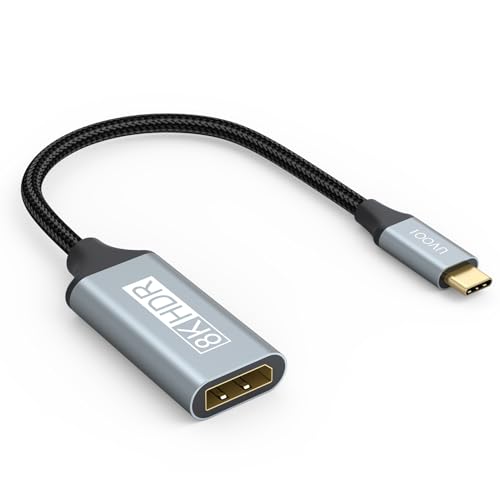
- Supports up to 8K@60Hz, plus 4K@240Hz and 144Hz
- Compatible with Thunderbolt 3/4/5 and USB-C video output
- Lightweight 0.03 kg single-port design
Best For: Small, simple adapter setups for high-resolution monitors
Trusted 8K Adapter Cable
UGREEN USB C to DisplayPort 1.4 Adapter Cable

- Up to 8K@60Hz, with 4K@240Hz and 2K@240Hz support
- MST, mirrored, and extended display modes supported
- Braided nylon, aluminum housing, and thicker copper wire
Best For: Reliable everyday use with strong display and gaming features
Top-Tier Bandwidth Pick – 80Gbps USB-C to DisplayPort 2.1 Adapter
If you want a USB-C to DisplayPort 2.1 adapter built for cutting-edge monitors, this Cable Matters model stands out with up to 80Gbps bandwidth and support for extremely high resolutions. It is aimed at users who need serious headroom for gaming, VR, or advanced desktop setups, while still keeping the setup simple with plug-and-play operation.
Best For: High-end displays, VR headsets, and users who want the newest DP 2.1 performance from USB-C or Thunderbolt devices.
Pros:
- Supports up to 16K@60Hz, plus 8K@240Hz and 4K@960Hz
- Compatible with Thunderbolt 5, Thunderbolt 4, USB4, and USB-C devices
- Premium metal housing for durability
- No driver installation required
Cons:
- Unidirectional use only from USB-C to DisplayPort
- More capability than many users need for standard monitors
Overall, this is the strongest fit if your priority is maximum bandwidth and future-facing DisplayPort 2.1 support. It makes the most sense for buyers pairing USB-C laptops or workstations with very high-refresh or high-resolution displays.
Compact 8K Value Pick – Short USB-C to DisplayPort Cable Adapter
This USB-C to DisplayPort adapter is a compact, short-format option for connecting a USB-C source to a DisplayPort screen. It supports 8K@60Hz and 4K@144Hz, making it a practical choice if you want strong display performance without a bulky cable hanging off the side of your laptop or phone.
Best For: Travelers, desk setups with tight spaces, and users who want a short unidirectional USB-C to DisplayPort adapter.
Pros:
- Supports up to 8K@60Hz, 4K@144Hz, and 4K@120Hz
- Short 0.6 ft design keeps setups tidy
- Uses gold-plated connectors and a braided nylon jacket
- Compatible with many USB-C devices including iPhone 15 and MacBook models
Cons:
- Unidirectional only from USB-C input to DisplayPort output
- Not intended for HDMI or reverse use
For buyers who want a simple, space-saving adapter rather than a longer cable, this model offers a useful mix of portability and high-resolution support. The short length and durable build make it especially appealing for mobile use and clean workstation layouts.
Portable Premium Pick – Foldable 4K@240Hz USB-C to DP Adapter
For buyers who want a portable USB-C to DisplayPort adapter with strong refresh-rate support, this Cable Matters model is a smart pick. It offers 4K@240Hz and 8K@60Hz output in a pocket-sized form factor with a foldable tether cable, making it easy to carry with a laptop, tablet, or VR headset.
Best For: Users who need a compact adapter for high-refresh external displays, VR, or on-the-go workstations.
Pros:
- Supports 4K@240Hz and 8K@60Hz with HDR and 4:4:4 RGB
- Foldable tether cable and compact body for portability
- Compatible with USB4, Thunderbolt 4, and supported USB-C hosts
- Works with VR headsets and selected RTX 4000 / RX 7000 systems
Cons:
- Unidirectional use only from USB-C host to DP monitor
- Not for HDMI, USB-C monitors, or reverse DisplayPort-to-USB-C use
This adapter is best when portability matters as much as performance. Its compact design and wide host compatibility make it a practical upgrade for users who frequently move between home, office, and travel setups.
Feature-Rich Gaming Pick – 8K USB-C to DisplayPort 1.4 Adapter
This USB-C to DisplayPort adapter focuses on high-resolution output, gaming features, and broad device support. With 8K@60Hz, 4K@144Hz, dynamic HDR, VRR, and ALLM, it is aimed at users who want a capable adapter for monitors, graphics cards, and compatible USB-C devices without giving up audio support.
Best For: Gamers and power users who want HDR, VRR, and strong 8K DisplayPort 1.4 performance from USB-C.
Pros:
- Supports up to 8K@60Hz and 4K@144Hz
- Includes dynamic HDR, VRR, and ALLM for smoother gaming
- Supports MST and precision audio formats including Dolby TrueHD
- Compact build with braided nylon cable and aluminum casing
Cons:
- Unidirectional only from USB-C input to DisplayPort output
- Not compatible with HDMI, VGA, or DVI displays
As a USB-C to DisplayPort 2.1 adapter alternative in the broader roundup, this model is a feature-heavy DisplayPort 1.4 option with a strong focus on gaming and audio. It is a good match if you want proven high-refresh support and broad compatibility with modern USB-C and Thunderbolt systems.
Editors’ Pick – Cable Matters 32.4Gbps USB-C to DP 1.4 Adapter
If you need a USB-C to DisplayPort 2.1 adapter-style solution for high-refresh displays but don’t actually need the newest DP 2.1 bandwidth, this Cable Matters USB-C to DisplayPort adapter is a strong, practical pick. It supports DisplayPort 1.4 features, up to 8K@60Hz or 4K@240Hz with compatible gear, and it’s built in a compact metal housing for travel and frequent use.
Best For: Users who want a dependable USB-C to DisplayPort adapter for high-refresh 4K or 8K displays on supported USB-C devices.
Pros:
- Up to 8K@60Hz and 4K@240Hz with compatible equipment
- Unidirectional USB-C to DisplayPort connection with DP Alt Mode support
- Metal housing, strain relief, and gold-plated connectors
- Supports MST daisy chaining and precision audio formats
Cons:
- Not a true DisplayPort 2.1 model
- Only works from USB-C to a DisplayPort monitor
- Not compatible with HDMI, USB-A, or reverse DisplayPort-to-USB-C use
This is the safer choice if your buying priority is proven compatibility and solid 8K/4K performance rather than chasing the latest spec label. It’s especially appealing for MacBook, iPad Pro, and Thunderbolt 4/USB4 users who just want a simple, rugged adapter that works well.
Performance Pick – UGREEN USB-C to DisplayPort 2.1 Adapter
If you want a USB-C to DisplayPort 2.1 adapter with the highest headline specs in this roundup, this UGREEN model is the one to look at. It supports up to 16K@60Hz, 80Gbps data rates, and backward compatibility for 8K@120Hz and 4K@240Hz, making it a strong match for modern gaming displays and high-end monitors.
Best For: Buyers who want the most future-facing DisplayPort 2.1 adapter for gaming monitors and premium USB-C devices.
Pros:
- DisplayPort 2.1 support with up to 80Gbps bandwidth
- Up to 16K@60Hz, plus backward support for 8K@120Hz and 4K@240Hz
- Supports FreeSync, G-Sync, HDR, HDCP 2.3, DTS, and Dolby Atmos sound
- Braided nylon cable and aluminum alloy housing for durability
Cons:
- Requires USB-C ports with video output or Thunderbolt 3/4/5
- DisplayPort compatibility is limited to devices with DP inputs
- Some supported devices and monitors still depend on the right cable and port standards
For shoppers comparing premium adapters, this is the most spec-heavy option here and the best fit when you want top-end refresh rates and broad gaming feature support. It’s a strong upgrade choice if your display chain is already built around high-performance USB-C and DisplayPort gear.
Value Pick – Bidirectional 8K USB-C to DisplayPort 1.4 Adapter
This bidirectional USB-C to DisplayPort adapter is a flexible choice if you want one compact connector for more than one direction of use. It supports up to 8K@60Hz, uses DP 1.4 bandwidth up to 32.4Gbps, and is designed for video-only connections from compatible USB-C, USB4, and Thunderbolt 4/5 ports.
Best For: Users who want a compact, bidirectional DisplayPort adapter for compatible laptops, tablets, and phones with video output.
Pros:
- Bidirectional design for flexible USB-C to DP use
- Up to 8K@60Hz, with support for 4K@240Hz and other high-refresh modes
- Supports G-Sync, FreeSync, HDR, and HDCP 2.2
- Aluminum build with gold-plated connectors
Cons:
- Video-only, with no charging or data functions
- Not suitable for docking stations or multiple conversions
- Some Thunderbolt-interface monitors are not supported directly
Because it adds bidirectional flexibility without giving up high-resolution output, this adapter is a good practical option for travelers and users who move between devices. Just make sure your source device supports DP Alt Mode, since that compatibility requirement is non-negotiable here.
Premium 16K Cable – USB-C to DisplayPort 2.1 Cable 6.6FT
If you want a USB-C to DisplayPort 2.1 adapter-style solution for pushing extreme resolutions and refresh rates, this 6.6 ft cable is built around DisplayPort 2.1 bandwidth. It supports up to 16K@30Hz, with backward compatibility for 8K@120Hz, 4K@240Hz, and 2K@480Hz, plus HDR, HDCP 2.3, VRR, and ALLM.
Best For: Users who want a direct USB-C to DisplayPort cable for cutting-edge monitors, high-refresh gaming, or high-resolution creative work.
Pros:
- Supports up to 16K@30Hz with backward support for 8K@120Hz and 4K@240Hz
- 40Gbps bandwidth with HDR, HDCP 2.3, VRR, ALLM, eARC, Dolby, and DTS support
- Braided nylon build, aluminum housings, gold-plated connectors, and multi-layer shielding
- Compatible with USB-C DP Alt Mode and Thunderbolt 3/4/5 devices
Cons:
- One-way cable only: USB-C source to DisplayPort display
- Requires a USB-C port with DP Alt Mode or Thunderbolt support
This is the strongest choice in the group if your priority is maximum spec support rather than a simple low-profile adapter. Its higher-end feature list makes it especially appealing for advanced displays and demanding setups.
Compact 8K Adapter – USB C to DisplayPort Adapter 8K@60Hz
This USB-C to DisplayPort 2.1 adapter pick is a compact single-port solution that supports up to 8K@60Hz, with backward support for 4K@240Hz and 144Hz modes. It is designed for Thunderbolt 3/4/5 and USB-C video-output devices, making it a simple way to connect a laptop, tablet, or phone to a DisplayPort monitor.
Best For: Buyers who want a lightweight, no-fuss adapter for 8K-capable displays and everyday monitor hookups.
Pros:
- Supports up to 8K@60Hz, with backward compatibility for 4K@240Hz and 144Hz
- Works with Thunderbolt 3/4/5 and USB-C devices with video output
- Very small and lightweight at 0.03 kg
- Single-port design keeps the setup simple
Cons:
- No included extra features beyond core video output
- Only works when the USB-C port supports DisplayPort signal output
If you want a straightforward adapter rather than a full cable, this is the most compact option here. Its appeal is simplicity: high resolution support, broad device compatibility, and an easy plug-in form factor.
Trusted 8K Adapter Cable – UGREEN USB C to DisplayPort 1.4 Adapter Cable
For a USB-C to DisplayPort 2.1 adapter-style purchase focused on stability and broad compatibility, this UGREEN cable supports up to 8K@60Hz and backward modes like 4K@240Hz and 2K@240Hz. It uses DisplayPort 1.4 bandwidth up to 32.4Gbps and includes HDR, VRR, ALLM, eARC, DTS, and Dolby support for a smoother viewing and gaming experience.
Best For: Users who want a trusted branded adapter cable for high-resolution displays, gaming features, and multi-monitor flexibility.
Pros:
- Up to 8K@60Hz with backward support for 4K@240Hz and 2K@240Hz
- Supports MST daisy chaining, mirrored mode, and extended mode
- 32.4Gbps bandwidth with HDR, VRR, ALLM, eARC, DTS, and Dolby support
- Braided nylon build, aluminum alloy housing, and thicker copper wire
Cons:
- Only works with USB-C ports that support DP Alt Mode or Thunderbolt 3/4
- Requires checking your device’s video output support before buying
This is a strong all-around option if you want a dependable adapter cable with useful extras for work or entertainment. The combination of feature support, build quality, and recognized brand backing makes it an easy practical pick.
How We Picked the Best USB-C to DisplayPort 2.1 Adapter Options
We prioritized models that balance display performance, device compatibility, and practical cable or adapter design. Key factors included supported resolution and refresh rate, whether the product is truly USB-C to DisplayPort 2.1 capable, Thunderbolt support, and whether it is a unidirectional adapter or a full cable-style solution.
We also looked for clear compatibility notes, since a USB-C to DisplayPort 2.1 Adapter can only perform as well as the source device, port standard, and monitor. Products that make setup easier and avoid confusing claims ranked higher.
Quick Comparison: Adapter Vs Cable Vs Higher-Bandwidth Models
Not every buyer needs the same type of connection. A compact adapter is best if you already own a good DisplayPort cable and want a simple bridge from USB-C. A USB-C to DisplayPort 2.1 cable is better for cleaner cable management and fewer parts. Higher-bandwidth models are the right pick for demanding users who want the highest practical refresh rates, support for 8K displays, or more headroom for future setups.
Key Buying Factors for a USB-C to DisplayPort 2.1 Adapter
Resolution and Refresh Rate
Check the exact mode you plan to use. Many listings advertise 8K support, but the real-world output may depend on compression, display timing, and your GPU or laptop. If you game, prioritize 4K at 120Hz, 144Hz, or 240Hz depending on your monitor.
Bandwidth and Port Standards
Look for bandwidth ratings such as 32.4Gbps, 40Gbps, or 80Gbps, but match them to your source device. USB4, Thunderbolt 3, Thunderbolt 4, and Thunderbolt 5 systems generally offer the broadest compatibility for a USB-C to DisplayPort 2.1 Adapter.
Directionality and Compatibility
Most of these products are unidirectional from USB-C source to DisplayPort display. If you need bidirectional support or a very specific source device, confirm that before buying. Also check support for MacBook, iPad, Windows laptops, and USB-C phones or handhelds, since not every device outputs DisplayPort Alt Mode equally.
Who Should Buy What
Choose a compact adapter if you want portability and already have a DisplayPort cable. Choose a cable-style USB-C to DisplayPort 2.1 Adapter if you prefer a tidier desk setup. Pick the highest-bandwidth option if you run a premium monitor, care about future-proofing, or want the best shot at top-tier refresh rates with minimal compromise.
If you are pairing a USB-C laptop with a modern monitor, start by matching your display goals to your device’s output capability. That is the fastest way to avoid overbuying and get the best results from your setup.