
If you shoot on modern cameras, a memory card reader with UHS-II support can save serious time offloads and keep your workflow moving.
This roundup focuses on fast, practical readers for creators who want reliable transfers, broad card compatibility, and the right port for their laptop or desktop.
Best 10 Memory Card Reader with UHS-II Support Picks for 2026
Dual-Slot Speed for Modern Cameras
SABRENT USB-C Dual-Slot UHS-II SD & microSD Reader

- UHS-II SD and microSD support up to 312MB/s
- Integrated USB-C cable and dual-slot design
- Plug-and-play, bus-powered operation
Best For: Creators who want a fast, tidy dual-slot reader for SD and microSD cards
Multi-Connection Flexibility
ProMaster Trifecta Deluxe UHS-II SD & microSD Reader

- USB-C, USB-A, and Micro-B connections
- UHS-II speeds up to 300MB/s
- Dual-slot design for card-to-card transfers
Best For: People who need one reader for modern and legacy ports
Compact Travel Pick
Kingston MobileLite Plus UHS-II microSD/SD Reader

- Compact, lightweight body for travel
- UHS-II support with UHS-I compatibility
- USB 3.2 Gen 1 and broad OS support
Best For: Travelers and mobile shooters who want a tiny reader
All-in-One Phone and Laptop Option
UGREEN USB-C SD 4.0 UHS-II Dual-Slot Reader

- UHS-II SD and TF slots with up to 312MB/s
- Reads and writes two cards at once
- Works with many USB-C devices and phones
Best For: Users who want a fast dual-slot reader for phones and laptops
Pro Workflow Dual-Slot

- Dual-slot CFast and SD UHS-II support
- USB 3.2 Gen 2 with up to 10Gb/s speeds
- Includes magnetic plate for mobile setups
Best For: Professionals managing both CFast and SD UHS-II cards
Compact USB-C Pick

- UHS-II SD slot up to 312 MB/s
- Dual SD and microSD card slots
- USB-C plug-and-play design
Best For: Travel-friendly SD and microSD users who want UHS-II support
Simple Sony Option

- Supports UHS-II and UHS-I SD cards
- USB 3.1 Gen 1 for faster transfers
- Portable single-slot design with connector cover
Best For: Users who want a simple UHS-II SD reader
All-in-One Multi-Card Pick
SD 4.0 4-in-1 Reader with USB A/C

- UHS-II SD support up to 312MB/s
- Handles SD, TF, CF, and MS cards
- USB A and USB C compatibility
Best For: Users who need one reader for several card formats and devices
Pro-Grade Mixed-Format Reader
CFexpress A/B and UHS-II 10Gbps Reader

- Supports CFexpress A/B plus UHS-II SD
- USB 3.2 Gen 2 delivers up to 10Gbps
- Auxiliary power improves Type B stability
Best For: Pro users who need CFexpress and UHS-II support in one reader
Best Compact SD Option
USB-C SD 4.0 Reader with Dual Slots
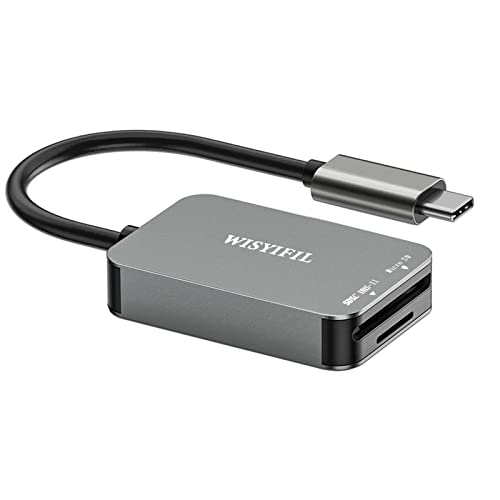
- UHS-II SD support up to 312MB/s
- SD and microSD slots in a compact body
- Plug-and-transfer USB-C design
Best For: Travelers and everyday users who mainly transfer SD cards
Dual-Slot Speed for Modern Cameras – SABRENT USB-C Dual-Slot UHS-II SD & microSD Reader
If you want a memory card reader with UHS-II support that can move photos and video quickly, this SABRENT dual-slot model is built for speed and convenience. It handles both SD and microSD cards, supports up to 312MB/s, and uses a built-in USB-C cable for easy use with newer laptops and desktops.
Best For: Creators who need a simple dual-slot USB-C reader for SD and microSD UHS-II cards.
Pros:
- Supports SDXC UHS-II and microSDXC with transfer speeds up to 312MB/s
- Dual-slot design lets you work with SD and microSD cards
- Integrated 6-inch USB 3.2 Gen1 Type-C cable keeps setup tidy
- Plug-and-play operation with no drivers required
Cons:
- USB performance is limited by the host connection and backward-compatibility conditions
- Windows and macOS support is listed, so broader device compatibility may be narrower than some multi-platform readers
This is a practical pick if you want a straightforward dual-slot reader that focuses on UHS-II speed and USB-C convenience rather than extra features. It should fit well into a camera workflow where fast transfers matter more than advanced controls.
Multi-Connection Flexibility – ProMaster Trifecta Deluxe UHS-II SD & microSD Reader
This memory card reader with UHS-II support stands out if you need multiple connection options in one compact accessory. The ProMaster Trifecta Deluxe offers USB-C 3.0, USB-A 3.0, and Micro-B 2.0 connections while supporting UHS-II speeds up to 300MB/s for SD and microSD cards.
Best For: Users who want one reader they can plug into newer laptops, older computers, or mobile setups.
Pros:
- Three connection options: USB-C 3.0, USB-A 3.0, and USB Micro-B 2.0
- UHS-II transfer speeds up to 300MB/s
- Dual-slot design supports copying files between cards
- Aluminum alloy housing with protective caps
Cons:
- Listed data transfer rate is lower than the UHS-II speed claim in the notes
- Fewer details are provided about broader device or app-specific compatibility
For people who switch between devices often, the Trifecta Deluxe is appealing because it reduces the need for multiple adapters. It is less about a stripped-down travel build and more about connection flexibility plus UHS-II support.
Compact Travel Pick – Kingston MobileLite Plus UHS-II microSD/SD Reader
If you need a compact memory card reader with UHS-II support for everyday transfers, the Kingston MobileLite Plus keeps things simple. It is designed for USB 3.2 Gen 1 speeds, supports UHS-II performance with backwards compatibility for UHS-I cards, and uses a very small body that is easy to carry.
Best For: Travelers and mobile shooters who want a small UHS-II reader that is easy to pack.
Pros:
- Supports UHS-II performance and is backwards-compatible with UHS-I cards
- Very compact and lightweight design for travel
- USB 3.2 Gen 1 speeds for faster transfers than USB 2.0
- Works across Windows, Mac OS, Linux, and Chrome OS according to the notes
Cons:
- Single-slot design only handles one card at a time
- Best paired with Kingston cards, so optimal performance may be ecosystem-dependent
This is the most minimalist option in the group, which makes it easy to slip into a camera bag or pocket. It is a good fit if you prioritize portability over dual-slot workflow features.
All-in-One Phone and Laptop Option – UGREEN USB-C SD 4.0 UHS-II Dual-Slot Reader
This memory card reader with UHS-II support is aimed at users who want fast transfers across phones, tablets, and computers. The UGREEN USB C SD 4.0 reader supports SD 4.0 UHS-II cards, includes both SD and TF slots, and is rated up to 312MB/s for moving photos, 4K clips, and video files.
Best For: Android and USB-C users who want a dual-slot reader that works with many devices.
Pros:
- Supports SD 4.0 UHS-II cards with speeds up to 312MB/s
- Dual-slot SD and TF design can read and write two cards simultaneously
- Driver-free plug-and-play use on many laptops, iPhone models, and smartphones
- Aluminum alloy case and braided cable add durability
Cons:
- Android phones need OTG support to use it
- USB 3.0 Type-C interface is capped at 5Gbps host-side according to the notes
For mixed-device workflows, this UGREEN model offers a strong balance of speed and compatibility. It is a smart choice when you want one reader for a phone, tablet, and laptop rather than a camera-only accessory.
Pro Workflow Dual-Slot – CFast & SD UHS-II Reader
If you need a memory card reader with UHS-II support for a mixed-card workflow, this ProGrade Digital model is built around speed and simplicity. It combines CFast and SD UHS-II in one dual-slot reader, uses USB 3.2 Gen 2, and is aimed at fast file transfers for professional post-production work.
Best For: Filmmakers, photographers, and creators who want a dual-slot reader for CFast and SD UHS-II cards.
Pros:
- Dual-slot design handles CFast and SD UHS-II cards in one reader.
- USB 3.2 Gen 2 supports up to 10Gb/s transfer speeds for quick offloads.
- Included adhesive magnetic plate can help build a compact field workstation.
- Backed by serialized component tracking and a two-year warranty.
Cons:
- It is not a Compact Flash reader.
- Heavier than a simple single-slot SD reader.
This is the strongest pick if your workflow includes both CFast and SD UHS-II media and you want a transfer-focused reader for production work. The tradeoff is that it is more specialized than a basic SD-only adapter.
Compact USB-C Pick – uni SD 4.0 UHS-II Reader
This memory card reader with UHS-II support is a compact USB-C option for everyday photo and video transfers. The uni reader includes dual slots with SD 4.0 protocols, supports UHS-II speeds up to 312 MB/s, and is designed for plug-and-play use across laptops, tablets, and phones.
Best For: Creators who want a small USB-C reader for SD and microSD cards with UHS-II support.
Pros:
- UHS-II SD slot supports transfer speeds up to 312 MB/s.
- Dual slots handle SD and MicroSD cards with SD 4.0 protocols.
- Plug-and-play setup avoids driver downloads.
- Compact aluminum body and 15cm cable suit travel and desk use.
Cons:
- MicroSD slot is included, but the speed claim centers on the SD slot.
- Not compatible with Lightning-port iPad and iPhone models.
For users who want a small, broadly compatible reader, this is an easy recommendation. It focuses on convenience first, while still giving you the UHS-II speed needed for fast SD card transfers.
Simple Sony Option – Sony MRW-S1 UHS-II Reader
If you want a straightforward memory card reader with UHS-II support, the Sony MRW-S1 keeps the formula simple: one SD-focused slot, USB 3.1 Gen 1 connectivity, and faster-than-most-PC-port performance. It is also usable with Micro SD cards when paired with a full-size adapter, making it a practical option for basic card ingest.
Best For: Users who want a simple, portable UHS-II SD reader from Sony.
Pros:
- Supports both UHS-II and UHS-I SD cards.
- USB 3.1 Gen 1 interface is designed for fast transfers.
- Compact, portable design with a protective cover for the USB connector.
- Activity indicator helps show when the reader is working.
Cons:
- Single-slot design only reads SD cards directly.
- Micro SD use requires a full-size SD adapter.
- Uses USB 3.1 Gen 1 rather than newer USB 3.2 Gen 2 speeds.
This is a sensible choice if you mainly need reliable UHS-II SD support without extra features. It is less versatile than dual-slot options, but it is easy to carry and keeps the setup familiar.
All-in-One Multi-Card Pick – SD 4.0 4-in-1 Reader with USB A/C
If you want a memory card reader with UHS-II support that can handle more than just SD cards, this 4-in-1 model is built for busy workflows. It supports SD 4.0 UHS-II speeds up to 312MB/s and adds CF, TF, and MS compatibility, making it a practical pick for photographers and creators moving 4K video and large photo sets.
Best For: Creators who need one compact reader for SD, microSD, CF, and MS cards across USB A and USB C devices.
Pros:
- Supports SD 4.0 UHS-II cards with transfer speeds up to 312MB/s
- Works with SD, TF, CF, and MS formats in a single reader
- Read and write 4 cards simultaneously for smoother file transfers
- USB A/C compatibility expands use with laptops, tablets, and more
Cons:
- Android phones must support OTG to work
- Does not support Lightning-port iPad or iPhone devices
- Micro SD and some other formats are listed alongside broad compatibility, so check your card type carefully
This is a strong all-in-one option if you want UHS-II speed plus broad card support in a single adapter. The main appeal is convenience: less swapping, fewer dongles, and faster transfers for mixed-card users.
Pro-Grade Mixed-Format Reader – CFexpress A/B and UHS-II 10Gbps Reader
For anyone shopping for a memory card reader with UHS-II support and also needing CFexpress coverage, this llano model is aimed at faster pro workflows. It supports UHS-II SD and micro SD/TF cards plus CFexpress Type A and Type B, and its USB 3.2 Gen 2 connection is rated up to 10Gbps for quick file transfers.
Best For: Users who work with CFexpress Type A/B alongside UHS-II SD cards and want a fast USB-C reader.
Pros:
- Supports CFexpress Type A, CFexpress Type B, UHS-II SD, and micro SD/TF
- USB 3.2 Gen 2 offers up to 10Gbps transfer speeds
- Built-in auxiliary power helps stabilize CFexpress Type B operation
- Compatible with Windows, Mac OS, Linux, iOS, iPadOS, and Android
Cons:
- Not compatible with Compact Flash/CF or XQD cards
- CFexpress Type A and Type B cannot be read simultaneously
- Type B cards may require auxiliary power for stable high-speed operation
This reader is the most specialized option here for fast, mixed-format media management. If your kit includes CFexpress Type B and UHS-II SD cards, the added power support and 10Gbps connection make it a strong desk-ready tool.
Best Compact SD Option – USB-C SD 4.0 Reader with Dual Slots
If you need a straightforward memory card reader with UHS-II support for SD cards, this USB-C model keeps things simple. It supports UHS-II SD cards at up to 312MB/s, adds a microSD slot, and is designed for quick plug-and-transfer use with laptops, tablets, smartphones, and other USB-C devices.
Best For: Users who mainly need fast SD card transfers from a compact USB-C reader.
Pros:
- Supports UHS-II SD cards with speeds up to 312MB/s
- Includes both SD and microSD slots for everyday use
- Plug-and-transfer design with no app or driver required
- Compact aluminum housing helps with portability and heat dissipation
Cons:
- MicroSD slot only supports UHS-I speed
- Does not offer the multi-format card support of larger readers
- Best suited to USB-C devices rather than older USB-A setups
This is the simplest pick for buyers who primarily use UHS-II SD cards and want a small, travel-friendly reader. It gives you the key speed benefit where it matters most, while keeping the design easy to carry and easy to use.
How We Picked the Best Memory Card Reader with UHS-II Support
We prioritized real-world transfer speed, UHS-II compatibility, connection type, and card-slot usefulness. A good Memory Card Reader with UHS-II Support should be fast enough to take advantage of UHS-II cards, stable during large transfers, and convenient for your setup.
Quick Comparison
Use the shortlist to match the reader to your workflow: single-slot models are often the simplest and most portable, dual-slot readers are better for mixed camera and drone media, and multi-format readers are the most flexible for creators who handle several card types. If you edit on USB-C laptops, a USB-C reader usually offers the cleanest experience.
Key Buying Factors for a Memory Card Reader with UHS-II Support
Card Format
Make sure the reader supports the cards you actually use, whether that is SD, microSD, CFast, or CFexpress. UHS-II support matters only if the reader and the card both support it.
Host Connection
USB 3.2 Gen 2 and USB-C readers can improve convenience and help reduce bottlenecks, especially when moving large batches of RAW photos or high-bitrate video. Check whether the cable is built in or detachable if portability matters.
Build and Heat Management
Metal housings often feel sturdier and can help with durability during frequent use. For long transfers, a solid design that stays cool and maintains connection stability is a plus.
Workflow Needs
Photographers may value a compact SD reader, while videographers often benefit from dual-slot or multi-format designs. If you frequently switch between devices, a versatile Memory Card Reader with UHS-II Support can simplify your kit.
Who Should Buy Which Memory Card Reader with UHS-II Support?
Choose a compact single-slot reader if you want the lightest travel option. Pick a dual-slot reader if you regularly work with SD and microSD cards from cameras, drones, or action cams. Go for a multi-card or CFast/CFexpress-capable model if you handle professional video media and need one reader for multiple camera systems.
For most buyers, the best choice is the reader that matches both your card format and your computer port. That combination will deliver the speed advantage UHS-II is meant to provide.