
If you shoot Sony Alpha or FX-series footage, the right reader can make offloads faster, safer, and far less frustrating.
This roundup of the best memory card reader with CFexpress Type A options for 2026 focuses on speed, compatibility, and everyday workflow value.
Best 10 Memory Card Reader with CFexpress Type a Picks for 2026
Value Pick
BENFEI CFexpress Type A Reader

- 10Gbps USB 3.2 Gen 2 performance
- USB-C and USB-A 2-in-1 design
- Works with Windows, Mac, Linux, and Android
Best For: Affordable Type A-only reading with flexible connectivity
Premium Speed Pick
Sony MRWG3 CFexpress Type A Reader
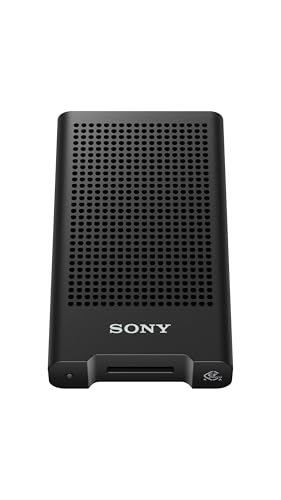
- USB 40Gbps support for fast transfers
- Optimized for CEA-G series cards
- Compatible with PCs, smartphones, and tablets
Best For: Sony shooters needing a fast, Type A ver 4 reader
Travel-Friendly Pick

- 10Gbps USB 3.2 Gen 2 speeds
- Compact aluminum alloy design
- USB-C and USB-A connectors for flexibility
Best For: Creators who need a portable Type A reader for mobile workflows
Dual-Slot Workhorse
Lexar CFexpress Type A/SD Reader

- CFexpress Type A and SD UHS-II support
- USB 3.2 Gen 2 up to 10Gbps
- Includes USB-C/A cable options
Best For: Users who need one reader for Type A and SD cards
Rocketek 4-in-1 Reader
CFexpress Type A/B + SD4.0 + TF4.0

- Reads CFexpress Type A and Type B
- Also supports UHS-II/UHS-I SD and microSD
- USB 3.2 Gen 2 up to 10Gbps
Best For: Creators who need one compact multi-format reader
Rocketek Dual-Slot Reader

- Dual-slot for CFexpress Type A and SD
- USB 3.2 Gen 2 transfer up to 10Gbps
- Includes USB-C and USB-A connectors
Best For: Users who want a simple Type A and SD reader
Tioleje 2-in-1 Reader

- Reads CFexpress Type B and SD cards
- USB 3.2 Gen 2 speeds up to 10Gbps
- USB-C and USB-A dual plug design
Best For: Type B shooters who also need SD support
Type B Dual-Slot Reader
2IN1 CFexpress Type B & SD Reader

- Reads CFexpress Type B and SD cards
- USB-C and USB-A connectivity
- 10Gbps USB 3.2 Gen 2 speed
Best For: Creators using CFexpress Type B and SD cards
Compact Type B Reader
Acer CFexpress Type B Card Reader

- CFexpress Type B only, no Type A support
- 10Gbps USB 3.2 Gen 2 speed
- USB-C and USB-A plugs with compact build
Best For: Creators who use CFexpress Type B cards only
Type A Dual-Slot Reader
CFexpress Type A and SD Dual-Slot Reader

- Built for CFexpress Type A cards
- Also supports SD, SDXC, SDHC, and UHS-I
- 10Gbps USB 3.2 Gen 2 with two cable types
Best For: Type A shooters who also need SD card support
Value Pick – BENFEI CFexpress Type A Reader
If you want a memory card reader with CFexpress Type A support that keeps costs down without giving up the basics, this BENFEI model is a straightforward choice. It delivers USB 3.2 Gen 2 10Gbps performance, works with both USB-A and USB-C ports, and is built for wide platform compatibility.
Best For: Budget-minded users who want a simple CFexpress Type A reader with dual-connector convenience.
Pros:
- USB 3.2 Gen 2 support with up to 10Gbps transfer speeds
- 2-in-1 USB-C and USB-A design for flexible connection options
- Compatible with Windows, Mac, Linux, and Android
- Braided nylon cable and aluminum alloy housing for added durability
Cons:
- Supports CFexpress Type A only, not Type B or SD cards
- Top speed depends on both the card and the host USB port
This is a practical pick if you mainly need dependable Type A offload and want a rugged, no-fuss reader with broad device support. The 18-month warranty adds extra peace of mind for everyday use.
Premium Speed Pick – Sony MRWG3 CFexpress Type A Reader
For buyers looking for a memory card reader with CFexpress Type A support and top-end transfer capability, Sony’s MRWG3 stands out. It is optimized for CEA-G series cards, supports CFexpress Type A ver 4, and uses USB 40Gbps support for fast offloads.
Best For: Sony users who want a high-speed reader tuned for CFexpress Type A ver 4 cards.
Pros:
- CFexpress Type A ver 4 compatible
- USB 40Gbps support for high-speed transfers
- Optimized for Sony CEA-G series cards
- Compatible with most PCs, smartphones, and tablets
Cons:
- Only one card slot
- Higher-end positioning may be more than casual users need
If speed and Sony-specific compatibility matter most, this reader is the most focused option in the group. Its compact design and USB-C connection make it a strong fit for modern mobile and desktop workflows.
Travel-Friendly Pick – Rytaki 10Gbps Type A Reader
This memory card reader with CFexpress Type A support is designed for creators who want a compact offload tool for fast field transfers. It offers USB 3.2 Gen 2 10Gbps speeds, dual USB-C and USB-A connectors, and a small aluminum-alloy body that is easy to carry.
Best For: Mobile photographers and videographers who need a compact Type A reader for laptops, phones, and tablets.
Pros:
- 10Gbps USB 3.2 Gen 2 transfer rate
- Dual USB-C and USB-A connectors for broad device compatibility
- Aluminum alloy build for heat dissipation during large transfers
- Plug-and-play operation with Windows, macOS, Linux, and Android
Cons:
- Supports CFexpress Type A only
- Short flexible cable may not suit every desk setup
Its small footprint and multi-device compatibility make it a sensible travel companion for quick backups and on-the-go editing. The aluminum housing and straightforward plug-and-play design reinforce its practical, creator-first focus.
Dual-Slot Workhorse – Lexar CFexpress Type A/SD Reader
If you need a memory card reader with CFexpress Type A support plus SD card coverage, this Lexar model is built around workflow efficiency. It supports CFexpress Type A and SD UHS-II cards, runs at USB 3.2 Gen 2 10Gbps, and includes cables for both USB-C and USB-A connections.
Best For: Photographers and videographers who move between CFexpress Type A and SD UHS-II cards.
Pros:
- Supports both CFexpress Type A and SD UHS-II cards
- USB 3.2 Gen 2 transfer rates up to 10Gbps
- Compact design for portable use
- Includes USB-C to Type-A and USB-C to USB-C cable options
Cons:
- CFexpress Type A transfer speed is listed up to 900MB/s, not the highest in the category
- Only one card slot is listed in the provided details
This is the most versatile option here if you regularly work with more than one card format. It is especially practical for streamlining offloads when you want one compact reader instead of carrying separate devices.
Rocketek 4-in-1 Reader – CFexpress Type A/B + SD4.0 + TF4.0
If you want a memory card reader with CFexpress Type A that can also handle other common formats, this Rocketek 4-in-1 model is built for busy workflows. It supports CFexpress Type A and B, UHS-II/UHS-I SD cards, and TF/micro SD cards, with USB 3.2 Gen 2 speeds up to 10Gbps for fast file offloads.
Best For: Photographers and content creators who need one compact reader for Type A, Type B, SD, and microSD cards.
Pros:
- Supports CFexpress Type A, CFexpress Type B, SD4.0, and TF4.0 cards
- USB 3.2 Gen 2 connection rated up to 10Gbps
- Aluminum alloy shell for heat dissipation and durability
- Works with Windows, Mac, Linux, Android, iOS, and iPadOS
Cons:
- Type A and Type B cards cannot be used concurrently
- Requires the Type-C power port for stable operation
- Only one card is recognized at a time when multiple CFexpress cards are inserted
This is a practical all-in-one choice if you regularly move between CFexpress and SD-based media. The compact metal build and broad device support make it especially useful for travel and on-location editing.
Rocketek Dual-Slot Reader – CFexpress Type A + SD
This memory card reader with CFexpress Type A is a straightforward pick if you mainly use Type A and SD cards. It offers USB 3.2 Gen 2 transfer speeds up to 10Gbps, plus a 2-in-1 USB-C/USB-A connection so you can plug into a wider range of computers without extra adapters.
Best For: Photographers, vloggers, and filmmakers who want a simple dual-slot Type A reader for travel or desk use.
Pros:
- Supports CFexpress Type A and SD cards in a dual-slot design
- USB 3.2 Gen 2 interface rated up to 10Gbps
- 2-in-1 USB-C/USB-A connection for flexible compatibility
- Compact aluminum body designed for heat dissipation
Cons:
- Not a multi-format reader beyond Type A and SD-focused use
- Only one reader unit is included
- Compatibility list is broad, but buyers should still confirm device and card support
For users who do not need a full multi-card hub, this model keeps the setup simple and portable. The dual-slot layout and dual-connector cable make it easy to move files quickly without carrying extra gear.
Tioleje 2-in-1 Reader – CFexpress Type B + SD
This is not a memory card reader with CFexpress Type A, but it is a strong option if your workflow centers on CFexpress Type B and SD cards. The USB 3.2 Gen 2 interface supports up to 10Gbps, and the dual plug cable works with both USB-C and USB-A devices for easy transfers.
Best For: Photographers using CFexpress Type B and SD cards who want a compact USB-C/USB-A reader.
Pros:
- Dedicated CFexpress Type B and SD card slots
- USB 3.2 Gen 2 speeds up to 10Gbps
- Integrated USB-C and USB-A connectors for broad compatibility
- Aluminum shell helps with heat dissipation during transfers
Cons:
- Not compatible with CFexpress Type A or XQD cards
- One card at a time only
- Smaller two-slot design means less format flexibility than multi-format readers
If your media library is built around Type B and SD, this reader keeps transfers fast and portable. The tradeoff is simple: strong performance for the formats it supports, but no Type A compatibility.
Type B Dual-Slot Reader – 2IN1 CFexpress Type B & SD Reader
If you need a memory card reader with CFexpress Type A support, this model is not the right match—it is built for CFexpress Type B and SD cards instead. For shooters who work with Type B media, it offers a practical 2-in-1 setup with USB-C and USB-A connectivity, making it easy to move files from cameras to a wide range of computers and mobile devices.
Best For: Photographers and videographers using CFexpress Type B plus SD cards who want a dual-slot, travel-friendly reader.
Pros:
- Dual-slot design reads CFexpress Type B and SD cards
- USB-C and USB-A support for broad device compatibility
- 10Gbps USB 3.2 Gen 2 transfer speed
- Aluminum alloy body for durability and heat dissipation
Cons:
- Does not support CFexpress Type A cards
- Not a fit if you specifically need a CFexpress Type A reader
Overall, this is a solid utility reader for Type B workflows, but buyers searching specifically for CFexpress Type A should skip it. Its dual-slot design and plug-and-play support make it convenient for mixed card use, as long as Type B is the format you need.
Compact Type B Reader – Acer CFexpress Type B Card Reader
This memory card reader with CFexpress Type A in mind is a mismatch: it supports CFexpress Type B only and explicitly does not work with Type A cards. If your workflow uses CFexpress Type B media, it is designed for fast USB 3.2 Gen 2 transfers and simple plug-and-play use across laptops, desktops, tablets, and phones that support OTG.
Best For: Users who only need a compact CFexpress Type B reader with USB-C and USB-A support.
Pros:
- 10Gbps USB 3.2 Gen 2 transfer speed
- USB-C and USB-A connectors for broad device compatibility
- Automatic locking and ejection mechanism
- Compact aluminum alloy body with nylon cord
Cons:
- Does not support CFexpress Type A cards
- Not compatible with SD, microSD, XQD, or other listed formats
As a Type B-only reader, this Acer model is straightforward and fast for the right card format, but it is not suitable for CFexpress Type A buyers. Its value is in the compact build and easy cross-device connectivity rather than multi-format flexibility.
Type A Dual-Slot Reader – CFexpress Type A and SD Dual-Slot Reader
If you want a memory card reader with CFexpress Type A support, this model is the relevant fit. It is built specifically for CFexpress Type A cards and also handles SD, SDXC, SDHC, and UHS-I cards, giving photographers and videographers a flexible 2-slot option for everyday offload work at up to 10Gbps.
Best For: Creators who use CFexpress Type A cards and want SD compatibility in a compact dual-slot reader.
Pros:
- Designed specifically for CFexpress Type A cards
- Also supports SD, SDXC, SDHC, and UHS-I cards
- 10Gbps USB 3.2 Gen 2 transfer speed
- Includes USB-C to C and USB-C to A cables
Cons:
- Both cards cannot be read simultaneously
- Not a multi-format reader beyond Type A and SD cards
This is the best match in the group for Type A users, especially if you also move SD media regularly. The lack of simultaneous dual-card reading is a limitation, but the format support and cable bundle make it a practical pick for portable editing setups.
How We Picked the Best Memory Card Reader with CFexpress Type a
We prioritized real-world transfer speed, host connection quality, broad device compatibility, and build reliability. For a Memory Card Reader with CFexpress Type a, that means looking for USB 3.2 Gen 2 performance, stable cable or port design, and clear support for the card type you actually use.
Quick Comparison
The best options generally fall into three groups: single-slot readers for the simplest setup, dual-slot CFexpress Type A and SD readers for mixed-camera workflows, and 2-in-1 USB-C/USB-A models for users who move between laptops and desktops. If you also archive stills, a dual-slot reader is often the most efficient choice.
Key Buying Factors for a Memory Card Reader with CFexpress Type a
Speed and Interface
Look for USB 3.2 Gen 2 with up to 10Gbps support. That won’t guarantee maximum card speed in every setup, but it helps avoid a bottleneck when offloading large video files.
Single-Slot Vs Dual-Slot
If you only use CFexpress Type A, a dedicated reader is usually compact and straightforward. If you regularly work with SD cards too, a dual-slot model can simplify your desk setup and reduce cable clutter.
USB-C, USB-A, and Cable Style
Choose the connection that matches your devices. A reader with both USB-C and USB-A support is more flexible, especially if you switch between newer laptops and older workstations.
Thermal and Build Considerations
Heavy transfers can warm up compact readers. Metal housings, solid connectors, and well-designed cable strain relief are good signs for long-term use.
Who Should Buy Which Memory Card Reader with CFexpress Type a?
Creators who want the cleanest workflow should choose a dedicated CFexpress Type A reader with USB-C. Hybrid shooters who also use SD cards should favor a dual-slot model. If you need to move files across multiple computers, a 2-in-1 USB-C and USB-A Memory Card Reader with CFexpress Type a support offers the most convenience. For Sony users who want an official accessory path, a brand-name reader can be worth the premium for added confidence and ecosystem fit.
For most buyers, the best choice is the reader that matches both your card format and your main computer connection, because that combination determines day-to-day speed and ease of use more than any single spec on the box.