
If your small form factor PC needs cleaner sound, better headphone output, or reliable surround support, a low-profile internal audio upgrade can make a real difference.
This guide focuses on compact, bracket-friendly PCIe options that fit slim cases without sacrificing the features most buyers want.
Best 10 Low Profile PCIe Sound Card Picks for 2026
Low-Profile 5.1 Hi-Res Gamer
ASUS Xonar SE low-profile 5.1-channel PCIe sound card
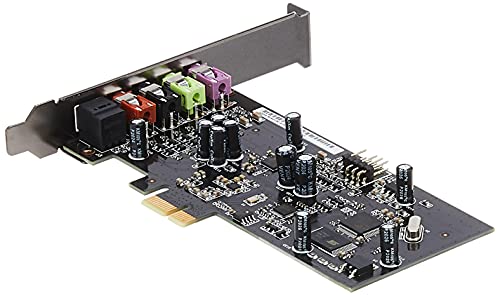
- Included low profile bracket
- 192kHz/24-bit audio with 116dB SNR
- 300ohm headphone amp and audio control
Best For: Compact gaming PCs needing detailed 5.1 sound
Compact 7.1 Surround Upgrade
Creative Sound Blaster Z SE compact 7.1 PCIe sound card

- 7.1-channel surround output
- 192kHz max sample rate with 116dB SNR
- Compact 0.87-inch height
Best For: Windows desktops needing compact 7.1 surround
Dual-Profile 7.1 Value Pick
SIIG DP Soundwave dual-profile 7.1 PCIe sound card

- Includes standard and low profile brackets
- 7.1-channel output with 120dB SNR
- Supports 192K/24-bit audio formats
Best For: Older or compact PCs needing dual-profile flexibility
Low-Height Audio Boost
Creative Sound Blaster Audigy FX V2 slim PCIe sound card

- 0.83-inch height for compact installs
- 192kHz max sample rate and 120dB SNR
- Supports stereo plus 5.1/7.1 surround
Best For: Windows 10 builds that need a slim audio upgrade
Compact Hi-Fi Low-Profile Option
ciciglow PCIe Sound Card with Fiber Out
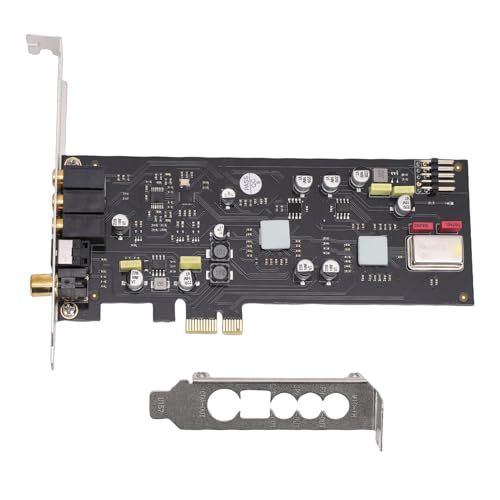
- Low profile bracket included for compact cases
- Optical, coaxial, and analog outputs
- Up to 96kHz, 16/24-bit audio support
Best For: Small form factor PC builds needing digital audio outputs
Premium Gaming and Headphone Pick
Creative Sound Blaster AE-7 with ACM

- 32-bit/384kHz playback with 127 dB DNR
- Xamp headphone amp drives up to 600 ohms
- Audio Control Module adds handy front access
Best For: Gaming rigs and headphone setups needing premium audio tuning
Budget-Friendly Flexible Audio Card
Jectse PCIe Sound Card with Low Profile Bracket

- Low profile bracket included
- Ph out, hifi out, and optical out
- 96kHz support at 16-bit and 24-bit
Best For: Compact builds needing basic, flexible audio output
Hi-Res Upgrade Pick
Creative Audigy Fx Pro Low-Profile PCIe

- 32-bit / 384 kHz playback
- Discrete 7.1-channel analog output
- Half-height bracket included
Best For: Desktop users wanting hi-res audio and a compact fit
Budget 5.1 Option
Padarsey PCIe 5.1 Low Profile Card
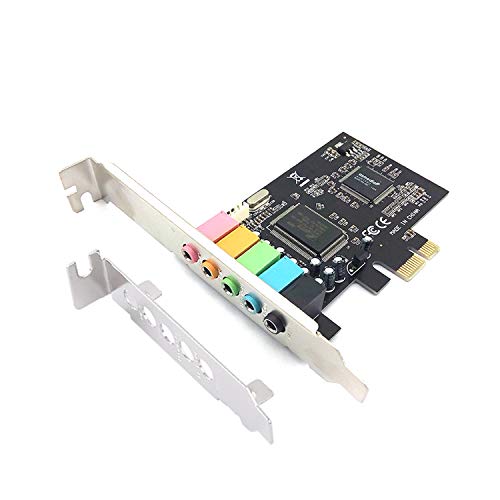
- 5.1 stereo audio output
- Low profile bracket for 2U cases
- CMI8738 chip with 16-bit decoding
Best For: Older Windows 7 desktops needing a compact basic surround card
Legacy Compatibility Pick
PCIe 5.1 Card with Low Profile Bracket

- Low profile bracket included
- Supports Windows 2000/XP/7/8
- Legacy DirectSound, A3D, and EAX support
Best For: Older PCs that need basic surround audio and legacy OS support
Low-Profile 5.1 Hi-Res Gamer – ASUS Xonar SE low-profile 5.1-channel PCIe sound card
If you want a low profile PCIe sound card that still feels built for serious listening and gaming, the ASUS Xonar SE is a strong fit. It combines 5.1-channel output, 192kHz/24-bit Hi-Res audio, and a 300ohm headphone amp, so it can deliver detailed playback with punchy, defined bass in compact systems.
Best For: Gamers and PC users who want a low-profile card with Hi-Res audio support and a strong headphone amp.
Pros:
- Included low profile bracket makes it easier to fit into smaller cases.
- 192kHz/24-bit Hi-Res audio with 116dB SNR supports clean, detailed sound.
- 300ohm headphone amp is useful for more demanding headphones.
- Xonar Audio Center provides full audio control through a simple interface.
Cons:
- It is limited to 5.1-channel output rather than 7.1.
- Best suited to users who want more control over audio, not a bare-bones install.
Overall, the Xonar SE stands out if you need a low-profile PCIe sound card with better audio hardware and flexible tuning. Its included bracket and Hi-Res specs make it a practical upgrade for compact desktop builds.
Compact 7.1 Surround Upgrade – Creative Sound Blaster Z SE compact 7.1 PCIe sound card
The Creative Sound Blaster Z SE is a practical low profile PCIe sound card option if you want 7.1-channel surround support in a slim internal card design. With a 192kHz maximum sample rate and 116dB SNR, it is aimed at users who want a straightforward upgrade for headphones or speakers on supported Windows systems.
Best For: Windows users who want a compact internal 7.1 sound card with solid surround support.
Pros:
- 7.1-channel surround output gives it broad home audio flexibility.
- Fits multiple PCIe slot sizes, including x1, x4, x8, and x16.
- 192K maximum sample rate and 116dB SNR support clear playback.
- Compact 0.87-inch height suits tighter internal installs.
Cons:
- Compatibility is listed for Windows 7, 8, and 10 only.
- It is primarily a basic internal card, not a feature-heavy external audio solution.
For buyers prioritizing surround output in a compact PCIe design, the Sound Blaster Z SE is easy to place in many desktop builds. Its low height and wide PCIe compatibility make it a sensible option for a low-profile sound upgrade.
Dual-Profile 7.1 Value Pick – SIIG DP Soundwave dual-profile 7.1 PCIe sound card
SIIG DP Soundwave Dual Profile PCI-Express 7.1-Channel Sound Card IC-710211-S1
Check Price On AmazonThe SIIG DP Soundwave is a low profile PCIe sound card designed for flexibility, since it installs in both standard height and low profile chassis with the included brackets. It delivers 7.1-channel audio, supports up to 192K/24-bit formats, and lists a 120dB SNR, making it a strong fit for older or compact desktop systems that still need modern surround audio.
Best For: Users who want a dual-profile 7.1 sound card that can work in standard or low-profile cases.
Pros:
- Includes both standard height and low profile brackets.
- 7.1-channel output supports surround sound setups.
- 120dB SNR and 192K/24-bit support suggest clean audio performance.
- Comes with extras like a fanout audio cable, software CD, and user manual.
Cons:
- Listed Windows support is limited to older versions such as Windows 8/7/Vista/XP.
- PCI-Express 1.1 compliance is older than newer PCIe generations.
As a dual-profile option, the SIIG DP Soundwave is especially useful if case fit matters as much as sound output. It is a practical pick for users who need a low-profile PCIe sound card without giving up 7.1-channel support.
Low-Height Audio Boost – Creative Sound Blaster Audigy FX V2 slim PCIe sound card
The Creative Sound Blaster Audigy FX V2 is a straightforward low profile PCIe sound card for Windows 10 PCs that need an internal audio upgrade. It supports stereo and surround output, lists up to 192kHz sample rate support, and offers a 120dB SNR, making it a practical choice for clearer everyday playback in a compact desktop build.
Best For: Windows 10 users looking for a simple internal sound card with a slim profile and strong audio specs.
Pros:
- Compact 0.83-inch height works well in tighter cases.
- Supports both stereo and surround output, including 5.1 and 7.1 configurations.
- 192kHz maximum sample rate and 120dB SNR are solid for the category.
- PCI Express x1 connectivity keeps installation simple.
Cons:
- Compatibility is listed for Windows 10 only.
- No bundled low profile bracket is mentioned in the supplied details.
If you want a low profile PCIe sound card with a slim internal footprint and modern audio specs, the Audigy FX V2 is an easy-to-place upgrade. It is best for users who want clean output without needing a complex feature set.
Compact Hi-Fi Low-Profile Option – ciciglow PCIe Sound Card with Fiber Out
If you want a low profile PCIe sound card for a small form factor build, this ciciglow model focuses on practical connectivity and higher-end digital audio support. It adds optical and coaxial outputs, supports 16/24-bit playback up to 96kHz, and includes a short bracket for easier installation in tighter cases.
Best For: PC builders and audiophiles who need a compact internal card with optical/coaxial output and flexible output options.
Pros:
- Includes a low profile bracket for easier fitment in smaller cases.
- Offers optical, coaxial, and analog outputs plus 7.1 channel support.
- Supports 44.1kHz, 48kHz, and 96kHz sampling at 16-bit or 24-bit depth.
- Uses an ES9018K2M DAC with strong SNR and low distortion claims.
Cons:
- Maximum sample rate is 96kHz, below some higher-end cards.
- Sound output is listed as stereo in the details, so setup may be platform-dependent.
- Best suited to users who value digital outputs more than advanced software features.
Overall, this is a straightforward pick if your priority is a low profile PCIe sound card with versatile connections and a compact installation profile. It looks especially appealing for users connecting to external DACs, AV gear, or home audio equipment through optical or coaxial output.
Premium Gaming and Headphone Pick – Creative Sound Blaster AE-7 with ACM
The Creative Sound Blaster AE-7 is a more premium low profile PCIe sound card choice for users who want strong playback quality, headphone amplification, and advanced control. It uses a PCIe x4 connection, includes an Audio Control Module, and is built around hi-res audio support up to 32-bit/384kHz.
Best For: Gamers and headphone users who want a high-end internal sound card with strong amplification and detailed software control.
Pros:
- 127 dB DNR and ESS SABRE-class 9018 DAC for high-resolution playback.
- Xamp bi-amp can drive headphones up to 600 ohms.
- Audio Control Module provides easy access to volume and mic/headphone I/O.
- Supports discrete 5.1 and virtual 7.1 surround options.
Cons:
- Uses a PCIe x4 interface, so it may not suit every compact build.
- More premium than a basic sound card if you only need simple audio output.
- Designed for Windows systems, which narrows compatibility.
In practice, the AE-7 makes sense when audio quality, headphone driving power, and software tuning matter more than budget. It is a strong fit for users who want a feature-rich internal card instead of a simple low profile PCIe sound card.
Budget-Friendly Flexible Audio Card – Jectse PCIe Sound Card with Low Profile Bracket
If you need a low profile PCIe sound card with a simple feature set and broad audio compatibility, this Jectse model keeps the focus on essentials. It offers ph out, hifi out, and optical out, along with 44.1kHz, 48kHz, and 96kHz support at 16-bit and 24-bit resolutions.
Best For: Users who want a compact internal sound card with multiple output options for everyday listening and general audio work.
Pros:
- Includes a low profile bracket for smaller PC builds.
- Provides ph out, hifi out, and optical out for flexible connections.
- Supports 44.1kHz, 48kHz, and 96kHz playback at 16-bit or 24-bit depth.
- Claims up to 127dB and -120dB THD+N for stronger audio processing.
Cons:
- Details list 100dB SNR, which is lower than the headline performance claims.
- No separate software features or bundled control module are mentioned.
- More focused on core output options than advanced surround or gaming extras.
This is a sensible choice if you want a compact, low profile PCIe sound card with useful output flexibility rather than a feature-heavy upgrade. It should suit straightforward PC audio setups where optical output and easy installation matter most.
Hi-Res Upgrade Pick – Creative Audigy Fx Pro Low-Profile PCIe
If you want a low profile PCIe sound card that focuses on cleaner playback and modern audio specs, the Creative Sound Blaster Audigy Fx Pro is built for that role. It delivers up to 32-bit/384 kHz audio, a 120 dB signal-to-noise ratio, and discrete 7.1-channel analog output, making it a strong fit for PC speaker setups and headphone listening alike.
Best For: Desktop users who want high-resolution audio, 7.1 surround support, and a half-height card for smaller cases.
Pros:
- 32-bit / 384 kHz playback with up to 120 dB SNR for clearer audio
- Supports discrete 7.1-channel analog output for surround speaker systems
- Includes SPDIF, headset, mic-in, and line-in connectivity
- Comes with a half-height bracket and compact 10.5 cm design
Cons:
- Designed for Windows PCs only
- Higher-end feature set may be more than basic audio needs require
This is the most capable option here if you care about sound quality and broader connectivity. The included low-profile bracket makes it easier to fit into smaller builds without giving up the stronger hi-res feature set.
Budget 5.1 Option – Padarsey PCIe 5.1 Low Profile Card
For shoppers looking for a low profile PCIe sound card on a budget, this Padarsey model keeps the focus on basic surround output and compatibility with older Windows systems. It offers 5.1 stereo audio, a low profile bracket for 2U cases, and a CMI8738 chip for simple PC audio upgrades.
Best For: Older Windows 7 PCs and compact cases that need a basic 5.1 sound card.
Pros:
- 5.1 stereo audio output for surround sound setups
- Includes a low profile bracket for 2U case compatibility
- Uses a CMI8738 chip with 16-bit multimedia signal decoding
- Supports 32/64-bit audio processing, recording, and playback
Cons:
- Limited to Windows 7 in the supplied details
- Maximum sample rate is only 48 kHz
- Signal-to-noise ratio is listed at 10 dB
This is a straightforward pick for older systems where low-profile fit matters more than advanced audio specs. It is best treated as a basic 5.1 expansion card rather than a high-fidelity upgrade.
Legacy Compatibility Pick – PCIe 5.1 Card with Low Profile Bracket
This low profile PCIe sound card is aimed at users running older Windows setups who need simple 5.1 audio in a compact build. It supports Windows 2000 through 8, includes a low profile bracket, and adds legacy 3D audio support such as DirectSound, A3D, and EAX.
Best For: Older PCs and compact cases that need legacy driver support and basic surround audio.
Pros:
- Includes a low profile bracket for smaller cases
- Supports 5.1 surround audio with a CMI8738 chip
- Works with Windows 2000/XP/7/8 per the supplied details
- Supports DirectSound, A3D, and EAX legacy audio features
Cons:
- Does not support Windows 10
- 1-month warranty is short
- Built for basic audio needs rather than premium playback
If your priority is compatibility with older operating systems, this card is the most specific match in the group. Its low-profile design and legacy audio support make it practical for keeping an aging PC usable.
How We Picked These Low Profile PCIe Sound Cards
We focused on cards that make sense for compact desktops and home theater builds: low-profile bracket support, PCIe compatibility, useful channel support, and practical audio features such as line-in, mic-in, optical/coaxial output, or headphone amplification. We also favored well-known chipsets and models with clear Windows support, since driver reliability matters as much as raw specs.
Quick Comparison: What Matters Most
For most buyers, the right card comes down to three questions: do you need simple stereo improvement, do you want 5.1 or 7.1 surround, or do you need higher-end headphone listening with stronger output and cleaner signal handling? Entry-level cards are often enough for basic desktop audio, while premium models are better suited to gaming headsets, powered speakers, and critical listening.
Best Fit by Use Case
Budget systems usually benefit from straightforward 5.1 or 7.1 cards with broad compatibility. Gamers and headphone users may prefer cards with better SNR, dedicated DACs, or amp circuitry. If you plan to use optical or coaxial output, check the rear I/O before buying.
Key Buying Factors for a Low Profile PCIe Sound Card
Bracket size: Make sure the card includes a low-profile bracket if your case is slim or SFF. Some cards ship with both full-height and low-profile options, while others require checking the box carefully.
Channel support: Choose 2.0, 5.1, or 7.1 based on your speakers or home theater setup. More channels are not always better unless your equipment can use them.
Audio quality specs: SNR, DAC quality, and sampling rates can indicate cleaner output, but real-world driver support and analog output quality matter too.
Connectivity: Look for the outputs you actually need, such as headphone out, mic in, line out, optical, or coaxial S/PDIF.
Software and OS support: A Low Profile PCIe Sound Card should be easy to install and stable on your operating system. If you are on Windows 10 or 11, driver availability is especially important.
Who Should Buy Which Low Profile PCIe Sound Card?
If you want a simple, affordable upgrade for a compact office or gaming PC, choose a straightforward low-profile model with solid Windows support and the right speaker channels. If you care more about music or headphone performance, step up to a card with better DAC and amp components. For home theater or legacy speaker setups, prioritize surround support and digital outputs. And if your main goal is just to replace weak motherboard audio in a slim case, any well-supported Low Profile PCIe Sound Card from this list should be a worthwhile improvement.