
A brief power outage can take your internet offline even when your laptop and phone still have charge. A UPS can keep your router and modem powered through short interruptions and give them time to shut down safely during a longer outage.
The right choice depends on your equipment’s power requirements, the outlets or DC connectors it needs, and how long you want it to run. This roundup covers compact mini UPS units and conventional battery backups for different home network setups.
Best 10 Ups for Wi Fi Router and Modem Picks for 2026
Compact Essentials Pick

- 425VA/255W backup power
- Up to 15 minutes at 100W
- Four battery-backed outlets
Best For: Brief outages affecting a small router-and-modem setup
DC Device Pick

- 97.2Wh lithium-ion battery
- 12V, 9V, and 5V outputs
- Check DC plug and voltage fit
Best For: Compatible DC-powered networking devices
More-Outlets Pick

- Eight AC outlets total
- Four battery-backed outlets
- 425VA/260W standby UPS
Best For: Network setups needing extra surge-only outlets
Longer-Runtime Pick
- 23 minutes at a 100W load
- Five battery-backed outlets
- USB charging and replaceable battery
Best For: Networking gear plus selected desk essentials
Portable Multi-Voltage Pick
- 13500mAh battery
- 5V, 9V, and 12V outputs
- Remaining-charge indicator
Best For: Compact backup for compatible network devices
Higher-Capacity Pick

- 20000mAh stated capacity
- 5V, 9V, 12V, USB, and Type-C options
- AVR protection and battery LEDs
Best For: Compatible setups needing varied output types
Seamless-Transfer Pick

- Specified 0ms transfer
- 10000mAh, 36Wh battery
- 5V, 9V, and 12V DC outputs
Best For: Compatible devices needing seamless power transfer
Most Output Options

- Five USB, DC, and PoE output ports
- LED battery-level indicator
- 18W maximum power
Best For: Mixed low-voltage router and home-device setups
Warranty Pick

- 10400mAh stated battery capacity
- DC, USB, and PoE outputs
- One-year warranty
Best For: Buyers seeking varied outputs with a stated warranty
Adapter-Friendly Pick

- Three included DC adapters
- USB, 9V DC, and 12V DC outputs
- Battery-status indicator
Best For: Setups needing the supplied DC adapters and splitter
Compact Essentials Pick – APC BE425M 425VA UPS
If you need a UPS for a Wi-Fi router and modem without taking up much space, the APC BE425M provides 425VA/255W of backup power in a wall-mountable design. APC rates it for up to 15 minutes at a 100W load; your runtime will depend on what you connect.
Best For: Keeping a router, modem, or other low-power essentials on during brief outages.
Pros:
- Four battery-backed, surge-protected outlets plus two surge-only outlets.
- Compact design can sit under a desk or mount on a wall.
- Three-year warranty and $75,000 connected-equipment protection.
Cons:
- 255W capacity limits the number of higher-power devices it can support.
- Only four outlets provide battery backup.
This is a practical choice for a small internet setup, provided you check your equipment’s total power draw and treat the quoted runtime as a 100W-load estimate.
For a UPS for a Wi-Fi router and modem that run on compatible DC power, the TalentCell Mini UPS offers a 97.2Wh lithium-ion battery rather than standard AC outlets. It has four 12V DC outputs, one 9V DC output, and two 5V USB outputs, so check each device’s power requirements before buying.
Best For: A compatible 12V or 9V router-and-modem setup where DC backup is preferable to an AC outlet UPS.
Pros:
- 97.2Wh battery can provide hours of operation during a power failure, depending on the load.
- Multiple DC and USB outputs accommodate compatible low-power devices.
- Includes two 5.5 × 2.1 mm DC cables and a charger.
Cons:
- No standard AC outlets; device voltage and connector compatibility need checking.
- Devices exceeding 37W cannot be powered continuously.
This option rewards a careful compatibility check: confirm your devices’ voltage, power draw, and DC plug size, and budget for an adapter if the included cables do not fit.
The CyberPower ST425 is a UPS for a Wi-Fi router and modem when you also want plenty of places to plug in nearby equipment. Its 425VA/260W standby design has eight AC outlets, though only four supply battery backup.
Best For: A home networking area that needs battery power for essential devices and surge-only outlets for others.
Pros:
- Four battery-backed, surge-protected outlets and four surge-only outlets.
- Transformer-spaced outlets help accommodate bulky plugs.
- Three-year warranty includes the battery; listed connected-equipment guarantee is $75,000.
Cons:
- Four of the eight outlets do not provide backup power.
- Supplied notes do not establish a router-and-modem runtime.
The ST425 is worth considering for its outlet layout, but put the router and modem on the battery-backed side and size the 260W capacity against your actual load.
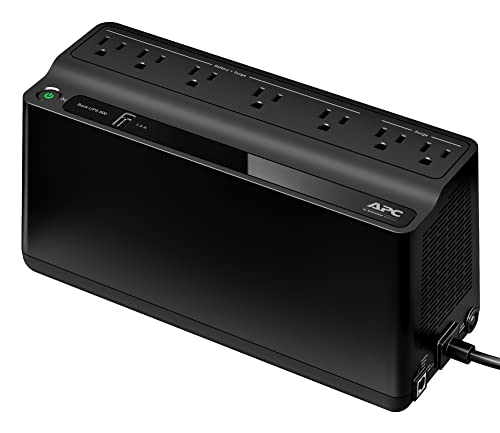
If you want a UPS for a Wi-Fi router and modem with room for additional desk essentials, the APC BE600M1 offers 600VA/330W of backup capacity. APC lists 23 minutes at a 100W load, making that figure a useful comparison point rather than a promise for every setup.
Best For: A router, modem, and selected home-office devices that need short-term backup during an outage.
Pros:
- Five battery-backed, surge-protected outlets plus two surge-only outlets.
- Built-in 1.5A USB charging port works during outages.
- Internal battery is replaceable with the separately sold APCRBC154.
Cons:
- Its 330W limit still requires careful load planning.
- Replacement battery is sold separately.
Compared with smaller backup units in this roundup, the BE600M1 offers more battery-backed outlets and a stated 100W runtime of 23 minutes. It is the better fit when those extras matter more than the smallest footprint.
Portable Multi-Voltage Pick – 13500mAh Mini DC UPS
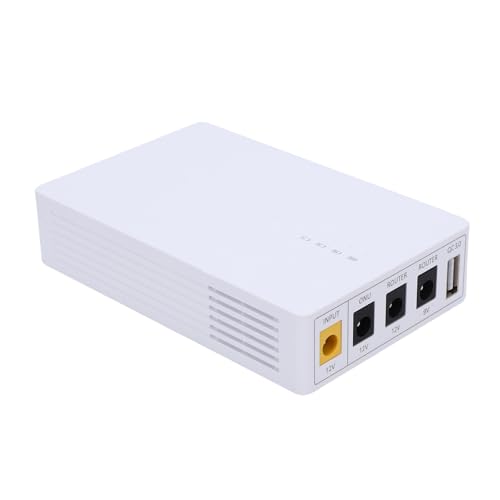
If you’re shopping for a ups for wi fi router and modem, this 13500mAh mini UPS offers 5V, 9V, and 12V outputs for compatible low-voltage devices. Its slim body can fit beside a router or travel with you.
Best For: A compact backup for routers, modems, cameras, switches, and ONUs with compatible power requirements.
Pros:
- 13500mAh battery capacity.
- Multiple voltage outputs accommodate different supported devices.
- Power indicator shows remaining charge.
Cons:
- No backup runtime or output wattage is specified.
- Check your devices’ connectors and power requirements before buying.
This is a flexible choice when you need several low-voltage options, but confirm compatibility rather than relying on the device list alone.
Higher-Capacity Pick – SKE DC20000 Plus Altair
For buyers comparing a ups for wi fi router and modem, the SKE DC20000 Plus Altair pairs a stated 20000mAh battery with 5V, 9V, and 12V DC outputs. USB and Type-C charging add options for other low-voltage electronics.
Best For: Router and modem setups that could benefit from multiple output types and a higher stated battery capacity.
Pros:
- 20000mAh battery capacity.
- DC, USB, and Type-C output options.
- AVR protection and LED battery-status indicators.
Cons:
- Stated maximum power is 20 watts; check your devices’ combined demand.
- Actual runtime will depend on the connected load.
Its output selection is the main draw for a mixed network setup. Verify each device’s voltage, connector, and power draw before connecting it.
Seamless-Transfer Pick – MARSRIVA KP3 Mini UPS
If uninterrupted switching is your priority in a ups for wi fi router and modem, the MARSRIVA KP3 specifies 0ms power transfer. Its compact 10000mAh, 36Wh design supports compatible routers, modems, ONUs, and other low-power DC devices.
Best For: Compatible network devices where an interruption during a power failure is a particular concern.
Pros:
- Specified 0ms transfer during power failures.
- 5V, 9V, and 12V DC output options.
- Listed safeguards include overcurrent, short-circuit, and thermal protection.
Cons:
- 18-watt maximum power limits the devices it can support.
- No specific backup runtime is provided.
The KP3’s stated transfer behavior makes it worth considering for an always-on network connection, provided your equipment fits its DC outputs and power limit.
Most Output Options – Hosyond 18W Mini DC UPS
If you need a UPS for a Wi-Fi router and modem with several low-voltage connections, this Hosyond model offers 5V USB and DC, 9V DC, 12V DC, and a selectable 15V/24V PoE output. Its built-in lithium-ion battery switches to backup power during an outage.
Best For: Homes with a router and other compatible low-voltage equipment that may need different output voltages.
Pros:
- Five output ports cover USB, DC, and PoE connections.
- LED indicator shows remaining battery capacity.
- Includes one-to-one and one-to-two DC power cables.
Cons:
- 18W maximum power limits the combined device load.
- Listing specifies no warranty.
Check each device’s voltage, connector size, and total power draw before connecting it; the flexible outputs are useful only when they match your equipment.
This UPS for a Wi-Fi router and modem pairs a stated 10400mAh battery with an 18W maximum output. The HQRP unit provides 5V, 9V, and 12V DC options, plus USB and PoE ports for compatible devices.
Best For: Buyers who want multiple output types and a stated one-year warranty.
Pros:
- 10400mAh battery capacity is specified.
- DC, USB, and PoE outputs support different connection needs.
- Includes two DC cables and a one-year warranty.
Cons:
- 18W maximum output may not cover higher-power equipment.
- No specific backup runtime is provided.
The stated capacity helps with comparison, but actual runtime will depend on what you connect. Confirm voltage, connectors, and combined wattage before buying.
For a UPS for a Wi-Fi router and modem, this Hilitand model stands out for its included DC adapters and splitter cable. It has an 8000mAh battery, 5V USB output, and 9V and 12V DC outputs.
Best For: Router-and-modem setups that need the included DC connector options.
Pros:
- Includes three DC adapters and a DC splitter cable.
- USB and two DC outputs offer three port choices.
- Battery-status indicator makes charge level easier to check.
Cons:
- No PoE output is listed.
- The stated five-hour runtime is not guaranteed for every device combination.
The accessories may make setup easier, but verify your equipment’s plug dimensions, voltage, and power requirements. Treat the listed runtime as an estimate rather than a promise for your setup.
How We Picked the Best Ups for Wi Fi Router and Modem
We looked for a useful mix of plug-in AC battery backups and compact DC mini UPS units among the selected products. Those two designs solve different problems: an AC UPS lets you use your devices’ existing power adapters, while a DC model can be smaller but requires closer attention to voltage, connectors, and output capacity. We prioritized clear power specifications, practical port combinations, and features relevant to keeping basic network equipment online. Listed battery capacities and features are starting points for comparison, not verified runtime claims.
Quick Comparison: AC UPS or Mini DC UPS?
Choose a conventional AC UPS, such as the APC BE425M, APC BE600M1, or CyberPower ST425, when you want to plug in a router and modem using their original power bricks. Check how many outlets are battery-backed rather than surge-only. These units are generally larger and may also suit other low-power electronics.
Consider a mini DC UPS when space is tight and your devices can be powered through its supported DC outputs. The TalentCell, SKE, KP3, HQRP, and other mini models in this roundup offer different combinations of DC, USB, or PoE-style connections. Those connections are not interchangeable: match the exact electrical requirements before buying.
Key Buying Factors for a UPS for Wi-Fi Router and Modem
Power and Connector Compatibility
Read each device’s power adapter label. Note its voltage, current, connector size, and polarity, then check whether the UPS can power the router and modem at the same time. For an AC UPS, add up the devices’ wattage and stay within its rated output. For a DC UPS, match the output voltage exactly and make sure the available current meets or exceeds each device’s needs. Confirm barrel-plug dimensions and polarity; a connector that fits is not proof that it is safe to use.
Runtime and Battery Capacity
Estimate the total load before comparing batteries. Divide a stated battery capacity in watt-hours by your combined load in watts for a rough upper-bound estimate; real runtime will be lower because of conversion losses and other operating factors. A mAh figure alone is not directly comparable across products unless the battery voltage is also known. Manufacturer runtime information at a similar load is more useful when available.
Ports, Switchover, and Maintenance
Count every device that must stay powered, including a separate modem, router, or network switch. If you use PoE, verify the required PoE voltage, standard, and power budget rather than relying on a PoE label alone. If uninterrupted operation is critical, check the stated transfer or switchover behavior. Also consider battery replacement options, charging time, unit placement, and whether the UPS provides the surge protection you need.
Who Should Buy Which Ups for Wi Fi Router and Modem?
Buy an AC UPS if you want the simplest setup with existing power adapters or may need to support additional electronics. Buy a mini DC UPS if you have confirmed compatible DC-powered equipment and value a compact footprint. For occasional brief outages, focus on reliable compatibility and enough capacity to ride through interruptions. For longer outages, calculate your actual load and compare realistic runtime estimates before choosing. A UPS powers your equipment, but it cannot keep you online if your internet provider’s network also loses service.