
If you want faster file transfers, smoother backups, and less waiting around for large media libraries, a 10GbE network switch for NAS can make a big difference.
Our roundup focuses on practical, easy-to-deploy switches that fit real NAS setups, from simple plug-and-play models to light-managed options with more flexibility.
Best 10 10GbE Network Switch for NAS Picks for 2026
Budget pick
5-Port 10G RJ45 Unmanaged Switch

- 5 x 10G RJ45 ports
- 100Gbps switching capacity
- Quiet 24 dB fan and metal case
Best For: Small NAS setups and plug-and-play 10GbE on a budget
Hybrid upgrade
10-Port Lite-Managed Multi-Gig Switch

- 2 x 10GbE and 8 x 2.5GbE ports
- Lite-managed with VLAN, QoS, and LAG
- Uses existing Cat5e/Cat6 cabling
Best For: NAS-centered home or SMB networks that need both speed and traffic control
High-capacity choice
6x10G Base-T + 2x SFP+ Unmanaged Switch

- Six 10G Base-T ports
- Two 10G SFP+ uplinks
- Fanless metal build with 160Gbps capacity
Best For: Larger NAS and multi-device networks that need more 10G ports
Best mixed-speed pick
10-Port 8x2.5G + 2x10G Unmanaged Switch
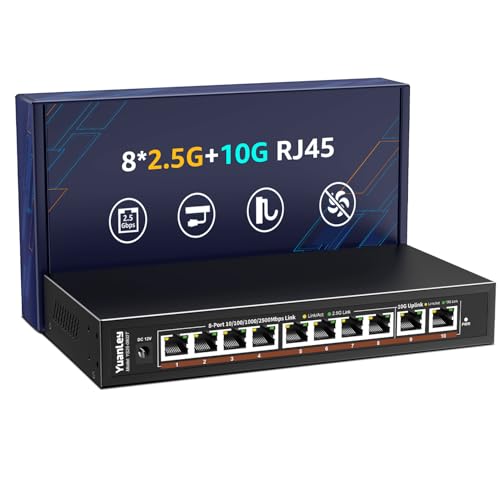
- 8 x 2.5GbE and 2 x 10GbE ports
- Fanless metal housing
- 80Gbps switching capacity
Best For: Mixed NAS, PC, and Wi-Fi 6 setups that need more 2.5G than 10G
High-Density NAS Expansion
8-Port Unmanaged 10G Ethernet Switch

- 8 x 10G RJ45 ports
- 160Gbps switching capacity
- Rackmount-ready metal case
Best For: Large NAS and home lab setups needing many copper 10G ports
Compact Dual-10G Pick
2x 10G + 4x 2.5G VunLink 6-Port Switch

- 2 x 10GbE ports and 4 x 2.5GbE ports
- 60Gbps switching capacity
- Fanless, unmanaged, desktop/wall-mount design
Best For: Small NAS setups that need quiet dual-10G connectivity
Best Value Basic Option
2x 10G + 4x 2.5G NICGIGA 6-Port Switch

- 2 x 10Gb RJ45 ports plus 4 x 2.5GbE ports
- 60Gbps switching capacity
- Fanless, plug-and-play metal design
Best For: Straightforward NAS and PC setups that only need a few multi-gig ports
Budget pick – 5-Port 10G RJ45 Unmanaged Switch
If you want a straightforward 10GbE network switch for NAS use, this 5-port unmanaged model keeps things simple while still offering full 10G RJ45 connectivity. It supports auto-negotiation across 10G, 5G, 2.5G, 1G, and 100Mbps, so it can fit mixed-speed gear without any setup work.
Best For: Small homes, desktop setups, and users who want plug-and-play 10GbE for a NAS, PC, or WiFi 7 router.
Pros:
- Five 10G RJ45 ports with 100Gbps switching capacity
- Unmanaged plug-and-play setup with no configuration required
- Metal case with quiet 24 dB fan cooling and rack/desktop mounting
- Supports NAS, 10G adapters, gaming PCs, and WiFi 7 routers
Cons:
- Only five ports, so expansion room is limited
- Requires Cat6 for 10G at shorter distances or Cat6a for longer runs
- No advanced management features for traffic control
This is a practical pick if your goal is simply to add 10GbE to a few devices around a NAS. It focuses on speed, simplicity, and quiet operation rather than flexibility.
Hybrid upgrade – 10-Port Lite-Managed Multi-Gig Switch
This QNAP 10GbE network switch for NAS setups is aimed at users who want more control than an unmanaged model but still want an easy path to faster networking. With 2 x 10GbE RJ45 ports and 8 x 2.5GbE ports, it works well as a hybrid switch for a NAS plus multiple clients.
Best For: Home and small-business networks that need 10GbE uplink to a NAS with 2.5GbE access for everyday devices.
Pros:
- 2 x 10GbE ports for NAS or core-network uplinks
- 8 x 2.5GbE ports for edge devices and Wi-Fi access points
- Lite-managed Layer 2 features including VLAN, QoS, IGMP Snooping, and link aggregation
- Supports existing Cat5e/Cat6 cabling for easier upgrades
Cons:
- Only two 10GbE ports, so high-speed expansion is limited
- More expensive and more complex than unmanaged switches
- Not ideal if you only need a basic plug-and-play setup
For users building a cleaner multi-gig network around a NAS, this model offers a solid balance of speed and control. It stands out if you want both 10GbE backbone connectivity and better traffic management.
High-capacity choice – 6x10G Base-T + 2x SFP+ Unmanaged Switch
If you need a 10GbE network switch for NAS use with more high-speed ports, this unmanaged unit offers six 10G Base-T connections plus two 10G SFP+ uplinks. It is designed for fast multi-device networking and supports auto-negotiation across 1000M, 2.5G, 5G, and 10G devices.
Best For: Users who want a higher-port-count 10GbE switch for a NAS, desktop, or mixed 2.5G/10G environment.
Pros:
- Six 10G Base-T ports plus two 10G SFP+ uplinks
- 160Gbps switching capacity for heavier traffic loads
- Fanless metal design for silent operation
- 6KV lightning protection for added durability
Cons:
- Unmanaged, so there are no VLAN or QoS controls
- SFP+ uplinks may not suit every home NAS setup
- Higher-capacity design may be more than simple two-device installs need
This is the strongest fit when you want a lot of 10G connectivity without adding fan noise. It makes sense for mixed-speed networks that need both RJ45 ports and SFP+ uplink options.
Best mixed-speed pick – 10-Port 8×2.5G + 2x10G Unmanaged Switch
This 10GbE network switch for NAS setups blends two 10G RJ45 ports with eight 2.5G ports, making it a practical choice for mixed home or office networks. It is unmanaged and plug-and-play, so it is easy to add high-speed connectivity without any configuration.
Best For: Mixed 2.5G and 10G networks where a NAS shares the switch with gaming PCs, Wi-Fi 6 APs, or other fast devices.
Pros:
- Eight 2.5GbE ports plus two 10GbE RJ45 ports
- 80Gbps switching capacity for fast file transfers and streaming
- Fanless metal housing for silent operation
- Desktop or wall-mount flexibility with 6KV lightning protection
Cons:
- Only two true 10GbE ports for top-speed devices
- Unmanaged design offers no traffic tuning options
- Best value depends on whether you actually need the 2.5G mix
This model is a smart middle ground if your NAS is part of a broader multi-gig network. It gives you enough 10G capacity for storage while leaving plenty of 2.5G ports for the rest of the house or office.
High-Density NAS Expansion – 8-Port Unmanaged 10G Ethernet Switch
If you need a 10GbE network switch for NAS setups with a lot of wired gear, this 8-port unmanaged model is built for straightforward high-speed expansion. All eight RJ45 ports support 10G/5G/2.5G/1G/100M auto-negotiation, so it can flex with a mix of NAS units, WiFi 7 routers, adapters, and gaming PCs without any configuration.
Best For: Larger home or small-office networks that need many 10G copper ports and simple plug-and-play operation.
Pros:
- Eight 10GbE RJ45 ports with 160Gbps switching capacity
- Auto-negotiation across 10G, 5G, 2.5G, 1G, and 100M speeds
- Plug-and-play design with no software or setup required
- Metal case with rackmount support, 4KV lightning protection, and LED status lights
Cons:
- Unmanaged design offers no advanced configuration options
- Active fan is rated at 24dB, so it is not fully silent
- Bulkier than smaller desktop-only switches
For buyers prioritizing port count, this NICGIGA switch stands out as a practical fit for multi-device 10G builds. It is especially appealing if you want a simple expansion point for NAS, PCs, and routers without moving to a managed switch.
Quiet Mixed-Speed Choice – 6-Port 10G/2.5G Unmanaged Switch
This 10GbE network switch for NAS users is a good fit when you need a mix of faster 10G uplinks and plenty of 2.5G connections. It combines two 10GbE RJ45 ports with four 2.5GbE ports, making it a flexible choice for a NAS, access points, gaming PC, or other wired devices in a compact setup.
Best For: Small networks that need a quiet, flexible mix of 10G and 2.5G ports.
Pros:
- 2 x 10GbE ports plus 4 x 2.5GbE ports for mixed-speed networks
- 60Gbps switching capacity for large transfers and streaming
- Fanless metal housing for silent operation
- One-key VLAN mode for isolating the 2.5G ports
Cons:
- Only two true 10GbE ports
- Not ideal if every device needs 10G connectivity
- VLAN feature is simple rather than fully managed networking
If your NAS is not the only device that needs high-speed Ethernet, this model offers a smart balance of speed and port mix. The fanless build makes it especially attractive for desks, studios, and quiet home installations.
Compact All-10G Pick – 5-Port Unmanaged 10GbE Switch
For a simpler 10GbE network switch for NAS builds, this 5-port model keeps every RJ45 port at 10G/5G/2.5G/1G/100M auto-negotiation. That makes it a straightforward way to connect a NAS, PC, WiFi 7 router, or 10G adapter without giving up full-speed copper connectivity across the switch.
Best For: Smaller 10G networks that want all ports running at the same high-speed feature set.
Pros:
- Five multi-gig RJ45 ports with full 10G support
- 100Gbps switching capacity in a compact layout
- Plug-and-play setup with no configuration required
- Metal case with rackmount support and 4KV lightning protection
Cons:
- Only five ports total, so expansion is limited
- Uses a fan, so it is not silent
- Best suited to smaller device counts
This is the most space-conscious option in the group while still keeping every port on the same high-speed spec. It makes sense if you want a clean, no-frills switch for a few 10G devices rather than a broader mixed-speed network.
Most Expandable – 2x 10G + 8x 2.5G NICGIGA 10-Port Switch
If you need a 10GbE network switch for NAS with room to grow, this NICGIGA 10-port model is built for mixed multi-gig setups. It gives you two 10Gb RJ45 ports for your NAS, router, or workstation plus eight 2.5GbE ports for the rest of your devices, all in an unmanaged, plug-and-play design.
Best For: Home labs and busy home networks that need a simple multi-gig switch for a NAS, gaming PC, WiFi 7 gear, and other 2.5GbE devices.
Pros:
- 2 x 10Gb RJ45 ports plus 8 x 2.5GbE ports for flexible expansion
- 80Gbps switching capacity for heavy data traffic
- Fanless metal design with desktop or wall-mount placement
- Auto MDI/MDIX and no software setup required
Cons:
- Unmanaged design offers no advanced configuration options
- Most ports are 2.5GbE, so only two devices can use 10GbE speeds
This is the most expandable option in the group if your NAS is only one part of a larger multi-gig network. The mix of 10GbE and 2.5GbE ports makes it easier to connect several fast devices without jumping to a more complex managed switch.
Compact Dual-10G Pick – 2x 10G + 4x 2.5G VunLink 6-Port Switch
This compact 10GbE network switch for NAS is a straightforward choice when you want two true 10GbE ports without a bulky chassis. The VunLink unit pairs two 10G RJ45 ports with four 2.5GbE ports, making it a practical fit for a NAS, PC, AP, or small home office network.
Best For: Smaller setups that want dual 10GbE connectivity for a NAS and main PC, plus a few 2.5GbE connections.
Pros:
- 2 x 10GbE ports for high-speed NAS and workstation links
- 4 x 2.5GbE ports for additional devices
- 60Gbps switching capacity with wire-speed forwarding
- Fanless, plug-and-play operation with desktop or wall mounting
Cons:
- Only six total ports, so expansion is limited
- Fully unmanaged, so there are no VLAN or traffic-control features
For a small network, this model keeps the setup simple while still delivering the 10GbE links that matter most. It is a good fit if your priority is fast NAS access and quiet operation rather than a long port list.
Best Value Basic Option – 2x 10G + 4x 2.5G NICGIGA 6-Port Switch
If you want a simpler 10GbE network switch for NAS without paying for extra port count, this NICGIGA 6-port model keeps the essentials. It combines two 10Gb RJ45 ports with four 2.5GbE ports, so you can connect a NAS and a main PC at full multi-gig speeds while leaving room for a few more devices.
Best For: Users who want a basic, quiet multi-gig switch for a NAS, gaming PC, and a handful of 2.5GbE devices.
Pros:
- 2 x 10Gb RJ45 ports for fast NAS and uplink connections
- 4 x 2.5GbE ports for everyday multi-gig devices
- 60Gbps switching capacity in a fanless metal case
- Plug-and-play setup with desktop or wall-mount placement
Cons:
- Fewer total ports than the 10-port NICGIGA model
- No advanced management features since it is unmanaged
This is the most streamlined option here if your NAS setup does not need a large port bank. It covers the core use case well: fast 10GbE links, quiet operation, and no configuration overhead.
How We Picked the Best 10GbE Network Switch for NAS
We focused on switches that make sense for NAS buyers first: enough 10GbE ports for the storage device and a few clients, stable multi-gig compatibility, and straightforward installation. We also weighed port mix, build style, cooling approach, and whether the switch is unmanaged or light-managed. That matters because the right 10GbE Network Switch for NAS should fit your current devices without forcing a complicated setup.
Quick Comparison: Which Type Fits Your Setup?
All-10GbE switches are best when you already have multiple 10G devices and want the simplest high-speed path. Mixed 10GbE/2.5GbE models are usually the smarter value for homes and small offices because they let a NAS, workstation, and several everyday devices share one switch. Light-managed models add features such as VLAN support and better traffic control, which can help more organized networks.
Key Buying Factors for a 10GbE Network Switch for NAS
Port Count and Port Mix
Start with how many 10GbE devices you actually own today, then add room for growth. A NAS plus one fast PC may only need two 10GbE ports, while creators or small teams may prefer 5 to 8 ports. Mixed 2.5GbE ports are useful for laptops, Wi-Fi 7 routers, and general-purpose devices.
RJ45 Vs. SFP+
RJ45 is the easiest choice if your NAS and computers use standard Ethernet cables. SFP+ can be a better fit for short, direct high-speed links or certain networking builds, but it may require different cabling or adapters. Choose based on your existing hardware, not just top-speed numbers.
Unmanaged Vs. Light-Managed
Unmanaged switches are ideal when you want plug-and-play simplicity. Light-managed models are worth considering if you need VLANs, traffic separation, or a little more control over your network layout.
Cooling, Noise, and Placement
Fanless models are attractive for quiet rooms, but make sure they can handle your expected load and ambient temperature. If the switch will sit near a desk, studio, or living area, noise level may matter as much as raw port count.
Who Should Buy Which 10GbE Network Switch for NAS?
If you want the easiest upgrade for a single NAS and one or two fast clients, choose a compact two-port 10GbE model. If you are replacing a busier home or office switch, look for a mixed 10GbE/2.5GbE design with enough ports for both storage and everyday devices. If you need traffic segmentation or a more structured network, a light-managed option is the better long-term choice. In short, the best 10GbE Network Switch for NAS is the one that matches your device count, cabling, and need for control without adding unnecessary complexity.