
An external GPU enclosure with OCuLink is a smart way to add desktop-class graphics to a mini PC, laptop, or small-form-factor build without replacing the whole system.
With 2026 models ranging from simple open-frame docks to powered enclosures with USB4 support, the best choice depends on your GPU size, power needs, and host-device compatibility.
Best 10 External GPU Enclosure with OCuLink Picks for 2026
Wide-Compatibility Pick

- Open design with no GPU size limits
- Supports PCIe 4.0 x16 graphics cards
- Works with ATX/SFX PSUs and multiple OSs
Best For: Users who want an open-frame OCuLink enclosure with broad compatibility
Budget Aluminum Pick
OCuLink GPU Enclosure for Laptops

- 64Gbps PCIe 4.0 x4 OCuLink link
- Supports ATX and SFX power supplies
- Aluminum alloy enclosure with GPU bracket
Best For: Users who want a basic aluminum OCuLink GPU dock
Premium High-Power OCuLink Dock

- 800W built-in PSU
- Up to 600W GPU power
- Open frame, no card length limit
Best For: High-wattage OCuLink setups with large GPUs
Flexible ATX OCuLink Bridge
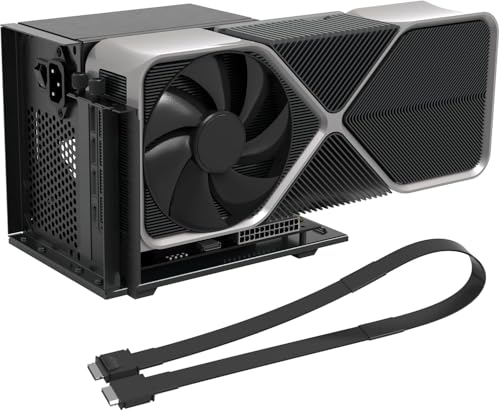
- 64Gbps PCIe 4.0 x4 link
- Includes 50cm OCuLink cable
- Supports AMD, Intel, and NVIDIA cards
Best For: Simple OCuLink-to-PCIe x16 setups with ATX power
Portable Open-Frame OCuLink Dock
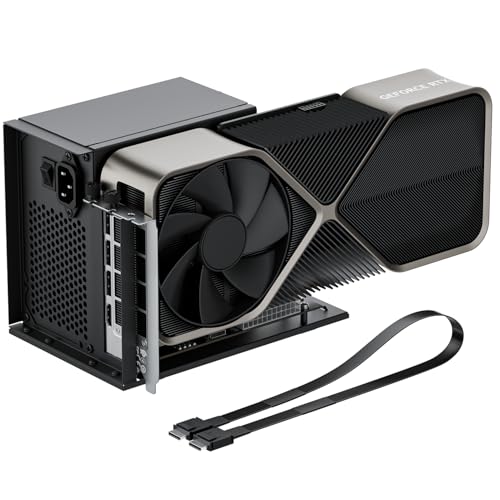
- 64Gbps PCIe 4.0 x4 transfer
- Detachable open-frame design
- Supports RTX 4090 and RX 7900 XTX
Best For: Portable open-frame eGPU builds with ATX power
High-Bandwidth Open-Frame Dock
OCuLink eGPU Dock for Laptops & Mini PCs

- PCIe 4.0 x4 64Gbps OCuLink dock
- Supports NVIDIA/AMD GPUs up to RTX 4090 and RX 7900
- Includes 50cm shielded cable and LED status indicators
Best For: High-performance OCuLink eGPU builds with your own GPU and ATX PSU
Portable Detachable Dock
PCIe 4.0 x4 OCuLink eGPU Enclosure

- Detachable enclosure for easier storage and transport
- PCIe 4.0 x4 64Gbps with shielded flat OCuLink cable
- Supports standard ATX PSUs and large GPUs
Best For: Portable OCuLink eGPU setups that still need full-size GPU support
Open-Frame Performance Kit

- PCIe 4.0 x4 64Gbps dock with included cable
- Supports NVIDIA, AMD, and Intel GPUs
- Open-frame design uses a standard ATX PSU
Best For: Users who want broad GPU compatibility in a simple OCuLink dock
MINISFORUM Pick – Compact OCuLink GPU Dock for Minisforum PCs
If you want an external GPU enclosure with OCuLink that stays compact and focuses on straightforward PCIe 4.0 x4 expansion, the MINISFORUM DEG1 is built for that lane. It supports ATX or SFX power supplies and is aimed at desktop-class cards like the RTX 4090 and AMD RX 7900 XTX, but the OCuLink connection is not hot-pluggable, so it is best for powered-down swaps and a careful setup.
Best For: MINISFORUM mini PC owners who want a compact OCuLink eGPU dock with standard PSU support.
Pros:
- OCuLink 4i connection with PCIe 4.0 x4 bandwidth
- Supports ATX and SFX standard power supplies
- Compatible with high-end cards like RTX 4090 and RX 7900 XTX
- Includes a force power-on button with LED
Cons:
- OCuLink does not support hot plugging
- Follow-start is only compatible with MINISFORUM Mini PCs using original wires
- Forced unplugging can damage the ports
This is a practical choice if you already know your OCuLink workflow and want a compact dock built around standard power supplies. The biggest advantage is simplicity, while the main tradeoff is that it is designed for powered-off connection handling only.
Power-First Choice – 800W OCuLink Dock with USB4
The AOOSTAR AG02 is an external GPU enclosure with OCuLink for buyers who want a built-in power supply and broader connection options. It combines an OCuLink port with USB4, a PCIe x16 slot, and three 8-pin GPU power connectors, making it a strong pick for desktop graphics cards that need substantial power headroom. Just keep in mind that OCuLink is not hot-pluggable and compatibility can vary by host device and GPU.
Best For: Users who want an OCuLink eGPU dock with an included high-wattage PSU and USB4 fallback.
Pros:
- Built-in 800W server-grade PSU
- OCuLink plus USB4 connectivity for flexibility
- Supports up to 600W GPU power output
- Includes a PCIe x16 slot and three 8-pin GPU power connectors
Cons:
- OCuLink does not support hot-plugging
- Compatibility varies by device, BIOS, firmware, and GPU
- Not recommended for several specific handhelds and very high-end GPU setups
If you want an all-in-one dock with serious power capacity, the AG02 stands out. Its flexibility is useful, but the compatibility notes are important, so it is best for buyers who are willing to verify their host device and graphics card before purchase.
Wide-Compatibility Pick – Open-Frame OCuLink eGPU Dock
This RIITOP external GPU enclosure with OCuLink is aimed at users who want an open design and broad graphics card compatibility. It uses an OCuLink SFF-8612 connection with PCIe 4.0 x16 card support, and it works with ATX or SFX power supplies. The open layout leaves no restriction on GPU size, but it still requires a powered-off connection because OCuLink does not support hot-plugging.
Best For: Users who want an open-frame OCuLink dock with wide GPU and OS compatibility.
Pros:
- Open design with no graphics card size restrictions
- Supports PCIe 4.0 x16 graphics cards
- Works with ATX or SFX power supplies
- Compatible with Windows, Linux, and Mac OS, with AMD support on Mac
Cons:
- OCuLink does not support hot-plugging
- Mac OS support is limited to AMD graphics cards
- Power supply and graphics card are not included
For buyers who want maximum physical flexibility and the freedom to choose their own PSU, this dock is easy to understand. Its strongest appeal is compatibility breadth, though users should pay attention to the Mac OS and hot-plug limitations.
Budget Aluminum Pick – OCuLink GPU Enclosure for Laptops
If you need an external GPU enclosure with OCuLink in a simple aluminum shell, this Tangxi dock covers the basics without extra complexity. It supports PCIe 4.0 x4 at 64Gbps, works with ATX or SFX power supplies, and is intended to turn an OCuLink-equipped laptop or PC into a desktop-style graphics setup. Installation is straightforward in concept, but the listing notes that technical knowledge may still be needed for driver and hardware compatibility.
Best For: Users who want a basic aluminum OCuLink GPU enclosure with standard PSU support.
Pros:
- 64Gbps PCIe 4.0 x4 OCuLink connection
- Supports both ATX and SFX power supplies
- Aluminum alloy construction
- Includes a graphics card bracket for installation
Cons:
- Requires technical knowledge for setup
- Listed system requirement is for 10 64-bit
- Power supply and GPU compatibility still need to be checked
This is a practical pick if you mainly want the enclosure and OCuLink link speed in a durable metal body. It is less about premium extras and more about providing a straightforward external GPU path for compatible systems.
Premium High-Power OCuLink Dock – AOOSTAR AG02 800W eGPU Dock
If you want an external GPU enclosure with OCuLink for a high-end desktop-style setup, the AOOSTAR AG02 is built around raw power and broad GPU support. Its 800W built-in PSU and 600W max GPU power rating make it a strong fit for demanding cards, while the open metal frame keeps installation simple and unrestricted on card length.
Best For: Users who want a powered OCuLink eGPU dock for large, high-wattage graphics cards on compatible laptops or mini PCs.
Pros:
- Built-in 800W power supply with up to 600W GPU power support
- Open metal design with no graphics card length limit
- Supports OCuLink plus USB4 connectivity, with auto-sync power behavior
- Compatible with most external graphics cards on the market
Cons:
- Only compatible with devices that have an OCuLink port
- OCuLink does not support hot-plugging
- Not compatible with Legion Go, Xbox Ally X rx9070xt gpu devices
The AG02 is best viewed as a high-power dock for users who already know their host device supports OCuLink. If your priority is headroom for big GPUs and a clean open-frame setup, it offers a very practical foundation.
Flexible ATX OCuLink Bridge – PCIe 4.0 x4 OCuLink eGPU Dock
This external GPU enclosure with OCuLink is aimed at users who want a straightforward PCIe 4.0 x4 bridge for a laptop or mini PC. It converts an OCuLink connection into PCIe x16 and ships with a 50cm cable, giving compact systems a direct path to full-size desktop graphics cards without the bulk of a closed box.
Best For: Mini PC and laptop users who want a simple OCuLink-to-PCIe x16 dock with ATX power support.
Pros:
- PCIe 4.0 x4 bandwidth rated at 64Gbps
- Includes a 19.7-inch SFF-8611 OCuLink cable
- Supports AMD, Intel, and NVIDIA cards
- Open-frame design with side bracket for GPU and ATX PSU stability
Cons:
- GPU and power supply are not included
- Hot-plugging is not supported
- Requires an ATX power supply, with wattage sized above GPU load
For buyers who care more about performance path and flexibility than enclosure extras, this dock keeps the formula simple. The included cable, broad GPU support, and stable ATX mounting make it a solid no-frills option.
Portable Open-Frame OCuLink Dock – OwlTree PCIe 4.0 x4 eGPU Dock
For buyers seeking an external GPU enclosure with OCuLink that stays compact and easy to store, the OwlTree dock takes a detachable open-frame approach. It supports PCIe 4.0 x4 transfer at 64Gbps and is designed for standard ATX power supplies, making it a practical bridge for laptop and mini PC GPU upgrades.
Best For: Users who want a detachable OCuLink eGPU dock for desktop-class cards and standard ATX power.
Pros:
- Supports graphics cards like RTX 4090 and RX 7900 XTX
- PCIe 4.0 x4 transfer speed rated at 64Gbps
- Detachable design for easier portability and storage
- Includes a 50cm ultra-thin, shielded OCuLink cable
Cons:
- GPU and power supply are not included
- Only compatible with standard ATX power supplies
- Hot plugging is not supported
This dock is a strong fit if you want the simplicity of an open-frame eGPU link without giving up support for large graphics cards. The detachable layout and shielded cable help it stand out for users who value portability and clean wiring.
High-Bandwidth Open-Frame Dock – OCuLink eGPU Dock for Laptops & Mini PCs
If you want an external GPU enclosure with OCuLink for a laptop or mini PC, this open-frame dock focuses on simple PCIe 4.0 x4 expansion and desktop-style GPU mounting. It includes the dock, a 50cm shielded OCuLink cable, and support for standard ATX power supplies, but the GPU and PSU are not included.
Best For: Users who want a high-bandwidth OCuLink eGPU setup for gaming, rendering, or AI work with their own ATX PSU and graphics card.
Pros:
- PCIe 4.0 x4 64Gbps bandwidth with OCuLink-to-PCIe x16 conversion
- Supports mainstream NVIDIA and AMD cards, including RTX 4090 and RX 7900
- Includes a 50cm shielded cable with EMI protection for more stable operation
- LED indicators plus auto-start and forced-start modes add practical control
Cons:
- Graphics card and power supply are not included
- Requires a standard ATX power supply
- Connections must be made with power off; no hot-plugging
This is a straightforward pick if you already own the GPU and PSU and want a simple OCuLink path to desktop-class expansion. The open design and included cable make it geared toward practical performance builds rather than enclosure-style portability.
Portable Detachable Dock – PCIe 4.0 x4 OCuLink eGPU Enclosure
This external GPU enclosure with OCuLink is built around PCIe 4.0 x4 64Gbps transfer and a detachable design that is easier to pack away than fixed-frame docks. It ships with the enclosure dock and a 50cm SFF-8611 cable, while the graphics card and power supply must be supplied separately.
Best For: Buyers who want a compact, portable OCuLink eGPU dock with flexible cable management and standard ATX power support.
Pros:
- Detachable design on both ends for easier portability and storage
- 10μ gold-plated contacts are designed to improve conductivity and reduce oxidation-related issues
- Supports large graphics cards such as RTX 4090 and RX 7900 XTX
- Flat, shielded 50cm cable aims to reduce interference and port damage risk
Cons:
- GPU and PSU are not included
- Compatible with standard ATX power supply only
- OCuLink does not support hot-plugging
If portability matters as much as performance, this dock stands out for its detachable structure and thin, flexible cable. It keeps the core OCuLink eGPU experience simple: add your own GPU, add an ATX PSU, and build around the hardware you already own.
Open-Frame Performance Kit – PCIe 4.0 x4 OCuLink eGPU Dock
For a no-frills external GPU enclosure with OCuLink, this open-frame dock provides PCIe 4.0 x4 64Gbps expansion for laptops and mini PCs. It comes with the enclosure, a 50cm shielded OCuLink cable, and a user manual, while the GPU and standard ATX power supply are sold separately.
Best For: Users who want a simple OCuLink eGPU dock with broad GPU support and a straightforward do-it-yourself setup.
Pros:
- PCIe 4.0 x4 64Gbps OCuLink-to-PCIe x16 design
- Supports NVIDIA, AMD, and Intel graphics cards with no length limits
- Includes a shielded 50cm cable with metal shielding and EMI-shielded conductive polymer
- Open-frame layout works with a standard ATX power supply
Cons:
- GPU and ATX power supply are not included
- OCuLink does not support hot-plugging
- Drivers must be installed before first use for proper detection
This is a practical choice if you want broad compatibility and don’t need a closed enclosure. Its strength is the straightforward hardware path: connect the dock, add your parts, and use OCuLink for a lower-latency external GPU setup.
How We Picked the Best External GPU Enclosure with OCuLink
We focused on practical buyer needs: OCuLink bandwidth support, graphics-card compatibility, power-supply flexibility, enclosure size, and overall setup simplicity. Because an External GPU Enclosure with OCuLink is often used with high-end cards, we also favored models that clearly support PCIe 4.0 x4 connectivity and standard ATX/SFX power supplies.
Quick Comparison: What Matters Most
Some options are bare dock stations intended for users who already have a power supply and want maximum flexibility. Others include an 800W PSU or extra USB4 support, which can make them easier to deploy but larger and more expensive. If you are pairing a powerful GPU with a compact host, prioritize stable power delivery and a short, quality OCuLink cable.
Key Buying Factors for an External GPU Enclosure with OCuLink
Bandwidth and Host Support
Look for PCIe 4.0 x4 and 64Gbps OCuLink support when possible. That is the main advantage of this connection type versus slower alternatives, especially for gaming and GPU-heavy creative work.
Power Supply and GPU Size
Check whether the dock includes a PSU or supports your own ATX/SFX unit. Make sure the enclosure can physically fit your card’s length, thickness, and power connectors, particularly if you plan to use a large flagship GPU.
Ports and Extras
USB4 or additional I/O can be useful if you want a more versatile desktop setup, but they are not required for core eGPU performance. If you only care about graphics expansion, a simpler dock may be the better value.
System Compatibility
Most buyers should confirm host-device support before purchase, especially on laptops and mini PCs. Windows 11 tends to be the easiest path, but firmware, BIOS settings, and motherboard OCuLink headers can still matter.
Who Should Buy Which External GPU Enclosure with OCuLink?
If you want the simplest path to a high-power build, choose a powered dock with broad GPU and PSU support. If you already own a suitable ATX or SFX power supply, a bare External GPU Enclosure with OCuLink can save money and let you tailor the setup. For compact systems and travel-friendly use, prioritize a smaller dock with a short, well-shielded cable and verify space for cable routing and ventilation.
In short, the best pick is the one that matches your GPU, power budget, and host system—not just the fastest-looking spec sheet.