
The right PS5 monitor depends on more than its advertised refresh rate. Resolution, HDMI support, screen size, and your viewing distance all affect how well it fits your games and desk.
These 10 options span compact 1080p displays, 1440p choices, and larger 4K screens. Use the guide below to narrow the field before checking each model’s console-specific features.
Best 10 Gaming Monitor for Playstation 5 Picks for 2026
Balanced 1440p Pick
Samsung 27-inch Odyssey G5 G51F

- 27-inch QHD VA display
- 180Hz maximum refresh rate
- Height, pivot, and tilt adjustments
Best For: Sharper 1440p gaming with an adjustable stand
Premium 4K OLED Pick

- 31.5-inch 4K QD-OLED panel
- HDMI 2.1 Console Mode
- True Black 400 HDR certification
Best For: 4K OLED gaming with console-oriented connectivity
Compact IPS Pick
Dell SE2426HG 24-inch Gaming Monitor

- 23.8-inch Full HD IPS panel
- HDMI VRR listed for consoles
- Two HDMI ports
Best For: Compact 1080p setups with HDMI VRR
Curved 27-inch Pick

- 27-inch 1500R curved screen
- Full HD with listed 4000:1 contrast
- Black-level adjustment and VESA support
Best For: Curved 1080p gaming with adjustable dark-scene visibility
Best QHD Pick
Samsung 27-inch Odyssey G5 G53F

- 27-inch QHD IPS panel
- Two HDMI ports
- 200Hz rating exceeds PS5 needs
Best For: PS5 players seeking QHD detail and PC versatility
Best Curved 1080p Pick
SANSUI 27-inch 1500R Gaming Monitor

- 27-inch 1500R curved display
- Supports 120Hz input signals
- One HDMI port; no speakers
Best For: Players who prefer a curved 1080p screen
Best Compact Pick
Sceptre 24.5-inch E255B-FWD240

- Compact 24.5-inch 1080p screen
- Two HDMI ports and built-in speakers
- 240Hz rating exceeds PS5 needs
Best For: Compact setups needing built-in audio
4K Immersion Pick
Samsung 37-inch Odyssey G7 Curved Monitor
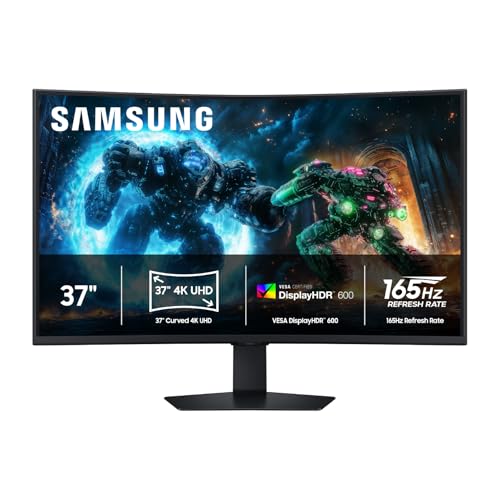
- 37-inch 1000R curved 4K screen
- DisplayHDR 600; 3000:1 contrast
- Two HDMI ports; adjustable stand
Best For: PS5 players seeking a large, curved 4K display
Compact Curved Pick
CRUA 27-inch FHD Gaming Monitor

- 27-inch 1800R curved screen
- 1080p with HDMI up to 120Hz
- Tilt adjustment; 100 x 100mm mount
Best For: Compact PS5 setups centered on 1080p gaming
Big-Screen 1080p Pick
SANSUI 32-inch Curved Gaming Monitor

- 32-inch 1500R curved screen
- 1080p resolution; 240Hz listed rating
- Headphone jack; no built-in speakers
Best For: Large-screen PS5 gaming where 1080p is sufficient
Balanced 1440p Pick – Samsung 27-inch Odyssey G5 G51F
If you want a gaming monitor for PlayStation 5 that prioritizes sharper detail over the highest advertised refresh rate, this 27-inch Samsung pairs QHD resolution with a 180Hz VA panel. Its adjustable stand makes it easier to position comfortably.
Best For: Players who want a 27-inch 1440p display with flexible ergonomics.
Pros:
- 2560 × 1440 resolution offers more detail than Full HD.
- 180Hz refresh rate and listed 1ms response time suit fast-moving games.
- Height, pivot, and tilt adjustments provide positioning options.
Cons:
- Not a 4K display.
- HDR10 support is paired with a listed 300 cd/m² brightness, so temper expectations for bright HDR highlights.
The G51F is a practical middle ground if screen sharpness, motion, and stand adjustability all matter. Its 180Hz specification is a monitor maximum, not a promise of 180 fps from a PS5.
For a gaming monitor for PlayStation 5 focused on 4K image quality, the 31.5-inch MSI MAG 321UPX combines a QD-OLED panel with VESA DisplayHDR True Black 400. Its Console Mode includes an HDMI 2.1 connection specified for up to 4K at 240Hz.
Best For: Players who prioritize 4K resolution, OLED contrast, and console-oriented HDMI connectivity.
Pros:
- 3840 × 2160 QD-OLED panel delivers 4K resolution and OLED black levels.
- HDMI 2.1 Console Mode is specified with 48Gbps bandwidth.
- Adjustable stand and MSI OLED Care 2.0 add practical usability features.
Cons:
- The 240Hz panel ceiling exceeds what a PS5 can output.
- OLED Care 2.0 reduces burn-in risk but does not eliminate it.
This is the strongest fit here for buyers putting display technology and 4K first. The 240Hz rating offers headroom for other compatible sources; it should not be read as a PS5 frame-rate capability.
If desk space is limited, this 23.8-inch Dell is a compact gaming monitor for PlayStation 5 setups. Its Full HD IPS panel offers wide viewing angles, while HDMI VRR is listed for smoother compatible console gameplay.
Best For: Players who prefer a smaller 1080p screen with IPS color and HDMI VRR.
Pros:
- HDMI VRR is specifically listed for console gameplay.
- IPS panel offers wide viewing angles and 99% sRGB coverage.
- Two HDMI ports make it easier to connect multiple devices.
Cons:
- 1920 × 1080 resolution is less detailed than 1440p or 4K.
- Stand adjustment is limited to tilt in the supplied specifications.
The SE2426HG makes sense when a compact footprint and straightforward HDMI connectivity matter more than resolution. Its 240Hz rating is the panel maximum, not a PS5 output target.
For buyers who want a curved gaming monitor for PlayStation 5, this 27-inch SANSUI offers a 1500R screen, Full HD resolution, and HDMI connectivity. Its 4000:1 listed contrast ratio and shadow-boosting adjustment may appeal to players who like tuning visibility in dark scenes.
Best For: Players who want a curved 27-inch 1080p display with gaming-focused picture controls.
Pros:
- 1500R curve distinguishes it from flat-screen alternatives.
- Listed 4000:1 contrast and black-level adjustment support dark-scene visibility.
- Includes a metal stand, tilt adjustment, and 100 × 100mm VESA compatibility.
Cons:
- Full HD resolution can look less sharp across 27 inches than QHD.
- No built-in speakers are listed.
- Only one HDMI port is specified.
Choose this one for its curve and display controls rather than its 240Hz headline: that figure is the monitor’s maximum refresh rate, not a PS5 frame-rate promise.
Best QHD Pick – Samsung 27-inch Odyssey G5 G53F
If you want a gaming monitor for PlayStation 5 with sharper-than-1080p visuals, this 27-inch Odyssey G5 offers a 2560 x 1440 IPS panel, two HDMI ports, and HDR10 support. Its 200Hz rating also leaves room for high-refresh-rate PC gaming, though the PS5 cannot use the full 200Hz.
Best For: PS5 players who prioritize QHD detail and also use a gaming PC.
Pros:
- QHD IPS display with wide 178-degree viewing angles.
- Two HDMI ports make it easier to keep multiple devices connected.
- HDR10, Black Equalizer, and Auto Source Switch+ add useful viewing and convenience options.
Cons:
- PS5 gaming will not take advantage of the full 200Hz refresh rate.
- Tilt adjustment is the only stand adjustment listed.
This is the strongest fit of the three if resolution matters most. The listed 300-nit brightness and 1000:1 contrast suggest keeping HDR expectations measured.
Best Curved 1080p Pick – SANSUI 27-inch 1500R Gaming Monitor
For a gaming monitor for PlayStation 5 with a curved screen, this SANSUI pairs a 27-inch 1500R panel with 1080p resolution and an HDMI 2.0 input. The monitor supports 120Hz signals depending on the source device, while its advertised 160Hz maximum exceeds what a PS5 can output.
Best For: Players who want a curved 27-inch screen and are comfortable with 1080p.
Pros:
- 4000:1 listed contrast ratio and 1500R curvature.
- Game Assistant includes shadow adjustment, crosshair, timer, and counter tools.
- Includes an HDMI cable and supports 100 x 100mm VESA mounting.
Cons:
- 1080p resolution provides less detail than QHD or 4K, especially at 27 inches.
- Only one HDMI port and no built-in speakers.
Its curvature and gaming tools distinguish it from the flat options. Confirm the console and monitor are set to a supported 120Hz mode if high-refresh PS5 play is your priority.
Best Compact Pick – Sceptre 24.5-inch E255B-FWD240
This 24.5-inch Sceptre is a compact gaming monitor for PlayStation 5 buyers who want a 1080p screen with built-in speakers. It has two HDMI ports for connecting multiple devices, plus a 240Hz rating aimed beyond the PS5’s refresh-rate capability.
Best For: Players who want a smaller 1080p display with simple onboard audio.
Pros:
- 24.5-inch size suits a compact desk setup.
- Two HDMI ports and two DisplayPorts offer connection flexibility.
- Built-in speakers, audio output, and Blue-Light Shift add everyday convenience.
Cons:
- PS5 cannot use the monitor’s full 240Hz refresh rate.
- 1080p resolution is less detailed than QHD or 4K alternatives.
Choose this for its smaller footprint, connections, and speakers rather than its headline 240Hz specification. The supplied details do not establish which refresh rates are available specifically over HDMI with a PS5.
4K Immersion Pick – Samsung 37-inch Odyssey G7 Curved Monitor
If you want a gaming monitor for PlayStation 5 with a large, detailed picture, the Samsung Odyssey G7 pairs a 37-inch 1000R curved screen with 4K UHD resolution. Its DisplayHDR 600 rating and 3000:1 contrast ratio add appeal for games with bright highlights and dark scenes.
Best For: PS5 players who prioritize a spacious 4K display and a strongly curved view.
Pros:
- 37-inch 4K UHD screen offers ample space and detail.
- DisplayHDR 600 and a 3000:1 contrast ratio support more defined highlights and shadows.
- Two HDMI ports, height adjustment, and swivel adjustment offer setup flexibility.
Cons:
- The strong 1000R curve may not suit players who prefer a flat screen.
- Its 32.1-inch width calls for a roomy desk.
The monitor’s 165Hz rating gives it headroom beyond the PS5’s 120Hz maximum; don’t choose it expecting 165Hz console output. Choose it instead for its combination of 4K resolution, size, and curvature.
Compact Curved Pick – CRUA 27-inch FHD Gaming Monitor
The CRUA is a gaming monitor for PlayStation 5 buyers who want a 27-inch curved screen and are comfortable with 1080p rather than 4K. Its 1800R curve, matte finish, and 3000:1 contrast ratio make it a practical option for a desktop setup.
Best For: PS5 players who want a smaller curved display for 1080p gaming.
Pros:
- 27-inch 1800R curved screen fits a more compact setup than larger displays.
- HDMI supports up to 120Hz, matching the PS5’s maximum refresh rate.
- Tilt adjustment and 100 x 100mm wall-mount compatibility add placement options.
Cons:
- 1080p resolution won’t show the detail of a 4K PS5 output.
- The advertised 180Hz requires DisplayPort; HDMI tops out at 120Hz.
This is a sensible choice if screen size and a curved shape matter more to you than 4K sharpness. For PS5 use, judge it by its HDMI capabilities, not its higher DisplayPort refresh-rate figure.
Big-Screen 1080p Pick – SANSUI 32-inch Curved Gaming Monitor
If you want a gaming monitor for PlayStation 5 with a bigger screen but don’t need 4K resolution, this SANSUI offers a 32-inch 1500R curved display at 1080p. Its 300-nit brightness, 3500:1 stated contrast ratio, and HDR feature round out the listed display specifications.
Best For: PS5 players who prefer a large curved image and can accept 1080p sharpness.
Pros:
- 32-inch 1500R curved screen provides a large viewing area.
- HDMI, DisplayPort, and a headphone jack offer connection options.
- Tilt adjustment and 100 x 100mm VESA compatibility support flexible placement.
Cons:
- 1080p resolution may look less sharp on a 32-inch screen than on a smaller display.
- There are no built-in speakers.
- The 240Hz rating exceeds the PS5’s 120Hz maximum output.
Pick this monitor for its screen size and curve rather than its 240Hz headline: a PS5 cannot output 240Hz. Plan on headphones or separate audio equipment if you need sound from the setup.
How We Picked the Best Gaming Monitor for Playstation 5
We compared the selected models as potential PS5 displays, prioritizing resolution, screen size, advertised refresh rate, panel type, and the features that matter when connecting a console. The lineup covers compact and large screens, flat and curved designs, and resolutions from 1080p to 4K. Manufacturer refresh-rate claims are a starting point, not proof of what a PS5 can output through a particular HDMI port.
Quick Comparison: Which Type Fits Your Setup?
The Dell SE2426HG and 24.5-inch Sceptre suit buyers who want a compact 1080p screen. The 27-inch SANSUI and CRUA models offer more screen area at the same resolution, while the 32-inch SANSUI stretches 1080p across a substantially larger display. For a sharper middle ground, compare the Samsung Odyssey G5 G51F and G53F at 27 inches and 1440p. The MSI MAG 321UPX pairs 32-inch 4K resolution with a QD-OLED panel; the 37-inch Samsung Odyssey G7 G75F offers a larger, curved 4K option.
Many of these monitors advertise 160Hz, 180Hz, or 240Hz operation. Those figures may be useful with a PC, but the PS5 tops out at 120Hz. Treat higher numbers as a bonus rather than a reason to pay more for console play alone.
Key Buying Factors for a Gaming Monitor for Playstation 5
Resolution and Size
PS5 supports 1080p, 1440p, and 4K output. A 24-inch 1080p monitor can work well at a close desk; at 27 or 32 inches, 1440p or 4K generally looks sharper. Choose 4K if image detail is a priority, but remember that a 4K monitor cannot make every game render at native 4K.
HDMI, 120Hz, and VRR
Check the exact model’s HDMI specifications before buying. To use a game’s 120Hz mode, the monitor must accept the required resolution and 120Hz signal over HDMI—not only DisplayPort. HDMI 2.1 is particularly relevant for 4K at 120Hz. PS5 variable refresh rate (VRR) support also depends on compatible HDMI features; an AMD FreeSync label alone does not confirm PS5 VRR compatibility. Verify supported modes in the manufacturer’s documentation or reliable console-specific testing.
Panel, HDR, and Shape
IPS is a practical choice for consistent viewing angles, while QD-OLED offers strong contrast but calls for care with persistent static images. An HDR badge by itself says little about real HDR impact; look for credible brightness and contrast information. Curvature is a preference, especially on smaller screens. Also confirm the stand adjustment, VESA mounting, speakers or audio output, and available ports for your setup.
Who Should Buy Which Gaming Monitor for Playstation 5?
Pick a compact 1080p model if desk space and cost matter most. Choose one of the 27-inch Odyssey G5 QHD models if you want a balance of screen size and sharpness, subject to its verified HDMI modes. Consider the MSI 32-inch QD-OLED for a premium 4K desktop setup, or the 37-inch Odyssey G7 if you want a larger curved 4K screen. The larger 1080p SANSUI models make more sense when screen size matters more to you than fine detail. For any pick, confirm PS5 120Hz and VRR behavior before paying extra for those features.