
If your case supports 200mm mounting, a large fan can move a lot of air at lower speeds for less noise. That makes 200mm case fans a smart choice for big towers, airflow-focused builds, and quieter systems.
Below, we focus on fans that balance cooling, sound, PWM control, and RGB options so you can choose the right fit without overbuying features you do not need.
Best 10 200mm Case Fans Picks for 2026
ARGB Airflow Upgrade
Cooler Master SickleFlow 200 ARGB

- ARGB lighting with frosted blades
- 102.8 CFM airflow, 15.7 dBA
- Reinforced frame with 160,000 MTTF
Best For: ARGB builds needing airflow and vibration control
High-Airflow Budget Pick
Thermaltake Pure 20 Series 200mm Fan
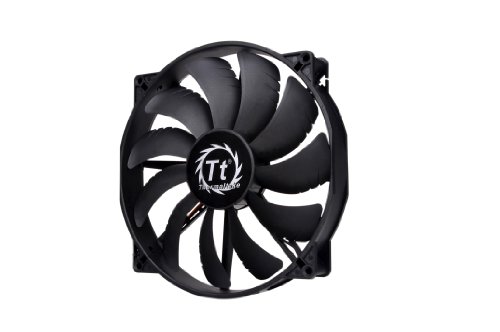
- 129.64 CFM airflow
- 200x30mm frame with anti-vibration mount
- 3-pin fan with 28.2 dBA noise
Best For: High-airflow cases that prioritize simple installation
Premium Quiet Pick
Noctua NF-A20 PWM chromax.Black.swap, 200x30mm Quiet Fan
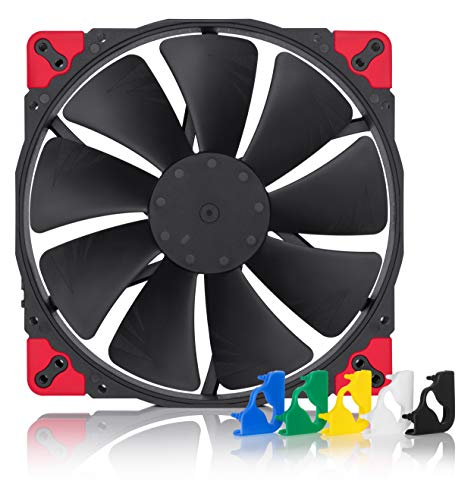
- 18.1 dB(A) max noise with PWM speed control
- 200x30mm fan with 146.9 m³/h airflow
- Swappable anti-vibration pads in multiple colors
Best For: Quiet builds needing a premium 200mm fan
Easy-Install Budget Pick
Thermaltake Pure 20 Blue LED 200mm Case Fan

- 200x30mm fan with airflow-focused blade design
- 3-and-4-pin combo connector for compatibility
- Blue LED version with easy-install shaved frame
Best For: Value builds needing a simple 200mm fan with lighting
ARGB Sync Pick
Thermaltake CT200 ARGB PWM Fan, 200mm

- 131.6 CFM airflow with PWM control
- 9 addressable LEDs with 5V sync
- Hydraulic bearing and daisy-chain connectors
Best For: Builders who want strong airflow plus ARGB lighting
Ultra-Quiet 200mm Cooling – Noctua NF-A20 PWM Premium Quiet Fan
If you want 200mm case fans focused on low-noise airflow, the Noctua NF-A20 PWM is built for exactly that job. Its 200x30mm frame, 4-pin PWM control, and very low 18.1 dB(A) noise rating make it a strong fit for large cases where quiet operation matters as much as cooling.
Best For: Quiet PC builds that can accommodate a 200x30mm fan and need flexible PWM control.
Pros:
- Very quiet at up to 18.1 dB(A)
- PWM control with a max speed of 800 RPM
- Large 200mm size for high airflow
- Includes anti-vibration mounts, extension cable, and y-cable
Cons:
- Requires enough clearance for the 30mm thickness
- Brown color may not suit all builds
This is a practical pick if your main priority is quiet cooling rather than lighting or aggressive styling. The included mounting accessories also make it easier to integrate into a compatible case setup.
ARGB Airflow Upgrade – Cooler Master SickleFlow 200 ARGB
Among 200mm case fans, the Cooler Master SickleFlow 200 ARGB stands out for adding lighting without giving up airflow. It uses frosted blades for even ARGB diffusion, a reinforced 200mm square frame, and a 3-pin connection, making it a straightforward option for compatible cases and ARGB setups.
Best For: Builders who want a 200mm fan with ARGB lighting, strong airflow, and a reinforced frame.
Pros:
- ARGB lighting with frosted blades for even diffusion
- 102.8 CFM airflow and 1.35 mmH2O pressure
- Reinforced frame helps reduce vibration and noise
- Rated at 15.7 dBA with a 160,000 MTTF bearing
Cons:
- Controller not included
- 3-pin connection limits speed control versus PWM models
This fan makes sense when visual impact and airflow both matter. The hybrid blade design and reinforced frame help it suit cases with obstructed airflow while keeping operation relatively quiet.
High-Airflow Budget Pick – Thermaltake Pure 20 Series 200mm Fan
The Thermaltake Pure 20 Series is a simple 200mm case fan aimed at strong airflow and easy installation. With a 200x30mm frame, 129.64 CFM airflow, and an anti-vibration mounting system, it is designed for users who want a straightforward cooling upgrade without extra lighting features.
Best For: PC cases that need a high-airflow 200mm fan with a basic, no-frills design.
Pros:
- High airflow rated at 129.64 CFM
- 200x30mm size for strong case cooling
- Anti-vibration mounting system included
- Shaved frame helps installation in compatible chassis
Cons:
- Noise level is higher at 28.2 dB(A)
- 3-pin connector offers less control than PWM fans
This is a sensible choice if airflow is the main goal and you do not need RGB or advanced fan control. Its long-life sleeve bearing and included hardware add value for a practical case cooling setup.
PWM RGB Performance – Cooler Master SickleFlow 200 aRGB Gen2
The Cooler Master SickleFlow 200 aRGB Case Fan is built for 200mm cases that need controllable cooling plus lighting. Its 4-pin PWM design lets speeds vary from 0 to 800 RPM, while the frosted blade and Gen2 aRGB lighting add a more polished look for modern builds.
Best For: Users who want a 200mm PWM fan with aRGB lighting and low-noise operation.
Pros:
- 4-pin PWM control from 0 to 800 RPM
- Gen2 aRGB lighting with frosted blade diffusion
- Hybrid frame design helps reduce noise
- 15.7 dBA noise rating for quieter operation
Cons:
- Listed maximum rotational speed is 1800 RPM, while the notes also describe 0 to 800 RPM PWM range
- Lighting-focused design may not appeal if you want a plain fan
This fan is a good fit when you want both visual customization and speed control in a 200mm form factor. The anti-resonance mounting and bearing sealant also point to a design focused on stability and longevity.
Premium Quiet Pick – Noctua NF-A20 PWM chromax.Black.swap, 200x30mm Quiet Fan
Noctua NF-A20 PWM chromax.Black.swap, Premium Quiet Fan, 4-Pin (200x30mm, Black)
Check Price On AmazonIf you want 200mm case fans that prioritize low noise without giving up airflow, the Noctua NF-A20 PWM chromax.Black.swap is built for that job. Its 200x30mm frame, PWM control, and very low 18.1 dB(A) noise rating make it a strong fit for larger cases where quiet cooling matters.
Best For: Quiet PC builds that need a large 200mm PWM fan with broad mounting compatibility.
Pros:
- Very quiet operation at up to 18.1 dB(A)
- PWM control with a 350-800 rpm range for automatic speed adjustment
- Large 20cm design moves 146.9 m³/h of airflow
- Includes swappable anti-vibration pads in multiple colors
Cons:
- Single-fan pack only
- Not an RGB option
- Best suited to cases that support 200mm mounting patterns
Overall, this is the most straightforward choice if your priority is premium quiet cooling in a 200mm form factor. The all-black design and flexible mounting compatibility help it fit into many builds while keeping sound levels down.
ARGB Value Pick – Thermaltake CT200 ARGB PWM White 200mm Fan
For buyers comparing 200mm case fans that blend airflow, lighting, and easy cable management, the Thermaltake CT200 ARGB PWM Fan stands out. It offers PWM control, daisy-chainable connectors, and 9 addressable LEDs with 16.8 million colors for builds that want a clean visual match.
Best For: White builds that want a large ARGB 200mm fan with straightforward syncing and installation.
Pros:
- 9 ARGB LEDs with 16.8 million color support
- PWM speed range of 500-900 rpm for controlled cooling
- Daisy-chainable 4-pin PWM connectors simplify setup
- Moves up to 131.6 CFM of airflow
Cons:
- Noise level is listed at 27.2 dB
- Single-pack purchase may not suit full multi-fan installs
- Requires both PWM and 5V ARGB connections for full feature use
In practice, this fan is a good fit if you want a 200mm case fan that balances appearance and airflow rather than chasing the lowest possible noise. The white finish and daisy-chain design make it especially convenient for coordinated builds.
Easy-Install Budget Pick – Thermaltake Pure 20 Blue LED 200mm Case Fan
If you need a simple 200mm case fan for airflow and basic lighting, the Thermaltake Pure 20 Series Blue LED fan is a practical option. Its 200x30mm thickness, enhanced airflow blade design, and easy-install shaved frame make it useful for larger chassis builds.
Best For: Budget-friendly builds that need a straightforward 200mm fan with blue LED styling.
Pros:
- 200x30mm frame supports high air pressure and airflow
- Blade design is tuned to focus airflow and reduce noise
- 3-and-4-pin combo connector increases compatibility
- Blue LED version adds a simple visual accent
Cons:
- Sleeve bearing is less premium than hydraulic or advanced bearing designs
- Noise level is listed at 28.2 dB
- Not a PWM-only fan
This model makes the most sense when you want a reliable large fan without extra complexity. It is more about easy fitment and solid airflow than premium features, so it works well in basic value-focused builds.
ARGB Sync Pick – Thermaltake CT200 ARGB PWM Fan, 200mm
If you want a 200mm case fan that combines high airflow with lighting support, the Thermaltake CT200 ARGB PWM Fan is built for that role. It runs on PWM control from 500 to 900 RPM, pushes up to 131.6 CFM, and adds 9 addressable LEDs with 16.8 million color support for a cleaner-looking build.
Best For: Builders who want a 200mm ARGB fan with strong airflow, PWM control, and easy motherboard sync.
Pros:
- Up to 131.6 CFM airflow with 1.92mm-H2O static pressure
- 9 addressable LEDs with 5V motherboard ARGB sync
- Hydraulic bearing for quieter, reliable operation
- Daisy-chainable 4-pin PWM connectors for simpler installation
Cons:
- Only runs within a 500 to 900 RPM range
- Single-pack purchase if you need multiple fans
- Requires a 5V ARGB header for lighting sync
This is a practical pick if you want a 200mm case fan that does both cooling and visual flair without adding installation complexity. Its airflow rating and daisy-chain connectors make it especially appealing for matching Thermaltake CT builds.
Balanced White Build – Thermaltake CT200 PWM Fan, White
The Thermaltake CT200 PWM Fan is a straightforward 200mm case fan for builds that prioritize airflow and simplicity. With PWM control from 500 to 900 RPM, up to 131.6 CFM of airflow, and a hydraulic bearing, it focuses on practical cooling rather than extra lighting features.
Best For: Builders who want a white 200mm PWM fan with strong airflow and a clean look.
Pros:
- Up to 131.6 CFM airflow and 1.92mm-H2O static pressure
- PWM-controlled 500 to 900 RPM range
- Hydraulic bearing for quiet, reliable operation
- Daisy-chainable 4-pin PWM connectors for easier cable management
Cons:
- No ARGB lighting features
- Single fan only, so multi-fan setups need extra purchases
- Large 200mm size may not fit every case
This model makes sense if you want a 200mm case fan that keeps the build visually simple while still delivering the same airflow and control profile as the rest of the CT200 lineup. The white finish is useful for lighter-themed systems that need a matching oversized fan.
Simple Cooling Pick – Thermaltake CT200 PWM Fan, Black
The Thermaltake CT200 PWM Fan is a no-frills 200mm case fan aimed at builders who want airflow first. It offers PWM control from 500 to 900 RPM, up to 131.6 CFM, and a hydraulic bearing, while keeping the design plain and functional in black.
Best For: Users who want a basic black 200mm PWM case fan with strong airflow and simple installation.
Pros:
- Up to 131.6 CFM airflow with 1.92mm-H2O static pressure
- Hydraulic bearing for quiet, dependable operation
- Daisy-chainable 4-pin PWM connectors for faster setup
- Black finish for a low-profile look
Cons:
- No RGB or ARGB lighting
- Single-pack format only
- 200mm size may not work in all cases
If your priority is cooling performance over extras, this CT200 is the most straightforward option in the group. It keeps the same airflow, speed range, and connector convenience as the other CT200 models, just without the lighting hardware.
How We Picked the Best 200mm Case Fans
For this roundup, we prioritized airflow performance, noise control, mounting compatibility, speed range, and extras such as PWM support and addressable RGB. We also looked for models that suit different build priorities, from ultra-quiet systems to colorful showpiece rigs.
Quick Comparison
In general, Noctua models are the strongest choice for low-noise focus, Thermaltake CT200 options lean toward modern PWM control and higher airflow, and Cooler Master picks are a better fit if you want lighting and a balanced all-around setup. If you want simple cooling with fewer extras, the plain black or blue LED Thermaltake options keep things straightforward.
Key Buying Factors for 200mm Case Fans
Airflow Vs. Noise
Larger fans can often deliver good airflow at lower RPMs, but the actual result depends on blade design and motor quality. Check the airflow rating, but also consider whether you want the quietest possible operation or maximum case ventilation.
Thickness and Clearance
Not all 200mm Case Fans are the same thickness. Some are 30mm thick, which can improve airflow but may create clearance issues with radiators, drive cages, motherboard headers, or front-panel space.
PWM Control
PWM support is useful if you want the fan to ramp up only when needed. For everyday gaming and mixed-use builds, that usually means a better balance of cooling and noise than a fixed-speed fan.
Lighting and Sync
If you care about aesthetics, ARGB compatibility matters. Make sure your motherboard or controller supports 5V addressable lighting before choosing a sync-dependent model.
Mounting and Case Support
Always confirm your case supports 200mm fan placement. Some cases accept 200mm fans only in front or top positions, and others may need specific brackets or limited-thickness models.
Who Should Buy Which 200mm Case Fans?
If you want the quietest premium option, choose a Noctua model. If you want RGB and modern control, look at the Cooler Master SickleFlow or Thermaltake CT200 ARGB fans. If you want simple, high-airflow cooling without lighting, the Thermaltake CT200 PWM or Pure 20 series makes more sense.
The best choice depends on whether your priority is silence, airflow, lighting, or easy installation. Match the fan to your case clearance and motherboard support first, then decide how much style you want on top of that.