
Choosing an industrial computer for digital signage is about more than just playback power. You need reliable 24/7 operation, the right display outputs, and easy remote management.
Below, we’ve narrowed the field to 10 options that fit different signage setups, from compact stick PCs to fanless mini PCs and cloud-managed players.
Best 10 Industrial Computer for Digital Signage Picks for 2026
Ultra-Compact Fanless Stick

- Fanless 24/7 operation
- Dual 4K display support
- WOL, PXE, Auto Power-On
Best For: Quiet signage players and unattended displays
Rugged Touch Display

- IP65 front and IK08 protection
- 10-point capacitive touch
- HDMI/VGA with VESA mounting
Best For: Durable touch screens for control panels and kiosks
Expanded Fanless Stick
- Fanless 24/7 operation
- 256GB onboard storage
- Dual 4K plus WOL/PXE features
Best For: Signage installs needing more local storage
Cloud Signage Player

- Built for digital signage
- Android OS with watchdog
- Vertical/horizontal screen support
Best For: Cloud-managed signage playback
Fanless Powerhouse
Core i7 Fanless Industrial PC for Signage

- Triple 4K output for multi-screen signage
- 6 COM ports, GPIO, CAN, and dual LAN
- Fanless aluminum build with TPM 2.0
Best For: Multi-screen signage installs with industrial connectivity and 24/7 uptime
Simple Streaming Stick
Amazon Signage Stick for Business Displays

- Auto-launches CMS in kiosk mode
- Easy app-based setup and management
- Wi-Fi 6E with 4K and quad-core performance
Best For: Businesses that want a simple CMS-ready signage player
Ultra-Wide Display
24-Inch Stretched Bar Monitor for Signage
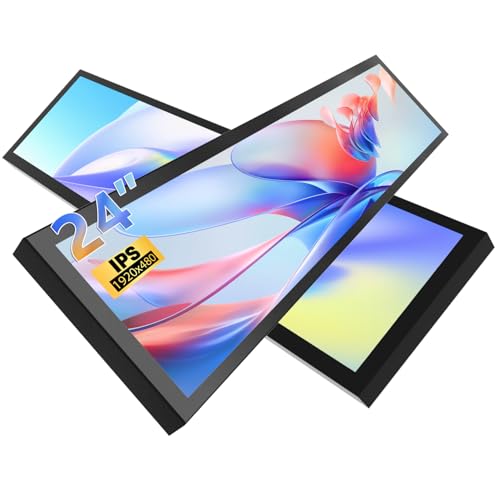
- 24-inch ultra-wide bar format
- Dual HDMI and DisplayPort inputs
- 800-nit brightness with VESA support
Best For: Wide-format signage in malls, transit areas, and restaurants
Cloud Menu Signage Player
Digital Signage for Business & Menu Boards

- Cloud-controlled remote scheduling
- 4K playback with HDMI output
- Built-in menu designer and AI enhancer
Best For: Restaurant menu boards and remote signage management
Fanless Stick PC
Windows 11 Digital Signage Mini Computer
- Fanless stick design for 24/7 use
- 4K dual-display support
- Auto Power On and Wake on LAN
Best For: Small signage installs and quiet always-on setups
Ultra-Bright Menu Display
18.5" Commercial Digital Signage Screen

- 700-nit screen for bright spaces
- Remote control and scheduled playback
- 24/7 operation with split-screen support
Best For: Bright restaurant and retail signage displays
Ultra-Compact Fanless Stick – MeLE N100 8GB 128GB
If you need an industrial computer for digital signage that stays hidden, runs quietly, and supports 24/7 operation, this MeLE stick PC fits the brief well. Its fanless N100 design, dual 4K display support, and remote-management features make it practical for unattended business installs and compact media setups.
Best For: Quiet signage players, kiosks, and unattended business displays that need auto power recovery and PXE support.
Pros:
- Fanless design for silent 24/7 operation
- 4K output over HDMI 2.0 and USB-C for dual displays
- Wake on LAN, PXE boot, RTC Wake, and Auto Power-On for remote deployment
- Compact stick form factor helps reduce clutter behind a screen
Cons:
- Only 8GB RAM and 128GB storage in this configuration
- Expansion relies on microSD and external USB storage
- Best suited to signage and light business workloads rather than heavy computing
Overall, this is a strong pick when space, silence, and remote restart features matter more than raw workstation power. It is built around the needs of digital signage and other always-on installs where reliability is the priority.
Rugged Touch Display – 7-Inch IP65 Touch Monitor
This industrial computer for digital signage companion is really a rugged 7-inch open frame touch monitor for HMI-style installs, control panels, and compact interactive displays. With IP65 front protection, 10-point capacitive touch, and 24/7 industrial positioning, it is aimed at harsh environments where durability and stable input matter.
Best For: Control panels, kiosks, and industrial signage setups that need a durable touch display with sealed front protection.
Pros:
- Front IP65 and IK08-rated design helps resist dust, dirt, and liquids
- 10-point capacitive touch supports responsive multi-touch interaction
- HDMI and VGA inputs offer flexible connectivity
- VESA and bracket mounting support portrait or landscape use
Cons:
- It is a monitor, not a full computer system
- 7-inch 1024×600 resolution is modest for some signage layouts
- Best value depends on having a separate media player or PC
For industrial touch applications, the strength here is the combination of sealed front protection and practical mounting options. Pair it with a suitable media player or mini PC, and it becomes a compact, durable front end for signage or operator control.
Expanded Fanless Stick – MeLE N100 8GB 256GB
For buyers looking for an industrial computer for digital signage with a little more local storage, this MeLE N100 stick PC is the same compact fanless concept with a 256GB drive. It keeps the 4K dual-display support, WiFi 5, Bluetooth 5.1, Gigabit Ethernet, and remote power features that are useful for unattended deployments.
Best For: Digital signage installs and small business systems that want a compact fanless PC with extra onboard storage.
Pros:
- Fanless chassis supports silent 24/7 use
- 256GB storage gives more breathing room than the smaller model
- Dual 4K output via HDMI 2.0 and USB-C
- WOL, PXE boot, RTC Wake, and Auto Power-On suit remote management
Cons:
- Still limited by stick-PC size and thermals compared with larger systems
- Storage is better, but external expansion may still be needed for large media libraries
- Most suitable for signage, office, and IoT workloads rather than heavy production tasks
This version makes sense if your signage content or local files need more room while you still want a hidden, low-profile install. It remains a practical fit for business environments where reliability and simple deployment are more important than upgrade flexibility.
Cloud Signage Player – mediaDROID+ Android Player
If you want a dedicated industrial computer for digital signage, this mediaDROID+ player is purpose-built around signage playback and cloud management. Its Android OS, custom watchdog, vertical and horizontal orientation support, and built-in local cache are all aimed at keeping content running without interruption.
Best For: Cloud-managed digital signage deployments that need a dedicated Android-based playback device.
Pros:
- Designed specifically for digital signage use
- Custom Android OS with built-in watchdog for dedicated playback
- Supports both vertical and horizontal screen modes
- 16GB local cache helps avoid playback interruptions
Cons:
- 4GB RAM and 16GB storage are modest by PC standards
- Single HDMI and single USB port limit expandability
- Best for signage playback rather than general computing
This is a focused choice if your priority is reliable signage delivery through cloud services instead of a general-purpose mini PC. It is less flexible than a Windows or Linux stick PC, but that specialization is exactly what many signage deployments need.
Fanless Powerhouse – Core i7 Fanless Industrial PC for Signage
If you need an industrial computer for digital signage that can also handle demanding back-end work, this FANPEEC fanless mini PC is built for that kind of job. It combines a Core i7-10610U, triple 4K display output, and a quiet fanless aluminum chassis, making it a strong fit for always-on business installs.
Best For: Multi-screen digital signage deployments that also need industrial I/O, remote management, and durable 24/7 operation.
Pros:
- Triple-display support via HDMI, EDP, and Type-C with 4K output
- 6 COM ports, 8 USB ports, dual Gigabit Ethernet, GPIO, and CAN expansion
- Fanless, all-aluminum design with wide temperature support and low 75W power use
- TPM 2.0, Wake-on-LAN, and Auto-Start for business-focused deployment
Cons:
- More interface-heavy than a simple plug-and-play signage player
- Built for industrial use, so it may be more computer than some signage setups need
For buyers who want a signage PC that can also connect to industrial gear, this model stands out for its flexibility. It offers plenty of memory, storage expansion, and video output options, but it makes the most sense when your install needs more than basic media playback.
Simple Streaming Stick – Amazon Signage Stick for Business Displays
For businesses that want a straightforward industrial computer for digital signage without the complexity of a full PC, the Amazon Signage Stick is a purpose-built media player. It auto-launches your CMS in kiosk mode, supports 4K playback, and is designed for easy setup through the free mobile app.
Best For: Small to large businesses that want an easy-to-manage signage player with CMS support and minimal setup.
Pros:
- Auto-launches CMS in kiosk mode for unattended operation
- Easy setup with the free Amazon Signage app
- Works with leading CMS providers
- Wi-Fi 6E, 4K support, and a quad-core processor in a compact device
Cons:
- CMS subscription is required
- Less flexible than a full industrial PC with physical ports and expansion
This is a strong option when simplicity matters more than hardware expansion. It is best suited to teams that already use a CMS and want a small, secure player that can be deployed and managed with minimal technical effort.
Ultra-Wide Display – 24-Inch Stretched Bar Monitor for Signage
This stretched bar monitor is a practical display choice when the goal is to present signage content in a wide, space-efficient format. With a 1920×380 resolution, dual HDMI and DisplayPort inputs, and a matte screen, it is designed for advertising displays in places like subways, malls, and restaurants.
Best For: Wide-format digital signage installations that need a slim, high-brightness display with simple connectivity.
Pros:
- Ultra-wide 24-inch bar format with 1920×380 resolution
- Dual HDMI and DisplayPort connections for flexible input options
- 800-candela brightness and 178-degree viewing angle for signage visibility
- Built-in dual speakers and VESA support for display setups
Cons:
- Mount bracket is not included
- Resolution is specified differently in the notes, so buyers should verify final display expectations
If your signage needs a long, narrow layout rather than a standard monitor shape, this model is worth a look. It is focused on display presentation and installation flexibility, making it a solid companion screen for public-facing advertising.
Cloud Menu Signage Player – Digital Signage for Business & Menu Boards
If you need an industrial computer for digital signage that is easy to deploy and manage, this cloud-controlled 4K media player is built for straightforward business use. It supports plug-and-play setup, remote scheduling, and menu-board editing tools, making it a practical fit for restaurants and other screen-based promotions.
Best For: Restaurant menu boards, small business promotions, and teams that want remote content control without a complex setup.
Pros:
- Plug-and-play setup with HDMI and power, plus Wi-Fi connectivity
- Remote content management for uploads, scheduling, and event promotion
- Built-in Canvas Menu Designer for creating menu boards without extra software
- Supports PowerPoint uploads and includes an AI image enhancer
Cons:
- Single HDMI port may limit some display setups
- Best suited to HDMI-equipped screens, not standalone use
- Advanced tools may require an upgrade plan
Overall, this is a business-focused signage player that emphasizes convenience over complexity. If you want an industrial computer for digital signage that handles scheduling, design, and 4K playback from one cloud-managed platform, it covers the essentials well.
Fanless Stick PC – Windows 11 Digital Signage Mini Computer
For buyers looking for an industrial computer for digital signage in the smallest possible form factor, this fanless mini PC stick is built for 24/7 use and commercial tasks. It pairs Windows 11 Home with wake, auto-power, and PXE features, so it fits signage, IoT, and light business deployments where space is tight.
Best For: Compact signage installs, kiosk-style setups, and businesses that need a quiet Windows-based player.
Pros:
- Ultra-compact fanless design for quiet, clutter-free installs
- Supports 4K dual display output through HDMI and USB-C
- Commercial features include Auto Power On, Wake on LAN, PXE, and RTC Wake
- Expandable storage with microSD and external drive support
Cons:
- 4GB RAM is modest for heavier multitasking
- Internal storage starts at 128GB eMMC
- Stick format may be less flexible than a full mini PC
This is a strong fit when the priority is a tiny, always-on signage player rather than raw performance. If your digital signage setup values low noise, simple mounting, and commercial wake features, it is a practical choice.
Ultra-Bright Menu Display – 18.5" Commercial Digital Signage Screen
If you want an industrial computer for digital signage with the display built in, this 18.5-inch commercial screen is designed for bright, always-on menu and promo use. It offers remote control, scheduling, split-screen playback, and a 700-nit panel that stays readable in strong ambient light.
Best For: Restaurants, retail counters, and business displays that need a bright all-in-one signage screen.
Pros:
- 700-nit brightness improves visibility in well-lit spaces
- Supports 24/7 continuous operation and image rotation
- Remote management from smartphones, computers, and tablets
- Built-in speakers and split-screen playback add flexibility
Cons:
- 720P display resolution is lower than full HD alternatives
- Desk-mount design may not suit every install
- Wi-Fi and USB-based connectivity may be enough for signage, but not for broader computing needs
This model makes sense when screen visibility and simple commercial management matter more than computing power. For a straightforward digital signage display that can run continuously and remain easy to control, it is a solid all-in-one option.
How We Picked These Industrial Computer for Digital Signage Options
We focused on practical signage features that matter in real deployments: stable 4K output, fanless or low-maintenance operation, auto power-on behavior, network connectivity, and form factors that work in tight enclosures or behind displays. We also considered whether each option is better suited to simple looping content, cloud-managed campaigns, or more demanding business environments.
Quick Comparison
In general, stick PCs are the best fit for compact, low-power installs where space is limited. Fanless mini PCs are better when you need more ports, better multitasking, or stronger compatibility with peripherals and serial devices. Dedicated signage players and cloud-connected devices are often the easiest choice for multi-location content management, while signage displays and monitors are best when you need an all-in-one presentation layer rather than a separate player-only setup.
Key Buying Factors for an Industrial Computer for Digital Signage
Performance and Playback Resolution
For basic menus, promotions, and static layouts, modest hardware is usually enough. If you plan to run 4K video, multiple widgets, or animated content, choose a device with enough CPU headroom and memory to avoid stutter. A solid Industrial Computer for Digital Signage should handle your content format without overheating or slowing down.
Ports and Display Compatibility
Check the video output first: HDMI is common, but some installations also benefit from Type-C, DisplayPort, or EDP support. If you need touchscreens, external sensors, printers, or serial accessories, look closely at USB and COM port counts.
Reliability and Deployment
Fanless designs reduce dust-related maintenance and are often preferred for retail, hospitality, and public-facing spaces. Auto power-on, PXE support, and remote control features can also make large-scale rollout easier, especially when devices are mounted behind displays or installed in hard-to-reach locations.
Content Management
Some buyers only need a local media player, while others need cloud-based scheduling, multi-screen syncing, or remote content updates. Make sure the platform matches how often you’ll update content and how many locations you manage.
Who Should Buy Which Industrial Computer for Digital Signage?
If you want the simplest hidden-install solution, a compact stick PC is usually the best place to start. If you need more horsepower or a wider range of business ports, a fanless mini PC is the stronger pick. For teams managing menus, promotions, or campaigns across several sites, cloud-controlled signage players are often the most efficient choice. And if you need the screen itself as part of the package, a dedicated signage display or industrial monitor may be the better investment.
Ultimately, the best Industrial Computer for Digital Signage is the one that matches your content, your installation space, and your maintenance expectations—not just the one with the biggest specs on paper.