
Finding the right gaming PC for VRChat means balancing CPU speed, GPU power, memory, and fast storage for crowded worlds, heavy avatars, and long sessions.
Below, we focus on prebuilt desktops that offer the best mix of value, stability, and upgrade headroom for different budgets and play styles in 2026.
Best 10 Gaming PC for VRChat Picks for 2026
Strong Mid-Range VRChat Pick

- Ryzen 7 5700 CPU with RTX 5060 graphics
- 32GB DDR4 RAM and 1TB NVMe SSD
- Wi-Fi, Windows 11, keyboard and mouse included
Best For: Balanced VRChat-ready desktop with extra memory
Budget Older-GPU Option

- Core i7 CPU with Radeon RX 580 8GB
- 16GB RAM and 512GB SSD
- Wi-Fi 6, Bluetooth 5.0, RGB mouse and keyboard
Best For: Budget-minded buyers wanting a ready-to-use starter tower
Best Overall VRChat Value

- Ryzen 7 8700F with RTX 5060 Ti 8GB
- 16GB DDR5 and 1TB PCIe 4.0 SSD
- WiFi 6, Bluetooth 5.3, and USB-C support
Best For: Most modern, balanced VRChat-ready option
Balanced VRChat Pick

- 8-core Ryzen 7 5700X for multitasking
- RTX 5060 with DLSS 4 and ray tracing
- 32GB RAM, 1TB NVMe, WiFi and Bluetooth
Best For: Players who want a balanced VRChat-ready prebuilt with extra memory
Easy-Setup VR Choice

- Intel i5-13400F with RTX 5060 8GB
- 16GB DDR5 and 1TB PCIe 4.0 SSD
- WiFi 6, Bluetooth 5.3, keyboard and mouse included
Best For: Buyers who want a plug-and-play VRChat desktop with modern connectivity
Entry-Level 1080p Pick
STGAubron i7 / RTX 3050 Gaming Tower
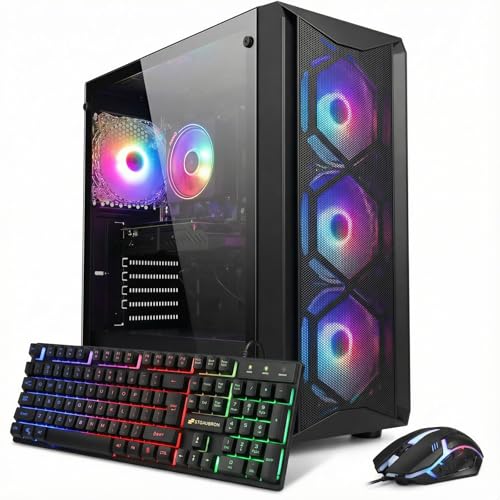
- Core i7 8th Gen with RTX 3050 6GB
- 1TB SSD and 16GB DDR4
- Wi‑Fi 6, Bluetooth 5.2, Windows 11
Best For: Budget-minded VRChat players and general 1080p gaming
Balanced Midrange Choice

- Ryzen 7 5700X with 8 cores / 16 threads
- RTX 3050 8GB with ray tracing and DLSS
- Wi‑Fi 6 plus HDMI 2.1 and DisplayPort
Best For: Balanced VRChat gaming with stronger CPU headroom
Strong Mid-Range VRChat Pick – Ryzen 7 5700 + RTX 5060
If you want a gaming PC for VRChat that feels responsive for everyday use and has headroom for modern PC gaming, this Skytech build is a strong middle-ground option. The Ryzen 7 5700, RTX 5060, and 32GB of RAM give it a well-rounded spec sheet for smooth 1080p play, fast loading from the 1TB NVMe SSD, and solid multitasking.
Best For: Players who want a balanced VRChat-ready desktop with more memory and newer graphics.
Pros:
- AMD Ryzen 7 5700 and RTX 5060 provide a capable foundation for VRChat and other games.
- 32GB DDR4 RAM is generous for multitasking and heavier desktop use.
- 1TB NVMe SSD helps keep loading times quick.
- Includes Wi-Fi, Windows 11 Home, and a free keyboard and mouse.
Cons:
- Graphics output notes indicate port layout may vary.
- Uses DDR4 instead of newer DDR5 memory.
- Listed performance target is 1080p, not higher-resolution gaming.
This is a practical choice if you want a gaming PC for VRChat with stronger memory capacity and a newer GPU than entry-level systems, while still keeping the setup straightforward. It is best viewed as a balanced 1080p desktop rather than a top-end enthusiast rig.
Budget Older-GPU Option – Core i7 with RX 580
This STGAubron desktop is a lower-cost gaming PC for VRChat shoppers who mainly want a ready-to-use tower with included peripherals. It pairs an older Core i7 and Radeon RX 580 with 16GB of RAM and a 512GB SSD, which makes it more of a basic 1080p gaming setup than a future-focused upgrade pick.
Best For: Buyers who want an inexpensive starter desktop with Wi-Fi 6 and bundled accessories.
Pros:
- Comes with Wi-Fi 6, Bluetooth 5.0, Windows 11 Home, and RGB extras.
- Includes 16GB RAM and a 512GB SSD for everyday responsiveness.
- Bundled RGB keyboard, mouse, and four RGB fans add value out of the box.
- Has HDMI, DisplayPort, and DVI output options.
Cons:
- Uses an older Intel Core i7 4th gen processor.
- RX 580 8GB is an older graphics card compared with newer gaming desktops.
- 16GB RAM is the listed maximum, so there is limited memory headroom.
For VRChat, this is the kind of gaming PC for VRChat that makes sense if price and included accessories matter more than raw upgrade potential. It covers the basics well, but the older platform means it is not the strongest long-term choice.
Best Overall VRChat Value – Ryzen 7 8700F + RTX 5060 Ti
If you want a gaming PC for VRChat with a more modern platform, this CyberPowerPC stands out on paper. The Ryzen 7 8700F, RTX 5060 Ti, DDR5 memory, and PCIe 4.0 SSD make it the strongest all-around spec set in this group for smooth everyday use, fast storage, and more breathing room for gaming.
Best For: Buyers who want the most modern and balanced VRChat-ready system in this roundup.
Pros:
- Ryzen 7 8700F and RTX 5060 Ti offer a strong current-gen combination.
- 16GB DDR5 and 1TB PCIe 4.0 SSD support fast loading and responsive use.
- WiFi 6, Bluetooth 5.3, and multiple USB-C/USB-A ports improve connectivity.
- Includes Windows 11 Home, RGB lighting, and keyboard and mouse.
Cons:
- Only 16GB RAM is included, which is less generous than some rivals.
- No mention of a larger bundled accessory package beyond keyboard and mouse.
- Best value here depends on whether you want the newer platform enough to justify it.
As a gaming PC for VRChat, this is the most forward-looking option in the list thanks to its newer CPU, DDR5 memory, and stronger graphics card tier. It is a solid pick if you want a system that feels better prepared for current games and general multitasking.
Entry-Level RGB Starter – Core i7 with RX 580
This STGAubron desktop is another budget-friendly gaming PC for VRChat shoppers who want a simple plug-and-play tower. It uses the same broad platform idea as the other RX 580 build: an older Core i7, 16GB of RAM, a 512GB SSD, and Windows 11 Home, plus Wi-Fi 6 and Bluetooth 5.0 for easy setup.
Best For: Buyers looking for an entry-level desktop with RGB styling and included accessories.
Pros:
- Includes Wi-Fi 6, Bluetooth 5.0, and Windows 11 Home.
- 16GB RAM and 512GB SSD are enough for basic gaming and everyday use.
- RGB fan lighting plus RGB keyboard and mouse come bundled.
- Provides HDMI, DisplayPort, and DVI outputs.
Cons:
- Uses an older Intel Core i7 4th-gen processor.
- RX 580 graphics are dated compared with newer GPUs.
- Memory maxes out at 32GB in the listing, but the included RAM is still modest for heavier use.
For a gaming PC for VRChat, this is a practical starter option if you want low hassle and lots of bundled extras. It is easy to recommend as a basic desktop, though buyers wanting more long-term performance may prefer a newer CPU and GPU combination.
Balanced VRChat Pick – Ryzen 7 RTX 5060 32GB Build
If you want a gaming PC for VRChat that can handle heavy multitasking and smooth visuals, this YAWYORE build is a strong middle-ground pick. The Ryzen 7 5700X, RTX 5060 8GB, and 32GB of DDR4 memory give it enough headroom for VR-ready play, social worlds, and background apps without feeling cramped.
Best For: VRChat users who want a balanced prebuilt with stronger multitasking, WiFi/Bluetooth, and plenty of memory.
Pros:
- Ryzen 7 5700X 8-core, 16-thread CPU is well suited to multitasking
- RTX 5060 8GB supports DLSS 4, ray tracing, and Reflex 2 optimization
- 32GB DDR4 3200MHz RAM and 1TB NVMe SSD give it solid everyday capacity
- Built-in WiFi and Bluetooth make setup and peripheral pairing easier
Cons:
- DDR4 platform is older than newer DDR5-based builds
- Brand may vary on the graphics card
- 650W bronze PSU is adequate, but not a high-end power supply tier
Overall, this is a practical choice if you care more about smooth VRChat use and balanced specs than chasing the newest platform. The extra RAM makes it especially comfortable for running other apps alongside your game.
Easy-Setup VR Choice – CyberPowerPC i5 RTX 5060 DDR5
This CyberPowerPC is a straightforward gaming PC for VRChat if you want a current-gen prebuilt with simple connectivity and a clean feature set. With an Intel Core i5-13400F, RTX 5060 8GB, DDR5 memory, and a 1TB PCIe 4.0 SSD, it has the specs to keep VRChat and other games responsive.
Best For: VRChat players who want a ready-to-use desktop with DDR5, WiFi 6, and bundled keyboard/mouse.
Pros:
- Intel Core i5-13400F and RTX 5060 8GB make for a capable gaming base
- 16GB DDR5 memory and a 1TB PCIe 4.0 NVMe SSD support fast load times
- WiFi 6, Bluetooth 5.3, and multiple USB ports simplify connectivity
- Includes Windows 11 Home, keyboard, mouse, and a 1-year parts and labor warranty
Cons:
- 16GB RAM is fine, but less spacious than 32GB builds for heavy multitasking
- It is positioned around 1080p output in the listed specs
- No ultra-high-end cooling or premium storage capacity is listed beyond 1TB
This is a good fit if you prefer an easy setup and modern connectivity over maxed-out specs. It delivers the essentials for VRChat without extra assembly or accessory shopping.
Value VRChat Option – Titan Pro RTX 5060 Prebuilt
If you are shopping for a gaming PC for VRChat on a simpler prebuilt platform, the NOVATECH Titan Pro covers the basics well. Its Ryzen 5 5500, RTX 5060, 16GB of DDR4 RAM, and 1TB M.2 SSD are aimed at smooth everyday gaming and VR use without unnecessary extras.
Best For: Budget-conscious VRChat buyers who want an RTX 5060 tower with Windows 11 Pro and a 1-year warranty.
Pros:
- RTX 5060 graphics are a strong foundation for VR gaming
- Ryzen 5 5500 and 16GB DDR4 RAM cover general gaming and multitasking
- 1TB M.2 SSD and Windows 11 Pro provide a ready-to-use setup
- WiFi, Bluetooth, and RGB fans add convenient features and visual flair
Cons:
- 16GB DDR4 is less roomy than 32GB alternatives for heavier multitasking
- DDR4 at 2666 MHz is not as fast as newer DDR5 systems
- Processor is a Ryzen 5, so it is a step below the Ryzen 7 option above
For VRChat, this build makes sense if you want solid core parts and a straightforward prebuilt experience. It is not the most powerful option here, but it keeps the focus on value and ease of use.
Entry-Level 1080p Pick – STGAubron i7 / RTX 3050 Gaming Tower
If you want a gaming PC for VRChat that stays focused on smooth 1080p play, this STGAubron build gives you a Core i7 8th Gen, RTX 3050 6GB graphics, 16GB of RAM, and a 1TB SSD. It also includes Wi‑Fi 6, Bluetooth 5.2, and bundled keyboard and mouse, making it a practical all-in-one starter tower for gaming and everyday use.
Best For: Players who want an affordable prebuilt with enough GPU and storage headroom for VRChat plus general gaming and streaming basics.
Pros:
- RTX 3050 6GB and Core i7 8th Gen support 60+ FPS claims in many popular games.
- 1TB SSD gives you roomy storage for games, apps, and VRChat installs.
- Wi‑Fi 6 and Bluetooth 5.2 help keep wireless setup simple.
- Includes RGB keyboard and mouse plus Windows 11 Home.
Cons:
- 16GB RAM is serviceable, but not as roomy as higher-end builds for heavy multitasking.
- RTX 3050 6GB is more entry-level than the newer 8GB options.
- Product details list 1080p native resolution, so it is best matched to standard-resolution gaming.
This is the most straightforward value pick in the group: solid storage, modern connectivity, and enough graphics muscle for casual VRChat use, but it is not the strongest option if you want extra future-proofing.
Best Performance Leap – CyberPowerPC Gamer Xtreme RTX 5060
For a gaming PC for VRChat that aims higher on headroom and responsiveness, this CyberPowerPC Gamer Xtreme stands out with an Intel Core i5-14400F, RTX 5060 8GB, 16GB of DDR5, and a 1TB PCIe 4.0 SSD. It also brings Wi‑Fi 6, Bluetooth 5.3, and Windows 11 Home, so it is a strong plug-and-play prebuilt for users who want a newer platform and faster storage.
Best For: Buyers who want the strongest graphics and overall platform in this roundup for smoother VRChat use and modern gaming.
Pros:
- RTX 5060 8GB is the most powerful graphics card in this set.
- Core i5-14400F with DDR5 memory gives it a more modern performance base.
- 1TB PCIe 4.0 NVMe SSD should help with fast loads and snappy system response.
- Wi‑Fi 6, Bluetooth 5.3, and multiple display outputs improve connectivity flexibility.
Cons:
- The CPU is an i5 rather than an i7 or Ryzen 7, so it is not the strongest processor on paper.
- 16GB RAM is good, but not oversized for heavier multitasking.
- It is likely the priciest option here based on the hardware tier.
If you want the most forward-looking choice for VRChat and games in this group, this build has the strongest GPU and the most modern core components, making it the best bet for extra performance margin.
Balanced Midrange Choice – Ryzen 7 RTX 3050 8GB Tower
This gaming PC for VRChat lands in the middle of the pack by pairing a Ryzen 7 5700X with an RTX 3050 8GB, 16GB of RAM, and a 512GB NVMe SSD. It adds Wi‑Fi 6, HDMI 2.1, DisplayPort, and notes VR connectivity support, so it reads like a balanced tower for gaming, streaming, and everyday productivity.
Best For: Buyers who want a well-rounded VR-friendly desktop with a stronger CPU and 8GB graphics memory.
Pros:
- Ryzen 7 5700X offers 8 cores and 16 threads with boost speeds up to 4.6GHz.
- RTX 3050 8GB includes ray tracing and DLSS support.
- Wi‑Fi 6, HDMI 2.1, and DisplayPort make setup and display connections easy.
- Quiet cooling and a compact 512GB NVMe SSD make it a tidy everyday tower.
Cons:
- 512GB storage is the smallest in this group.
- RTX 3050 8GB is still behind the RTX 5060 8GB in raw graphics power.
- The listing mixes some component details, so buyers should verify the exact configuration before ordering.
This is a sensible middle-ground option: faster CPU horsepower than the Intel i7 8th Gen build, more VRAM than the 6GB card, but less storage and less graphics power than the top CyberPowerPC pick.
How We Picked the Best Gaming PC for VRChat
We prioritized parts that matter most for a Gaming PC for VRChat: a strong modern CPU, enough RAM for multitasking and avatar-heavy lobbies, an SSD for faster loading, and a GPU that can handle higher resolutions and visual effects. We also favored systems with Wi-Fi, Windows 11, and reasonable power supplies or upgrade-friendly layouts.
Quick Comparison
For VRChat, the best all-around systems in this list are the RTX 5060-based builds with 16GB to 32GB of RAM and 1TB SSDs. Those offer a much better balance for crowded social instances than older RX 580 or RTX 3050 machines, which are better suited to lighter use, lower settings, or tighter budgets. If you plan to stream, multitask, or use very detailed avatars, lean toward 32GB RAM and the stronger CPU options.
Key Buying Factors for Gaming PC for VRChat
CPU Performance
VRChat can be CPU-heavy, especially in large worlds with many avatars. Look for at least a modern 6-core processor, with 8-core options offering more breathing room for background apps, voice chat, and smoother frame pacing.
GPU and VR Readiness
The graphics card matters for resolution, anti-aliasing, and visual quality. An RTX 5060-class card is a strong target for most buyers, while RTX 3050 and RX 580 systems are more entry-level and may require lower settings in demanding worlds.
Memory and Storage
16GB RAM is the practical minimum, but 32GB is the safer choice if you keep many apps open or jump into busy instances. A 1TB NVMe SSD is ideal because it helps with load times and leaves room for the game, OS, and cached content.
Cooling, Power, and Connectivity
Good airflow and a solid PSU help maintain performance during longer sessions. Wi-Fi 6, Bluetooth, and Windows 11 are useful quality-of-life features, especially for headsets, controllers, and everyday use.
Who Should Buy Which Gaming PC for VRChat?
If you want the best balance for demanding social worlds, choose one of the RTX 5060 desktops with 32GB RAM. If you’re buying on a tighter budget or only plan to play lighter VRChat sessions, an RTX 3050 or RX 580 system can still work, but expect to make more compromises on settings and multitasking. Creators, streamers, and heavy multitaskers should prioritize the strongest CPU and the most RAM available in this roundup.
In short, the best Gaming PC for VRChat is the one that gives you enough headroom for the worlds you actually visit today, plus a little extra for tomorrow’s heavier avatars and higher-resolution displays.