
Microsoft Flight Simulator can look breathtaking, but it is also demanding on your PC. A strong gaming PC for Microsoft Flight Simulator needs fast CPU performance, a capable GPU, plenty of RAM, and enough storage for large world updates and add-ons.
We focused on desktop builds that can handle smooth frame rates, high settings, and the extra headroom sim pilots want for mods, scenery packs, and future updates.
Best 10 Gaming PC for Microsoft Flight Simulator Picks for 2026
Elite Flight-Sim Powerhouse
Ryzen 7 9700X / RTX 5060 Ti 16GB
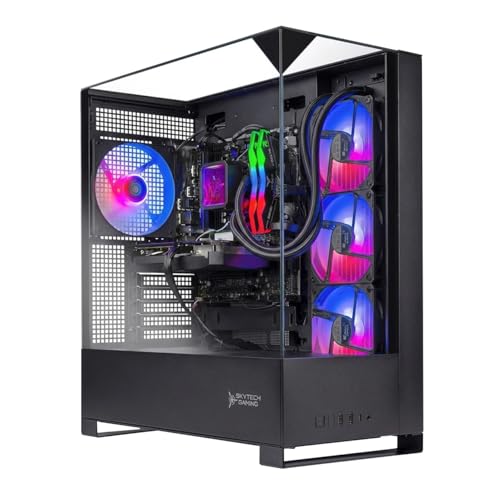
- 8-core Ryzen 7 9700X with 5.5GHz turbo
- RTX 5060 Ti 16GB for extra VRAM headroom
- 360mm AIO and 1TB NVMe SSD
Best For: Pilots who want stronger performance and cooling for long sim sessions
Precision HOTAS Controller

- 189 programmable controls for mapping
- Twin throttles with adjustable spring tension
- Hall-effect sensors for accurate axis input
Best For: Players who want a feature-rich HOTAS for flight and space sims
Budget-Friendly Sim Tower

- Ryzen 5 5500 with 6 cores
- RTX 5060 Ti 8GB for 1080p gaming
- 1TB NVMe SSD with 16GB DDR4
Best For: Buyers who want a lower-cost prebuilt for 1080p simulation
Classic Yoke Setup

- Yoke plus throttle quadrant design
- 75 programmable controls
- Steel shaft with desk clamps
Best For: Pilots who want a realistic yoke-and-throttle cockpit feel
RTX 5060 Smart-Display Build
Ryzen 7 9700X Flight-Ready Tower

- Ryzen 7 9700X + RTX 5060 8GB
- 16GB DDR5 and 1TB PCIe 4.0 SSD
- 360mm liquid cooling with 11.3-inch smart display
Best For: Players who want a ready-made flight sim PC with modern connectivity and a polished setup
Flight Control Pack

- Includes joystick, throttle, and pedals
- H.E.A.R.T precision and twist rudder support
- 16 buttons with ambidextrous design
Best For: Sim pilots building a more immersive control setup for PC flight games
RTX 5080 Premium Tower
Aurora ACT1250 Performance Desktop

- Intel Core Ultra 9 285 with RTX 5080
- 32GB DDR5 RAM and 1TB SSD
- 1000W Platinum PSU with water cooling
Best For: Buyers who want a premium, high-performance desktop with plenty of sim headroom
Precision Rudder Control
Logitech G Pro Flight Rudder Pedals

- Smooth self-centering rudder action
- Adjustable tension for lighter or heavier feel
- Differential toe brakes for runway control
Best For: PC flight sim players who want realistic pedal steering and braking
Balanced 1080p Gaming Tower
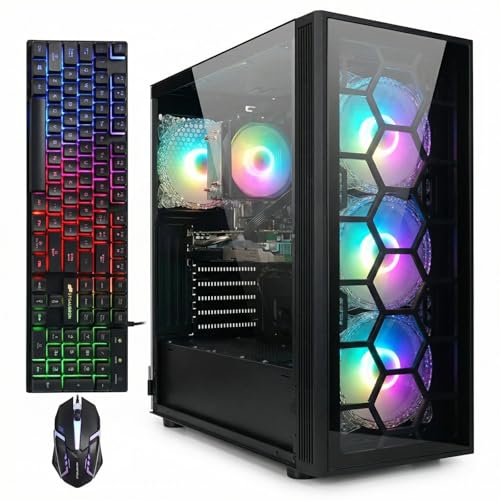
- Ryzen 7 5700G with 16GB DDR4
- RTX 3050 6GB and 1TB SSD
- Wi‑Fi 6, Bluetooth 5.2, Windows 11 Home
Best For: Buyers wanting a prebuilt desktop for 1080p flight sim play
Entry-Level HOTAS Starter

- Detachable throttle for flexible setups
- 12 programmable buttons and 5 axes
- Plug-and-play with adjustable resistance
Best For: PC sim players who want a simple starter HOTAS
Elite Flight-Sim Powerhouse – Ryzen 7 9700X / RTX 5060 Ti 16GB
If you want a gaming PC for Microsoft Flight Simulator that can also handle demanding modern games, this Skytech build stands out with its Ryzen 7 9700X, RTX 5060 Ti 16GB, and fast 6000MHz DDR5 memory. The 1TB NVMe SSD helps keep load times low, while the 360mm AIO cooler is a strong fit for long sim sessions.
Best For: Sim pilots who want a stronger mid-to-high-end PC with extra VRAM and liquid cooling for long sessions.
Pros:
- Ryzen 7 9700X gives you an 8-core AM5 platform with up to 5.5GHz turbo boost.
- RTX 5060 Ti 16GB offers generous VRAM for flight sim textures and other demanding games.
- 360mm AIO liquid cooling is built for sustained performance without thermal throttling.
- 1TB NVMe SSD and 16GB DDR5 6000 keep the system responsive.
Cons:
- 16GB RAM is serviceable, but heavier sim multitasking could benefit from more.
- Wi‑Fi 5 is included, not a newer wireless standard.
This is the most future-ready option in the group for Microsoft Flight Simulator, especially if you value higher graphics headroom and stronger cooling. It is a sensible choice when you want a desktop that can do more than just run the sim.
Precision HOTAS Controller – X56 Throttle and Stick
The Logitech G X56 is a practical add-on for a gaming PC for Microsoft Flight Simulator when you want more hands-on control than a keyboard and mouse can provide. It includes twin throttles, a customizable stick, and a large set of programmable controls designed for flight and space sim inputs.
Best For: Sim players who want a feature-rich HOTAS setup with lots of programmable inputs.
Pros:
- 189 programmable controls give you plenty of room to map sim functions.
- Twin throttles and an adjustable 4-spring system add flexibility.
- Hall-effect sensors and 16-bit axis support are built for precise control.
- RGB lighting and VR-friendly control placement round out the package.
Cons:
- Requires two USB 2.0 ports.
- Best suited to users who plan to spend time learning and mapping controls.
If your priority is tactile control for flight sim maneuvers, the X56 is a strong step up from basic peripherals. It is especially appealing for users who want a complex control layout without moving to a full yoke setup.
Budget-Friendly Sim Tower – Ryzen 5 / RTX 5060 Ti 8GB
For a more affordable gaming PC for Microsoft Flight Simulator, the Skytech Storm pairs a Ryzen 5 5500 with an RTX 5060 Ti 8GB and 16GB of DDR4 memory. It keeps the formula simple with a 1TB NVMe SSD and air cooling, making it a straightforward desktop for 1080p play.
Best For: Buyers who want a lower-cost prebuilt for 1080p simulation and general gaming.
Pros:
- Ryzen 5 5500 provides a 6-core AM4 CPU for everyday sim use.
- RTX 5060 Ti 8GB is a capable dedicated GPU for 1080p gaming.
- 1TB NVMe SSD and 16GB RAM keep the system practical and responsive.
- Air cooling and a mesh-front case support simpler thermals.
Cons:
- DDR4 memory and the older AM4 platform are less current than newer builds.
- 8GB of VRAM is more limited than 16GB options for heavier sim settings.
This build makes sense if you want to get into Microsoft Flight Simulator without stepping up to a pricier premium desktop. It is the more value-focused option, but it is also the one with the least long-term upgrade cushion.
Classic Yoke Setup – PRO Flight Yoke System
The Logitech G PRO Flight Yoke System is a strong match for a gaming PC for Microsoft Flight Simulator if you prefer a more traditional cockpit feel. With a steel shaft, throttle quadrant, and 75 programmable controls, it is designed to make desktop flying feel more natural and familiar.
Best For: Sim fans who want a yoke-and-throttle setup for a more realistic general aviation experience.
Pros:
- Yoke and throttle quadrant offer a more aircraft-like control layout.
- 75 programmable controls provide plenty of assignable functions.
- Steel shaft helps deliver smooth and accurate movement.
- Desk clamps make mounting more secure on a variety of setups.
Cons:
- Requires a bit more desk space than a simple joystick.
- Uses optional software for Microsoft Flight Simulator compatibility.
For users who care about immersion and traditional control feel, this is the most natural companion piece in the lineup. It is a better fit for pilots who want a yoke rather than a combat-style HOTAS.
RTX 5060 Smart-Display Build – Ryzen 7 9700X Flight-Ready Tower
If you’re shopping for a gaming PC for Microsoft Flight Simulator, this KOTIN prebuilt is aimed at smooth 1080p to 1440p play with modern features that make setup easy. The Ryzen 7 9700X, RTX 5060 8GB, and 16GB DDR5 memory should handle the simulator plus background apps well, while the 1TB PCIe 4.0 SSD helps keep load times down.
Best For: Sim pilots who want a ready-to-use desktop with a strong CPU/GPU balance, WiFi 7, and a premium look.
Pros:
- Ryzen 7 9700X and RTX 5060 8GB are built for high-FPS gaming and smooth AAA play.
- 360mm liquid cooling and 80+ Gold 650W PSU add stability for long sessions.
- 11.3-inch smart display shows CPU/GPU usage, temps, memory, SSD usage, and weather.
- WiFi 7, Bluetooth 5.4, and three M.2 slots add modern connectivity and upgrade room.
Cons:
- 16GB RAM is fine for many games, but heavy multitasking may eventually call for an upgrade.
- RTX 5060 8GB is better suited to 1080p to 1440p than top-end 4K targets.
Overall, this is a practical flight sim desktop if you want a plug-and-play setup with strong core specs and some extra flair. The built-in display and liquid cooling make it feel more polished than a basic prebuilt.
Flight Control Pack – T16000M FCS PC Bundle
For a gaming PC for Microsoft Flight Simulator, the right controls matter as much as the desktop itself, and this Thrustmaster T16000M FCS Flight Pack is built for that job. It includes a joystick, throttle, and pedals, with USB PC compatibility and the kind of control layout that suits flight sim inputs.
Best For: PC sim pilots who want an all-in-one starter control setup with joystick, throttle, and pedals.
Pros:
- Includes the flight stick, throttle, and pedals in one package.
- H.E.A.R.T technology is designed for precision that does not decrease over time.
- Ambidextrous joystick with removable components works for left- or right-handed use.
- 16 buttons, an 8-way POV hat, and twist rudder give solid control options.
Cons:
- It is a control bundle, not a PC, so you still need a compatible Windows gaming desktop.
- Software setup may take extra time if you want custom mapping profiles.
This pack makes more sense than a generic gamepad when you want realistic simulator controls. It is a focused add-on for Microsoft Flight Simulator players who want better immersion and finer input control.
RTX 5080 Premium Tower – Aurora ACT1250 Performance Desktop
If you want a high-end gaming PC for Microsoft Flight Simulator, this Alienware Aurora is the most powerful option in the group. Its Intel Core Ultra 9 285 processor, RTX 5080 graphics, and 32GB DDR5 RAM are aimed at demanding gaming and multitasking, while the 1TB SSD and liquid cooling support long sessions.
Best For: Enthusiasts who want a premium desktop with flagship-class graphics and strong multitasking headroom.
Pros:
- RTX 5080 graphics and Intel Core Ultra 9 285 deliver top-tier performance potential.
- 32GB DDR5 RAM is well suited to gaming and multitasking.
- 1000W Platinum PSU and water cooling support sustained high-power use.
- AlienFX lighting and Command Center add customization and performance control.
Cons:
- Higher-end hardware likely goes beyond what casual sim players need.
- 16.46-inch tall chassis and 33.9-pound weight make it less compact.
For buyers who want the strongest headroom and a premium branded desktop, this Alienware stands out. It is a serious pick for Microsoft Flight Simulator when you want flagship hardware and a polished ecosystem.
Precision Rudder Control – Logitech G Pro Flight Rudder Pedals
If you’re building a gaming PC for Microsoft Flight Simulator setup, rudder pedals are one of the biggest upgrades you can make for more realistic control. The Logitech G Pro Flight Rudder Pedals add smooth self-centering movement, adjustable tension, and differential toe brakes so you can handle taxiing, turning, and runway stops with more finesse.
Best For: Flight sim players who want more realistic pedal control and toe brake input on PC.
Pros:
- Smooth, accurate self-centering rudder pedals
- Adjustable tension dial for lighter or heavier feel
- Differential toe brakes for runway and ground control
- USB 2.0 PC compatibility with Windows support
Cons:
- Requires extra desk or floor space
- Windows-focused compatibility
For simmers who want finer directional control than a keyboard or joystick twist axis can provide, these pedals are a practical cockpit-style upgrade. They are especially appealing if you want to tune the feel to match different aircraft types.
Balanced 1080p Gaming Tower – STGAubron Ryzen 7 RTX 3050
If you’re shopping for a gaming PC for Microsoft Flight Simulator and want a ready-to-go tower, this STGAubron system offers a practical mix of Ryzen 7 performance, 16GB memory, and an RTX 3050 6GB graphics card. It is also positioned as a general-purpose desktop for gaming, streaming, editing, and everyday work, with Windows 11 Home preinstalled.
Best For: PC flight sim players who want a prebuilt Windows 11 desktop for 1080p gaming and everyday use.
Pros:
- AMD Ryzen 7 5700G processor with up to 4.6GHz boost
- NVIDIA GeForce RTX 3050 6GB graphics
- 16GB DDR4 memory and 1TB SSD included
- Wi-Fi 6, Bluetooth 5.2, and multiple video outputs
Cons:
- Geared toward 1920×1080 maximum display resolution
- Only 16GB RAM installed out of a 32GB maximum
As a prebuilt desktop, it covers the basics well for players who want to install the sim and start flying without assembling parts. The included RGB keyboard and mouse also make it a convenient all-in-one starter option.
Entry-Level HOTAS Starter – Thrustmaster T-Flight Hotas X
For a gaming PC for Microsoft Flight Simulator setup, a HOTAS controller can make flying feel much more natural than a standard gamepad. The Thrustmaster T-Flight Hotas X combines a detachable throttle, ergonomic grip, and programmable controls, making it a straightforward way to get hands-on control on PC.
Best For: PC sim players who want an affordable, easy-to-use HOTAS with built-in throttle.
Pros:
- Detachable full-size throttle for flexible desk setups
- 12 programmable buttons and 5 axes
- Adjustable resistance for more precise stick feel
- Plug-and-play design with preconfigured controls
Cons:
- PC-focused compatibility
- Basic layout may not suit advanced cockpit builders
This is a sensible choice if you want quick setup and practical flight controls without a complicated learning curve. Its built-in memory and profile switching also make it easy to tailor to different flight sim sessions.
How We Picked the Best Gaming PC for Microsoft Flight Simulator
We looked for desktops that offer the best mix of CPU speed, graphics power, memory, cooling, and upgrade potential. Flight Simulator benefits from strong single-core CPU performance, a modern GPU with ample VRAM, and at least 16GB of RAM, with 32GB being preferable for heavier use.
We also considered storage speed and capacity, since the game plus add-ons can consume a lot of space. For bundled flight controls like HOTAS sticks, yokes, and rudder pedals, we prioritized compatibility and value for sim-focused buyers.
Quick Comparison: What Matters Most
If you want the best overall experience, aim for a newer CPU, an RTX 5060 Ti-class card or better, 16GB to 32GB of DDR5 memory, and a fast NVMe SSD. Midrange systems can still deliver a good experience at 1080p or 1440p, while premium rigs are better suited for higher resolutions, denser scenery, and smoother performance in busy airports.
Key Buying Factors for a Gaming PC for Microsoft Flight Simulator
CPU Performance
Flight Simulator is often CPU-limited, especially in large cities and detailed airports. A recent Ryzen 7 or Core Ultra-class processor is a strong starting point if you want smoother minimum frame rates.
GPU and VRAM
The graphics card handles resolution, visual quality, and texture-heavy scenery. For a Gaming PC for Microsoft Flight Simulator, more VRAM helps reduce stutter when you use high-resolution assets, complex weather, or add-on aircraft.
Memory and Storage
16GB RAM is workable, but 32GB is a smarter long-term choice for serious sim users. A 1TB NVMe SSD is a practical minimum because the base game and expansions grow quickly.
Cooling and Power Delivery
Stable cooling matters during long flights. A well-cooled system with a quality power supply is more likely to sustain performance without throttling.
Who Should Buy Which Gaming PC for Microsoft Flight Simulator?
Budget-minded buyers should look for a system that can handle 1080p play and still leave room for upgrades later. Mainstream buyers who want a balanced setup should prioritize newer CPUs, stronger GPUs, and DDR5 memory for better longevity. Enthusiasts who want ultra-smooth performance, higher resolutions, and heavier scenery should step up to premium hardware with more RAM and top-tier graphics.
If you also plan to build a full cockpit setup, consider pairing your PC with a yoke, HOTAS, or rudder pedals for a more realistic and immersive experience. The right combination depends on whether you value raw performance, value, or a true sim-pilot feel.