
Choosing a mini pc for Kubernetes is mostly about matching real cluster needs to compact hardware. The best options balance CPU threads, memory headroom, fast SSD storage, and reliable networking.
This roundup focuses on practical mini PCs that make sense for lab clusters, lightweight edge deployments, and homelab testing without wasting power or desk space.
Best 10 Mini PC for Kubernetes Picks for 2026
Quiet Business Choice
Intel 7505 Mini PC with 3-Year Warranty

- Fast single-core Intel 7505 for responsive daily use
- Upgradeable to 64GB RAM and 2TB SSD
- Quiet 24/7 design with 3-year warranty
Best For: Light homelabs and business users who want quiet, upgradeable hardware
Budget-Friendly Balanced Pick
Ryzen R2544 Mini Desktop for Everyday Use

- Ryzen R2544, 16GB RAM, and 512GB SSD
- Supports Linux, PXE, Wake On LAN, and Auto Power On
- Triple-display output with VESA mounting
Best For: Affordable everyday use and light lab setups that need simple manageability
Entry-Level Value Pick
Intel N95 Mini PC for Light Workloads
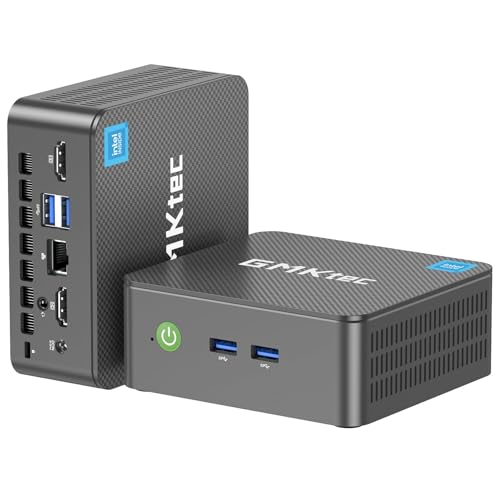
- Intel N95 with 8GB RAM and 256GB SSD
- Dual HDMI 2.0 for two 4K displays
- Wake-on-LAN, PXE Boot, and Auto Power On
Best For: Budget buyers who need a simple machine for light workloads and testing
Efficient Everyday Pick
Ryzen 7330U Mini PC for Quiet Multitasking

- Ryzen 7330U 4C/8T for efficient day-to-day performance
- 16GB LPDDR4X RAM plus 256GB SSD
- Triple 4K output and VESA-ready compact design
Best For: Light Kubernetes labs, coding, and office multitasking
Power User Choice
Ryzen 7 Pro 8845HS Mini PC for Heavy Workloads

- 8C/16T Ryzen 7 Pro 8845HS with strong benchmark claims
- 32GB DDR5 and 1TB PCIe 4.0 storage
- Dual 2.5GbE plus USB4 for lab-friendly connectivity
Best For: Advanced Kubernetes home labs and heavy multitasking
Budget-Friendly Lab Starter
Ryzen 5300U Mini PC with Dual LAN

- Ryzen 3 5300U 4C/8T for light Kubernetes tasks
- 1TB SSD and 16GB RAM included
- Dual 2.5GbE LAN and triple 4K display support
Best For: Entry-level Kubernetes labs and budget home servers
Budget-Friendly Windows Pick

- Ryzen R2544 with 4 cores and up to 3.7GHz
- 16GB RAM, 256GB SSD, and Linux/PXE support
- Compact VESA design with Gigabit Ethernet
Best For: Home labs and light Kubernetes node or controller use
Networking-Ready Homelab Choice

- Ryzen 3 5300U with 4 cores and 8 threads
- Dual 2.5GbE LAN ports for lab networking
- Upgradeable to 64GB RAM with triple 4K display support
Best For: Homelab Kubernetes nodes and dual-NIC network roles
Balanced Storage and Performance Pick

- Ryzen 5 3500U with 16GB dual-channel RAM
- 512GB SSD plus dual M.2 expansion slots
- 2.5GbE, Wi-Fi 5, and triple-display support
Best For: All-round Kubernetes labs and general-purpose homelab use
High-Performance Pick – Ryzen 7 7735HS Mini PC for Heavy Multitasking
If you want a mini pc for Kubernetes-style multitasking, lab work, and always-on containers, this KAMRUI model is built around the Ryzen 7 7735HS and 16GB of fast LPDDR5 memory. Its 8-core/16-thread CPU, 2.5GbE LAN, and dual M.2 expansion make it a stronger fit for heavier local workloads than basic entry-level minis.
Best For: Users who want a compact mini PC with stronger CPU headroom, fast networking, and flexible storage for development or homelab use.
Pros:
- Ryzen 7 7735HS offers 8 cores, 16 threads, and up to 4.75GHz for sustained multitasking.
- 16GB LPDDR5 RAM and a 512GB SSD, with support for up to 4TB storage expansion.
- 2.5GbE Ethernet plus WiFi 6 is a good fit for networked workloads and file transfers.
- Triple display support and many USB ports make it easy to build a compact workstation.
Cons:
- 16GB RAM may be limiting if you plan to run larger Kubernetes clusters locally.
- More power than a basic office mini PC, so it may be overkill for simple browsing.
- Best storage flexibility still depends on adding your own SSD upgrades.
This is the most capable option in the group for users who want more CPU performance, better cooling, and room to grow. It stands out if your mini pc for Kubernetes needs lean toward a stronger dev box or homelab node rather than a bare-bones client machine.
Quiet Business Choice – Intel 7505 Mini PC with 3-Year Warranty
This GEEKOM Air12 is a practical mini pc for Kubernetes learning, light lab testing, or remote admin work when you want low power draw and quiet 24/7 operation. The Intel 7505 is tuned for responsive single-core performance, and the dual-slot design lets you scale memory and storage later as your needs grow.
Best For: Light homelabs, business desktops, and users who value quiet operation, long warranty support, and easy upgrade paths.
Pros:
- Intel 7505 delivers faster single-core performance than N95/N100/N150 chips.
- Dual-slot memory and NVMe storage support up to 64GB RAM and 2TB SSD.
- Triple 4K display support, WiFi 6, Bluetooth, and multiple USB ports.
- Built for quiet 24/7 use and backed by a 3-year warranty.
Cons:
- 8GB RAM and 256GB SSD are modest out of the box for more demanding workloads.
- Better suited to light containers and admin tasks than heavy multi-node clustering.
- Pentium-class CPU is not aimed at high-performance compute jobs.
For buyers prioritizing stability, low noise, and upgrade flexibility, this is a well-balanced small desktop. It makes sense when your mini pc for Kubernetes use is more about a quiet lab node or management box than raw performance.
Budget-Friendly Balanced Pick – Ryzen R2544 Mini Desktop for Everyday Use
If you need a practical mini pc for Kubernetes experiments, office work, or a small home server role, the KAMRUI Pinova P1 offers a balanced hardware package. Its Ryzen R2544 processor, 16GB RAM, and 512GB SSD give it more room than ultra-cheap mini systems, while the compact chassis and VESA mount keep it easy to place anywhere.
Best For: Users who want a compact, affordable desktop for everyday tasks, light Linux use, and small-scale lab setups.
Pros:
- Ryzen R2544 is rated higher than 10110U and N150/N95 in the supplied notes.
- 16GB RAM and 512GB SSD provide a more comfortable baseline for multitasking.
- Supports Linux, PXE, Wake On LAN, Auto Power On, and RTC Wake.
- Triple-display support and VESA mounting improve workspace flexibility.
Cons:
- 4-core/4-thread CPU is less capable than higher-end options for bigger clusters.
- WiFi 5 and Bluetooth 4.2 are older than the wireless features on some rivals.
- Not the best pick if you plan to run demanding containers or heavy compile workloads.
This model is a sensible middle ground if you want a compact machine without paying for more horsepower than you need. For a mini pc for Kubernetes in a light lab environment, it provides useful manageability features and decent expansion for the price tier.
Entry-Level Value Pick – Intel N95 Mini PC for Light Workloads
For buyers seeking a compact mini pc for Kubernetes testing, home entertainment, or basic office tasks, the GMKtec Nucbox G3S keeps the hardware straightforward. The Intel N95 chip, 8GB RAM, and 256GB SSD are enough for routine use and light multitasking, while dual HDMI and Wake-on-LAN features make it a flexible little box.
Best For: Entry-level users who want a low-cost mini desktop for light workloads, simple lab tinkering, and media playback.
Pros:
- Intel N95 is positioned above older N-series chips for routine performance.
- Dual HDMI 2.0 outputs support two 4K@60Hz displays.
- Wake On LAN, PXE Boot, RTC Wake, and Auto Power On are useful for always-on setups.
- WiFi 5, Bluetooth 5.0, and Gigabit Ethernet cover basic connectivity needs.
Cons:
- 8GB RAM and 256GB SSD are modest for container-heavy workloads.
- Intel N95 is best suited to light tasks rather than demanding compute.
- Less expansion headroom than higher-tier mini PCs in this roundup.
This is the simplest option here, and it makes sense when budget matters more than raw capacity. If your mini pc for Kubernetes needs are limited to testing, remote access, or small utility services, it delivers the essentials without complexity.
Efficient Everyday Pick – Ryzen 7330U Mini PC for Quiet Multitasking
If you want a mini pc for Kubernetes that stays compact, quiet, and efficient, the KAMRUI Pinova P2 is a practical fit for lighter cluster work, coding, and general multitasking. Its Ryzen 7330U, 16GB LPDDR4X memory, and fast SSD make it a solid small desktop for development tasks, while the triple-display support helps when you want multiple dashboards or terminals open at once.
Best For: Home lab users, developers, and office buyers who want a low-power mini PC for Kubernetes-related tasks and everyday productivity.
Pros:
- Ryzen 7330U 4C/8T chip is tuned for efficient multitasking and heavier-than-basic workloads.
- 16GB LPDDR4X RAM and 256GB SSD provide a responsive base for apps and local tools.
- Triple 4K display output supports multi-monitor setups for dashboards and monitoring.
- Small case with VESA mount and quiet cooling helps it fit neatly into a desk or rack-like workspace.
Cons:
- 256GB included storage is modest if you plan to keep many images, logs, or project files locally.
- It is better suited to efficient development and light lab use than high-intensity virtualization.
Overall, this is a balanced mini PC for Kubernetes learners or home-lab builders who value efficiency and a compact footprint over maximum raw power. It gives you the essentials for a tidy, always-on workspace without pushing into high-wattage territory.
Power User Choice – Ryzen 7 Pro 8845HS Mini PC for Heavy Workloads
If your mini pc for Kubernetes needs can stretch into heavier virtualization, builds, and lab workloads, the Getorli AI Mini PC is the strongest option in this group. The Ryzen 7 Pro 8845HS brings 8 cores and 16 threads, while the 32GB DDR5 RAM and 1TB PCIe 4.0 SSD give you a much larger foundation for containers, tools, and local services.
Best For: Advanced home-lab builders, developers, and power users who want a high-performance mini PC for Kubernetes and multitasking.
Pros:
- Ryzen 7 Pro 8845HS offers desktop-class performance with 8C/16T for demanding workloads.
- 32GB DDR5 memory and 1TB PCIe 4.0 SSD are well suited to multi-app and VM-heavy setups.
- Dual 2.5GbE ports make it appealing for wired networking and lab environments.
- USB4 ports, HDMI 2.1, and DP 1.4 provide strong connectivity and display flexibility.
Cons:
- Higher 54W-65W TDP means it is not as power-sipping as lower-tier mini PCs.
- Its performance focus may be more than casual users need for simple office tasks.
This is the most capable mini PC here for Kubernetes-style workloads, especially if you want room for containers, background services, and other demanding tools. If performance and networking matter more than low power draw, it stands out clearly.
Budget-Friendly Lab Starter – Ryzen 5300U Mini PC with Dual LAN
For a budget-conscious mini pc for Kubernetes setup, the BOSGAME E5 gives you a sensible mix of CPU cores, memory, storage, and networking. The Ryzen 3 5300U is a 4C/8T chip, and the included 16GB DDR4 RAM, 1TB PCIe SSD, and dual 2.5GbE ports make it a practical entry point for smaller home-lab projects and basic container testing.
Best For: Entry-level Kubernetes experimentation, home server use, and budget buyers who want dual LAN.
Pros:
- Ryzen 3 5300U 4C/8T processor is suitable for light-to-moderate workloads.
- 1TB PCIe SSD provides generous included storage for images, files, and projects.
- Dual 2.5GbE LAN ports are useful for networked lab setups.
- Triple 4K display support adds flexibility for dashboards or desktop use.
Cons:
- DDR4 memory and older Wi-Fi 5/BT 5.0 are less modern than higher-end alternatives.
- Its CPU is better for entry-level use than for large or resource-heavy clusters.
The E5 is a straightforward choice if you want an affordable way to start learning, testing, or hosting small services. It is not the fastest system here, but its dual LAN and roomy SSD make it easy to justify for practical lab use.
Budget-Friendly Windows Pick – KAMRUI Pinova P1 Mini PC
If you want a mini pc for Kubernetes on a tighter budget, the KAMRUI Pinova P1 offers a practical mix of compact size, modern I/O, and Linux support. Its AMD Ryzen R2544 chip, 16GB of RAM, and 256GB SSD are aimed at everyday responsiveness, while PXE, Wake on LAN, and Auto Power On are useful for small home lab and cluster-management setups.
Best For: Home labs, light Kubernetes control-plane or dev-node use, and small office setups that need Linux support and a space-saving chassis.
Pros:
- AMD Ryzen R2544 with 4C/4T and up to 3.7GHz for light multitasking.
- 16GB RAM and 256GB SSD provide a solid starting point for lab tools and containers.
- Supports Linux, PXE, Wake on LAN, RTC Wake, and Auto Power On.
- Compact VESA-mountable design with Gigabit Ethernet and dual-band Wi-Fi.
Cons:
- Only one Gigabit Ethernet port, so it is less network-focused than dual-LAN options.
- 256GB storage is serviceable, but not generous for larger images or log-heavy labs.
- Bluetooth 4.2 is older than the newer versions found on some rivals.
Overall, this is the most straightforward budget option in the group if you need a compact mini pc for Kubernetes experiments rather than a more advanced homelab gateway or storage-heavy node.
Networking-Ready Homelab Choice – BOSGAME E5 Mini PC
The BOSGAME E5 is a strong mini pc for Kubernetes if your priority is networking and expansion. Its Ryzen 3 5300U, dual 2.5GbE LAN ports, and Linux support make it especially appealing for homelab users who want to build cluster nodes, lab firewalls, or other network-aware services in a compact box.
Best For: Homelab builders, Kubernetes experiments, and users who need dual 2.5GbE ports for advanced networking roles.
Pros:
- Ryzen 3 5300U offers 4 cores and 8 threads for better multitasking than low-end N-series chips.
- Dual 2.5GbE LAN ports are ideal for software routers, firewalls, NAS, or lab networking.
- Upgradeable design with dual SODIMM slots and support for up to 64GB RAM.
- Triple 4K display support and a full-function Type-C port add flexibility.
Cons:
- Comes with 8GB RAM in the supplied configuration, so heavy Kubernetes workloads may want an upgrade.
- 256GB SSD is modest if you plan to store many images, backups, or VM data.
- Its strengths lean more toward networking than raw compute compared with higher-tier mini PCs.
For users who care about dual NICs first and foremost, this model stands out as the most homelab-friendly option here and a very sensible choice for a Kubernetes mini server.
Balanced Storage and Performance Pick – GMKtec G10 Mini PC
The GMKtec G10 is a balanced mini pc for Kubernetes when you want more storage headroom and flexible connectivity than the most basic systems. With a Ryzen 5 3500U, 16GB dual-channel RAM, and a 512GB SSD, it gives you a stronger starting point for running lab services, local tooling, and container workloads without immediately needing upgrades.
Best For: Developers and homelab users who want a practical all-rounder for Kubernetes labs, media, and general-purpose desktop use.
Pros:
- Ryzen 5 3500U delivers 4 cores, 8 threads, and boost speeds up to 3.7GHz.
- 16GB dual-channel RAM and 512GB SSD provide a better baseline for storage and multitasking.
- Dual M.2 slots support substantial future storage expansion.
- 2.5GbE Ethernet, Wi-Fi 5, and triple-display output improve versatility.
Cons:
- It is still a midrange 15W-class chip, so it is not aimed at heavier server-grade Kubernetes workloads.
- Performance mode tuning requires BIOS changes if you want the higher-power profile.
- While it supports up to 32GB on the CPU side, the practical value depends on your upgrade plan.
If you want one machine that can cover a desktop, media, and small cluster-lab duties, the G10 is the most rounded pick in this set.
How We Picked the Best Mini PC for Kubernetes
For a Mini PC for Kubernetes, we looked for systems that are practical as single-node labs or small multi-node clusters. Priority went to CPUs with enough cores and threads for running multiple containers, plus configurations that can handle at least 16GB of RAM for a smoother control plane and workload mix.
We also favored models with SSD storage, upgradeable memory where possible, and networking that supports stable cluster communication. Features like 2.5GbE are especially helpful if you plan to move images, run distributed storage, or connect several nodes on the same LAN.
Quick Comparison: What Matters Most
If you want the simplest setup, choose a quieter, lower-power mini PC with 8GB to 16GB RAM for learning Kubernetes basics. If you want room for add-ons like monitoring, ingress, databases, or multiple test apps, move up to stronger Ryzen-based systems with 16GB or 32GB memory and larger SSDs.
For multi-node homelabs, network speed and reliability matter almost as much as raw CPU. A faster NIC can improve cluster responsiveness more than a small CPU bump in everyday use.
Key Buying Factors for a Mini PC for Kubernetes
CPU and Core Count
Kubernetes is more comfortable on CPUs with multiple cores and threads. Lightweight clusters can run on modest chips, but smoother scheduling and better multitasking usually come from modern Ryzen or efficient Intel processors.
Memory Capacity
RAM is often the first bottleneck. For testing and small workloads, 8GB can work, but 16GB is a better starting point, and 32GB is ideal if you plan to run several pods, observability tools, or a control plane alongside application workloads.
Storage and Upgrades
SSD capacity affects image pulls, log retention, and general responsiveness. A 256GB drive may be enough for a basic lab, but 512GB or 1TB gives more breathing room. Upgradeable slots are valuable because Kubernetes environments tend to grow.
Networking
Stable Ethernet is essential. For a Mini PC for Kubernetes, dual LAN or 2.5GbE can be a strong advantage, especially in a clustered setup or when using local registries and shared storage.
Who Should Buy Which Mini PC for Kubernetes?
If you are just learning Kubernetes, a lower-cost mini PC with modest specs is usually enough to start. If you want a long-term homelab node, choose a higher-RAM Ryzen model with stronger CPU headroom and better upgrade potential.
For edge deployments or always-on services, prioritize efficient power use, dependable Ethernet, and enough RAM to stay stable under load. If you plan to run heavier containers, databases, or multiple nodes, spend more on CPU and memory now to avoid hitting limits later.
In short, the best Mini PC for Kubernetes is not just the fastest one. It is the one that gives you enough memory, storage, and networking to keep your cluster usable as your workloads expand.