
If you want a single monitor that can replace a cramped dual-screen setup, a Dell UltraSharp ultrawide monitor for work is one of the most practical upgrades you can make. These displays are built for long days of spreadsheets, timelines, code, creative projects, and video calls.
In this roundup, we focus on models that balance screen space, sharpness, connectivity, and desk-friendly ergonomics so you can choose the right fit without overbuying.
Best 10 Dell Ultrasharp Ultrawide Monitor for Work Picks for 2026
Best for Docked Productivity
Dell U3421WE 34" Curved USB-C Monitor
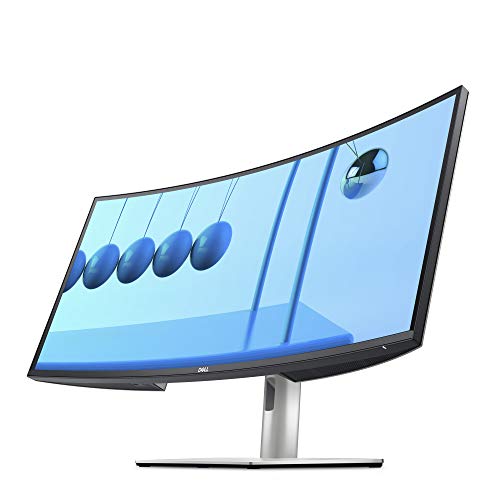
- 34.14-inch 21:9 curved ultrawide panel
- USB-C hub helps simplify your desk setup
- Ergonomic stand with height, tilt, swivel, and slant adjustments
Best For: Office users who want a roomy ultrawide monitor with easy docking and strong ergonomics.
Best for Color-Accurate Work
Dell UltraSharp U2725QE 27-inch 4K Thunderbolt 4

- 4K IPS Black panel with factory calibration
- Thunderbolt 4 single-cable docking with 140W power
- 120Hz refresh and full ergonomic adjustments
Best For: Professionals who want a color-accurate 4K monitor with one-cable laptop docking.
Best for Cable-Managed Desk Setups
Dell UltraSharp 34 Curved USB-C Hub Monitor
- 34-inch 21:9 ultrawide display for side-by-side work
- 90W USB-C hub plus RJ45 Ethernet cuts desk clutter
- Adjustable stand and VESA support suit office ergonomics
Best For: Remote workers and office users who want a clean, single-cable ultrawide workstation.
Best for Multitasking
Dell UltraSharp 34 U3425WE Curved Monitor

- 34-inch curved 21:9 screen is ideal for side-by-side work
- Anti-glare panel and ambient light sensor reduce eye strain
- Picture-by-Picture and daisy chain features aid multi-device setups
Best For: Professionals who need a roomy ultrawide for spreadsheets, documents, and dual-device workflows.
Best for Dual-Device Productivity
Dell UltraSharp U3824DW 37.5" Curved USB-C Hub
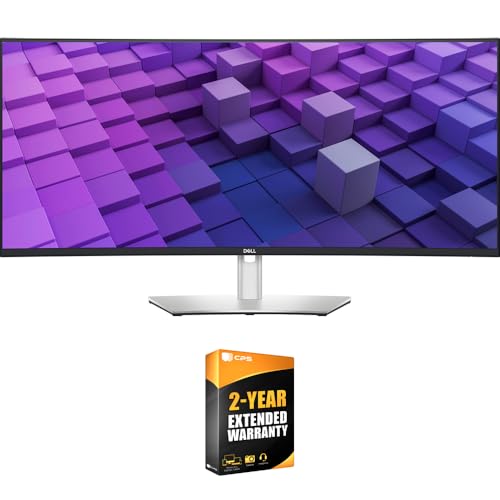
- 37.5-inch 21:9 ultrawide is great for multitasking
- USB-C hub with up to 90W charging cuts cable clutter
- Auto KVM makes switching between two PCs simple
Best For: Professionals who want a spacious ultrawide with USB-C docking and easy dual-PC control.
Best for Serious Multitasking
Dell UltraSharp U4924DW 49" DQHD Curved Monitor

- 49-inch 32:9 display mimics two QHD monitors
- USB-C with up to 90W power delivery
- Auto KVM and Ethernet support busy desk setups
Best For: Power users who want one ultra-wide display for spreadsheets, creative work, and dual-PC workflows.
Best Ultrawide Hub Monitor
Dell U3821DW Curved USB-C Monitor

- 37.5-inch 3840 x 1600 ultrawide boosts workspace
- USB-C hub with 90W power delivery and Ethernet
- Auto KVM, PBP, and PIP support dual-PC workflows
Best For: Professionals who want a productivity-focused ultrawide with docking and easy multitasking.
Best for Desktop Multitasking
Dell UltraSharp U4025QW 40" 5K2K Curved Monitor

- 40-inch 5K2K ultrawide panel for serious multitasking
- USB-C helps simplify docking and cable management
- 600-nit brightness suits bright office environments
Best For: Professionals who want a spacious, high-resolution ultrawide for productivity and clean desk setups.
Best Heavy-Duty Pick
Dell UltraSharp U3225QE 32" 4K Thunderbolt Monitor

- 4K sharpness with 31.5-inch workspace
- IPS Black panel with deeper contrast
- Thunderbolt hub for easy docking
Best For: Professionals who want a spacious, color-accurate monitor for productivity and a clean single-cable desk setup.
Best for Spreadsheets & Multitasking
Dell UltraSharp 49 Curved USB-C Monitor U4919DW

- 49-inch super-ultrawide format for serious multitasking
- USB-C helps streamline modern workstations
- Great for spreadsheets, timelines, and side-by-side apps
Best For: Professionals who need maximum horizontal workspace for finance, coding, editing, or heavy multitasking.
Best for Docked Productivity – Dell U3421WE 34" Curved USB-C Monitor
If you’re looking for a dell ultrasharp ultrawide monitor for work, the Dell U3421WE is built around productivity first: a 34.14-inch 21:9 curved panel, WQHD resolution, and USB-C hub connectivity that helps cut cable clutter on a desk.
Best For: Professionals who want a spacious ultrawide workspace, easy docking, and ergonomic adjustments for long office days.
Pros:
- 3440 x 1440 ultrawide resolution gives you room for side-by-side windows and timelines
- USB-C hub design is ideal for a cleaner, more streamlined workstation
- Height, tilt, swivel, and slant adjustments make it easier to dial in comfort
- Anti-glare coating helps reduce distractions in bright office environments
Cons:
- 60Hz refresh rate is fine for work, but not aimed at fast-paced gaming
- Large footprint may feel big on smaller desks
- Not the highest-resolution ultrawide in its class
For buyers focused on desk efficiency and all-day comfort, this Dell delivers a practical balance of screen space, ports, and adjustability. As a dell ultrasharp ultrawide monitor for work, it makes sense if you value a tidy setup more than flashy extras.
Best for Color-Accurate Work – Dell UltraSharp U2725QE 27-inch 4K Thunderbolt 4
If you want a dell ultrasharp ultrawide monitor for work experience focused on sharp text, reliable color, and clean cable management, the U2725QE is a strong fit. It pairs a 4K IPS Black panel with factory calibration, a fast 120Hz refresh rate, and Thunderbolt 4 docking so your desk stays streamlined.
Best For: Professionals who want a highly accurate 27-inch 4K monitor with dock-like connectivity for office, creative, and multitasking setups.
Pros:
- 4K IPS Black panel with 99% DCI-P3 and factory calibration for accurate color
- Thunderbolt 4 delivers video, data, and up to 140W charging over one cable
- 120Hz refresh rate makes scrolling and window switching feel smoother
- Strong ergonomic adjustments plus HDMI 2.1, USB-A, USB-C, and Ethernet
Cons:
- 27-inch size may feel small if you specifically want an ultrawide layout
- Premium feature set pushes the price above basic office monitors
For buyers comparing a dell ultrasharp ultrawide monitor for work, this model stands out more for precision, docking convenience, and comfort than sheer screen width. It is especially appealing if you prefer a crisp 4K workspace and want one monitor to handle display and laptop charging at once.
Best for Cable-Managed Desk Setups – Dell UltraSharp 34 Curved USB-C Hub Monitor
If you want a dell ultrasharp ultrawide monitor for work that can do more than just add screen space, the Dell UltraSharp U3421WE is a strong productivity pick. Its 34-inch 21:9 curved panel gives you room for side-by-side windows, while the USB-C hub, RJ45 Ethernet, and 90W power delivery help reduce dock clutter on a busy desk.
Best For: Professionals who want a clean, single-cable ultrawide setup for spreadsheets, multitasking, and hybrid office work.
Pros:
- 34-inch 3440 x 1440 ultrawide panel is great for multitasking
- USB-C hub with 90W charging helps simplify workstation connections
- Built-in RJ45 Ethernet is useful for stable office networking
- Height, tilt, swivel, and VESA support make it easy to position
Cons:
- 60Hz refresh rate is fine for work, but not ideal for gaming
- Renewed condition may not appeal to buyers who want brand-new gear
This is a practical dell ultrasharp ultrawide monitor for work if your priority is productivity and desk organization rather than raw speed. The combination of ultrawide workspace, docking features, and business-friendly ergonomics makes it especially appealing for remote workers and office setups.
Best for Multitasking – Dell UltraSharp 34 U3425WE Curved Monitor
If you want a dell ultrasharp ultrawide monitor for work that makes split-screen productivity feel effortless, the Dell UltraSharp 34 U3425WE is a strong fit. Its 34-inch curved 21:9 layout gives you room for spreadsheets, timelines, and reference docs side by side, while the anti-glare finish and ambient light sensor help keep the image comfortable through long office hours.
Best For: Professionals who juggle multiple windows all day and want a clean, ergonomic ultrawide workstation.
Pros:
- Wide 34-inch curved 21:9 canvas is great for multitasking
- Anti-glare display and ambient light sensor support comfortable all-day use
- Picture-by-Picture and Digital Daisy Chain features help with multi-device workflows
- Locking stand adds a secure, office-friendly setup
Cons:
- UW-QHD resolution is sharp for work, but not ideal for users chasing 4K detail
- Large size may be more monitor than some compact desks need
This is a practical pick if your priority is workspace efficiency over flashy gaming specs. For anyone searching for a dell ultrasharp ultrawide monitor for work, it stands out as a polished, productivity-first option with useful extras that simplify a busy desk.
Best for Dual-Device Productivity – Dell UltraSharp U3824DW 37.5" Curved USB-C Hub
If you want a dell ultrasharp ultrawide monitor for work that feels built for serious multitasking, the Dell UltraSharp U3824DW is a strong fit. Its 37.5-inch curved 3840×1600 display gives you plenty of room for side-by-side windows, while the IPS Black panel delivers excellent contrast and color accuracy for office, creative, and mixed-use workflows.
Best For: Professionals who want a spacious ultrawide with USB-C docking, strong color performance, and easy dual-PC switching.
Pros:
- Huge 37.5-inch 21:9 screen is ideal for multitasking and timeline-heavy work
- USB-C hub with up to 90W power delivery reduces cable clutter
- IPS Black panel offers deep contrast and accurate color for work tasks
- Auto KVM and multiple inputs make dual-device setups easier
Cons:
- 60Hz refresh rate is fine for work, but not aimed at gaming
- Large footprint may be too much for compact desks
- Premium pricing puts it above basic office ultrawides
For buyers comparing a dell ultrasharp ultrawide monitor for work, this model stands out for its dock-like connectivity and polished panel quality. It is especially compelling if you want one monitor to handle your laptop, desktop, and daily productivity setup with minimal hassle.
Best for Serious Multitasking – Dell UltraSharp U4924DW 49" DQHD Curved Monitor
Dell UltraSharp U4924DW 49" Dual Quad HD (DQHD) Curved Screen Edge WLED LCD Monitor - 32:9,Black
Check Price On AmazonIf you want a dell ultrasharp ultrawide monitor for work that can replace a dual-monitor setup, the Dell UltraSharp U4924DW is built for exactly that kind of productivity. Its 49-inch 32:9 panel gives you two 27-inch QHD spaces in one seamless screen, plus USB-C, Ethernet, and KVM features that simplify a busy desk.
Best For: Power users who want one ultra-wide display for spreadsheets, creative work, and dual-PC workflows.
Pros:
- Huge 49-inch DQHD canvas feels like two monitors without the bezel gap
- USB-C with up to 90W power delivery helps keep laptop setups clean
- Auto KVM and RJ45 networking are great for switching between work systems
- IPS Black panel offers strong contrast and wide viewing angles for office use
Cons:
- Very large footprint, so it needs a deep desk and enough wall space
- Premium pricing may be hard to justify for lighter office use
- Its size can feel excessive if you only need a standard single-monitor setup
This is a strong pick if you need a dell ultrasharp ultrawide monitor for work that prioritizes workflow, cable reduction, and screen real estate over portability. For demanding productivity users, it delivers a very polished all-in-one desktop experience.
Best Ultrawide Hub Monitor – Dell U3821DW Curved USB-C Monitor
If you want a dell ultrasharp ultrawide monitor for work that gives you room to multitask without jumping to a super-wide TV-style display, the Dell U3821DW is a strong fit. Its 37.5-inch 3840 x 1600 panel adds extra vertical space for spreadsheets, timelines, and side-by-side windows, while the USB-C hub design helps keep a desk setup clean and efficient.
Best For: Professionals who want a productivity-focused ultrawide with docking, single-cable convenience, and comfortable all-day viewing.
Pros:
- Wide 3840 x 1600 workspace is great for multitasking and document-heavy work
- USB-C with up to 90W power delivery plus RJ-45 creates a true workstation hub
- Auto KVM, PBP, and PIP make it easy to switch between two connected PCs
- Strong color coverage and ComfortView support both creative work and long sessions
Cons:
- 60Hz refresh rate is fine for office use but not ideal for gaming
- Large footprint may overwhelm compact desks
This is a practical dell ultrasharp ultrawide monitor for work if you value screen space, docking convenience, and a polished build over flashy specs. It stands out most for productivity users who want one monitor to replace extra cables, a dock, and even a second display in some setups.
Best for Desktop Multitasking – Dell UltraSharp U4025QW 40" 5K2K Curved Monitor
If you want a dell ultrasharp ultrawide monitor for work that can replace a dual-monitor setup, the Dell UltraSharp U4025QW is built for exactly that kind of desktop multitasking. Its 40-inch 21:9 curved panel, sharp 5K2K resolution, and USB-C connectivity make it a strong fit for people who spend all day on spreadsheets, timelines, creative tools, and side-by-side windows.
Best For: Professionals who want a spacious, high-resolution ultrawide for productivity, docking, and clean cable management.
Pros:
- Large 40-inch 5K2K display gives you plenty of room for multiple windows
- USB-C connectivity supports a cleaner single-cable work setup
- 600-nit brightness helps the screen stay usable in bright offices
- Curved 21:9 format is comfortable for long work sessions
Cons:
- Premium size and features mean a high price compared with basic monitors
- It may be too large for shallow desks or tight workspaces
- 5 ms response time is fine for casual use, but not the main reason to buy it
This is a compelling dell ultrasharp ultrawide monitor for work if your priority is maximizing usable screen space without moving to a dual-display arrangement. It leans hard into productivity and connectivity, so it makes the most sense for office users, remote workers, and creators who want an expansive all-in-one display.
Best Heavy-Duty Pick – Dell UltraSharp U3225QE 32" 4K Thunderbolt Monitor
If you want a dell ultrasharp ultrawide monitor for work in the practical sense of a roomy, high-end desktop display, the Dell UltraSharp U3225QE is built for exactly that kind of daily office and creative use. Its 32-inch 4K panel, 120Hz refresh rate, and Thunderbolt hub make it a strong pick for multitasking, docked laptop setups, and anyone who cares about sharp text and accurate color.
Best For: Professionals who want a spacious, color-accurate monitor for productivity, content work, and a clean single-cable desk setup.
Pros:
- 4K resolution on a 31.5-inch panel gives you sharp text and plenty of workspace
- IPS Black with 3000:1 contrast improves blacks and overall image depth
- Thunderbolt hub simplifies laptop docking and peripheral connections
- 120Hz refresh rate makes scrolling and window movement feel smoother than standard office monitors
Cons:
- Not a true ultrawide, so horizontal workspace is more limited than 34-inch curved models
- Premium pricing may be hard to justify for basic office tasks
- Large 4K panel may require scaling adjustments on some systems
For buyers comparing a dell ultrasharp ultrawide monitor for work against standard 16:9 options, this model stands out more for image quality, docking convenience, and smooth everyday use than for sheer width. It is a better fit if you want a polished all-purpose productivity monitor instead of a traditional ultrawide layout.
Best for Spreadsheets & Multitasking – Dell UltraSharp 49 Curved USB-C Monitor U4919DW
If you want a dell ultrasharp ultrawide monitor for work that can replace a dual-monitor setup, the Dell UltraSharp 49 Curved USB-C Monitor U4919DW is built for wide-format productivity. Its 49-inch super-ultrawide layout gives you room for side-by-side windows, large timelines, and dense spreadsheets without constant tab switching.
Best For: Professionals who need maximum horizontal workspace for finance, coding, editing, or heavy multitasking.
Pros:
- Massive 49-inch screen is excellent for split-screen workflows
- USB-C connectivity helps keep desk setups cleaner and simpler
- Curved panel improves comfort when viewing the full width
- UltraSharp tuning suits long work sessions and detail-focused tasks
Cons:
- Very large size needs plenty of desk space
- Not the best fit if you mainly need a compact monitor
- Premium pricing may be hard to justify for basic office use
For buyers comparing a dell ultrasharp ultrawide monitor for work, this model stands out most when productivity and screen real estate matter more than minimal footprint. It is a strong choice if you want to consolidate two monitors into one wide, efficient workspace.
How We Picked the Best Dell Ultrasharp Ultrawide Monitor for Work
For a Dell Ultrasharp Ultrawide Monitor for Work, the most important factors are usable screen area, text clarity, USB-C or Thunderbolt docking, and strong ergonomics. We prioritized models that suit real office workflows rather than gaming-first specs.
We also looked for reliable panel quality, wide aspect ratios that support multitasking, and features like KVM support, RJ45 Ethernet, and high-wattage charging where they add genuine productivity value.
Quick Comparison
Smaller ultrawides around 34 inches are usually best for standard desks and single-user productivity. Mid-size 38- to 40-inch models offer a better balance of width and vertical space for side-by-side documents, timelines, and dashboards. Huge 49-inch displays are ideal for power users who want one-screen replacement for multiple monitors.
If resolution matters most, favor higher pixel density for crisp text and long editing sessions. If docking matters most, look for USB-C with sufficient power delivery, upstream ports, and Ethernet built in.
Key Buying Factors for Dell Ultrasharp Ultrawide Monitor for Work
Screen Size and Aspect Ratio
Choose the size that matches both your desk depth and your workflow. A 34-inch 21:9 screen is a safe all-rounder, while 38- to 40-inch curved ultrawides give more breathing room for split windows. A 49-inch 32:9 model is best only if you truly need a very wide canvas.
Resolution and Text Sharpness
Resolution should scale with size. Lower-density ultrawides can look fine from a normal viewing distance, but sharper models make spreadsheets, code, and dense documents easier on the eyes. If you work with lots of text, prioritize clarity over raw width.
USB-C, Thunderbolt, and Docking
Many buyers choose a Dell UltraSharp because one cable can handle video, data, and laptop charging. For a work monitor, USB-C or Thunderbolt with enough wattage to power your laptop can simplify your desk dramatically. Extras like Ethernet and USB hub ports reduce clutter further.
Color, Panel Type, and Comfort
IPS Black and similar premium IPS panels are helpful if you want strong contrast, wide viewing angles, and consistent office-friendly image quality. A curved screen can improve immersion and make wide layouts feel more natural, especially on larger displays.
Who Should Buy Which Dell Ultrasharp Ultrawide Monitor for Work?
If you want the most balanced option, choose a 34-inch Dell UltraSharp ultrawide. If you need more vertical space for document work or multiple app panes, step up to a 38- or 40-inch model. If you live in spreadsheets, dashboards, or complex multitasking, a 49-inch display may be the best productivity choice.
For laptop users who dock daily, prioritize Thunderbolt or high-power USB-C. For home offices where desk space is tight, a more compact ultrawide often delivers the best mix of comfort, value, and simplicity.