
If you want better temperatures without turning your PC into a noise source, the right fan setup matters. Corsair offers several strong options for airflow-focused builds, from simple PWM fans to integrated RGB ecosystems.
This roundup covers the best Corsair case fans for airflow in 2026, plus a few matching case and fan-system options that help you choose the right cooling setup for your build goals.
Best 10 Corsair Case Fans for Airflow Picks for 2026
Best for RGB + Cable-Simplified Builds
CORSAIR iCUE Link LX120 3-Pack
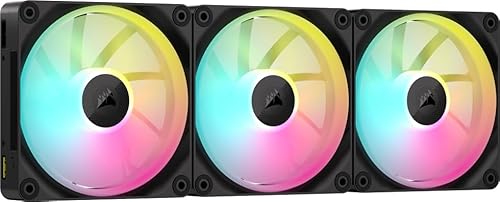
- Strong airflow with 2,400 RPM PWM control
- High static pressure suits radiators and tight cases
- iCUE LINK hub and daisy-chain design reduce cables
Best For: PC builders who want strong airflow, radiator-friendly pressure, and a tidy iCUE LINK setup with RGB.
Best for Clean Cable Builds
AsiaHorse Dawn Pro 120mm ARGB PWM Fan

- Daisy-chain cabling keeps installs neat
- Strong 71 CFM airflow for case cooling
- Forward/reverse blades add build flexibility
Best For: PC builders who want strong airflow with easier cable management and ARGB styling.
Best for High-Airflow RGB Builds
CORSAIR iCUE Link RX120 RGB 3-Pack

- Up to 74.2 CFM airflow for strong case cooling
- High static pressure suits radiators and dense filters
- iCUE LINK simplifies cable management and fan syncing
Best For: PC builders who want high airflow, RGB, and a cleaner Corsair cable setup.
Best for ARGB Fan Control
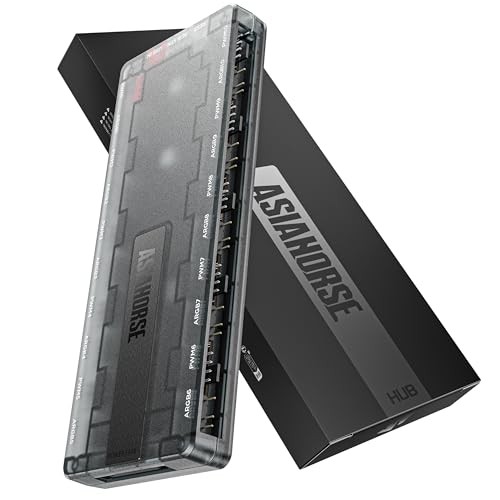
- 10 independent ARGB channels
- DIY software with canvas mode
- Works with fans, cables, and strips
Best For: PC builders who want individual ARGB control for fans, cables, and strips without relying on daisy-chaining.
Best for Daisy-Chained Builds

- Daisy-chain setup reduces cable clutter
- High airflow and strong static pressure
- Good fit for cases, radiators, and heatsinks
Best For: PC builders who want clean wiring and reliable airflow from a three-fan pack.
Best for High-Airflow Builds
CORSAIR 4000D RS ARGB Airflow Case

- Three included RS ARGB PWM fans
- Highly flexible InfiniRail fan mounting
- Perforated front panel for low-restriction intake
Best For: Builders who want a cool-running mid-tower with included ARGB fans and upgrade room.
Best for RGB Cable Management
AsiaHorse COSMIQ 120mm Reverse Fan 3-Pack
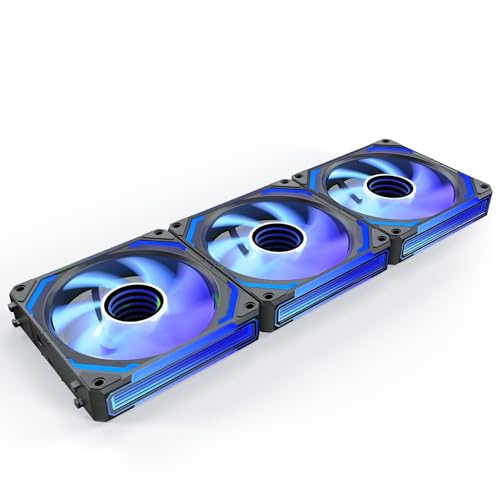
- 2000 RPM and 68.5 CFM for strong airflow
- Daisy-chain wiring cuts down on cable clutter
- Infinity mirror RGB with music sync for themed builds
Best For: RGB-first builders who want tidy wiring and dependable case airflow.
Best with Extra Features
CORSAIR 4000D RS Frame Airflow Case

- 3 preinstalled RS PWM fans
- Flexible InfiniRail fan mounting
- Supports multiple 360mm radiators
Best For: Airflow-focused builders who want strong stock cooling and modular upgrade options.
Best for Clean Cable-Routing
AsiaHorse Nyota Pro 120mm ARGB Fans

- Daisy-chain design simplifies wiring
- 61.5 CFM airflow with 2000RPM PWM control
- Dual-zone ARGB lighting with 18 LEDs
Best For: PC builders who want strong airflow and a cleaner interior with addressable lighting.
Best for RGB + Cable-Simplified Builds – CORSAIR iCUE Link LX120 3-Pack
If you want corsair case fans for airflow that also cut down on cable clutter, the CORSAIR iCUE Link LX120 RGB triple pack is a strong fit. It combines high-speed PWM cooling, AirGuide airflow shaping, and a simple link-and-go hub setup, so it makes sense for builders who want both performance and a clean interior.
Best For: PC builders who want strong airflow, radiator-friendly pressure, and a tidy iCUE LINK setup with flashy RGB.
Pros:
- Up to 2,400 RPM with 69.9 CFM airflow for solid case cooling
- 5.22 mmH2O static pressure helps on radiators and restrictive intakes
- Dual light loops with 18 LEDs per fan create vivid, synchronized RGB
- iCUE LINK daisy-chaining reduces cable mess and simplifies installation
Cons:
- Requires the iCUE LINK ecosystem, which adds cost and limits compatibility
- RGB-focused design may be more than plain-airflow buyers need
For builders comparing corsair case fans for airflow, this pack stands out because it pairs legitimate cooling specs with a much cleaner wiring experience than traditional fan kits. It is especially appealing if you are already invested in CORSAIR lighting and want a premium-looking setup without sacrificing practical airflow.
Best for Clean Cable Builds – AsiaHorse Dawn Pro 120mm ARGB PWM Fan
If you want corsair case fans for airflow-style performance without the cable mess, the AsiaHorse Dawn Pro is a strong alternative to consider. It combines high-airflow PWM control, a daisy-chain layout, and reversible blades, making it especially appealing for builders who care about both cooling and a tidy interior.
Best For: PC builders who want strong airflow, simple cable management, and a clean-looking ARGB setup.
Pros:
- Modular daisy-chain design reduces cable clutter in multi-fan builds.
- Up to 71 CFM airflow with PWM control for balanced cooling performance.
- Forward and reverse blade options help match airflow and aesthetics.
- ARGB lighting syncs with major motherboard ecosystems for easy customization.
Cons:
- Not a Corsair-branded fan, so it may not fit brand-matched builds.
- ARGB and modular features may be more than basic builders need.
- Best visual results depend on using multiple fans together.
Overall, the Dawn Pro makes sense if you’re comparing corsair case fans for airflow and want a cleaner wiring setup with modern RGB features. It’s a practical pick for builders who value both cooling performance and a polished look.
Best for High-Airflow RGB Builds – CORSAIR iCUE Link RX120 RGB 3-Pack
If you want corsair case fans for airflow that can still look clean in a showcase build, the CORSAIR iCUE Link RX120 RGB triple pack is a strong fit. It combines high airflow, solid static pressure, and simplified cabling through iCUE LINK for a neat, modern setup.
Best For: Builders who want strong cooling performance, RGB lighting, and a cable-managed Corsair fan setup for cases or radiators.
Pros:
- Up to 74.2 CFM airflow and 2,100 RPM for serious cooling performance
- 4.38mm-H2O static pressure helps on radiators and restrictive front panels
- iCUE LINK daisy-chaining reduces cable clutter with a single hub connection
- Eight RGB LEDs plus side visibility give the fans a premium lighting look
Cons:
- Requires the iCUE LINK ecosystem, which adds cost and compatibility limits
- Triple-pack pricing is higher than basic non-RGB airflow fans
- RGB may be unnecessary if you only care about raw cooling value
For builders comparing corsair case fans for airflow, this pack stands out when you want both strong cooling and a cleaner install. It is especially appealing if you are cooling a radiator or want a polished RGB fan bank without a mess of separate cables.
Best for ARGB Fan Control – AsiaHorse UMBRA ARGB Hub
If you want more control over lighting than basic motherboard sync can offer, the AsiaHorse UMBRA ARGB Hub is a strong fit for building a visually clean setup around corsair case fans for airflow and other 5V ARGB gear. Its 10 independent channels, DIY software, and dual-zone effects make it ideal for users who care as much about customization as they do about cooling.
Best For: PC builders who want individual ARGB control for fans, cables, and strips without relying on daisy-chaining.
Pros:
- 10 independent 5V 3-pin channels for true per-device lighting control
- Custom software with preset effects, canvas mode, and screen-sync options
- Supports asynchronous dual-zone lighting for compatible ARGB fans
- Works with a wide range of standard ARGB fans, cables, and strips
Cons:
- Needs dedicated SATA power and enough PSU headroom for stable operation
- Dual-zone features are limited to compatible series-LED fan setups
- More of an RGB control hub than a cooling upgrade by itself
For builders tuning a showcase PC around corsair case fans for airflow, this hub is about lighting flexibility rather than raw performance. It makes the most sense when you want cleaner cable management, per-fan effects, and a more advanced ARGB setup than a standard splitter or motherboard header can deliver.
Best for Daisy-Chained Builds – CORSAIR RS120 PWM 3-Pack
If you want corsair case fans for airflow that are easy to wire and strong enough for demanding cooling setups, the RS120 triple pack is a smart fit. The daisy-chain design keeps cable clutter down, while the high-RPM PWM control gives you flexibility for quiet idle operation or more aggressive cooling under load.
Best For: Builders who want a clean, low-cable fan setup with solid airflow for cases, radiators, and heatsinks.
Pros:
- Daisy-chained 4-pin PWM connection simplifies installation
- Up to 2,100 RPM and 72.8 CFM for strong airflow
- AirGuide vanes help focus air toward hot components
- Magnetic Dome bearing aims for quieter, longer-lasting operation
Cons:
- 21 00 RPM capability may be louder at full speed than slower fans
- Less appealing if you prefer fully independent fan cabling
Overall, this pack stands out if you want corsair case fans for airflow without a messy install. It combines strong static pressure, tidy cable management, and broad cooling flexibility in a package that works well for both case and radiator use.
Best for High-Airflow Builds – CORSAIR 4000D RS ARGB Airflow Case
If you want corsair case fans for airflow in a case that’s already tuned for cooling, the 4000D RS ARGB is an easy fit. It ships with three pre-installed RS ARGB fans, a perforated 3D Y-pattern front panel, and flexible fan mounting that makes it simple to push fresh air through a modern gaming build.
Best For: Builders who want a high-airflow mid-tower with included ARGB fans and room to expand cooling later.
Pros:
- 3 pre-installed RS ARGB PWM fans help deliver strong out-of-box airflow
- InfiniRail mounting system makes front and roof fan placement highly flexible
- 3D Y-pattern front panel reduces restriction for better intake performance
- Modular FRAME design leaves room for future upgrades and customization
Cons:
- Premium modular features can push the price above basic airflow cases
- ARGB and fan controls may require motherboard support for the best experience
This is a strong pick if you want corsair case fans for airflow without starting from a blank chassis: the case already includes quality cooling hardware, but still gives you the flexibility to add more fans or adjust layout as your build grows.
Best for RGB Cable Management – AsiaHorse COSMIQ 120mm Reverse Fan 3-Pack
If you want corsair case fans for airflow-style performance with a cleaner look, the AsiaHorse COSMIQ 120mm is a strong option to consider. It pairs high airflow, PWM speed control, and a reverse-blade design with infinity mirror RGB, making it a good fit for builders who want cooling and aesthetics without a cable mess.
Best For: RGB-focused builders, AIO users, and DIY cases that need tidy daisy-chain wiring plus solid airflow.
Pros:
- Up to 2000 RPM and 68.5 CFM for strong airflow output
- Daisy-chain design helps reduce cable clutter inside the case
- FDB bearing keeps noise lower and improves long-term reliability
- ARGB sync plus music-reactive lighting adds a polished visual finish
Cons:
- Reverse-blade layout may not suit every intake/exhaust plan
- RGB features add complexity if you only want simple cooling
- Best performance depends on proper PWM and controller setup
For builders comparing corsair case fans for airflow, this model stands out more for its lighting, cable management, and reverse-fan convenience than for raw cooling value alone. It makes the most sense when you want an easy-to-build, visually coordinated setup that still moves plenty of air.
Best with Extra Features – CORSAIR 4000D RS Frame Airflow Case
If you’re comparing corsair case fans for airflow, this 4000D RS Frame stands out because it pairs a high-airflow chassis with three preinstalled RS PWM fans and a front panel designed to move air with minimal restriction. It’s a practical pick for builders who want strong cooling out of the box, plus room to expand with flexible fan and radiator support.
Best For: Builders who want an airflow-first Corsair case with preinstalled fans, flexible cooling layouts, and upgrade-friendly modular features.
Pros:
- Includes 3x RS PWM fans for solid front intake right away
- InfiniRail mounting system gives you flexible fan placement
- High-airflow front panel and multiple 360mm radiator options
- Modular FRAME design supports future upgrades and customization
Cons:
- More expensive than basic airflow cases
- Advanced modular features may be unnecessary for simple builds
For buyers focused on corsair case fans for airflow, this case is appealing because it balances strong stock cooling with a chassis that can grow with your build. It’s especially useful if you want better thermal performance without starting from a bare-bones enclosure.
Best for Intake RGB Builds – Corsair RS120-R ARGB 3-Pack
If you want corsair case fans for airflow that also keep the lighting fully visible on intake, the Corsair RS120-R ARGB triple pack is a smart pick. The reverse-rotor design is made for front or bottom intake mounting, while PWM control gives you room to balance noise, cooling, and performance.
Best For: PC builders who want strong intake airflow, easy daisy-chained wiring, and visible ARGB lighting in a clean three-fan setup.
Pros:
- Reverse rotor layout keeps ARGB facing outward on intake mounts
- Up to 2,100 RPM and 65.8 CFM for solid case airflow
- High static pressure helps with radiators and restricted intakes
- Daisy-chain PWM and +5V ARGB reduce cable clutter
Cons:
- ARGB control requires a compatible motherboard header
- More expensive than basic non-RGB case fans
- Triple-pack makes the most sense for builds needing multiple fans
For builders focused on corsair case fans for airflow, this model stands out because it combines practical cooling specs with an intake-friendly lighting layout. It is a better fit for showpiece cases and clean cable management than for plain, no-frills cooling.
Best for Clean Cable-Routing – AsiaHorse Nyota Pro 120mm ARGB Fans
If you want strong cooling without turning your build into a cable mess, the AsiaHorse Nyota Pro is a smart alternative to typical corsair case fans for airflow-focused setups. The modular daisy-chain design lets one cable power a full fan run, while the 2000RPM PWM motor and 61.5 CFM rating give it the muscle for gaming rigs, radiators, and high-airflow cases.
Best For: Builders who want high airflow, cleaner wiring, and customizable ARGB effects in a single 120mm fan package.
Pros:
- Modular daisy-chain design cuts cable clutter dramatically
- Strong airflow and pressure for cases or liquid coolers
- Dual-zone ARGB lighting with 18 addressable LEDs
- Low-noise, vibration-dampened design for quieter operation
Cons:
- Dual-zone lighting needs the AsiaHorse UMBRA Hub/software for full control
- Performance and features may be more than casual builds need
- ARGB setup can take extra planning compared with simpler fans
For builders comparing corsair case fans for airflow, the Nyota Pro stands out if you value neat installation as much as cooling power. It blends high airflow, PWM control, and eye-catching lighting in a way that suits modern showcase PCs and practical thermal upgrades alike.
How We Picked the Best Corsair Case Fans for Airflow
We focused on fan performance, airflow-to-noise balance, installation simplicity, and compatibility with modern builds. For Corsair Case Fans for Airflow, that means prioritizing PWM control, useful static pressure for filtered intakes or radiators, and practical cable management features like daisy-chain or controller-based setups.
We also considered whether each option is better suited to pure airflow, RGB showcase builds, or a complete case-and-fan package. That helps narrow the list to fans that fit real-world use instead of just spec-sheet appeal.
Quick Comparison
If you want the simplest upgrade, look for a standard PWM airflow fan with daisy-chain support. If you want the cleanest premium build, a hub-based ecosystem can reduce cable clutter. If your case already includes strong fans, you may not need to buy many extras at all.
As a shortcut: choose high-airflow fans for open front panels and mesh cases, higher static pressure fans for restrictive filters or radiators, and reverse-blade or RGB-oriented fans when visual direction matters in a showcase build.
Key Buying Factors for Corsair Case Fans for Airflow
Airflow Vs. Static Pressure
Airflow-focused fans are best for moving air through open mesh panels and general case ventilation. Static pressure matters more when air has to pass through dense dust filters, tightly spaced front panels, or radiator fins.
Noise and PWM Control
PWM lets the motherboard adjust fan speed automatically, which is important if you want Corsair Case Fans for Airflow that stay quiet during idle and ramp up only when needed. A fan with a good low-RPM operating range usually feels much more refined in everyday use.
Installation and Cable Management
Daisy-chain or unified hub systems can significantly reduce cable mess, especially in multi-fan builds. That is useful if you are adding three or more fans and want a cleaner layout without using too many motherboard headers.
RGB, Reverse Blades, and Build Direction
RGB is optional, but reverse-blade designs can matter if you want intake lighting to face the right way. If appearance is a priority, check whether the fan is meant for standard airflow orientation or visual symmetry in a showcase case.
Who Should Buy Which Corsair Case Fans for Airflow?
Choose premium Corsair ecosystem fans if you want software control, synchronized lighting, and a polished build. Choose standard PWM fans if your goal is straightforward cooling with minimal fuss. If you are building a high-airflow system from scratch, a case that includes multiple quality fans may offer better value than buying everything separately.
For most users, the best choice depends on whether the build is tuned for silence, aesthetics, or maximum cooling efficiency. If airflow is the main goal, focus first on the fan’s shape, control method, and placement rather than RGB extras.