
If you want a cooler PC without the constant hum, the right fans matter as much as the case itself. Corsair quiet case fans are popular because they pair strong airflow with refined acoustics and convenient installation options.
Below, we focus on the best 2026 picks for builders who want dependable cooling, cleaner cable routing, and options for RGB, reverse-blade setups, and different radiator or case sizes.
Best 10 Corsair Quiet Case Fans Picks for 2026
Best for Daisy-Chained Builds

- Daisy-chain wiring keeps installation clean and simple.
- Strong airflow with PWM control for tuned cooling.
- Low-noise Magnetic Dome bearing suits quieter builds.
Best For: Builders who want tidy cabling, strong airflow, and low-noise cooling in a 3-fan pack.
Best for High-Pressure RGB Cooling
CORSAIR LX120 RGB 120mm PWM Fan

- Strong 5.22mmH2O static pressure for cases and radiators
- Magnetic dome bearing helps reduce noise and friction
- iCUE LINK daisy-chaining cuts down cable clutter
Best For: Builders who want a quieter-tuned, high-pressure RGB fan for an iCUE LINK setup.
Best for Easy Cable Management
CORSAIR RS120 120mm PWM Triple Pack

- Daisy-chain setup cuts down on cable clutter
- Strong airflow with radiator-friendly static pressure
- Quiet-focused bearing and Zero RPM mode at low loads
Best For: PC builders who want tidy wiring, solid airflow, and quieter everyday cooling.
Best for RGB-Integrated Builds
iCUE Link QX120 RGB Triple Fan Kit

- Includes a system hub for cleaner cable management
- Triple-fan starter kit simplifies a multi-fan install
- Magnetic dome RGB styling stands out in showcase builds
Best For: Builders who want premium lighting, easier wiring, and a coordinated Corsair setup.
Best for Cable-Free RGB Builds
AsiaHorse Nyota Pro 120mm ARGB Fans
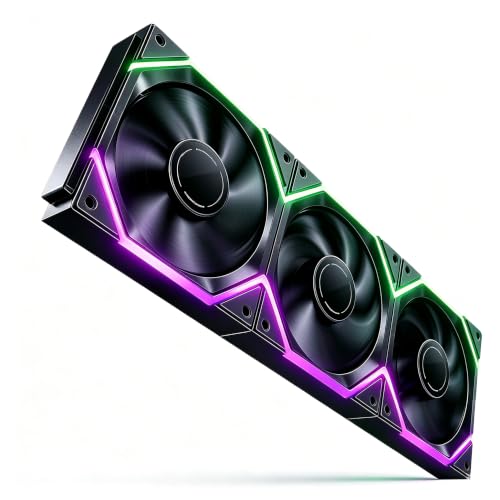
- Daisy-chain modular design reduces cable clutter
- Dual-zone ARGB with 18 addressable LEDs
- Strong 61.5 CFM airflow with PWM control
Best For: Builders who want tidy wiring, bold RGB, and solid cooling performance.
Best for Reverse-RGB Builds
CORSAIR iCUE LINK LX120-R RGB 3-Pack

- Reverse rotor keeps RGB visible on intake
- Magnetic Dome bearing reduces noise and friction
- iCUE LINK daisy-chaining simplifies cable management
Best For: PC builders who want a cleaner-looking intake setup with quieter operation and strong lighting.
Best RGB Quiet Pick
AsiaHorse COSMIQ 120mm Reverse Fan 3-Pack
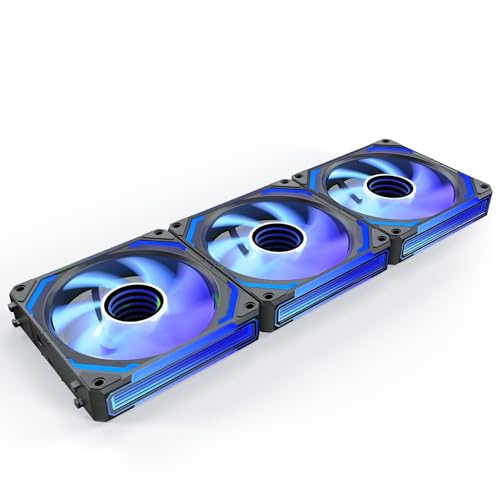
- FDB bearing with quieter daily operation
- 2000 RPM, 68.5 CFM airflow, and good static pressure
- Daisy-chain wiring for a cleaner build
Best For: PC builders who want quieter cooling, RGB lighting, and easier cable management.
Best with Extra Features

- Daisy-chain setup keeps wiring tidy
- Strong airflow with PWM speed control
- Quiet Magnetic Dome bearing design
Best For: PC builders who want quieter cooling and simpler fan cable management.
Best for Visible RGB Intakes
Corsair RS120-R ARGB Reverse Fans

- Reverse rotor keeps intake lighting visible
- PWM control for quieter or higher-speed use
- High static pressure suits radiators and filters
Best For: RGB-focused builders who want intake fans that look clean and still move air well.
Best RGB Intake Pick

- Reverse rotor keeps intake RGB fully visible
- Strong airflow and static pressure for cases or radiators
- Daisy-chain wiring helps cut cable clutter
Best For: PC builders who want quiet-looking, high-airflow intake fans with easy ARGB control.
Best for Daisy-Chained Builds – CORSAIR RS120 3-Pack PWM Fans
If you want corsair quiet case fans that are easy to wire and still move real air, the RS120 triple pack is a practical pick. The daisy-chain design cuts down on cable clutter, while the 120mm PWM control lets you tune noise and speed for everyday case cooling or radiator duty.
Best For: Builders who want a cleaner cable setup, strong airflow, and reliable low-noise cooling in a 3-fan pack.
Pros:
- Daisy-chain connection simplifies installation and reduces PWM cable mess.
- Up to 2,100 RPM and 72.8 CFM for strong airflow in performance cases.
- Magnetic Dome bearing helps keep noise down and supports long-term durability.
- High static pressure makes them a solid choice for radiators and heatsinks.
Cons:
- Not the absolute quietest option at maximum speed.
- Black-only finish may not suit RGB-focused or themed builds.
Overall, the RS120 stands out for builders who want corsair quiet case fans with simpler wiring and dependable cooling performance. It is especially appealing if you need a balanced fan set for a case or radiator without paying for extra frills.
Best for High-Pressure RGB Cooling – CORSAIR LX120 RGB 120mm PWM Fan
If you want corsair quiet case fans that still push strong airflow, the LX120 is a smart pick for performance-first builds with a clean cable setup. It combines a magnetic dome bearing, AirGuide vanes, and iCUE LINK daisy-chaining, so you get solid cooling and a simpler install path—if you already have the hub.
Best For: PC builders who want a single high-pressure 120mm fan with polished RGB, strong radiator-capable airflow, and a quieter-tuned design inside an iCUE LINK system.
Pros:
- High static pressure and 2,400 RPM ceiling make it capable on radiators and restricted cases
- Magnetic dome bearing is designed to reduce friction and help keep noise down
- Dual light loops create a premium RGB look with 18 LEDs per fan
- iCUE LINK reduces cable clutter by chaining fans together
Cons:
- Requires the iCUE LINK System Hub, which is sold separately
- Single-pack pricing is less convenient for full case upgrades
- RGB-focused design may be more than some quiet-only buyers need
Overall, this is a strong option for builders comparing corsair quiet case fans who also want radiator-ready pressure and a cleaner wiring experience. It is less about being the absolute silent pick and more about balancing restrained acoustics, airflow, and premium lighting in one fan.
Best for Easy Cable Management – CORSAIR RS120 120mm PWM Triple Pack
If you want corsair quiet case fans that are simple to install and easy to control, the CORSAIR RS120 triple pack is a smart pick. The daisy-chain design keeps wiring tidy, while PWM control lets you tune noise and airflow for everyday use or more demanding cooling setups.
Best For: Builders who want a cleaner fan setup with strong airflow, radiator-ready pressure, and quieter operation.
Pros:
- Daisy-chain connection reduces cable clutter and simplifies installation
- Up to 2,100 RPM and 72.8 CFM for solid cooling performance
- Magnetic Dome bearing and Zero RPM mode help keep noise down at low loads
- AirGuide technology improves airflow direction for focused cooling
Cons:
- White finish may not match every build theme
- Higher top speed can be louder if run aggressively
Overall, these are a strong fit for builders who want practical, well-rounded corsair quiet case fans without extra wiring hassle. They lean more toward controlled performance than absolute silence, which makes them especially useful in compact or radiator-heavy builds.
Best for RGB-Integrated Builds – iCUE Link QX120 RGB Triple Fan Kit
If you want corsair quiet case fans that prioritize clean wiring as much as airflow, the iCUE Link QX120 kit is built for a polished, high-end build. The included system hub and magnetic dome design make it easier to chain fans together, while the RGB lighting gives you a more coordinated look than typical standalone fan kits.
Best For: Builders who want an easy-to-manage, premium-looking cooling setup with centralized control and strong visual impact.
Pros:
- iCUE Link system hub simplifies cable management
- Triple-fan starter kit is convenient for new builds or upgrades
- Magnetic dome RGB design delivers a standout visual effect
- Good fit for coordinated Corsair ecosystem setups
Cons:
- Pricier than basic case fan packs
- More focused on premium features than maximum value
- RGB and hub features may be overkill for minimalist builds
For buyers comparing corsair quiet case fans, this kit makes the most sense when you want streamlined installation, linked control, and a more refined aesthetic rather than the cheapest cooling option. It’s a strong pick for showcase PCs where cable cleanup and lighting matter.
Best for Cable-Free RGB Builds – AsiaHorse Nyota Pro 120mm ARGB Fans
If you want a fan set that looks cleaner than most corsair quiet case fans alternatives while still pushing strong airflow, the AsiaHorse Nyota Pro is built around easy daisy-chain installation and high-output cooling. It suits builders who care about tidy cable management, addressable RGB effects, and enough PWM headroom for gaming cases and radiators.
Best For: PC builders who want a clean, modular fan setup with strong airflow, low noise, and standout RGB lighting.
Pros:
- Modular daisy-chain design cuts cable clutter and simplifies installation
- Dual-zone ARGB with 18 LEDs creates more flexible lighting effects
- Up to 2000 RPM and 61.5 CFM offer strong cooling for cases or radiators
- Anti-vibration pads help keep noise down to a claimed 29 dB
Cons:
- Dual-zone lighting needs compatible AsiaHorse hub/software for full control
- Not the quietest option if you prioritize silence over airflow
- RGB-focused design may be more than minimal-build users want
For builders comparing corsair quiet case fans, this set stands out less for pure silence and more for its cleaner wiring, strong airflow, and more advanced lighting control. It is a smart pick if you want an easier install and a livelier visual setup without giving up PWM speed control.
Best for Reverse-RGB Builds – CORSAIR iCUE LINK LX120-R RGB 3-Pack
If you want corsair quiet case fans that look as good on intake as they do in a showcase build, this LX120-R triple pack is a strong fit. The reverse-rotor design keeps the RGB ring visible, while iCUE LINK and PWM control make setup and tuning more streamlined.
Best For: PC builders who want quiet-enough cooling, bold lighting, and a clean intake-fan look without extra cable clutter.
Pros:
- Reverse rotor keeps the lighting fully visible on intake mounts
- Magnetic Dome bearing helps reduce noise and wear
- Up to 2,400 RPM, 66.7 CFM, and 4.72mm H2O for capable airflow
- iCUE LINK daisy-chaining cuts down on cable mess
Cons:
- Requires the iCUE LINK ecosystem for the cleanest setup
- Not the simplest choice if you only want basic, standalone fans
For builders prioritizing style and easier wiring, these are a smart modern take on corsair quiet case fans. They are especially appealing if your intake fans need to be visible, since the reverse-rotor design preserves the RGB effect instead of hiding it.
Best RGB Quiet Pick – AsiaHorse COSMIQ 120mm Reverse Fan 3-Pack
If you want corsair quiet case fans but also care about showy lighting and cleaner cable management, the AsiaHorse COSMIQ 120mm 3-pack is a strong alternative. It pairs a reverse-blade layout with daisy-chain wiring, so it can fit neatly into a modern ATX or mATX build while still moving a lot of air.
Best For: Builders who want quiet-enough cooling, RGB effects, and a tidier fan setup for gaming cases or AIO radiator installs.
Pros:
- FDB bearing and 29.2 dB(A) noise rating help keep everyday operation relatively quiet
- Up to 2000 RPM, 68.5 CFM, and 2.05 mmH₂O for solid airflow and static pressure
- Daisy-chain connection reduces cable clutter and simplifies installation
- Infinity mirror lighting plus ARGB and music-sync support add strong visual appeal
Cons:
- Not the quietest choice if you prioritize near-silent operation above all else
- RGB features and included controller may be unnecessary for minimal builds
- Reverse-fan design may take a moment to plan correctly in your airflow setup
For buyers comparing corsair quiet case fans, this model makes the most sense when you want a blend of decent acoustics, higher airflow, and cleaner-looking cable management. It is more of a style-plus-function option than a pure silence-first fan.
Best with Extra Features – CORSAIR RS140 140mm PWM Fans
If you want corsair quiet case fans that are simple to install and easy to tune, the RS140 dual pack is a strong fit. The daisy-chain design cuts down on cable clutter, while the 140mm format and PWM control give you a good balance of airflow and noise for everyday builds.
Best For: Builders who want a quieter, cleaner-looking fan setup with straightforward motherboard control.
Pros:
- Daisy-chain connection reduces cable mess and simplifies installation
- Up to 1,700 RPM with strong airflow for case or radiator use
- Magnetic Dome bearing helps keep noise down and supports long-term durability
- AirGuide vanes improve airflow direction toward hot components
Cons:
- No RGB lighting for builders who want visual effects
- Top-end speed may be more than some ultra-silent users need
Overall, the RS140 is a practical pick if you want corsair quiet case fans that prioritize cleaner wiring, solid cooling, and controlled noise over flashy extras. It is especially appealing for users who value radiator-ready performance and an easier build process.
Best for Visible RGB Intakes – Corsair RS120-R ARGB Reverse Fans
If you want corsair quiet case fans that still prioritize lighting, the Corsair RS120-R ARGB triple pack is built for showcase-style builds. The reverse rotor design keeps the RGB visible on intake mounts, while PWM control lets you tune noise and airflow for everyday use or heavier cooling demand.
Best For: Builders who want a clean RGB look on intake fans without giving up decent airflow or radiator-friendly pressure.
Pros:
- Reverse rotor design keeps ARGB lighting fully visible on intake placement
- PWM speed control supports quieter operation when you don’t need maximum airflow
- High static pressure makes them a solid option for radiators and restricted spaces
- Daisy-chain design helps reduce cable clutter in a tidy build
Cons:
- RGB focus may not appeal to builders who want a plain stealth look
- Requires compatible motherboard ARGB control for full lighting setup
- Not the absolute quietest choice if you run them near max RPM
For builders balancing style and cooling, these are a smart pick among corsair quiet case fans because they can run slower for noise-sensitive setups while still having enough pressure for radiators and tight intake paths. The tradeoff is that their main appeal is visual polish, so they fit best in RGB-focused PCs rather than stealth builds.
Best RGB Intake Pick – Corsair RS120-R ARGB 3-Pack
If you want corsair quiet case fans that still move serious air, the RS120-R triple pack is built for intake-focused builds. The reverse rotor design keeps RGB lighting fully visible, while PWM control, a magnetic dome bearing, and Zero RPM mode help keep noise in check when you don’t need full speed.
Best For: Builders who want quiet, high-airflow intake fans with clean RGB visibility and easy daisy-chain wiring.
Pros:
- Reverse rotor design shows off the RGB lighting on intake mounts
- Up to 2,100 RPM, 65.8 CFM airflow, and strong static pressure for radiators or restricted cases
- Daisy-chain support reduces cable clutter and simplifies setup
- Zero RPM mode and magnetic dome bearing help keep operation quieter at low load
Cons:
- Requires a compatible +5V ARGB motherboard header
- Full lighting and fan control depend on motherboard software support
For a build that needs both style and practical cooling, these are a smart fit among corsair quiet case fans. They’re not the absolute softest-spinning option at max speed, but the combination of reverse blades, PWM tuning, and low-noise features makes them a strong pick for visible intake setups.
How We Picked the Best Corsair Quiet Case Fans
We prioritized models that make sense for real-world builds: low noise at practical RPM ranges, solid airflow or static pressure, and features that simplify installation. That includes daisy-chain designs, reverse-rotor options for cleaner aesthetics, and fan sizes that fit common front, top, and rear mounting positions.
We also looked at whether a fan is part of a full ecosystem or a simpler standalone option. Some Corsair fans are ideal for builders who want plug-and-play simplicity, while others make more sense for synchronized RGB and centralized control.
Quick Comparison: What Matters Most
- 120mm vs. 140mm: 140mm fans can move similar air at lower speeds, which often helps reduce noise if your case supports them.
- ARGB vs. non-RGB: RGB adds visual appeal, but non-RGB models are usually easier to set up and can be a better value.
- Standard vs. reverse blades: Reverse-rotor fans are useful when you want the finished side of the fan visible in intake positions.
- Hub or controller requirements: iCUE Link and some ARGB setups may require extra hardware, so check your current ecosystem before buying.
Key Buying Factors for Corsair Quiet Case Fans
Noise Profile
Look beyond maximum RPM. A fan that can run quietly at typical gaming or productivity loads is usually more valuable than one with a higher peak speed on paper.
Airflow and Static Pressure
For open case airflow, prioritize airflow-oriented fans. For radiators, filters, or restrictive front panels, static pressure matters more and can help maintain performance without ramping noise too aggressively.
Installation and Cable Management
Daisy-chain connections can cut cable clutter and make multi-fan builds far easier to manage. That is especially helpful in compact cases or showcase builds where clean routing matters.
Lighting and Ecosystem
If you already use Corsair iCUE gear, matching fans can simplify control and synchronization. If you do not want extra software or hubs, simpler PWM or ARGB options may be the better fit.
Fan Size and Layout
Choose 120mm for broad compatibility, or 140mm if your case supports it and you want strong airflow at lower speeds. Match intake and exhaust needs to your case design rather than chasing the highest rated specifications.
Who Should Buy Which Corsair Quiet Case Fans?
Choose non-RGB Corsair Quiet Case Fans if you want the simplest, most cost-effective cooling upgrade. Pick RGB or iCUE Link models if your build is meant to be displayed and you want synchronized lighting across the system. If you are building around a radiator or a restrictive front panel, favor higher static pressure and magnetic dome bearing designs. For visually polished intake setups, reverse-blade fans can make a noticeable difference.
In short, the best choice depends on whether your priority is silence, appearance, cable management, or full ecosystem control. The right Corsair fan should solve your build’s specific cooling problem without adding unnecessary complexity.